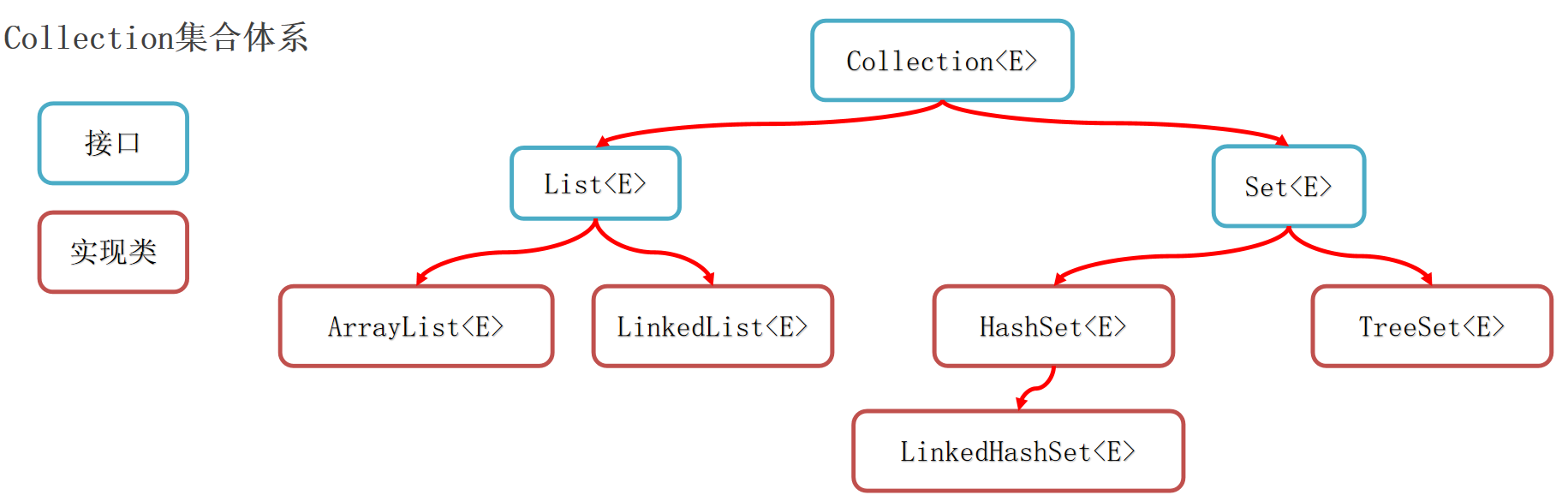
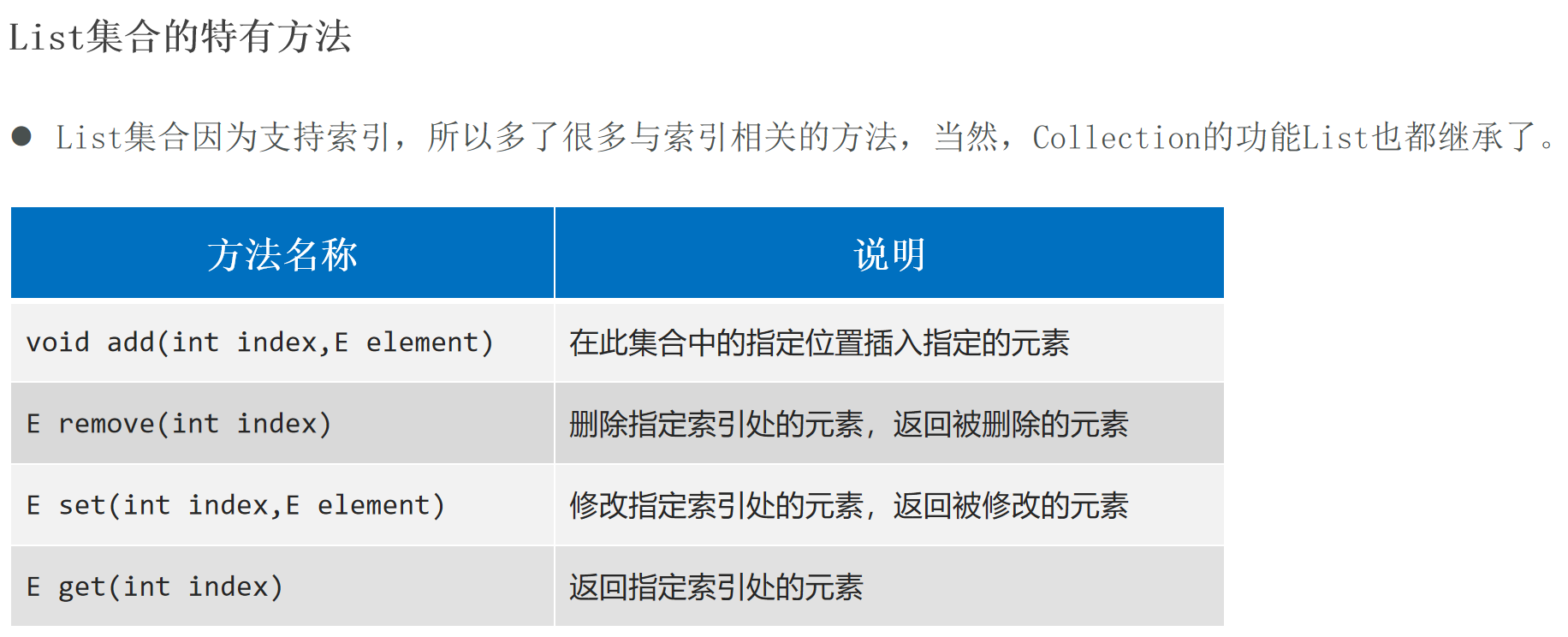
集合(Collection和Map两种) 集合体系结构:
Collection代表单列 集合,每个元素(数据)只包含一个值。
Map代表双列 集合,每个元素包含两个值(键值对)。
Collection
List系列集合:添加的元素是有序 、可重复 、有索引 。
ArrayList、LinekdList:有序 、可重复 、有索引 。
Set系列集合:添加的元素是无序 (添加数据的顺序和获取出的数据顺序不一致)、不重复 、无索引 (不支持通过索引操作数据)。
HashSet:无序 、不重复 、无索引 。LinkedHashSet:有序 、不重复 、无索引 。TreeSet:按照大小默认升序排序 、不重复 、无索引 。
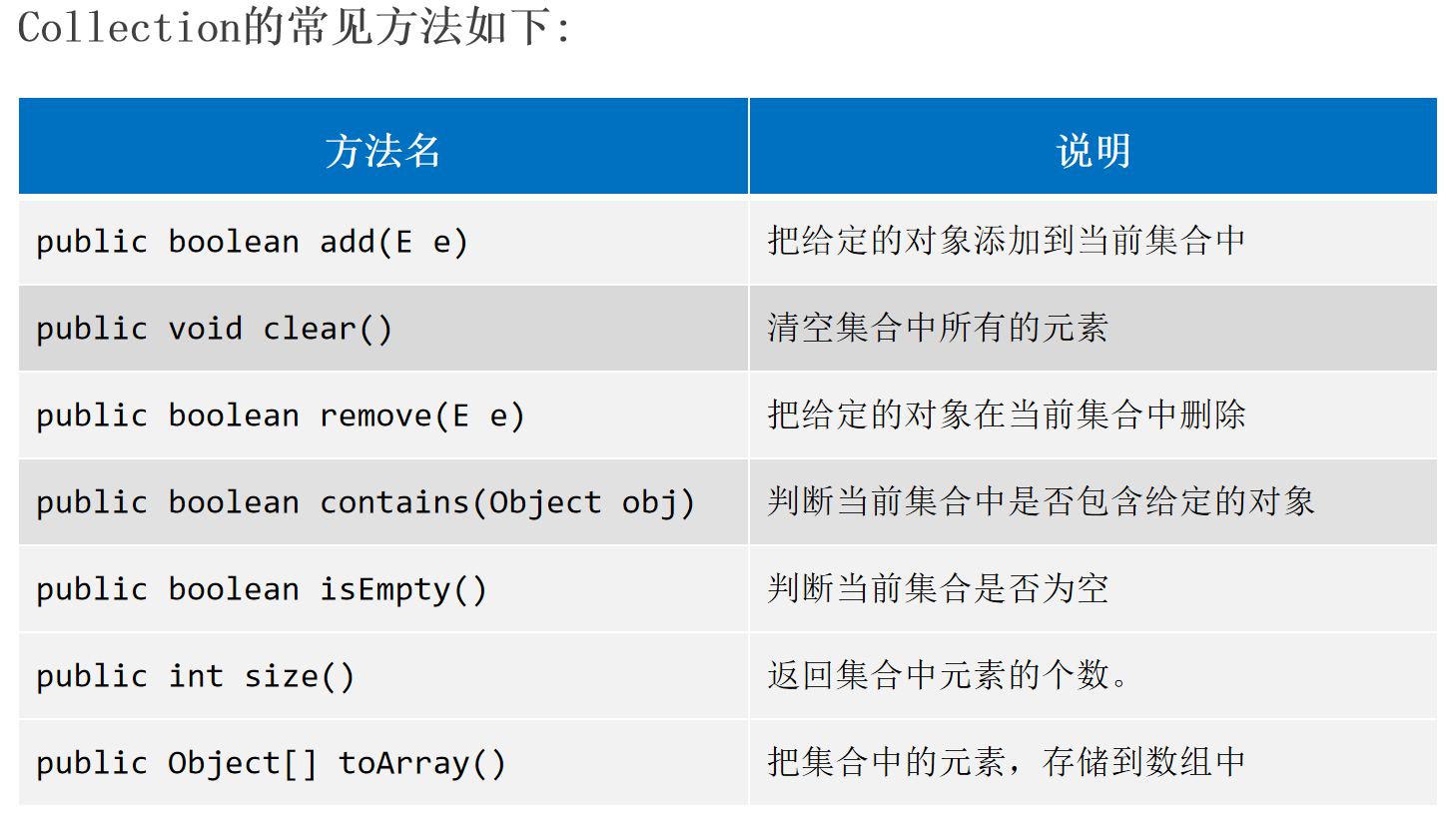
Collection的常用方法 Collection是单列集合的祖宗,它规定的方法(功能)是全部单列集合都会继承的。
1
2
3
4
5
6
7
8
9
10
11
12
13
14
15
16
17
18
19
20
Collection<String> c = new ArrayList <String>();"A" );"B" );"B" );"A" ));new ArrayList <>();"A" );"srr" );
Collection没有规定集合的索引,Collection不支持使用for循环进行遍历。
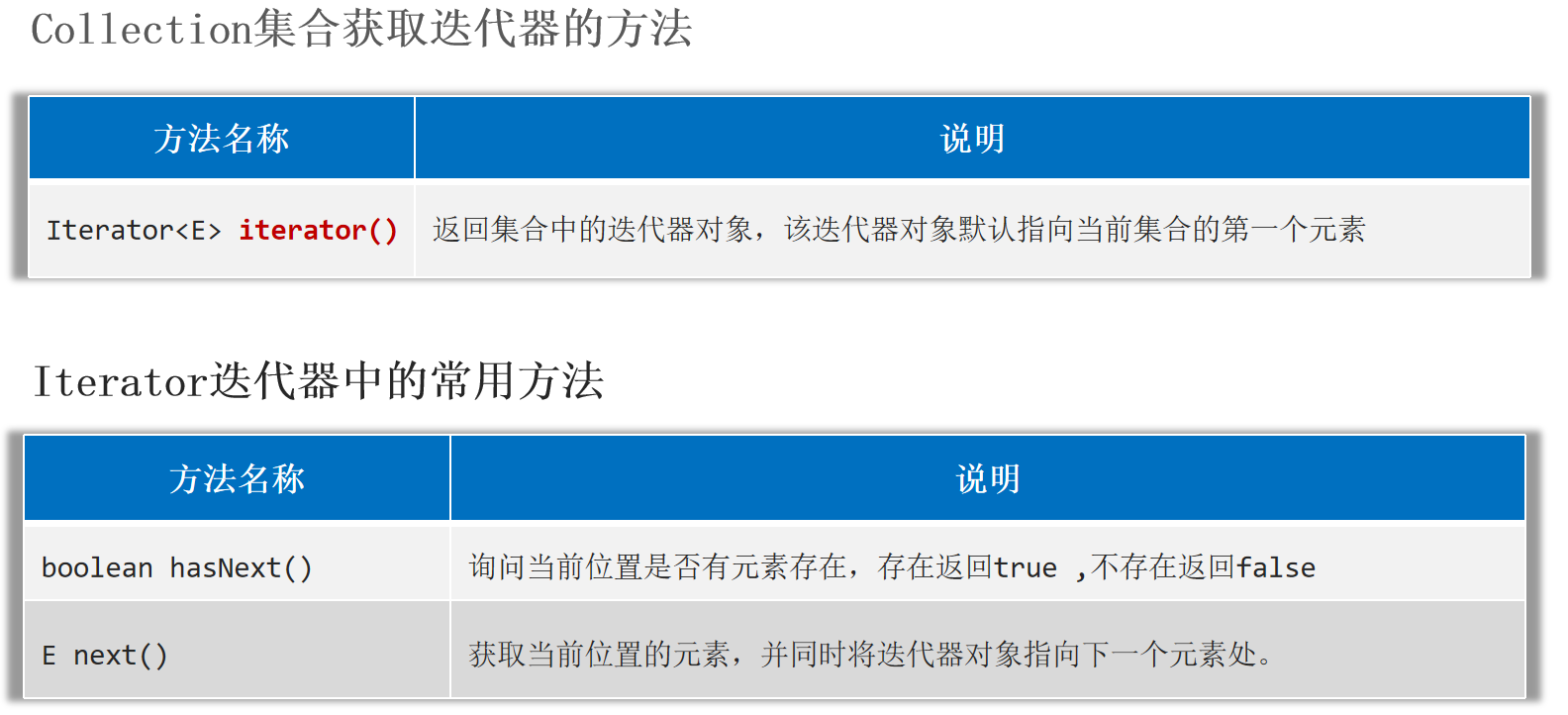
Collection的遍历方式 1.迭代器 是用来遍历集合的专用方式(数组没有迭代器),在Java中迭代器的代表是Iterator。
通过迭代器获取集合的元素,如果取元素越界会出现NoSuchElementException异常。
1
2
3
4
5
6
7
8
Collection<String> c2 = new ArrayList <>();"AAA" );"BBB" );while (it.hasNext()) {
2.增强for循环
增强for可以用来遍历集合或者数组 。增强for遍历集合,本质就是迭代器遍历集合的简化写法 。
注意:修改增强for中的变量值不会影响到集合中的元素。
1
2
3
4
5
for (String ele: c2){"aaa" ;
3.Lambda表达式 遍历集合
1 default void forEach (Consumer<? super T> action)
1 2 3 4 5 6 7 8 9 c2.forEach(new Consumer <String>() {@Override public void accept (String s) {
1 2 3 4 5 6 7 default void forEach (Consumer<? super T> action) {for (T t : this ) {
List
List集合支持的遍历方式:for循环 (因为List集合有索引 )、迭代器 、增强for循环、Lambda表达式。
1
2
3
4
5
6
7
8
9
10
11
List<String> list1 = new ArrayList <>();"srr" );"18" );2 , "888" );1 ));0 ));1 , "666" ));for (int i = 0 ; i < list1.size(); i++) {
ArrayList的底层原理:基于数组实现 特点:查询快,增删慢。
1
2
3
4
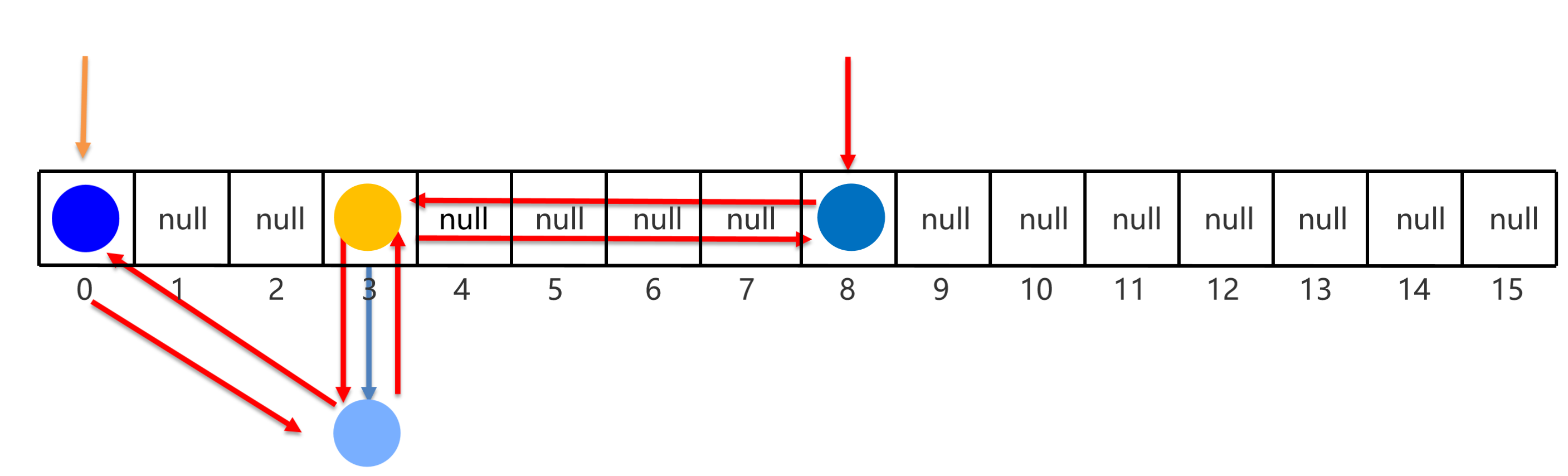
1 .利用无参构造器创建的集合,会在底层创建一个默认长度为0 的数组。2 .添加第一个元素时,底层会创建一个新的长度为10 的数组。3 .存满时,会扩容1 .5 倍。4 .如果一次添加多个元素,1 .5 倍还放不下,则新创建数组的长度以实际为准。
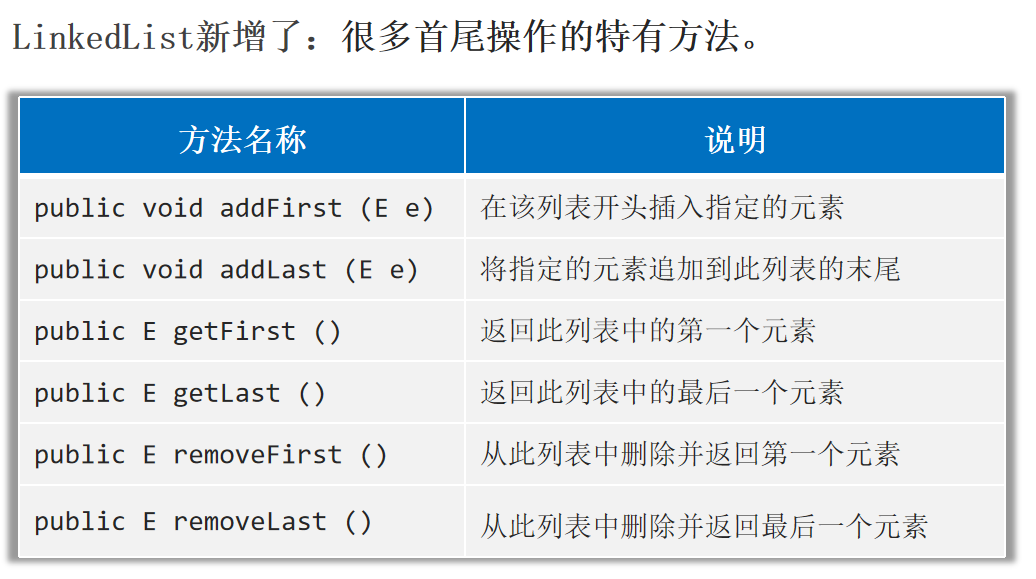
LinkedList的底层原理:基于双链表实现 特点:查询慢,增删相对较快,但对首尾元素进行增删改查的速度是极快的。
LinkedList的应用场景:
1.设计队列。
1
2
3
4
5
6
7
8
LinkedList<String> queue = new LinkedList <>();"1" );"2" );
2.设计栈。
1
2
3
4
5
6
7
8
9
10
11
LinkedList<String> stack = new LinkedList <>();"1" );"2" );"3" );"4" );
1 2 3 4 public void push (E e) {
1 2 3 4 public E pop () {return removeFirst();
Set Set系列集合:添加的元素是无序 (添加数据的顺序和获取出的数据顺序不一致)、不重复 、无索引 (不支持通过索引操作数据)。
HashSet: 无序 、不重复 、无索引 。LinkedHashSet: 有序 、不重复 、无索引 。TreeSet:按照大小默认升序排序 、不重复 、无索引 。
注意:Set要用到的常用方法,基本上就是Collection提供的。自己几乎没有额外新增一些常用功能。
1 2 3 4 5 6 7 8 new TreeSet <>();"18" );"222" );"222" );"888" );
HashSet HashSet:无序 、不重复 、无索引 。
哈希值:是一个int类型的数值,Java中每个对象都有一个哈希值。
Java中的所有对象,都可以调用Obejct类提供的hashCode方法,返回该对象自己的哈希值。
同一个对象多次调用hashCode()方法返回的哈希值是相同的。
不同的对象,它们的哈希值一般不相同,但也有可能会相同(哈希碰撞)。
HashSet集合的底层原理 :基于哈希表 实现。
哈希表:
JDK8之前,哈希表 = 数组+链表
JDK8开始,哈希表 = 数组+链表+红黑树
JDK8之前HashSet集合的底层原理,基于哈希表:数组+链表
1 2 3 4 5 6 7 8 9 1.创建一个默认长度16的数组,默认加载因子为0.75,数组名tablenull ,如果是null 直接存入null ,表示有元素,则调用equals方法比较*0 .75 =12时,就自动扩容,每次扩容原先的两倍。
JDK8开始HashSet集合的底层原理,基于哈希表:数组 + 链表 + 红黑树
1 2 JDK8开始,当链表长度超过8 ,且数组长度>= 64 时,自动将链表转成红黑树
注意:HashSet集合默认不能对内容一样的两个不同对象去重复 。比如内容一样的两个学生对象存入到HashSet集合中去 , HashSet集合是不能去重复的。
解决办法:如果希望Set集合认为2个内容一样的对象是重复的,必须重写对象的hashCode和equals方法。
1
2
3
4
5
6
7
8
9
10
11
12
13
14
15
16
17
18
19
20
21
22
23
24
25
26
27
28
29
30
public class Student {private String name;private int age;public Student (String name, int age) {this .name = name;this .age = age;@Override public boolean equals (Object o) {if (this == o) return true ;if (o == null || getClass() != o.getClass()) return false ;Student student = (Student) o;return age == student.age && Objects.equals(name, student.name);@Override public int hashCode () {return Objects.hash(name, age);@Override public String toString () {return "Student{" +"name='" + name + '\'' +", age=" + age +'}' ;
1
2
3
4
5
6
Set<Student> students = new HashSet <>();new Student ("srr" , 18 ));new Student ("scb" , 222 ));new Student ("scb" , 222 ));
LinkedHashSet LinkedHashSet:有序 、不重复 、无索引 。
LinkedHashSet的底层原理 :基于哈希表(数组、链表、红黑树) 实现。但是,它的每个元素都额外的多了一个双链表的机制记录它前后元素的位置 。
TreeSet TreeSet:按照大小默认升序排序 、不重复 、无索引 。底层是基于红黑树实现的排序 。
注意:
1.对于数值类型:Integer , Double,默认按照数值本身的大小进行升序排序。
2.对于字符串类型:默认按照首字符的编号升序排序。
3.对于自定义类型如Student对象,TreeSet默认是无法直接排序的。
解决方法:TreeSet集合存储自定义类型的对象时,必须指定排序规则 ,支持如下两种方式来指定比较规则。
1.让自定义的类(如学生类)实现Comparable接口,重写里面的compareTo方法来指定比较规则。
1
2
3
4
5
6
7
8
9
10
11
12
13
14
15
16
17
18
19
20
21
22
23
24
25
26
27
28
29
public class Student implements Comparable <Student> {private String name;private int age;private double score;public Student (String name, int age, double score) {this .name = name;this .age = age;this .score = score;@Override public int compareTo (Student o) {return this .age - o.age;@Override public String toString () {return "Student{" +"name='" + name + '\'' +", age=" + age +", score=" + score +'}' ;public double getScore () {return score;
1
2
3
4
5
6
7
Set<Student> set1 = new TreeSet <>();new Student ("sll" , 48 , 88.8 ));new Student ("srr" , 18 , 99.8 ));new Student ("scb" , 18 , 96.8 ));
2.通过调用TreeSet集合有参数构造器,可以设置Comparator对象(比较器对象),用于指定比较规则。
1 public TreeSet (Comparator<? super E> comparator)
注意:如果类本身有实现Comparable接口,TreeSet集合同时也自带比较器,默认使用集合自带的比较器排序 。
1
2
3
4
5
6
7
8
9
10
11
12
13
Set<Student> set2 = new TreeSet <>(new Comparator <Student>() {@Override public int compare (Student o1, Student o2) {return Double.compare(o1.getScore(), o2.getScore());new Student ("sll" , 48 , 88.8 ));new Student ("srr" , 18 , 99.8 ));new Student ("scb" , 18 , 96.8 ));
集合的并发修改异常 1.使用迭代器遍历集合 时,又同时在删除集合中的数据 ,程序就会出现并发修改异常的错误。
2.由于增强for循环遍历集合就是迭代器遍历集合的简化写法,因此,使用增强for循环遍历集合 ,又在同时删除集合中的数据 时,程序也会出现并发修改异常的错误。
集合的并发修改异常报错:java.util.ConcurrentModificationException。
1
2
3
4
5
6
7
8
9
10
11
12
13
14
15
16
17
18
19
20
21
22
23
24
25
26
27
28
List<String> list2 = new ArrayList <>();"srr" );"小李子" );"李爱花" );"张三" );"李玉刚" );while (it2.hasNext()){String name = it2.next();if (name.contains("李" )){
保证遍历集合同时删除数据时不出bug:
1.使用迭代器遍历集合,但用迭代器自己的删除方法删除数据 即可。不要使用集合的删除方法删除数据 。使用迭代器的remove方法删除数据当前遍历到的数据,每删除一个数据后,相当于在底层做了i--。
1
2
3
4
5
6
7
8
Iterator<String> it2 = list2.iterator();while (it2.hasNext()){String name = it2.next();if (name.contains("李" )){
2.如果能用for循环遍历时:可以倒着遍历并删除;或者从前往后遍历,但删除元素后做i--操作。
3.使用增强for循环 或forEach的Lambda表达式 (底层是使用增强for循环实现的)遍历集合并删除数据,没有办法解决并发修改异常 。
可变参数 可变参数是一种特殊形参 ,定义在方法、构造器的形参列表里,格式是:数据类型...参数名称。
可变参数可以不传数据给它;可以传一个或者同时传多个数据给它;也可以传一个数组给它。可变参数常常用来灵活的接收数据。
注意:
1.可变参数在方法内部就是一个数组 。
2.一个形参列表中可变参数只能有一个 。
3.可变参数必须放在形参列表的最后面 。
1
2
3
4
5
6
7
8
9
10
11
12
13
14
15
public class Test {public static void main (String[] args) {10 );10 , 100 );10 , 1 ,2 ,3 ,4 );10 , new int []{1 ,2 ,3 ,4 ,5 });public static void test (int age, int ...nums) {"---------------------" );
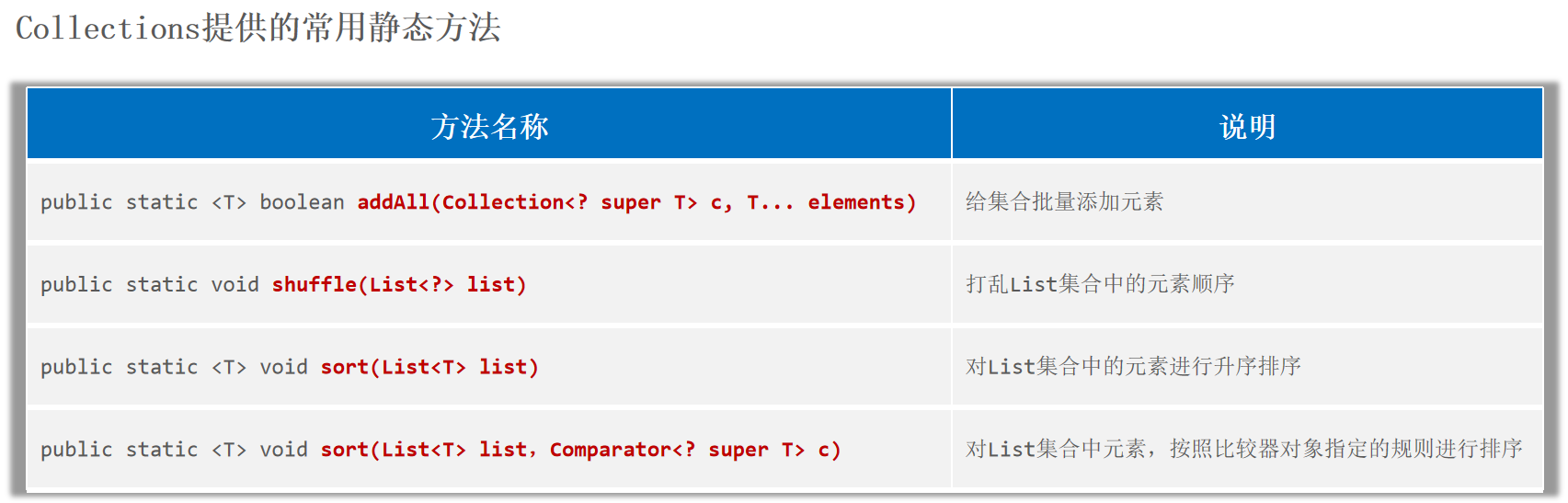
Collections Collections是一个用来操作集合 的工具类。
1
2
3
4
List<String> names = new ArrayList <>();"srr" , "scb" , "sll" , "szz" );
注意:Collections只能支持对List集合 进行排序。
1 2 3 4 5 6 public static <T> void sort (List<T> list) public static <T> void sort (List<T> list,Comparator<? super T> c)
1 2 3 4 5 6 7 8 9 10 11 12 13 14 15 16 17 18 19 20 new ArrayList <>();new Student ("srr" , 18 , 99.3 ));new Student ("scb" , 16 , 96.3 ));new Student ("sll" , 48 , 92.3 ));new Comparator <Student>() {@Override public int compare (Student o1, Student o2) {return Double.compare(o1.getScore(), o2.getScore());
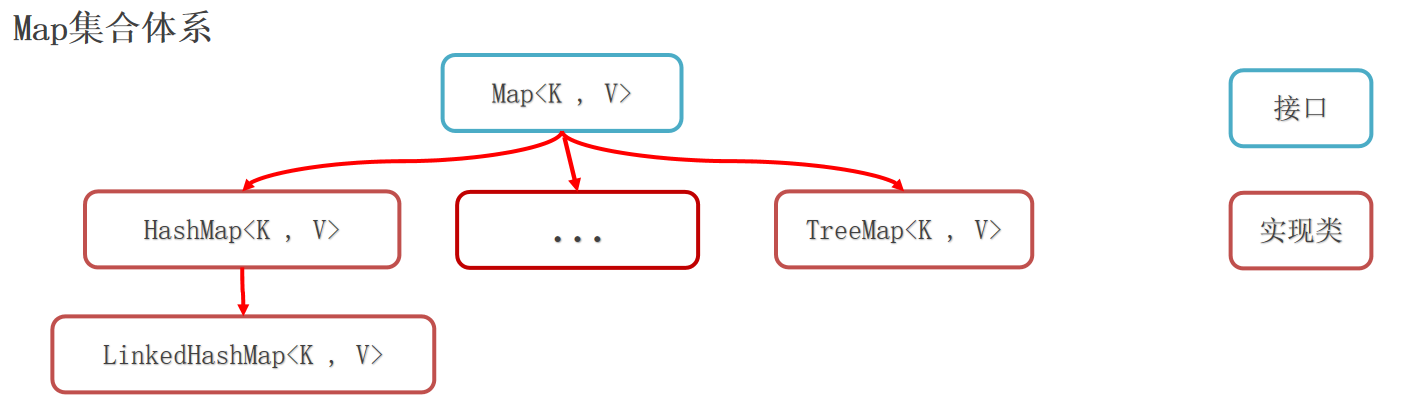
Map Map集合称为双列集合 ,格式:{key1=value1 , key2=value2 , key3=value3 , ...}, 一次需要存一对数据做为一个元素。
Map集合的每个元素key=value称为一个键值对/键值对对象/一个Entry对象,Map集合也被叫做键值对集合 。
Map集合的所有键是不允许重复 的,但值可以重复,键和值是一一对应的,每一个键只能找到自己对应的值。
注意:Map系列集合的特点都是由键决定 的,值只是一个附属品,值是不做要求的。
HashMap(由键决定特点):无序、不重复、无索引。LinkedHashMap(由键决定特点):由键决定的特点:有序、不重复、无索引。TreeMap(由键决定特点):按照大小默认升序排序、不重复、无索引。
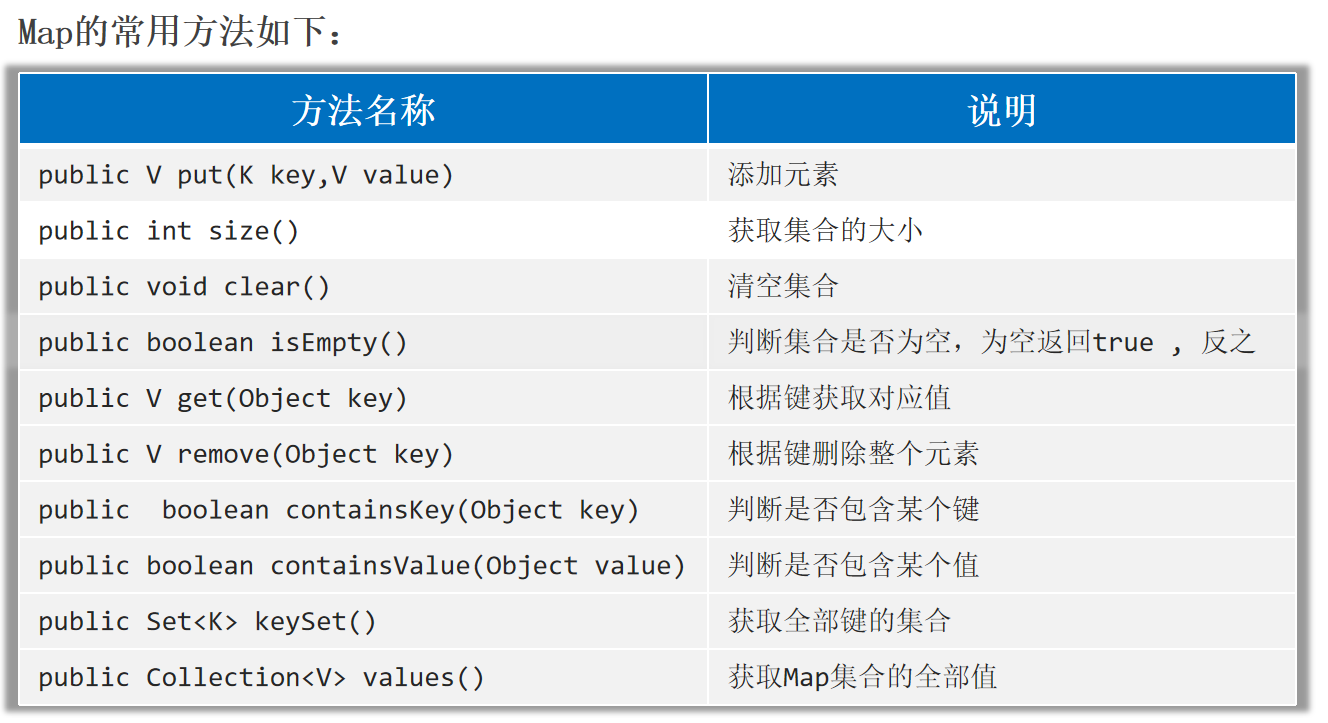
Map的常用方法 Map是双列集合的祖宗,它的功能是全部双列集合都可以继承过来使用的。
1
2
3
4
5
6
7
8
9
10
11
12
13
14
15
16
17
18
19
20
21
22
23
24
25
26
27
28
29
30
31
Map<String, Integer> map = new HashMap <>();"srr" , 180 );"srr" , 200 );"scb" , 200 );"sll" , 100 );null , null );"srr" ));"sll" ));"srr" ));100 ));new HashMap <>();"java" , 1 );"python" , 2 );"srr" , 888 );
Map的遍历方式 1.键找值 :先获取Map集合全部的键,再通过遍历键来找值。
1
2
public Set<K> keySet () public V get (Object key)
1
2
3
4
5
6
7
8
9
Map<String, Double> mymap = new HashMap <>();"srr" , 100.8 );"scb" , 99.9 );"sll" , 80.8 );for (String k : mykey) {"->" + mymap.get(k));
2.键值对 :把键值对看成一个整体Map.Entry<K, V>进行遍历。
1
2
3
4
Set<Map.Entry<String, Double>> entries = mymap.entrySet();for (Map.Entry<String, Double> entry : entries) {"->" + entry.getValue());
3.Lambda表达式 。
1 default void forEach (BiConsumer<? super K, ? super V> action)
1 2 3 4 5 6 7 8 mymap.forEach(new BiConsumer <String, Double>() {@Override public void accept (String s, Double d) {"->" + d);"->" + v));
1 2 3 4 5 6 7 8 9 10 11 12 13 14 15 16 default void forEach (BiConsumer<? super K, ? super V> action) {for (Map.Entry<K, V> entry : entrySet()) {try {catch (IllegalStateException ise) {throw new ConcurrentModificationException (ise);
HashMap HashMap(由键决定特点):无序、不重复、无索引。
HashMap集合的底层原理 :HashMap跟HashSet的底层原理一模一样,都是基于哈希表 实现的。HashSet的底层原理就是HashMap 。
注意:Set系列集合的底层就是基于Map实现的 ,只是Set集合中的元素只要键数据,不要值数据而已。
HashMap在存储时,会把键值对封装成Entry对象,然后利用键计算哈希值 ,跟值无关。其余存储的流程HashSet一模一样。
注意:
1.HashMap的键依赖hashCode方法和equals方法保证键的唯一。
2.如果键存储的是自定义类型的对象 ,可以通过重写hashCode和equals方法,这样可以保证多个对象内容一样时,HashMap集合就能认为是重复的。这一点和HashSet类似。
1
2
3
4
5
6
7
8
9
10
11
12
13
14
15
16
17
18
19
20
21
22
23
24
25
26
27
28
29
30
31
32
33
public class Student {private String name;private int age;private double score;public Student (String name, int age, double score) {this .name = name;this .age = age;this .score = score;@Override public String toString () {return "Student{" +"name='" + name + '\'' +", age=" + age +", score=" + score +'}' ;@Override public boolean equals (Object o) {if (this == o) return true ;if (o == null || getClass() != o.getClass()) return false ;Student student = (Student) o;return age == student.age && Double.compare(score, student.score) == 0 && Objects.equals(name, student.name);@Override public int hashCode () {return Objects.hash(name, age, score);
1
2
3
4
5
6
Map<Student, String> map2 = new HashMap <>();new Student ("srr" , 18 , 100 ), "szu" );new Student ("scb" , 16 , 99.8 ), "gzu" );new Student ("scb" , 16 , 99.8 ), "gzu" );
LinkedHashMap LinkedHashMap(由键决定特点):由键决定的特点:有序、不重复、无索引。
LinkedHashMap集合的底层原理 :基于哈希表 实现,只是每个键值对元素又额外的多了一个双链表 的机制记录元素顺序(保证有序)。LinkedHashSet集合的底层原理就是LinkedHashMap 。
LinkedHashMap在存储时,会把键值对封装成Entry对象,然后利用键计算哈希值 ,跟值无关。其余存储的流程LinkedHashSet一模一样。
1
2
3
4
5
Map<Student, String> map3 = new LinkedHashMap <>();new Student ("srr" , 18 , 100 ), "szu" );new Student ("scb" , 16 , 99.8 ), "gzu" );new Student ("scb" , 16 , 99.8 ), "gzu" );
TreeMap TreeMap(由键决定特点):按照大小默认升序排序、不重复、无索引。
TreeMap集合的底层原理 :TreeMap跟TreeSet集合的底层原理是一样的,都是基于红黑树 实现的排序。TreeSet的底层原理就是TreeMap 。
TreeMap集合同样也支持两种方式来指定排序规则:(否则put时会报错:java.lang.ClassCastException)
1.让类实现Comparable接口,重写比较规则。
2.TreeMap集合有一个有参数构造器,支持创建Comparator比较器对象,以便用来指定比较规则。
1
2
3
4
5
6
7
8
9
10
11
12
13
14
15
16
17
18
19
20
21
22
23
24
25
26
27
28
29
30
31
32
33
34
35
36
37
38
39
40
41
42
package com.itheima.Map_;import java.util.Objects;public class Student implements Comparable <Student> {private String name;private int age;private double score;@Override public int compareTo (Student o) {return this .age - o.age;public Student (String name, int age, double score) {this .name = name;this .age = age;this .score = score;public double getScore () {return score;@Override public String toString () {return "Student{" + "name='" + name + '\'' + ", age=" + age + ", score=" + score + '}' ;@Override public boolean equals (Object o) {if (this == o) return true ;if (o == null || getClass() != o.getClass()) return false ;Student student = (Student) o;return age == student.age && Double.compare(score, student.score) == 0 && Objects.equals(name, student.name);@Override public int hashCode () {return Objects.hash(name, age, score);
1 2 3 4 5 6 7 8 9 10 11 12 13 14 15 16 17 18 19 20 21 22 new TreeMap <>();new Student ("srr" , 18 , 100 ), "szu" );new Student ("scb" , 16 , 99.8 ), "gzu" );new Student ("scb" , 16 , 99.8 ), "gzu" );new TreeMap <>(new Comparator <Student>() {@Override public int compare (Student o1, Student o2) {return Double.compare(o1.getScore(), o2.getScore());new Student ("srr" , 18 , 100 ), "szu" );new Student ("scb" , 16 , 99.8 ), "gzu" );new Student ("scb" , 16 , 99.8 ), "gzu" );
集合的嵌套 1 2 3 4 5 6 7 8 9 10 11 12 Map<String, List<String>> citymap = new HashMap <>();new ArrayList <>();"南京" , "苏州" );"江苏" , cities1);new ArrayList <>();"广州" , "深圳" , "珠海" );"广东" , cities2);"->" + v));
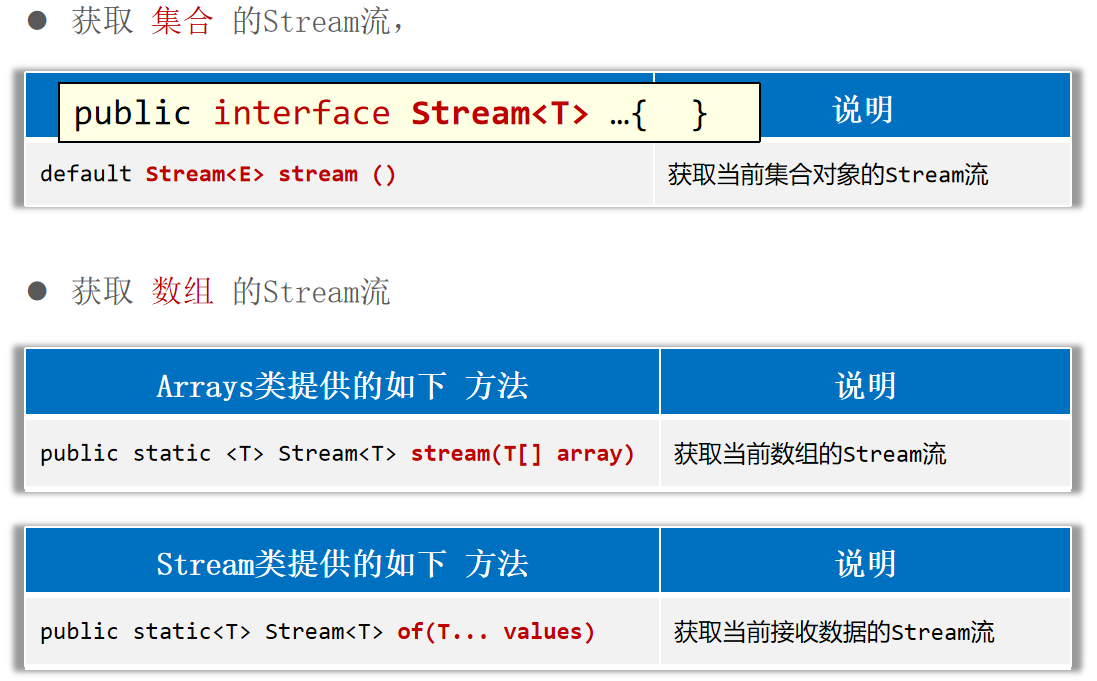
Stream 获取Stream流
1 2 3 4 5 6 7 8 9 10 11 12 13 14 15 16 17 18 19 20 21 22 23 24 25 26 27 28 29 30 31 32 33 34 35 36 37 38 39 40 41 42 43 44 45 46 public class Student {private String name;private int age;private double height;@Override public boolean equals (Object o) {if (this == o) return true ;if (o == null || getClass() != o.getClass()) return false ;Student student = (Student) o;return age == student.age && Double.compare(student.height, height) == 0 && Objects.equals(name, student.name);@Override public int hashCode () {return Objects.hash(name, age, height);public Student (String name, int age, double height) {this .name = name;this .age = age;this .height = height;public String getName () {return name;public int getAge () {return age;public double getHeight () {return height;@Override public String toString () {return "Student{" +"name='" + name + '\'' +", age=" + age +", height=" + height +'}' ;
1 2 3 4 5 6 7 8 9 10 11 12 13 14 15 16 17 18 19 20 21 22 23 24 25 26 27 28 29 30 31 32 33 new ArrayList <>();"张三丰" ,"张无忌" ,"周芷若" ,"赵敏" ,"张强" );new HashSet <>();"刘德华" ,"张曼玉" ,"蜘蛛精" ,"马德" ,"德玛西亚" );"德" )).forEach(s -> System.out.println(s));new HashMap <>();"古力娜扎" , 172.3 );"迪丽热巴" , 168.3 );"马尔扎哈" , 166.3 );"卡尔扎巴" , 168.3 );"巴" ))"-->" + e.getValue()));"张翠山" , "东方不败" , "唐大山" , "独孤求败" };
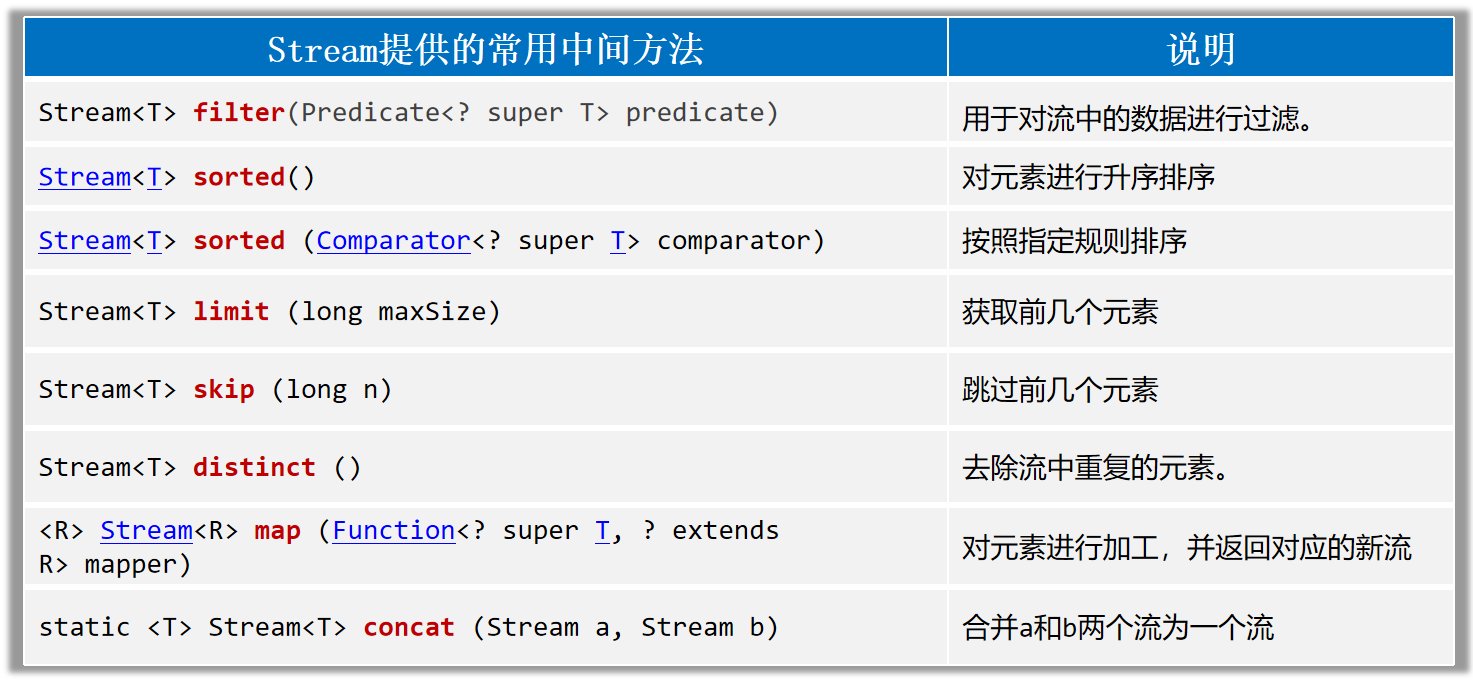
Stream流的中间方法 中间方法指的是调用完成后会返回新的Stream流,可以继续使用(支持链式编程)。
1 2 3 4 5 6 7 8 9 10 11 12 13 14 15 16 17 18 19 20 21 22 23 24 25 26 27 28 29 30 31 32 33 34 35 36 37 38 39 List<Double> scores = new ArrayList <>();88.5 , 100.0 , 60.0 , 99.0 , 9.5 , 99.6 , 25.0 );60 ).sorted().forEach(s -> System.out.println(s));new ArrayList <>();Student s1 = new Student ("蜘蛛精" , 26 , 172.5 );Student s2 = new Student ("蜘蛛精" , 26 , 172.5 );Student s3 = new Student ("紫霞" , 23 , 167.6 );Student s4 = new Student ("白晶晶" , 25 , 169.0 );Student s5 = new Student ("牛魔王" , 35 , 183.3 );Student s6 = new Student ("牛夫人" , 34 , 168.5 );23 && s.getAge() <= 30 )3 ).forEach(System.out::println);"----------------------------------------------------------------" );2 ).forEach(System.out::println);168 ).map(Student::getName)168 )"张三" , "李四" );"张三2" , "李四2" , "王五" );
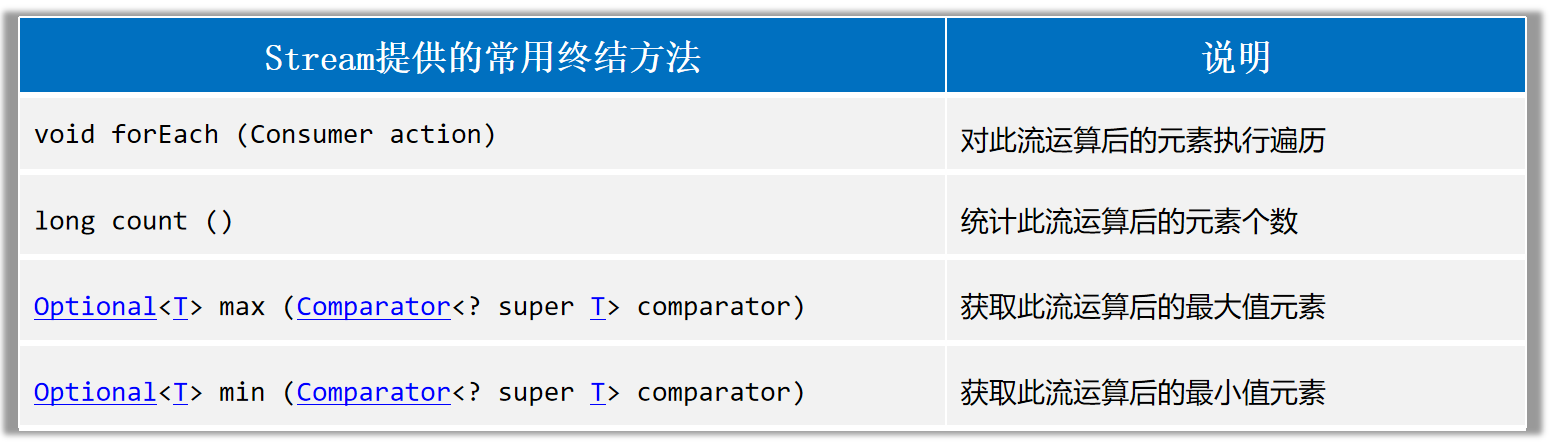
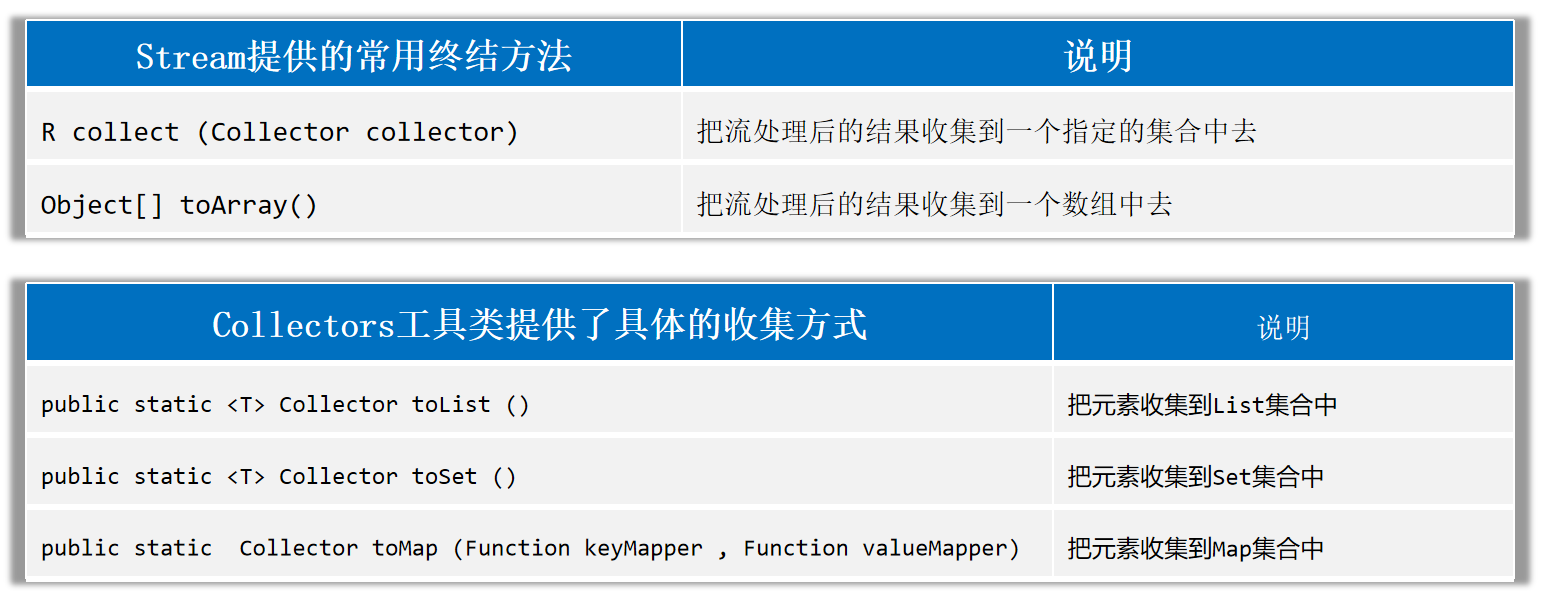
Stream流的终结方法 终结方法指的是调用完成后,不会返回新Stream了,没法继续使用流了。
收集Stream流:就是把Stream流操作后的结果转回到集合或者数组中去返回。
Stream流:方便操作集合/数组的手段。集合/数组:才是开发中的目的。
1 2 3 4 5 6 7 8 9 10 11 12 13 14 15 16 17 18 19 20 21 22 23 24 25 26 27 28 29 30 31 32 33 34 35 36 37 38 39 40 41 42 43 44 45 46 47 48 49 50 51 52 53 List<Student> students = new ArrayList <>();Student s1 = new Student ("蜘蛛精" , 26 , 172.5 );Student s2 = new Student ("蜘蛛精" , 26 , 172.5 );Student s3 = new Student ("紫霞" , 23 , 167.6 );Student s4 = new Student ("白晶晶" , 25 , 169.0 );Student s5 = new Student ("牛魔王" , 35 , 183.3 );Student s6 = new Student ("牛夫人" , 34 , 168.5 );long size = students.stream().filter(s -> s.getHeight() > 168 ).count();Student s = students.stream().max((o1, o2) -> Double.compare(o1.getHeight(), o2.getHeight())).get();Student ss = students.stream().min((o1, o2) -> Double.compare(o1.getHeight(), o2.getHeight())).get();170 ).collect(Collectors.toList());170 ).collect(Collectors.toSet());170 )170 ).toArray(len -> new Student [len]);