API API(Application Programming interface) :应用程序编程接口。
Object Object类是Java中所有类的祖宗类。Java中所有类的对象都可以直接使用Object类中提供的一些方法。
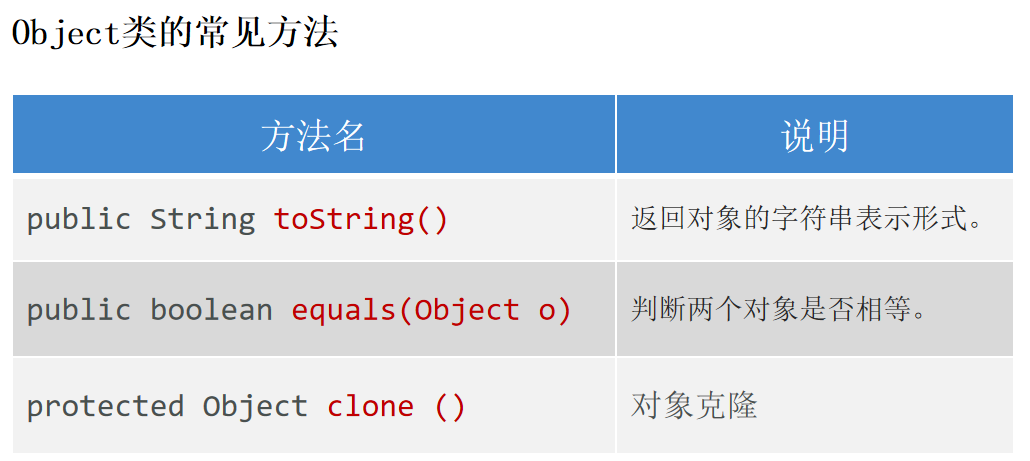
toString 返回对象的字符串形式。让子类重写,返回子类对象的内容。
1
2
3
4
5
6
7
8
9
10
11
12
public class Student {private int age;private String name;@Override public String toString () {return "Student{" +"age=" + age +", name='" + name + '\'' +'}' ;
equals 默认比较两个对象的地址是否相等。让子类重写,用于比较对象的内容是否相同。
1
2
3
4
5
6
7
8
9
10
@Override public boolean equals (Object o) {if (this == o) return true ;if (o == null || getClass() != o.getClass()) return false ;Student student = (Student) o;return age == student.age && Objects.equals(name, student.name);
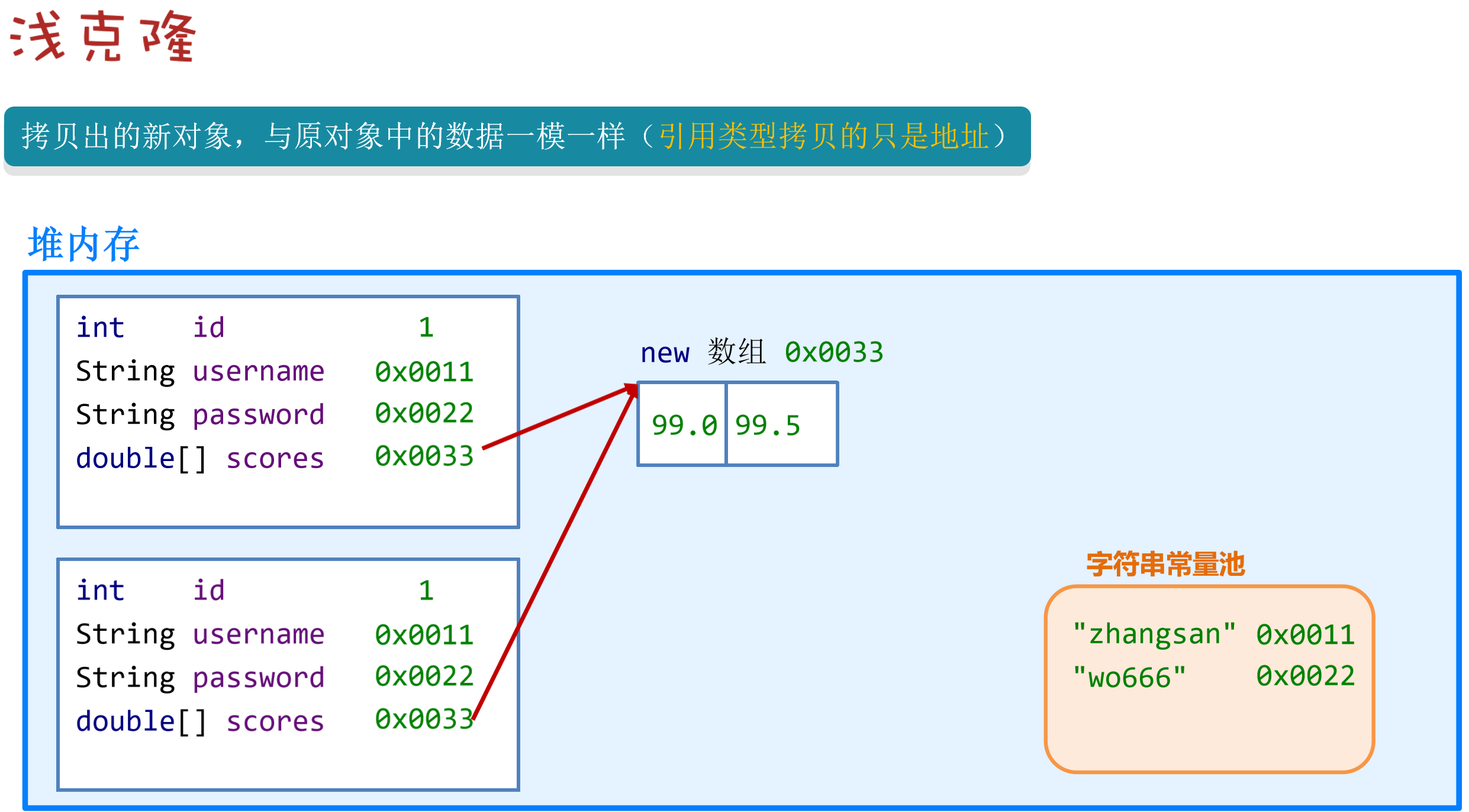
clone 当某个对象调用这个方法时,clone方法会复制一个一模一样的新对象返回。
clone方法是protected,只能在Object所在的lang包下或者Object的子类中访问。需要在子类中重写clone方法才能在其他包下使用clone方法。
1 2 3 4 5 6 7 8 9 10 11 12 13 14 15 16 17 18 19 20 21 22 23 24 25 26 27 28 29 30 public class User implements Cloneable {private String name;private int age;private double [] scores;public User () {}public User (String name, int age, double [] scores) {this .name = name;this .age = age;this .scores = scores;@Override protected Object clone () throws CloneNotSupportedException {return super .clone();@Override public String toString () {return "User{" +"name='" + name + '\'' +", age=" + age +", scores=" + Arrays.toString(scores) +'}' + ", scores addr=" + scores;
1
2
3
4
5
6
7
public static void main (String[] args) throws CloneNotSupportedException {User u1 = new User ("surourou" , 18 , new double []{100 ,99.8 });User u2 = (User) u1.clone();
浅克隆
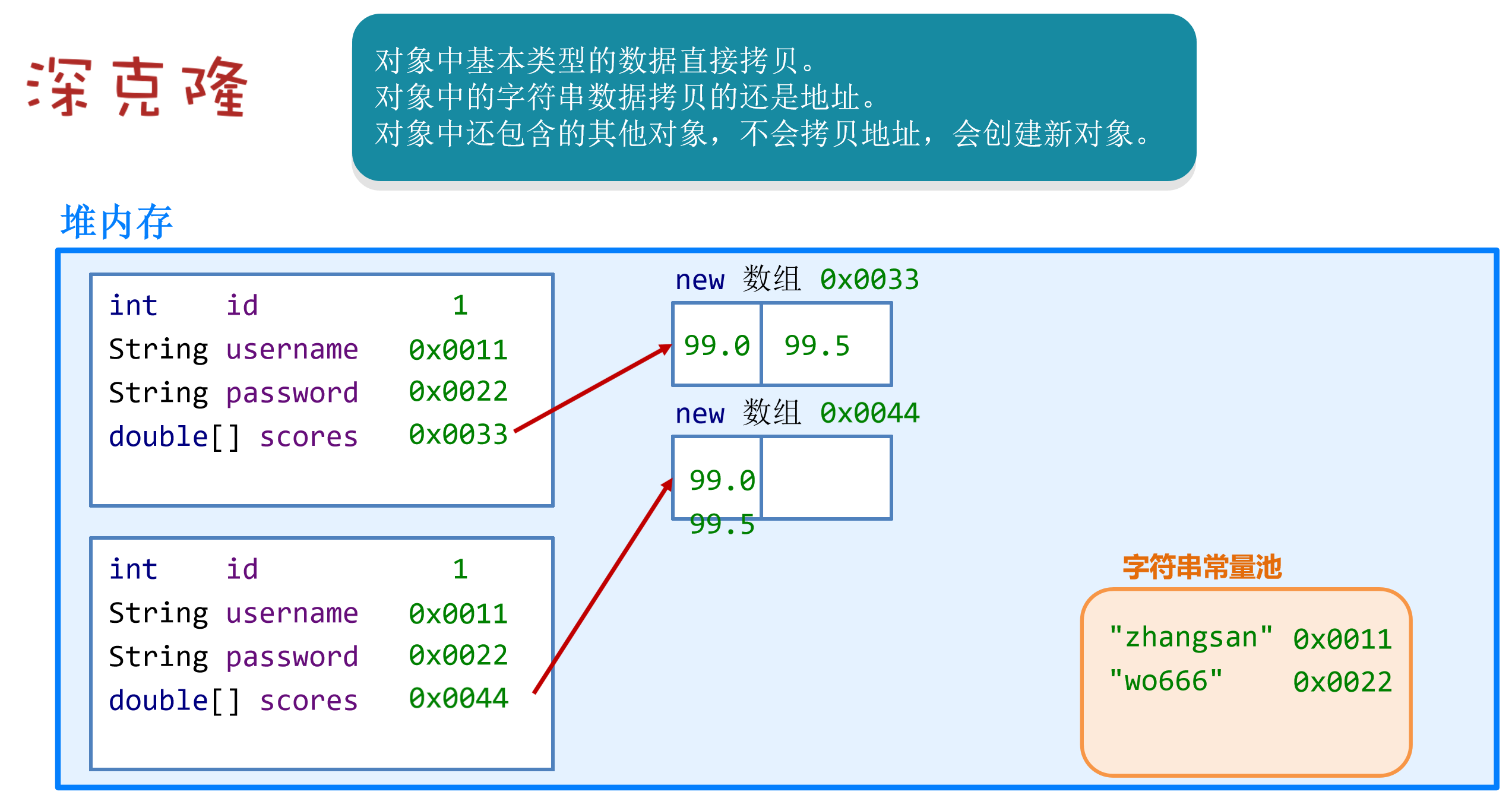
深克隆
1 2 3 4 5 6 7 8 9 @Override protected Object clone () throws CloneNotSupportedException {User u2 = (User) super .clone();return u2;
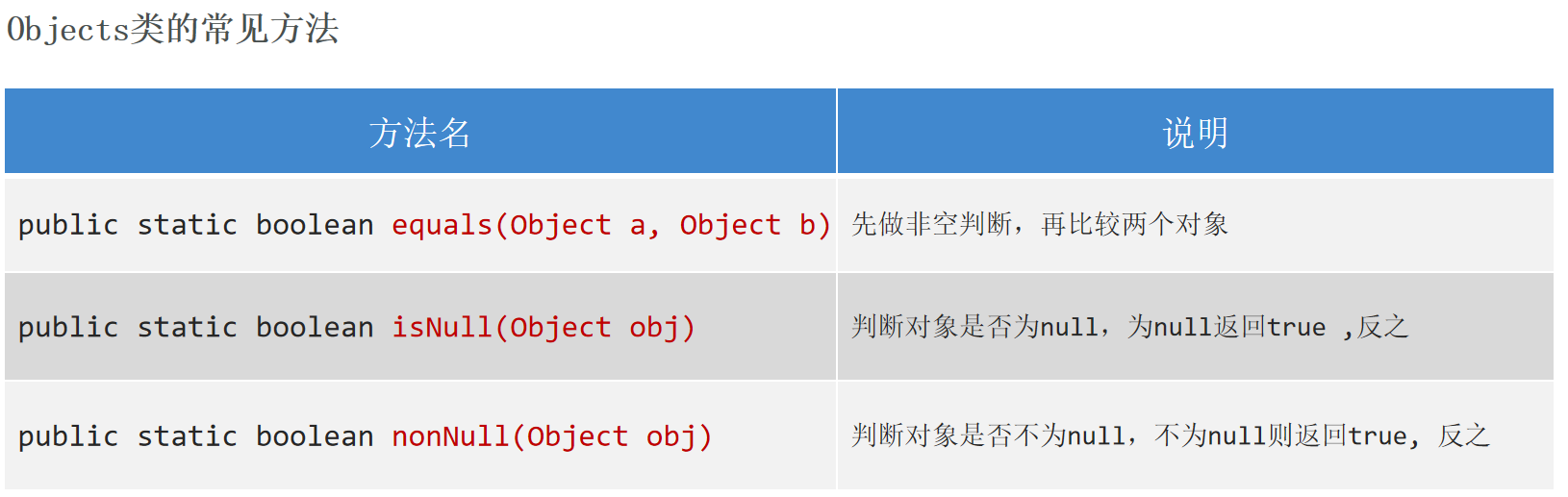
Objects 操作对象
1
2
3
4
String s1 = null ;String s2 = "girl" ;
1 2 3 4 public static boolean equals (Object a, Object b) {return (a == b) || (a != null && a.equals(b));
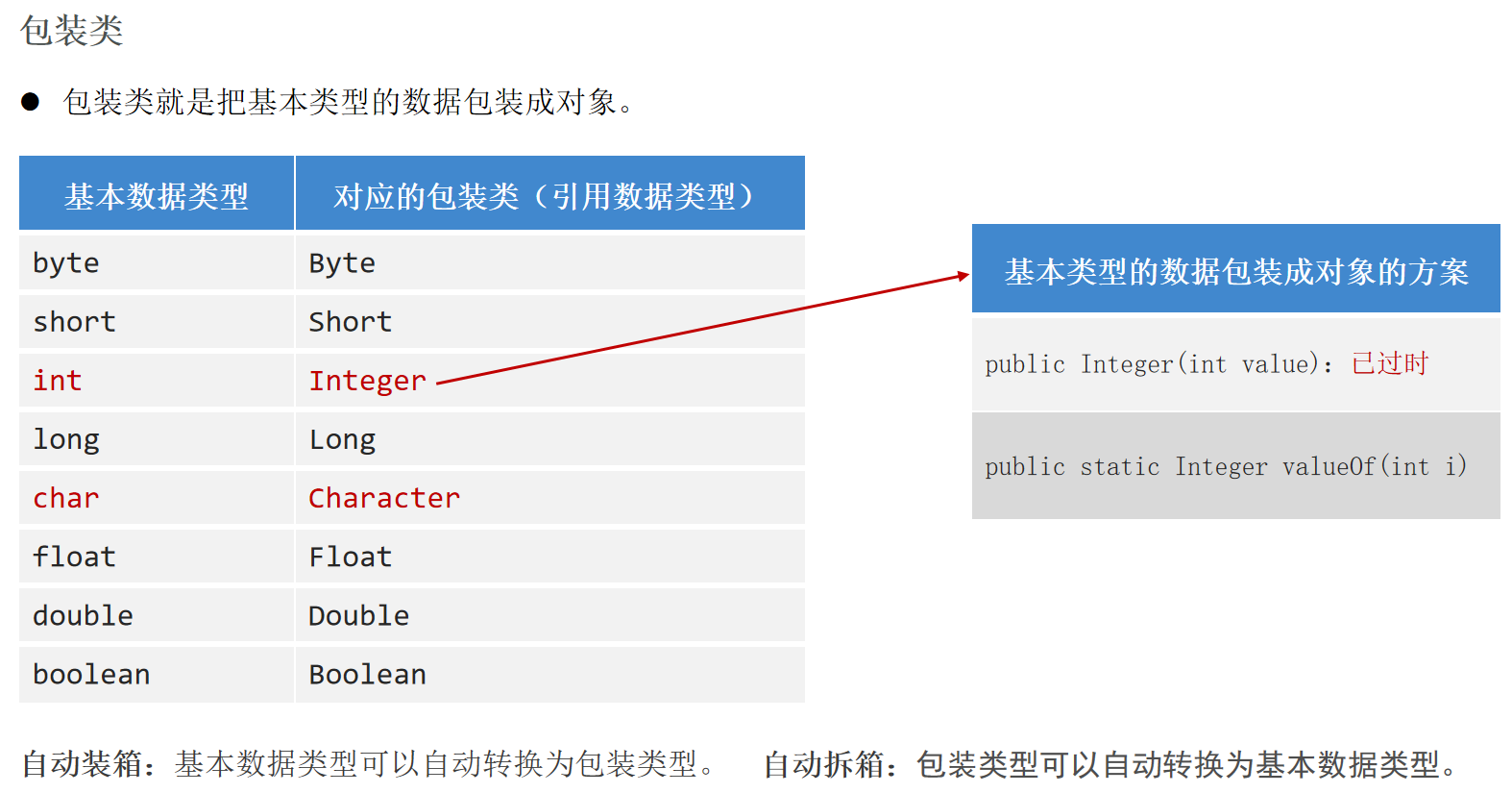
包装类 包装类把基本类型的数据包装成对象 。
自动装箱 :基本数据类型可以自动转换为包装类型。
自动拆箱 :包装类型可以自动转换为基本数据类型。
1
2
3
4
5
6
7
8
9
10
11
12
13
Integer i1 = new Integer (12 );Integer i2 = Integer.valueOf(12 );Integer i3 = 18 ;int i4 = i3;new ArrayList <>();18 );19 );int rs = list.get(0 );
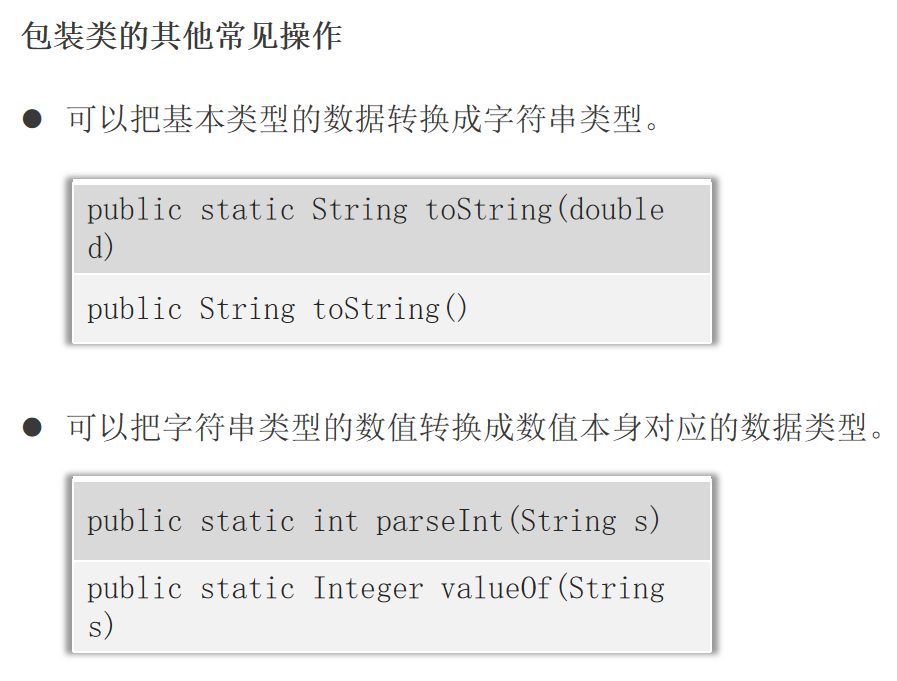
1 2 3 4 5 6 7 8 9 10 11 12 Integer in1 = Integer.valueOf(23 );String st1 = Integer.toString(in1);String st2 = in1.toString();String st3 = in1 + "" ;String str1 = "18" ;int age = Integer.valueOf(str1);String str2 = "99.88" ;double score = Double.valueOf(str2);
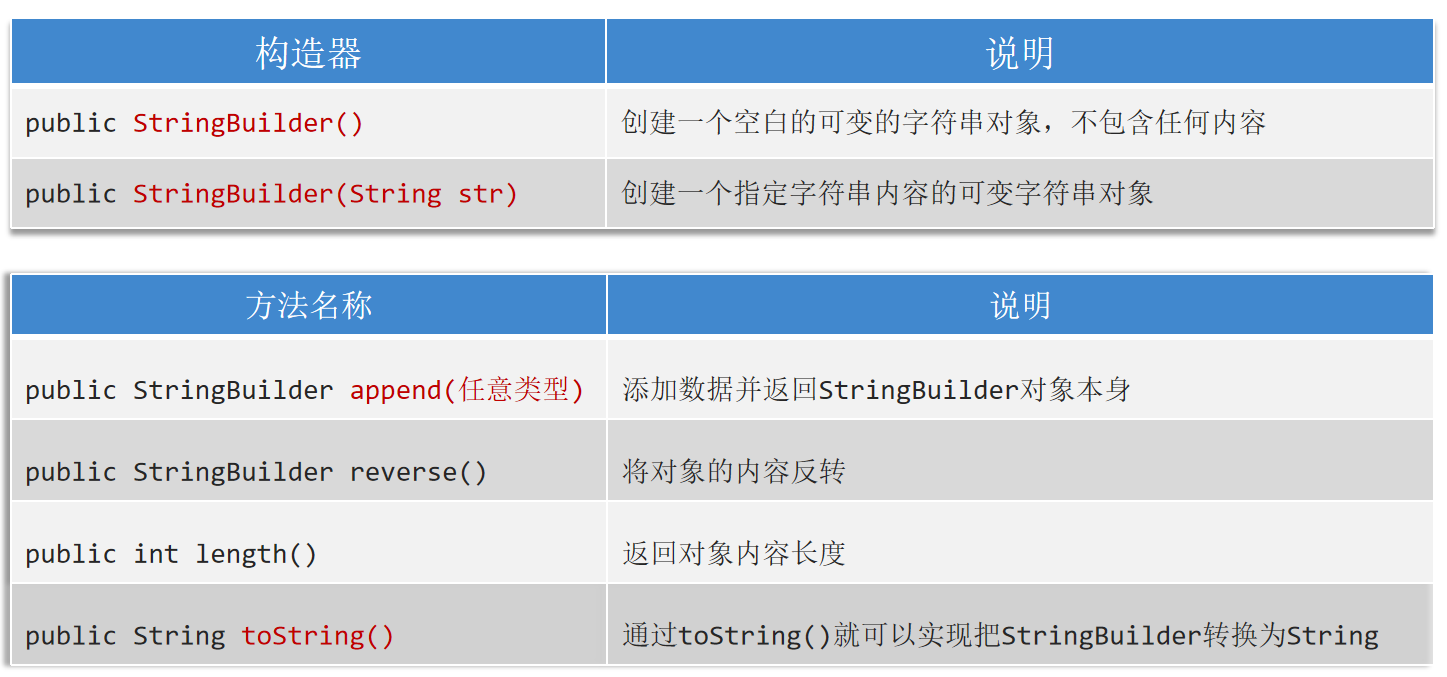
StringBuilder StringBuilder是可变字符串对象 ,相当于一个容器,它里面装的字符串可以改变 ,用来操作字符串。
StringBuilder比String更适合做字符串的修改操作,效率更高。对于字符串相关的操作,如频繁的拼接、修改 等,建议用StringBuidler效率更高。
1
2
3
StringBuffer sb = new StringBuffer ();"srr" ).append("666" ).append(18 ).append(true );
StringBuffer StringBuffer的用法与StringBuilder一模一样。
StringBuilder是线程不安全 的StringBuffer是线程安全 的。
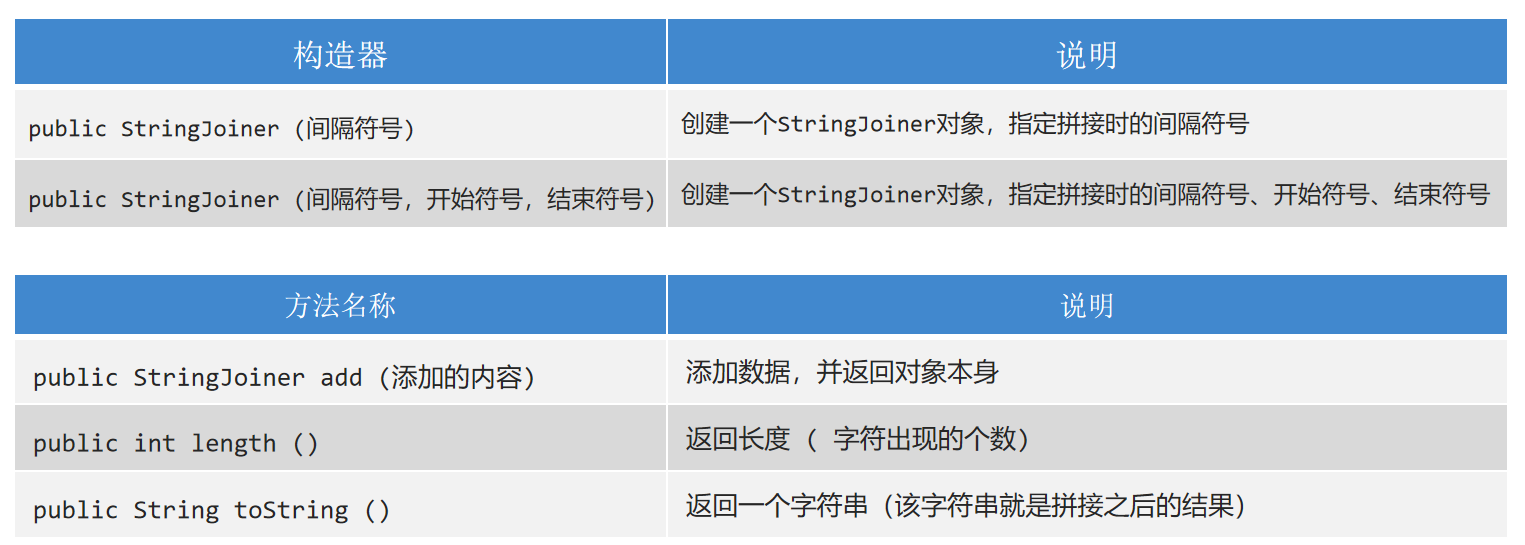
StringJoiner(JDK8) JDK8开始才有,跟StringBuilder一样用来操作字符串 的,也可以看成是一个容器,创建之后里面的内容可变 。
1
2
3
4
5
StringJoiner sj = new StringJoiner ("," );"srr" ).add("666" );StringJoiner sj1 = new StringJoiner ("," ,"[" ,"]" );"srr" ).add("666" );
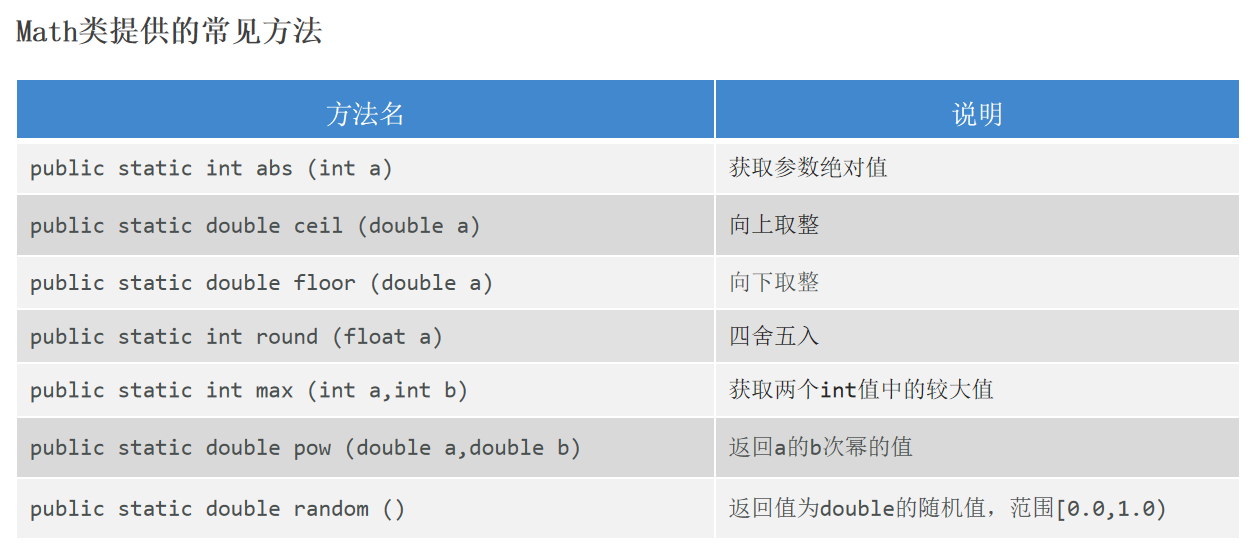
Math
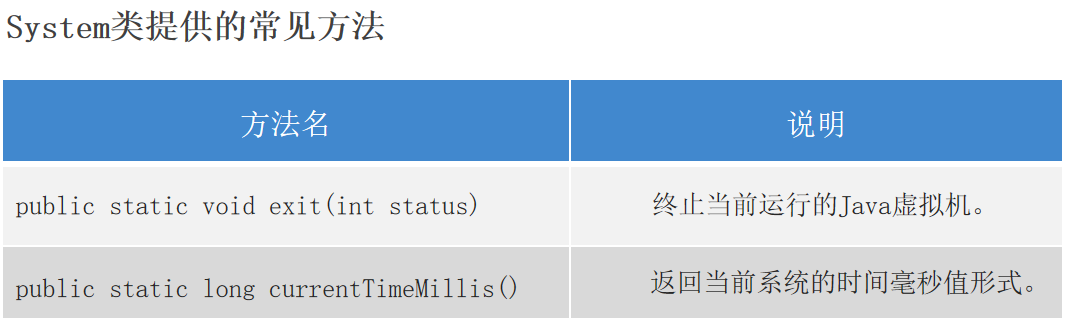
System System代表程序所在的系统。
注意:exit方法参数为0代表人为操作,非零代表异常值。
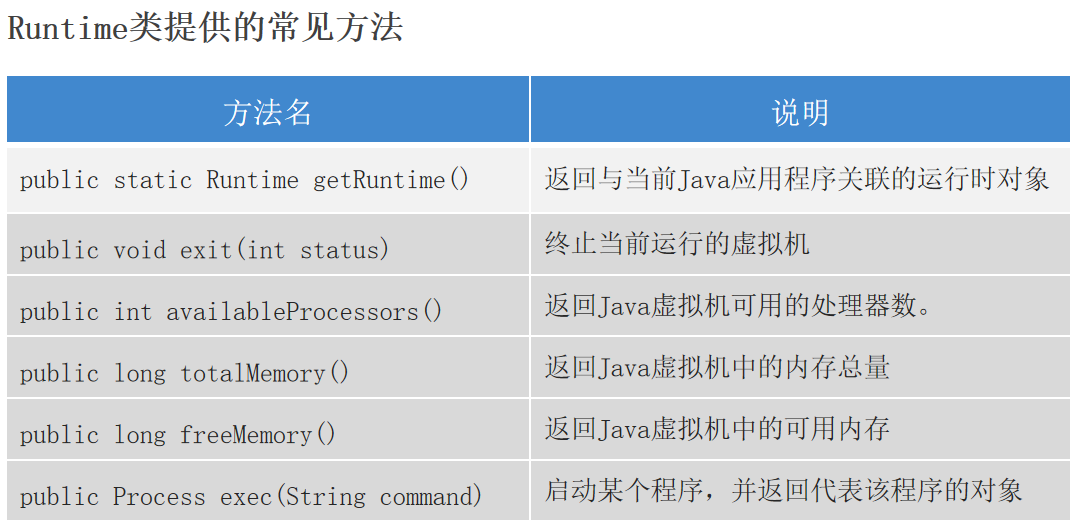
Runtime Runtime代表程序所在的运行环境。Runtime是一个单例类。
注意:
1.System的exit方法就是调用Runtime的exit方法,两者是一样的。
2.totalMemory和freeMemory返回的单位Byte,/1024得到单位KB,/1024/1024得到单位MB。
3.使用exec方法启动程序需要throws IOException。
1
2
3
Process p = rt.exec("D:\\software\\ToDesk\\ToDesk.exe" );5000 );
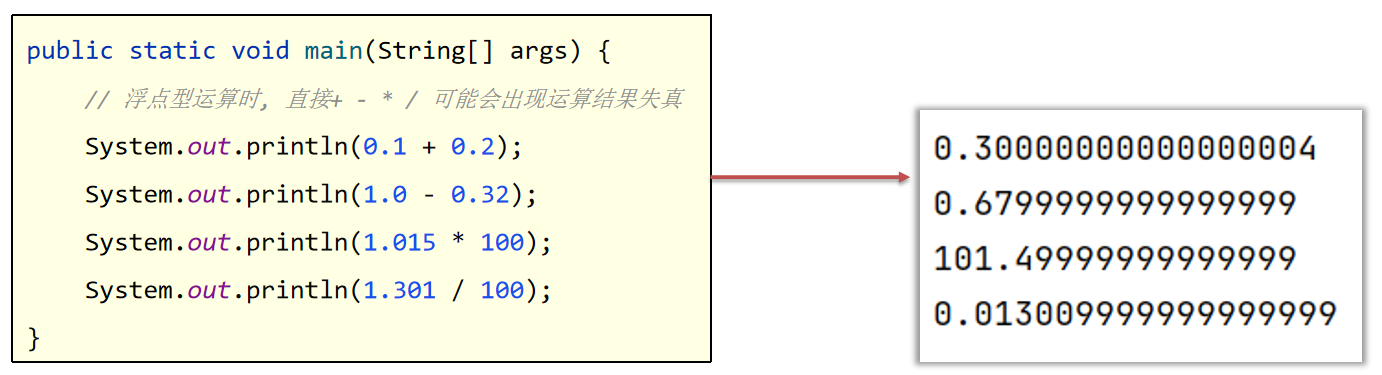
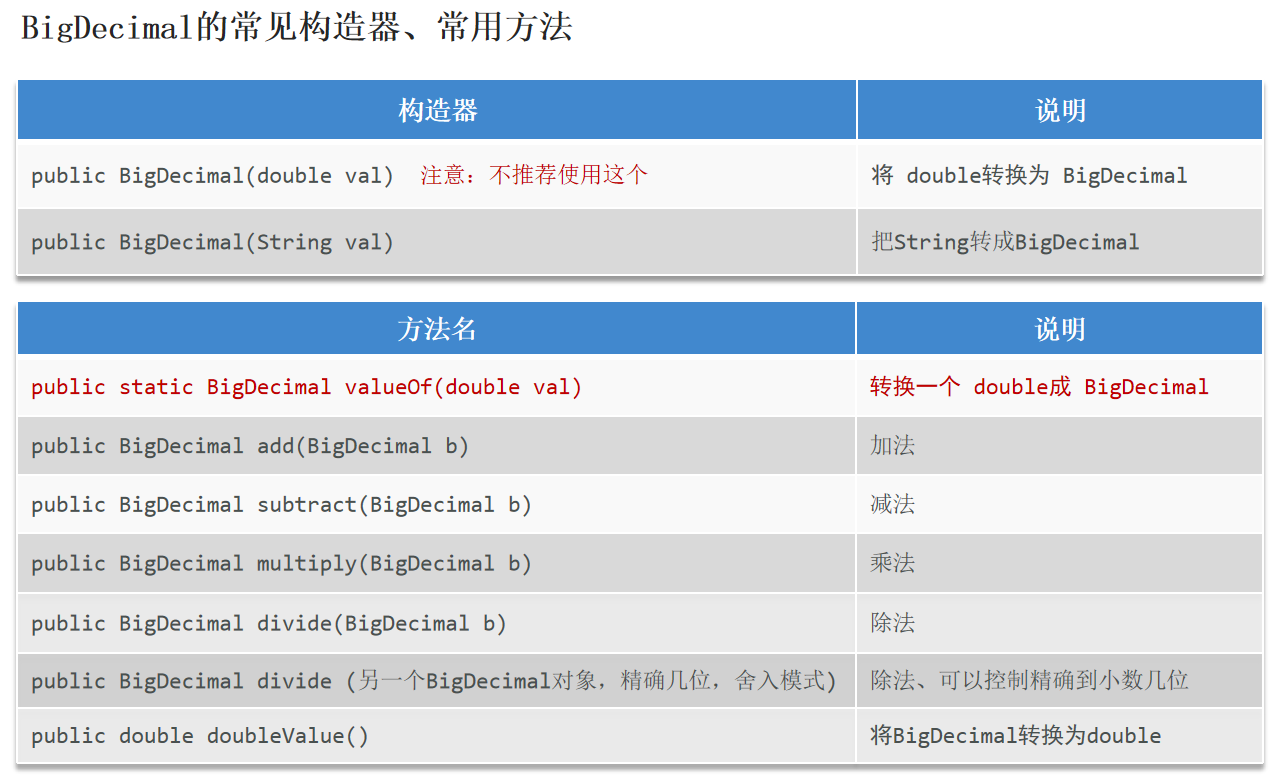
BigDecimal BigDecimal用于解决浮点型运算时,出现结果失真 的问题。
注意:
1.使用BigDecimal(double val)会出现精度问题,使用BigDecimal(String val)来进行构造
1 2 3 4 5 6 7 8 9 10 11 BigDecimal b1 = BigDecimal.valueOf(0.1 );BigDecimal b2 = new BigDecimal (Double.toString(0.2 ));BigDecimal b3 = BigDecimal.valueOf(0.3 );3 , BigDecimal.ROUND_HALF_UP));
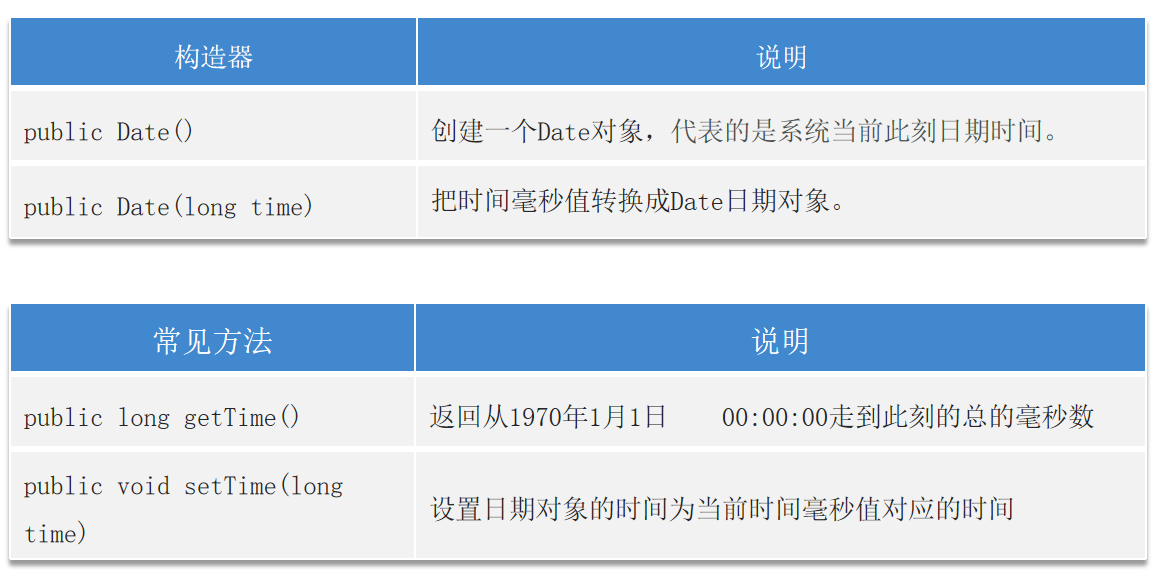
Date Date代表日期和时间。
1 2 3 4 5 6 7 8 9 10 Date d1 = new Date ();long time = d1.getTime();Date d2 = new Date (time);Date d3 = new Date ();"\n" + d2 + "\n" + d3);
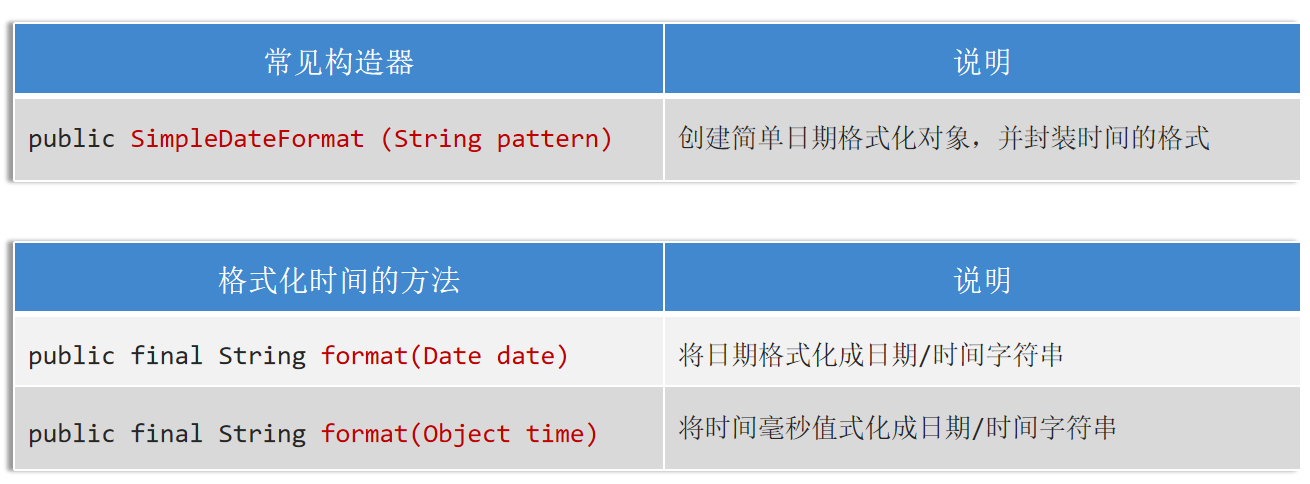
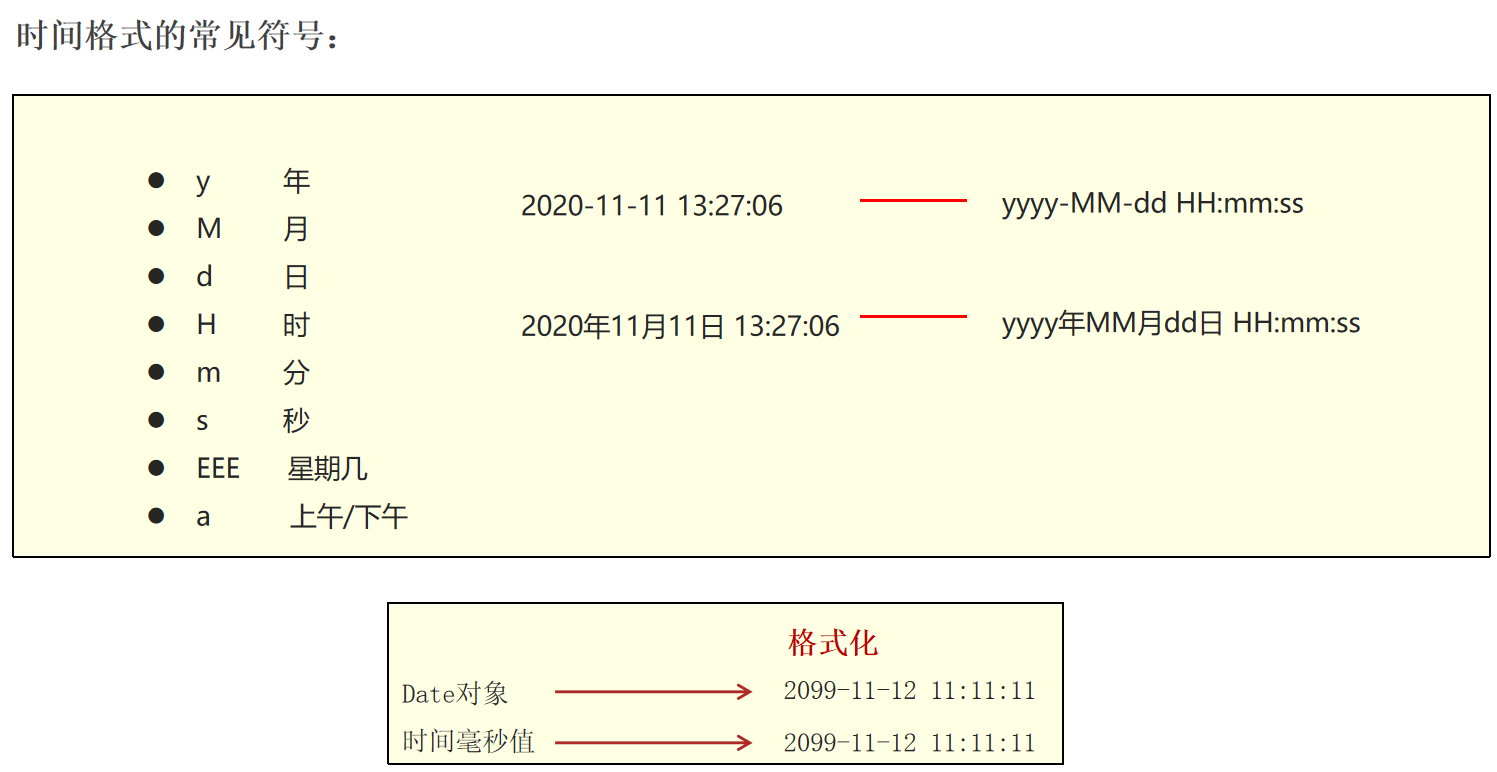
SimpleDateFormat代表简单日期格式化 ,可以用来把日期对象 、时间毫秒值 格式化成想要的形式。
1
2
3
4
5
6
Date d = new Date ();long t = d.getTime();SimpleDateFormat sdf = new SimpleDateFormat ("yyyy年MM月dd日 HH:mm:ss EEE a" );String s1 = sdf.format(d);String s2 = sdf.format(t);"\n" + s2);
SimpleDateFormat可以解析字符串时间成为日期对象。
1 2 3 4 5 SimpleDateFormat sdf1 = new SimpleDateFormat ("yyyy-MM-dd HH:mm:ss" );String s3 = "2024-09-15 12:18:08" ;Date date = sdf1.parse(s3);
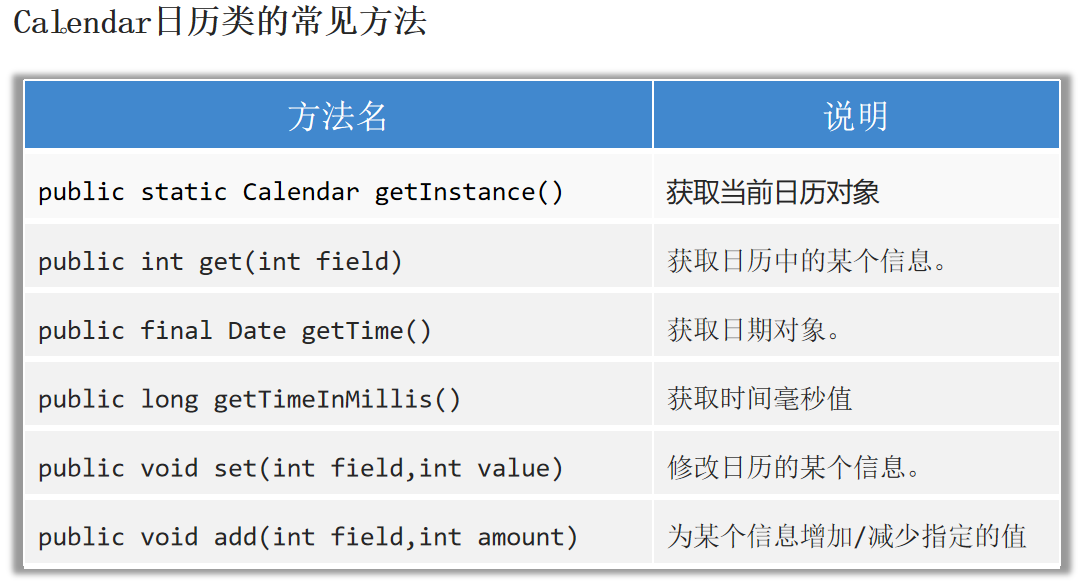
Calendar Calendar代表的是系统此刻时间对应的日历 ,通过它可以单独获取、修改时间 中的年、月、日、时、分、秒等。
注意:calendar是可变对象 ,一旦修改后其对象本身表示的时间将产生变化 。
Calendar是抽象类,类方法getInstance获取该类的通用对象,返回一个Calendar对象。
1
2
3
4
5
6
7
8
9
10
11
12
13
14
15
16
Calendar calendar = Calendar.getInstance();int month = calendar.get(Calendar.MONTH);Date date1 = calendar.getTime();long time1 = calendar.getTimeInMillis();2016 );
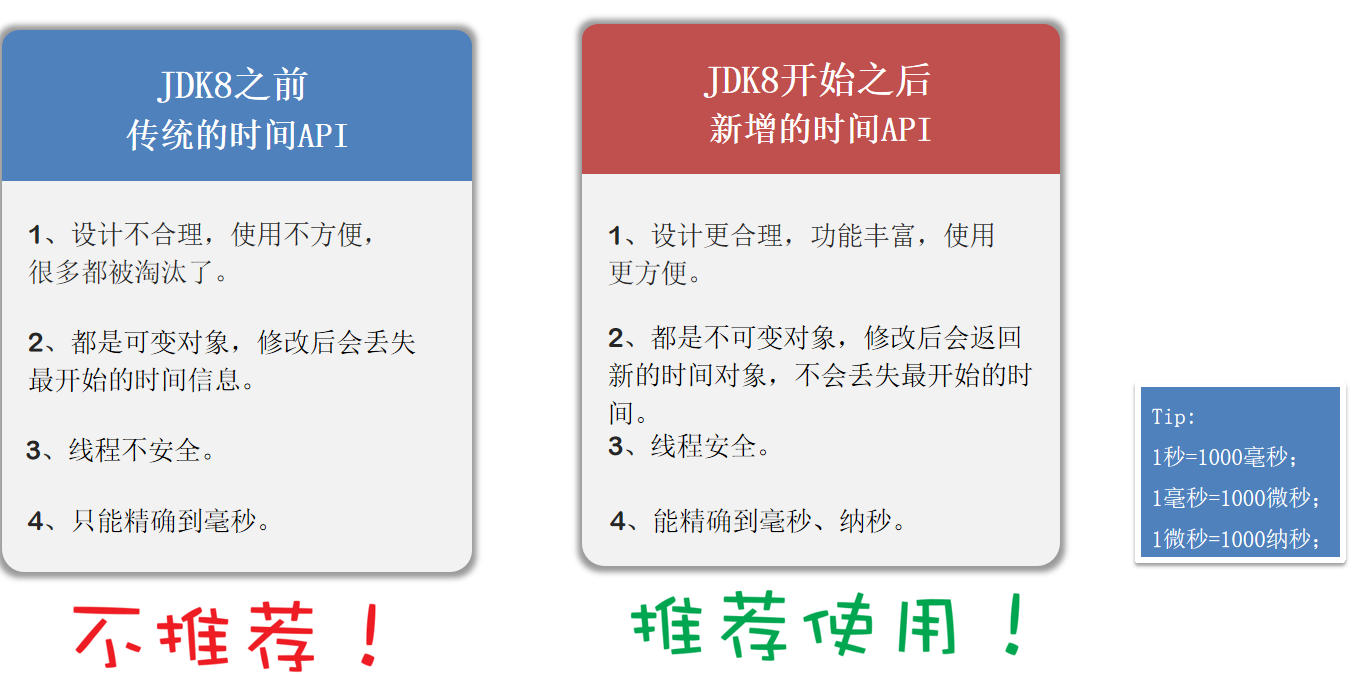
JDK8新增的时间API
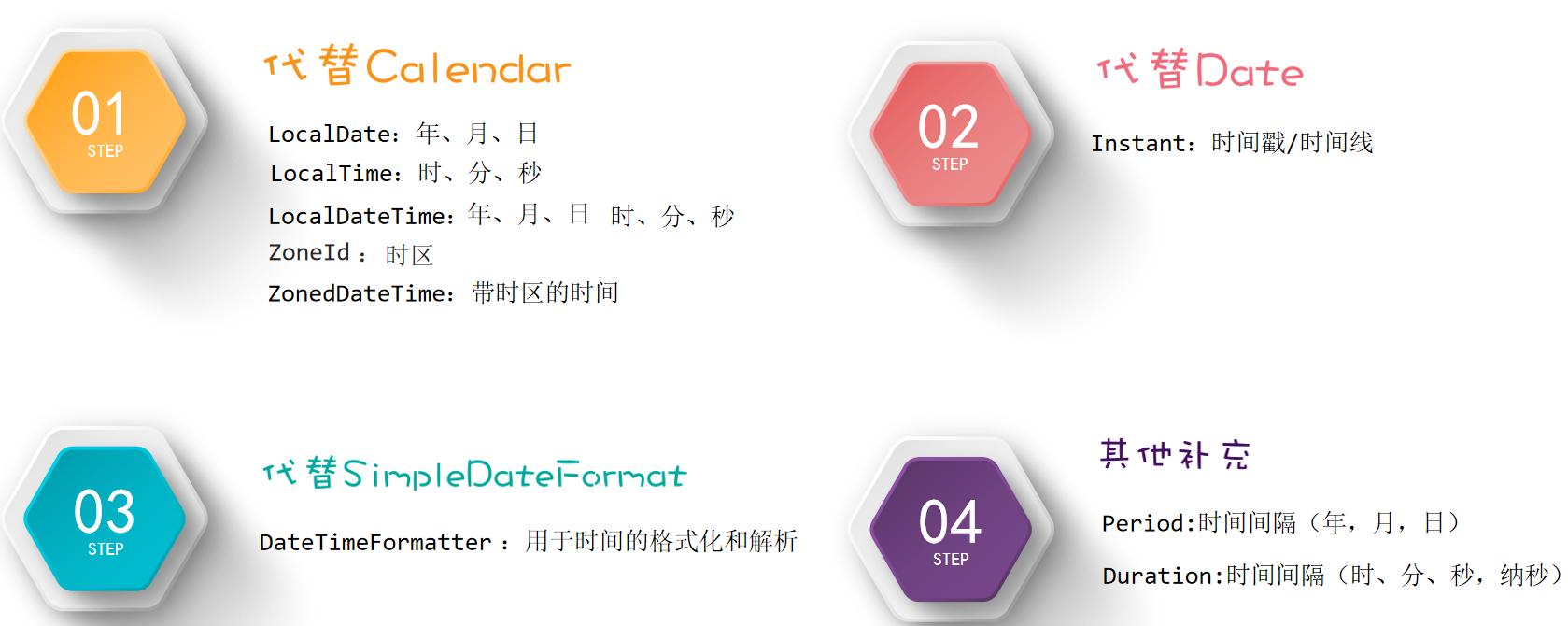
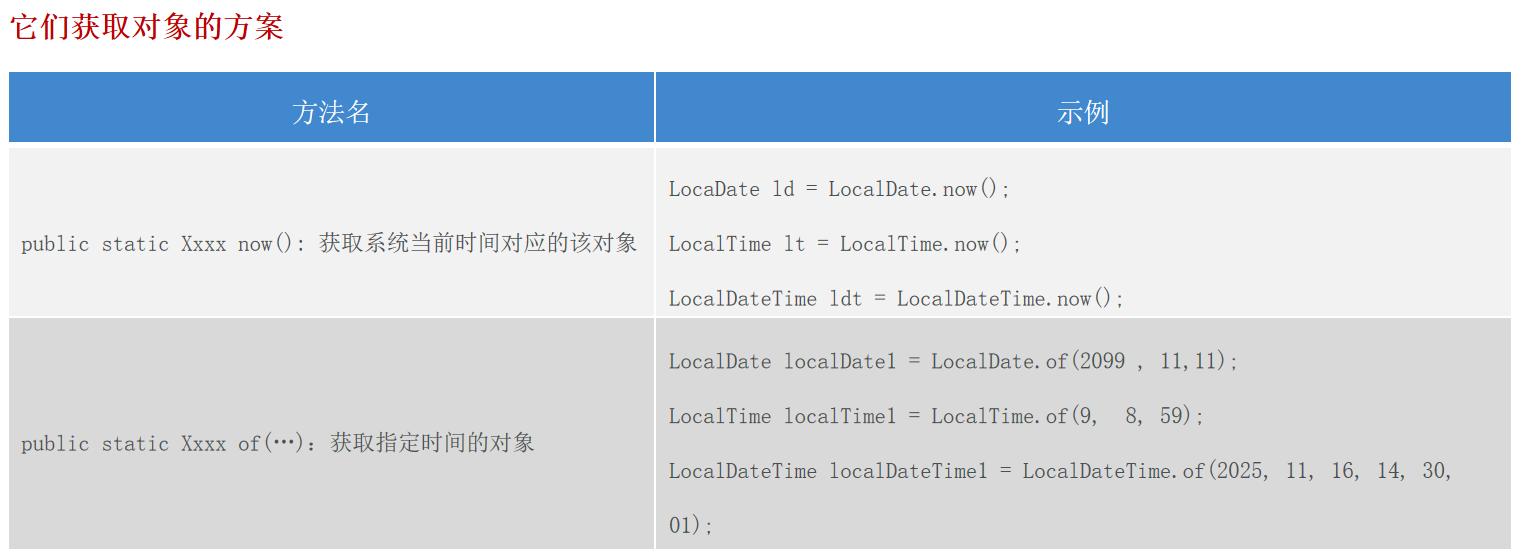
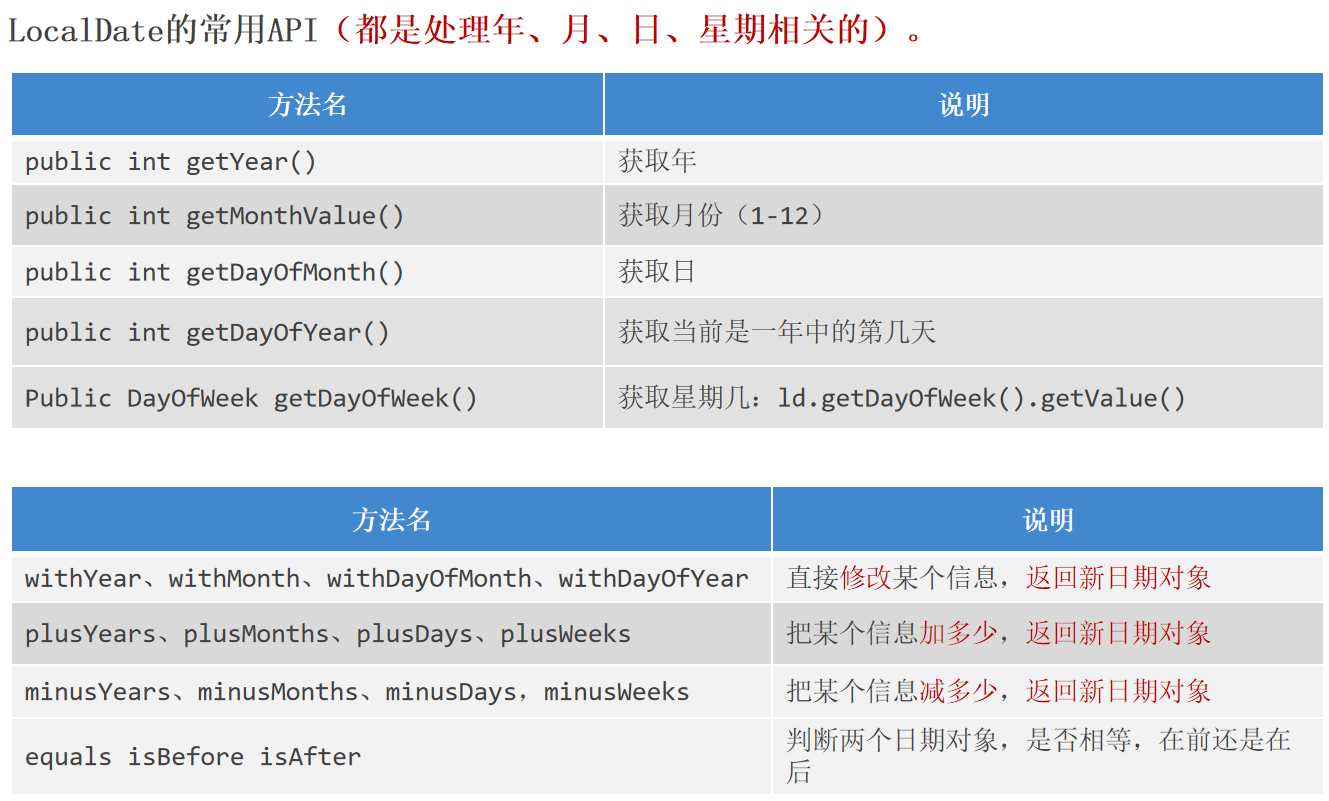
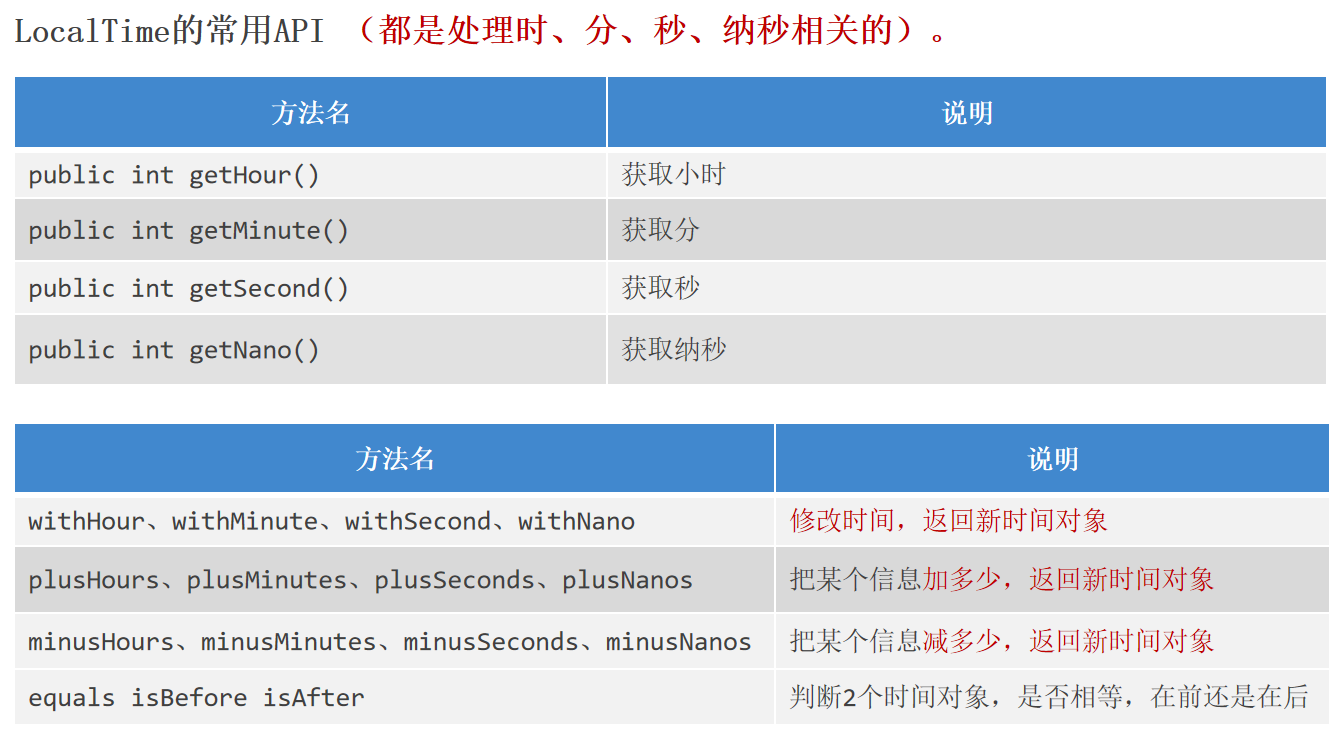
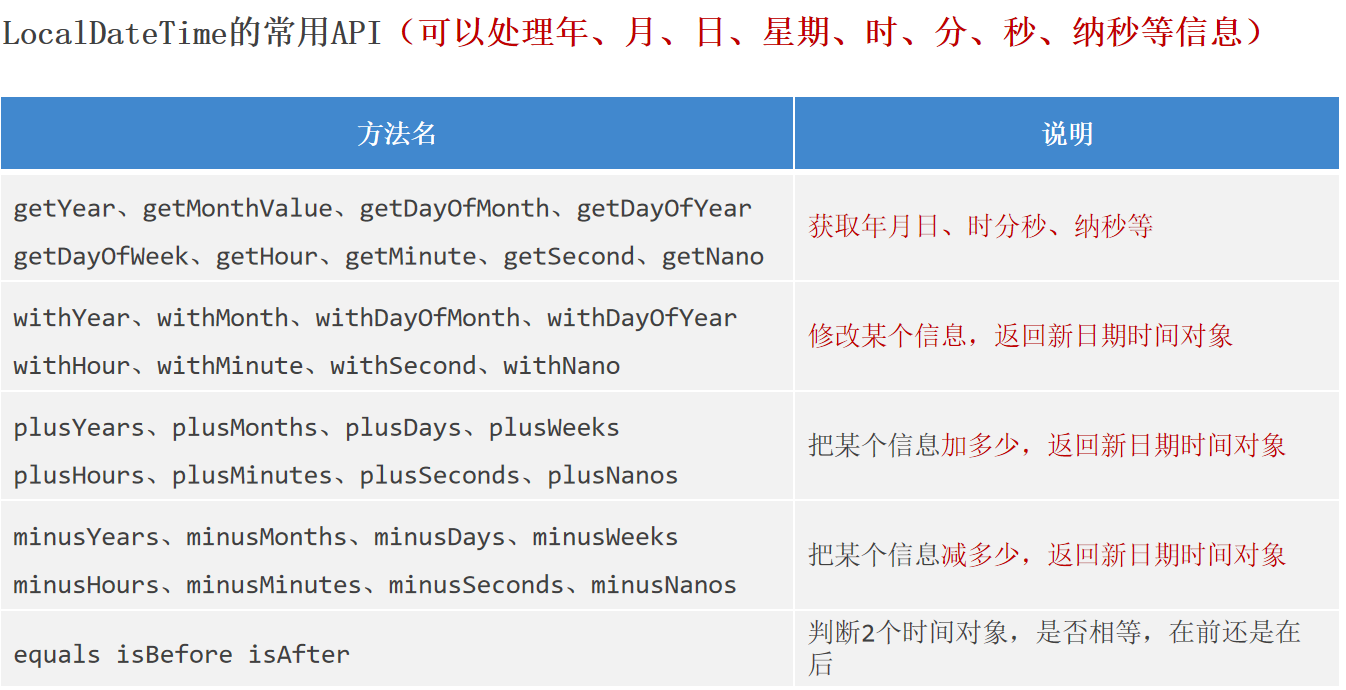
LocalDate、LocalTime、LocalDateTime LocalDate:代表本地日期(年、月、日、星期)
LocalTime:代表本地时间(时、分、秒、纳秒)
LocalDateTime:代表本地日期、时间(年、月、日、星期、时、分、秒、纳秒)
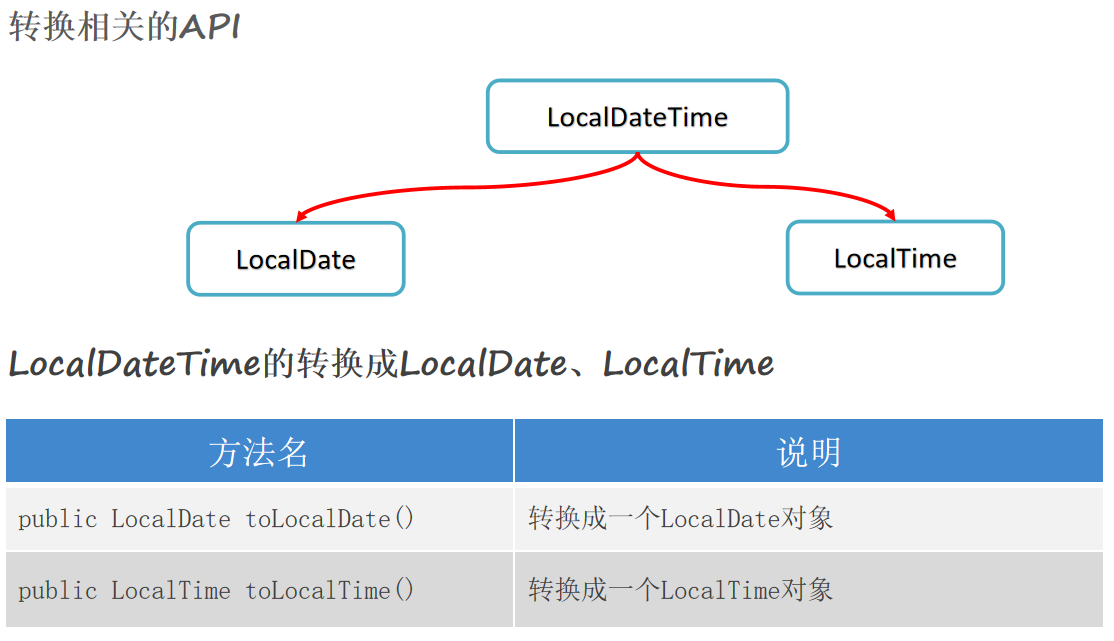
1 2 3 4 5 LocalDateTime ldt = LocalDateTime.now();LocalDate ld = ldt.toLocalDate();LocalTime lt = ldt.toLocalTime();LocalDateTime ldt1 = LocalDateTime.of(ld, lt);
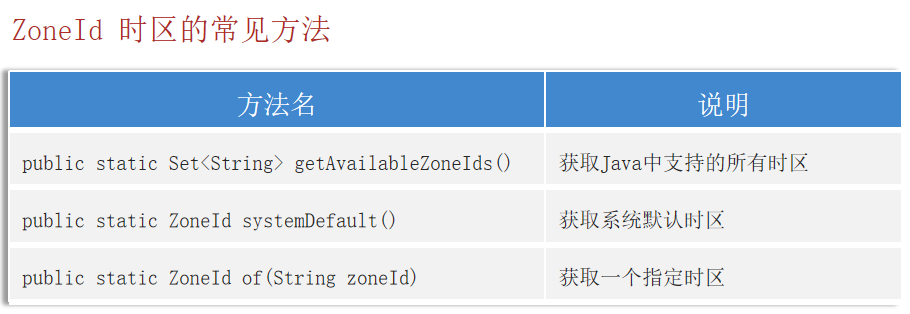
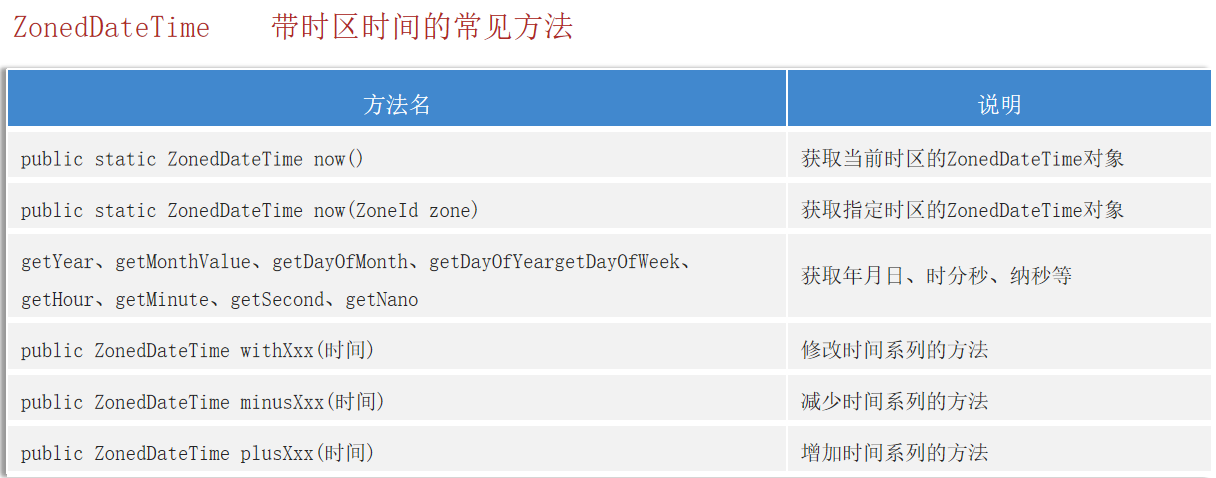
ZoneID、ZonedDateTime
1
2
3
4
5
ZoneId zone = ZoneId.systemDefault();ZonedDateTime zdt = ZonedDateTime.now(zone);ZonedDateTime zdt1 = ZonedDateTime.now(Clock.systemUTC());ZonedDateTime zdt2 = ZonedDateTime.now();Calendar calendar1 = Calendar.getInstance(TimeZone.getTimeZone(zone));
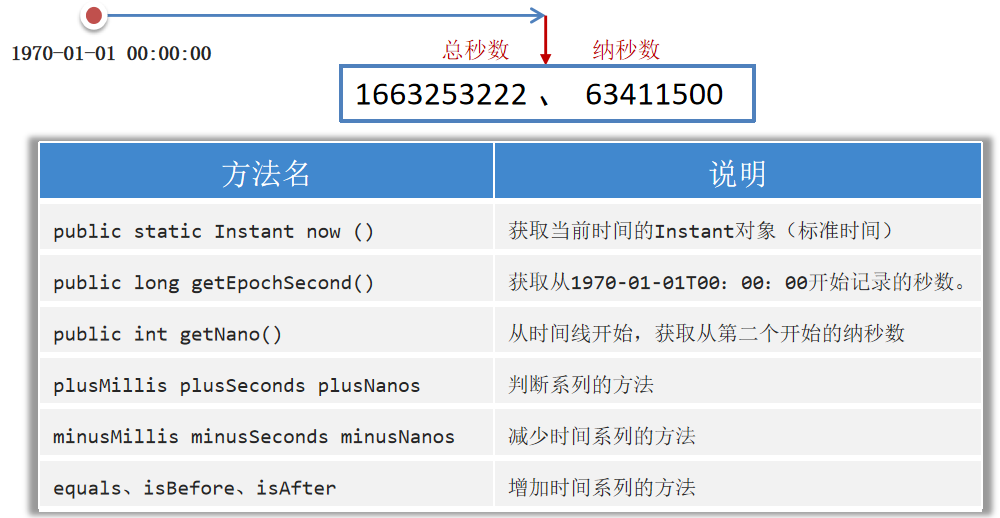
Instant 通过获取Instant的对象可以拿到此刻的时间,该时间由两部分组成:从1970-01-01 00:00:00 开始走到此刻的总秒数 + 不够1秒的纳秒数 。
作用:可以用来记录代码的执行时间,或用于记录用户操作某个事件的时间点。
传统的Date类,只能精确到毫秒,并且是可变对象;新增的Instant类,可以精确到纳秒,并且是不可变对象,推荐用Instant代替Date。
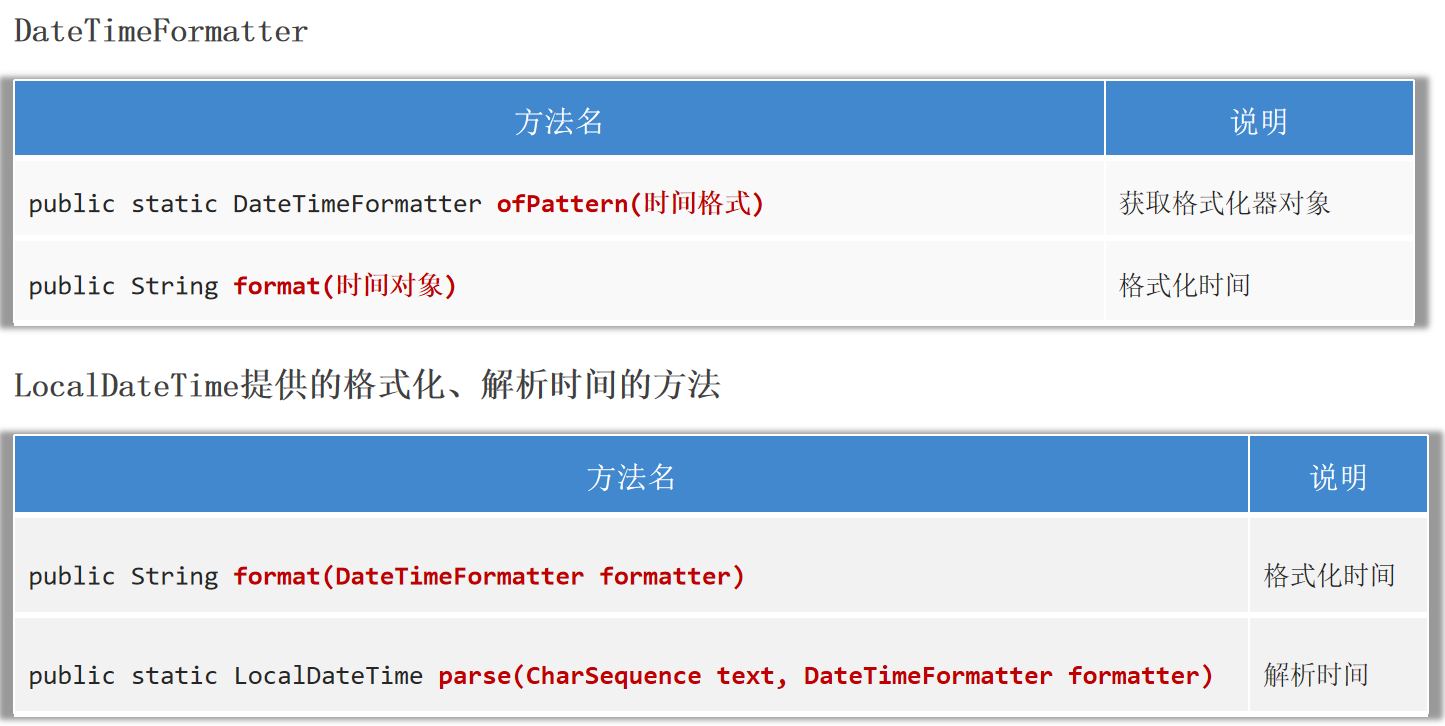
DateTimeFormatter是格式化器,用于时间的格式化、解析。和SimpleDateFormat相比,DateTimeFormatter是线程安全的。
1
2
3
4
5
6
7
8
DateTimeFormatter dtf = DateTimeFormatter.ofPattern("yyyy-MM-dd HH:mm:ss" );LocalDateTime ldt2 = LocalDateTime.now();String rs = dtf.format(ldt2);String rs1 = ldt2.format(dtf);String string = "2024-09-08 12:08:22" ;LocalDateTime ldt3 = LocalDateTime.parse(string, dtf);
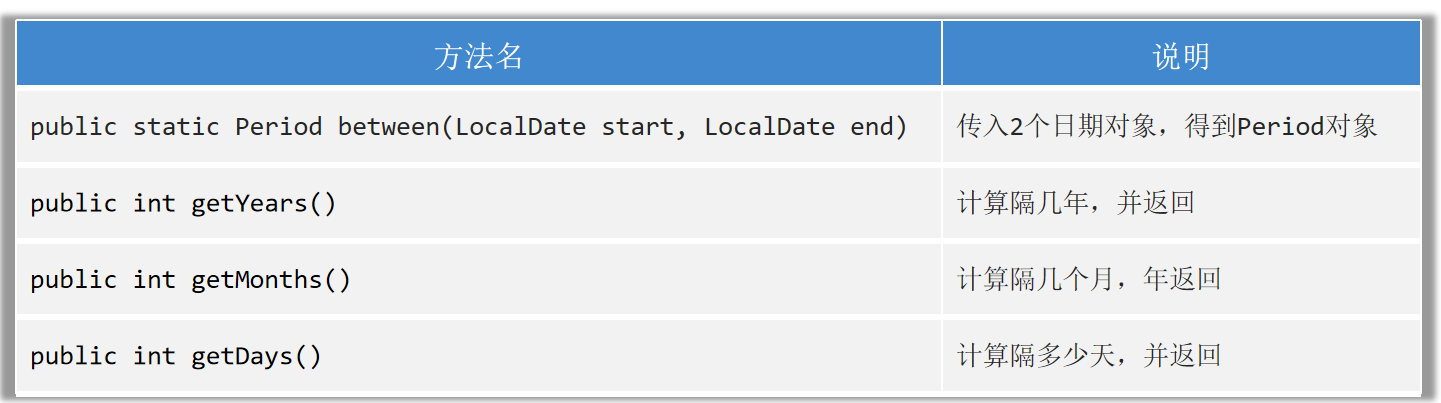
Period 用于计算两个LocalDate对象相差的年数、月数、天。
1
2
3
4
5
6
7
LocalDate d1 = LocalDate.of(2020 , 10 , 1 );LocalDate d2 = LocalDate.of(2024 , 9 , 26 );Period p = Period.between(d1, d2);
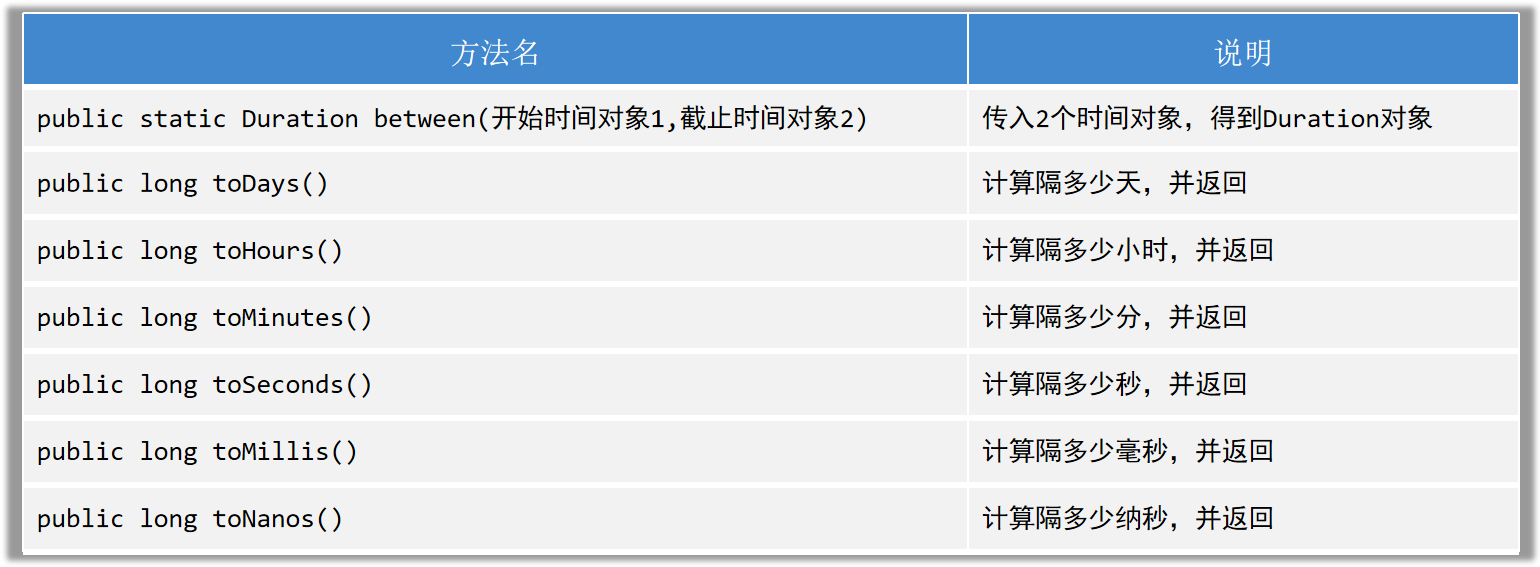
Duration 用于计算两个时间对象相差的天数、小时数、分数、秒数、纳秒数;支持LocalTime、LocalDateTime、Instant等时间。
1
2
3
4
5
6
7
8
9
10
11
12
LocalDateTime t1 = LocalDateTime.of(2024 , 9 , 25 , 10 , 10 , 22 );LocalDateTime t2 = LocalDateTime.of(2024 , 9 , 26 , 12 , 8 , 21 );Duration d = Duration.between(t1, t2);"天:" + d.toDays());"时:" + d.toHours());"分:" + d.toMinutes());"秒:" + d.toSeconds());"毫秒:" + d.toMillis());"纳秒:" + d.toNanos());
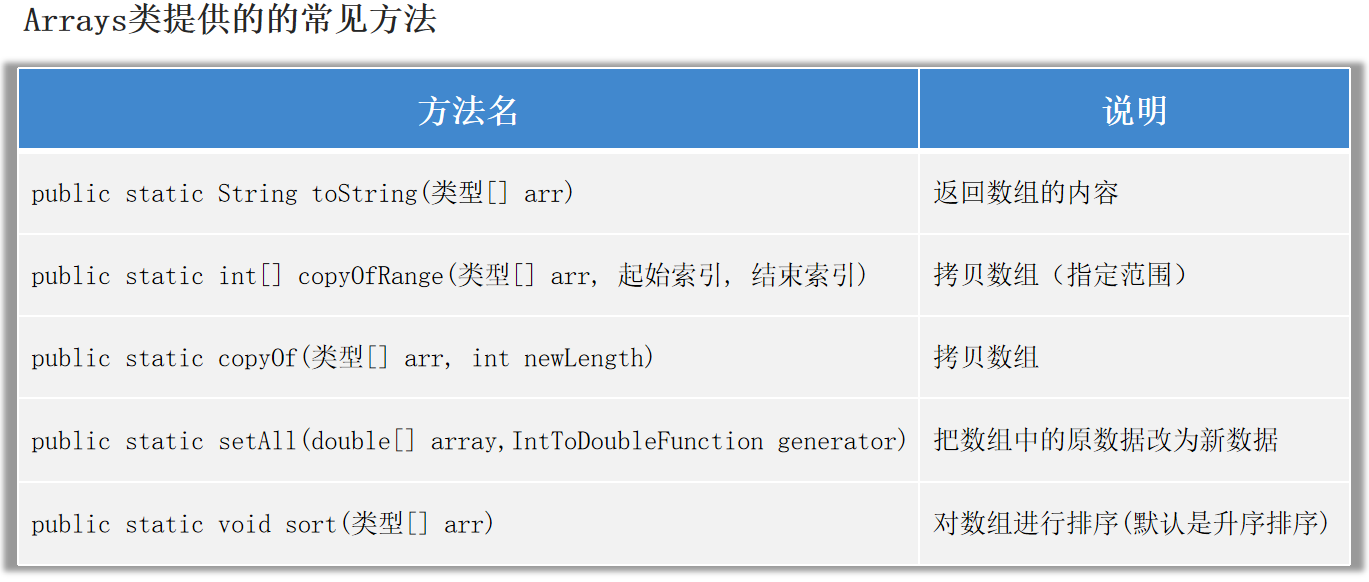
Arrays 用来操作数组 的一个工具类。
1
2
3
4
5
6
7
8
9
10
11
12
13
double [] arr = {10 , 20 , 30 , 40 , 50 };double [] arr1 = Arrays.copyOf(arr, 3 );double [] arr2 = Arrays.copyOfRange(arr, 1 , 3 );new IntToDoubleFunction () {@Override public double applyAsDouble (int value) {return arr[value] * 0.8 ;
1 2 3 4 5 6 public static void setAll (double [] array, IntToDoubleFunction generator) {for (int i = 0 ; i < array.length; i++)
Arrays使用sort方法进行排序。使用Arrays对对象进行排序时,有两种方法:
1.让该对象的类实现Comparable(比较规则)接口,然后重写compareTo方法,自己来制定比较规则。
2.使用下面这个sort方法,创建Comparator比较器接口的匿名内部类对象,然后自己制定比较规则。
1 public static <T> void sort (T[] arr, Comparator<? super T> c)
1 2 3 4 5 6 7 8 9 10 11 12 13 14 15 16 17 18 19 20 21 22 23 24 25 26 27 28 29 30 31 32 33 34 35 36 37 38 39 40 41 42 43 44 45 46 47 48 49 50 51 52 53 54 55 public class Student implements Comparable <Student>{private String name;private double height;private int age;@Override public int compareTo (Student o) {if (this .age > o.age) {return 1 ;}else if (this .age < o.age) {return -1 ;}return 0 ;public Student () {}public Student (String name, double height, int age) {this .name = name;this .height = height;this .age = age;@Override public String toString () {return "Student{" +"name='" + name + '\'' +", height=" + height +", age=" + age +'}' ;public String getName () {return name;public void setName (String name) {this .name = name;public double getHeight () {return height;public void setHeight (double height) {this .height = height;public int getAge () {return age;public void setAge (int age) {this .age = age;
1
2
3
4
5
6
7
8
9
10
11
12
13
14
15
16
17
18
19
Student[] student = new Student [3 ];0 ] = new Student ("srr1" , 168.2 , 18 );1 ] = new Student ("srr2" , 163.2 , 16 );2 ] = new Student ("srr3" , 160.2 , 19 );new Comparator <Student>() {@Override public int compare (Student o1, Student o2) {return Double.compare(o1.getHeight(), o2.getHeight());
Lambda表达式 Lambda表达式是JDK8开始新增的一种语法形式,用于简化匿名内部类的代码写法。
Lambda表达式只能简化函数式接口 的匿名内部类 。
函数式接口 :有且仅有一个抽象方法 的接口。
注意:大部分函数式接口,上面都可能会有一个@FunctionalInterface的注解,有该注解的接口就必定是函数式接口。
Lambda表达式的省略写法(进一步简化Lambda表达式的写法):
1.参数类型可以省略不写。
2.如果只有一个参数,参数类型可以省略,同时()也可以省略。
3.如果Lambda表达式中的方法体代码只有一行代码,可以省略大括号不写,同时要省略分号;。此时,如果这行代码是return语句,也必须去掉return不写。
1
2
3
4
5
6
7
8
9
10
11
12
13
14
15
16
Arrays.sort(student, new Comparator <Student>() {@Override public int compare (Student o1, Student o2) {return Double.compare(o1.getHeight(), o2.getHeight());return Double.compare(o2.getHeight(), o1.getHeight());
方法引用 方法引用:进一步简化Lambda表达式,方法引用的标志性符号::。
静态方法的引用 格式:类名::静态方法。
如果某个Lambda表达式里只是调用一个静态方法,并且前后参数的形式一致,就可以使用静态方法引用。
1
2
3
4
5
6
7
8
9
public class CompareByData {public static int compareByAge (Student o1, Student o2) {return o1.getAge() - o2.getAge();public int compareByAgeDesc (Student o1, Student o2) {return o2.getAge() - o1.getAge();
1
2
3
4
5
6
7
8
9
10
11
12
13
Arrays.sort(student, new Comparator <Student>() {@Override public int compare (Student o1, Student o2) {return o1.getAge() - o2.getAge();
实例方法的引用 格式:对象名::实例方法。
如果某个Lambda表达式里只是调用一个实例方法,并且前后参数的形式一致,就可以使用实例方法引用。
1 2 3 4 5 6 CompareByData compare = new CompareByData ();
特定类型的方法引用 格式:类型::方法。
如果某个Lambda表达式里只是调用一个实例方法,并且前面参数列表中的第一个参数是作为方法的主调,后面的所有参数都是作为该实例方法的入参的,则此时就可以使用特定类型的方法引用。
1
2
3
4
5
6
7
8
9
10
11
12
String[] names = {"srr" , "Jack" , "Lin" , "Su" , "irina" , "Anna" };new Comparator <String>() {@Override public int compare (String o1, String o2) {return o1.compareToIgnoreCase(o2);
构造器引用 格式:类名::new。
如果某个Lambda表达式里只是在创建对象,并且前后参数情况一致,就可以使用构造器引用。(开发中用的少,了解就行)
1
2
3
4
5
6
7
8
9
10
public class Car {private String name;private double price;public Car () {}public Car (String name, double price) {this .name = name;this .price = price;
1
2
3
4
5
6
7
8
9
10
11
12
13
14
15
16
17
18
public class Test {public static void main (String[] args) {CreateCar cc1 = new CreateCar () {@Override public Car create (String name, double price) {return new Car (name, price);Car c = cc1.create("奔驰" , 50 );CreateCar cc2 = (name, price) -> new Car (name, price);CreateCar cc3 = Car::new ;interface CreateCar {create (String name, double price) ;
算法 排序 冒泡排序:每次从数组中找出最大值放在数组的后面去。
选择排序:每轮选择当前位置,开始找出后面的较小值与该位置交换
查找 二分查找Arrays.binarySearch
前提条件:数组中的数据必须是有序的
核心思想:每次排除一半的数据。
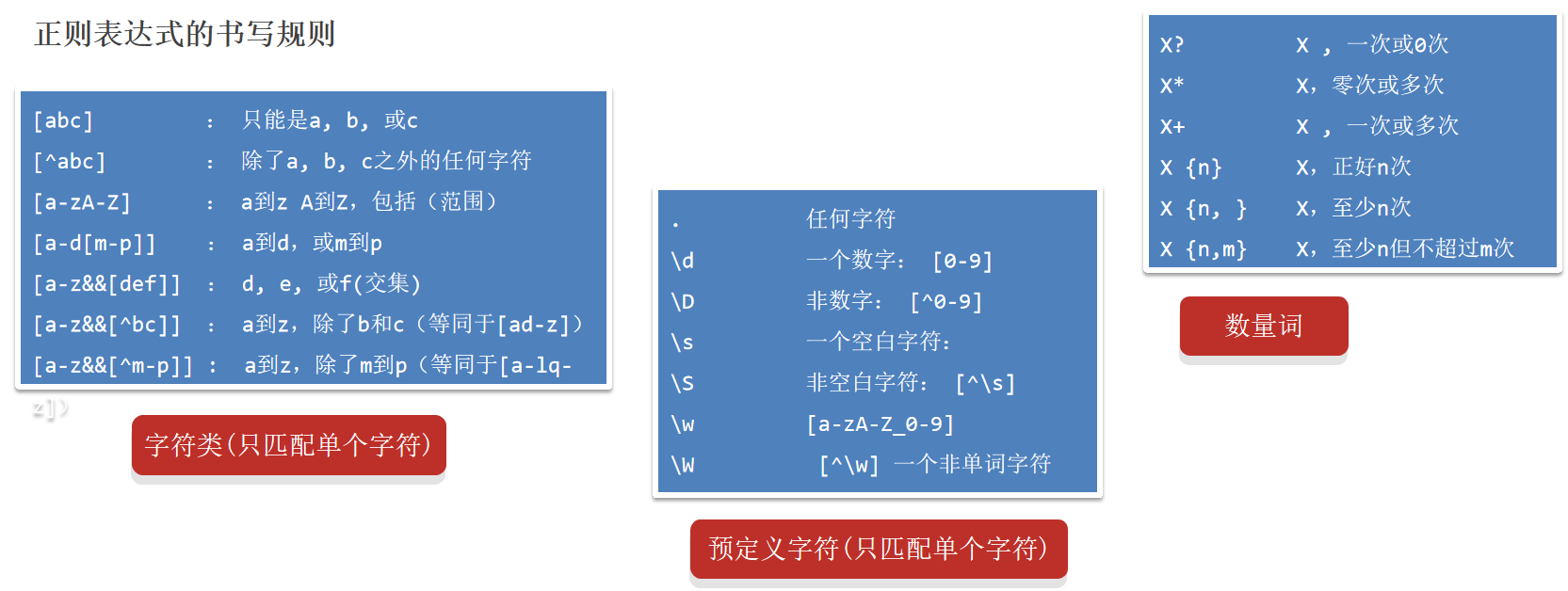
正则表达式 String提供了一个匹配正则表达式的方法:
1 public boolean matches (String regex)
符号 含义 举例
?
0次或1次
\d?
*
0次或多次
\d* (abc)*
+
1次或多次
\d+ (abc)+
{}
具体次数
a{7} \d{7,19}
(?i)
忽略后面字符的大小写
(?i)abc
a((?i)b)c
只忽略b的大小写
a((?i)b)c
[]
里面的内容出现一次
[abc]
^
取反
[^abc]
&&
交集,不能写单个的&
[a-z&&m-p]
.
任意字符
\n 回车符号不匹配
\
转义字符
\d
\d
0-9
\d+
\D
非0-9
\D+
\s
空白字符
\S
非空白字符
[^\s]
\w
单词字符
[a-zA-Z_0-9]
\W
非单词字符
[^\w]
()
分组
a(bc)+
|
写在方括号外面表示并集
ab|AB
1 2 3 4 5 6 7 8 9 10 11 12 13 14 15 16 17 18 19 20 21 22 23 24 25 26 27 28 29 30 31 32 33 34 35 36 37 38 39 40 41 42 43 44 45 46 47 48 49 50 51 52 53 54 55 56 57 58 59 60 61 62 63 64 65 66 67 68 69 70 71 72 73 74 75 76 77 78 79 80 public class RegexTest2 {public static void main (String[] args) {"a" .matches("[abc]" )); "e" .matches("[abcd]" )); "d" .matches("[^abc]" )); "a" .matches("[^abc]" )); "b" .matches("[a-zA-Z]" )); "2" .matches("[a-zA-Z]" )); "k" .matches("[a-z&&[^bc]]" )); "b" .matches("[a-z&&[^bc]]" )); "ab" .matches("[a-zA-Z0-9]" )); "徐" .matches("." )); "徐徐" .matches("." )); "\"" );"3" .matches("\\d" )); "a" .matches("\\d" )); " " .matches("\\s" )); "a" .matches("\s" )); "a" .matches("\\S" )); " " .matches("\\S" )); "a" .matches("\\w" )); "_" .matches("\\w" )); "徐" .matches("\\w" )); "徐" .matches("\\W" )); "a" .matches("\\W" )); "23232" .matches("\\d" )); "a" .matches("\\w?" )); "" .matches("\\w?" )); "abc" .matches("\\w?" )); "abc12" .matches("\\w*" )); "" .matches("\\w*" )); "abc12张" .matches("\\w*" )); "abc12" .matches("\\w+" )); "" .matches("\\w+" )); "abc12张" .matches("\\w+" )); "a3c" .matches("\\w{3}" )); "abcd" .matches("\\w{3}" )); "abcd" .matches("\\w{3,}" )); "ab" .matches("\\w{3,}" )); "abcde徐" .matches("\\w{3,}" )); "abc232d" .matches("\\w{3,9}" )); "abc" .matches("(?i)abc" )); "ABC" .matches("(?i)abc" )); "aBc" .matches("a((?i)b)c" )); "ABc" .matches("a((?i)b)c" )); "abc" .matches("[a-z]{3}|\\d{3}" )); "ABC" .matches("[a-z]{3}|\\d{3}" )); "123" .matches("[a-z]{3}|\\d{3}" )); "A12" .matches("[a-z]{3}|\\d{3}" )); "我爱编程编程666666" .matches("我爱(编程)+(666)+" )); "我爱编程编程66666" .matches("我爱(编程)+(666)+" ));
案例:使用正则表达式查找一段文本中的内容 1 2 3 4 5 6 7 8 9 10 11 12 13 14 15 16 17 18 19 20 21 22 23 24 25 26 27 public class RegexTest4 {public static void main (String[] args) {public static void method1 () {String data = " 来黑马程序员学习Java,\n" +" 电话:1866668888,18699997777\n" +" 或者联系邮箱:boniu@itcast.cn,\n" +" 座机电话:01036517895,010-98951256\n" +" 邮箱:bozai@itcast.cn,\n" +" 邮箱:dlei0009@163.com,\n" +" 热线电话:400-618-9090 ,400-618-4000,4006184000,4006189090" ;String regex = "(1[3-9]\\d{9})|(0\\d{2,7}-?[1-9]\\d{4,19})|(\\w{2,}@\\w{2,20}(\\.\\w{2,10}){1,2})" "|(400-?\\d{3,7}-?\\d{3,7})" ;Pattern pattern = Pattern.compile(regex);Matcher matcher = pattern.matcher(data);while (matcher.find()){String rs = matcher.group();
正则表达式用于搜索替换、分割内容,需要结合String提供的如下方法完成:
1 2 public String replaceAll (String regex , String newStr) public String[] split(String regex):
1 2 3 4 5 6 7 8 9 10 11 12 13 14 15 16 17 18 19 20 21 22 23 24 public class RegexTest6 {public static void main (String[] args) {String s1 = "古力娜扎ai8888迪丽热巴999aa5566马尔扎哈fbbfsfs42425卡尔扎巴" ;"\\w+" , "-" ));String s2 = "我我我喜欢编编编编编编编编编编编编程程程" ;"(.)\\1+" , "$1" ));String s3 = "古力娜扎ai8888迪丽热巴999aa5566马尔扎哈fbbfsfs42425卡尔扎巴" ;"\\w+" );
1 2 3 4 5 6 7 8 9 10 11 12 13 14 15 16 17 18 19 20 21 22 23 24 25 26 27 28 29 30 public class RegexTest7 {public static void main (String[] args) {String data = "欢迎张全蛋光临本系统!他删库并跑路,欢迎李二狗子光临本系统!" +"欢迎马六子光临本系统!它浏览了很多好看的照片!欢迎夏洛光临本系统!他在六点钟购买了一台拖拉机!" ;String regex = "欢迎(.+)光临" ; String regex2 = "欢迎(.+?)光临" ; Pattern pattern = Pattern.compile(regex2);Matcher matcher = pattern.matcher(data);while (matcher.find()) {1 ));
异常
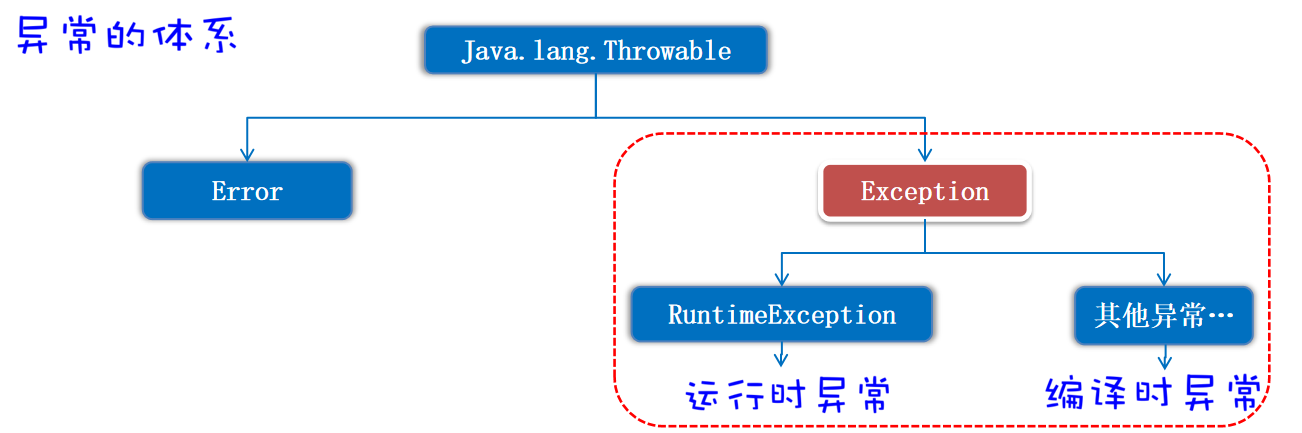
Error:代表的系统级别错误(属于严重问题),也就是说系统一旦出现问题,sun公司会把这些问题封装成Error对象给出来,Error是给sun公司自己用的,不是给程序员用的,开发人员不用管它。
Exception:异常,代表程序可能出现的问题,程序员通常会用Exception以及它的子类来封装程序出现的问题。
运行时异常 :RuntimeException及其子类,编译阶段不会出现错误提醒,运行时出现的异常(如:数组索引越界异常)。
1 2 3 Integer.valueOf("abc" );int [] arr = {1 , 2 , 3 };3 ]);
编译时异常 :编译阶段就会出现错误提醒的。(如:日期解析异常)。
1 2 SimpleDateFormat sdf = new SimpleDateFormat ("yyyy-MM-dd HH:mm:ss" );Date date = sdf.parse("2024-9-18 12:28:22" );
编译时异常的解决方法 :
1.抛出异常(throws) :在方法上使用throws关键字,可以将方法内部出现的异常抛出去给调用者处理。使用throws把异常抛给main方法,main方法不是最终调用者,main方法会把异常抛给JVM进行处理,JVM无法处理异常就会显示出错误。
1 2 3 4 5 6 public class Test {public static void main (String[] args) throws ParseException {SimpleDateFormat sdf = new SimpleDateFormat ("yyyy-MM-dd HH:mm:ss" );Date date = sdf.parse("2024-9-18 12:28" );
2.捕获异常(try…catch) :直接捕获程序出现的异常。
1 2 3 4 5 6 7 8 try {SimpleDateFormat sdf = new SimpleDateFormat ("yyyy-MM-dd HH:mm:ss" );Date date = sdf.parse("2024-9-18 12:28" );catch (ParseException e) {
自定义异常 自定义运行时异常 1 2 3 1 .定义一个异常类继承RuntimeException 。2 .重写构造器。3 .通过throw new 异常类(xxx)来创建异常对象并抛出。
自定义运行时异常编译阶段不报错,提醒不强烈,运行时才可能出现。
1 2 3 4 5 6 7 8 public class AgeIllegalRuntimeException extends RuntimeException {public AgeIllegalRuntimeException () {}public AgeIllegalRuntimeException (String message) {super (message);
1 2 3 4 5 6 7 8 9 10 11 12 13 14 15 16 17 18 19 20 21 22 23 24 25 26 27 public class Test {public static void main (String[] args) {try {188 );"执行成功" );catch (Exception e) {"执行失败" );public static void checkAge (int age) {if (age > 0 && age < 150 ){"年龄合法" + age);else {throw new AgeIllegalRuntimeException ("/age is illegal, your age is " + age);
自定义编译时异常 1 2 3 1 .定义一个异常类继承Exception 。2 .重写构造器。3 .通过throw new 异常类(xxx)来创建异常对象并抛出。
throw抛出去异常对象。
throws用在方法上,抛出方法内部的异常。
自定义编译时异常编译阶段就报错,提醒更加强烈。
1 2 3 4 5 6 7 8 public class AgeIllegalException extends Exception {public AgeIllegalException () {}public AgeIllegalException (String message) {super (message);
1 2 3 4 5 6 7 8 9 10 11 12 13 14 15 16 17 18 19 20 21 22 23 24 25 26 27 28 public class Test {public static void main (String[] args) {try {188 );"执行成功" );catch (AgeIllegalException e) {"执行失败" );public static void checkAge2 (int age) throws AgeIllegalException{if (age > 0 && age < 150 ){"年龄合法" + age);else {throw new AgeIllegalException ("/age is illegal, your age is " + age);
注意:异常使用try…catch进行处理后,还能继续往下进行。
异常的处理 1.捕获异常,记录异常并响应合适的信息给用户。
1 2 3 4 5 6 7 8 9 10 11 12 13 14 15 16 17 18 19 20 21 22 23 24 25 26 27 28 29 30 31 32 33 public class Test2 {public static void main (String[] args) {try {catch (ParseException e) {"解析的世界格式有问题" );catch (FileNotFoundException e) {"文件不存在" );try {catch (Exception e) {"操作有误" );public static void test1 () throws ParseException, FileNotFoundException {SimpleDateFormat sdf = new SimpleDateFormat ("yyyy-MM-dd HH:mm:ss" );Date d = sdf.parse("2025-9-10 13:14:22" );public static void test2 () throws FileNotFoundException {InputStream is = new FileInputStream ("D:/image.png" );
2.捕获异常,尝试重新修复。
1 2 3 4 5 6 7 8 9 10 11 12 13 14 15 16 17 18 19 20 21 22 23 24 25 public class Test3 {public static void main (String[] args) {while (true ) {try {break ;catch (Exception e) {"输入价格有误" );public static double getMoney () {Scanner sc = new Scanner (System.in);while (true ){"请输入合法的价格:" );double money = sc.nextDouble();if (money >= 0 ){return money;else {"输入价格有误" );