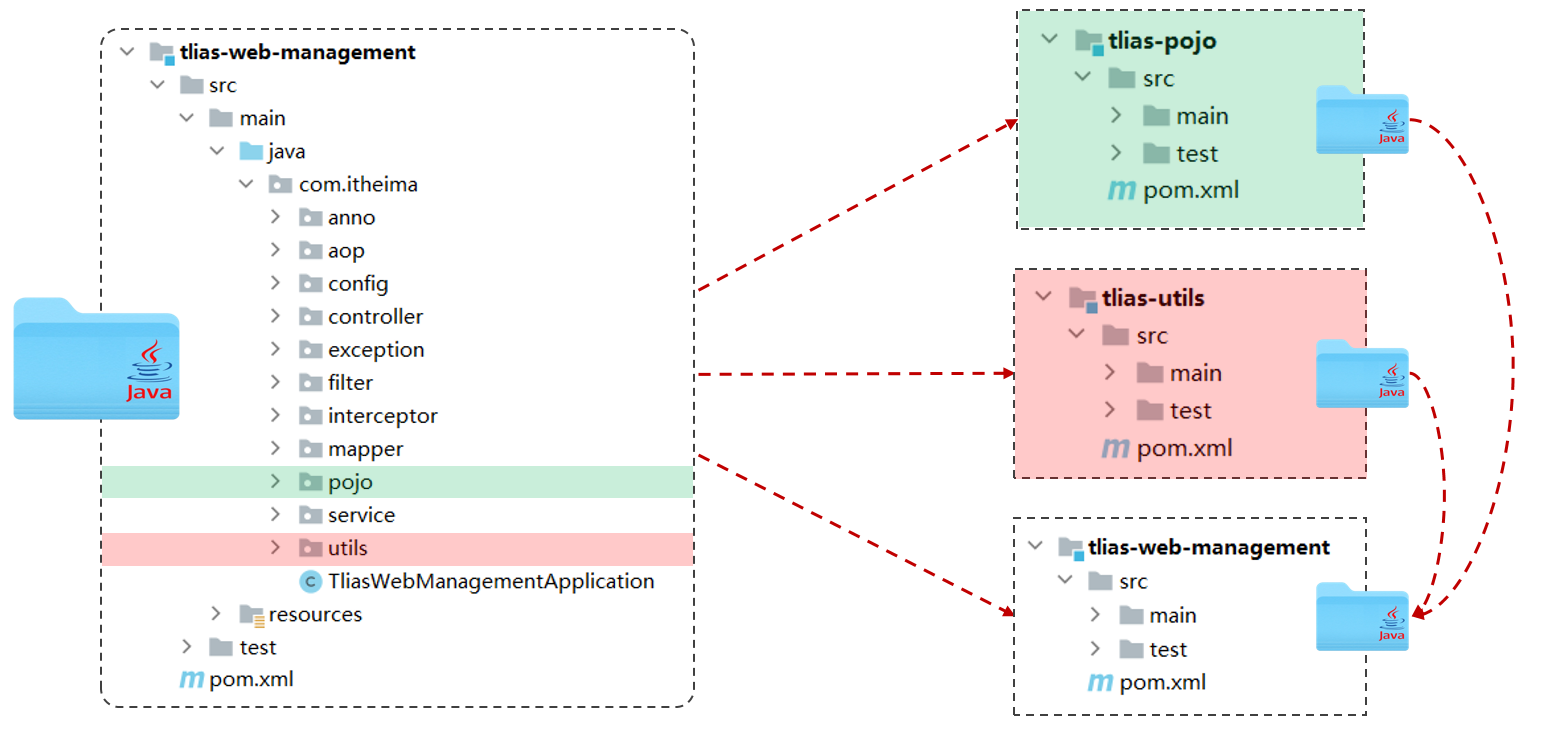
Maven高级 分模块设计与开发 分模块设计:将项目按照功能拆分成若干个子模块。
作用:方便项目的管理维护、扩展,也方便模块间的相互调用,资源共享。
1.创建maven模块tlias-pojo,存放实体类。需要在同一个名称的包下。
1
2
3
4
5
6
7
8
9
10
11
12
13
14
15
16
17
18
19
20
21
22
23
24
25
<?xml version="1.0" encoding="UTF-8" ?> <project xmlns ="http://maven.apache.org/POM/4.0.0" xmlns:xsi ="http://www.w3.org/2001/XMLSchema-instance" xsi:schemaLocation ="http://maven.apache.org/POM/4.0.0 http://maven.apache.org/xsd/maven-4.0.0.xsd" > <modelVersion > 4.0.0</modelVersion > <groupId > com.itheima</groupId > <artifactId > tlias-pojo</artifactId > <version > 1.0-SNAPSHOT</version > <properties > <maven.compiler.source > 21</maven.compiler.source > <maven.compiler.target > 21</maven.compiler.target > <project.build.sourceEncoding > UTF-8</project.build.sourceEncoding > </properties > <dependencies > <dependency > <groupId > org.projectlombok</groupId > <artifactId > lombok</artifactId > <version > 1.18.34</version > </dependency > </dependencies > </project >
2.创建maven模块tlias-utils,存放相关工具类。需要在同一个名称的包下。
1
2
3
4
5
6
7
8
9
10
11
12
13
14
15
16
17
18
19
20
21
22
23
24
25
26
27
28
29
30
31
32
33
34
35
36
37
38
39
40
41
42
43
44
45
46
47
48
49
50
51
52
53
54
55
56
57
58
59
60
61
62
<?xml version="1.0" encoding="UTF-8" ?> <project xmlns ="http://maven.apache.org/POM/4.0.0" xmlns:xsi ="http://www.w3.org/2001/XMLSchema-instance" xsi:schemaLocation ="http://maven.apache.org/POM/4.0.0 http://maven.apache.org/xsd/maven-4.0.0.xsd" > <modelVersion > 4.0.0</modelVersion > <groupId > com.itheima</groupId > <artifactId > tlias-utils</artifactId > <version > 1.0-SNAPSHOT</version > <properties > <maven.compiler.source > 21</maven.compiler.source > <maven.compiler.target > 21</maven.compiler.target > <project.build.sourceEncoding > UTF-8</project.build.sourceEncoding > </properties > <dependencies > <dependency > <groupId > io.jsonwebtoken</groupId > <artifactId > jjwt</artifactId > <version > 0.12.3</version > </dependency > <dependency > <groupId > com.aliyun.oss</groupId > <artifactId > aliyun-sdk-oss</artifactId > <version > 3.17.4</version > </dependency > <dependency > <groupId > javax.xml.bind</groupId > <artifactId > jaxb-api</artifactId > <version > 2.3.1</version > </dependency > <dependency > <groupId > javax.activation</groupId > <artifactId > activation</artifactId > <version > 1.1.1</version > </dependency > <dependency > <groupId > org.glassfish.jaxb</groupId > <artifactId > jaxb-runtime</artifactId > <version > 2.3.3</version > </dependency > <dependency > <groupId > org.springframework.boot</groupId > <artifactId > spring-boot-starter-web</artifactId > <version > 3.3.5</version > </dependency > <dependency > <groupId > org.projectlombok</groupId > <artifactId > lombok</artifactId > <version > 1.18.34</version > </dependency > </dependencies > </project >
3.主项目需要在pom.xml引入各个子模块。
1 2 3 4 5 6 7 8 9 10 11 12 13 <dependency > <groupId > com.itheima</groupId > <artifactId > tlias-pojo</artifactId > <version > 1.0-SNAPSHOT</version > </dependency > <dependency > <groupId > com.itheima</groupId > <artifactId > tlias-utils</artifactId > <version > 1.0-SNAPSHOT</version > </dependency >
注意:分模块开发需要先针对模块功能进行设计,再进行编码。不会先将工程开发完毕,然后进行拆分。
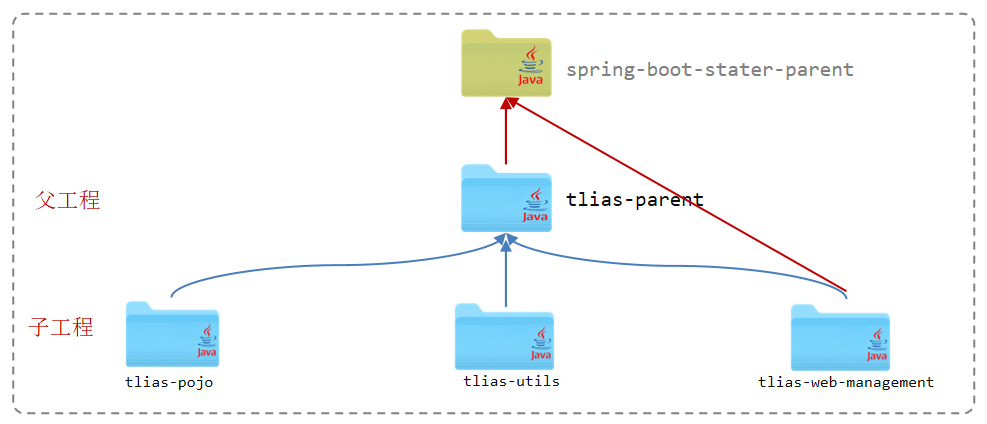
继承 继承关系 概念:继承描述的是两个工程间的关系,与Java中的继承相似,子工程可以继承父工程中的配置信息,常见于依赖关系的继承。
作用:简化依赖配置、统一管理依赖。
实现:<parent> … </parent>。
步骤:
1.创建maven模块tlias-parent ,该工程为父工程,设置打包方式pom(默认jar)。
三种打包方式:
jar:普通模块打包,springboot项目基本都是jar包(内嵌tomcat运行)。war:普通web程序打包,需要部署在外部的tomcat服务器中运行。pom:父工程或聚合工程,该模块不写代码,仅进行依赖管理。
1
2
3
4
5
6
7
8
9
10
11
12
13
14
15
16
17
18
19
20
21
22
23
24
25
26
27
28
29
30
31
32
33
34
35
36
37
<?xml version="1.0" encoding="UTF-8" ?> <project xmlns ="http://maven.apache.org/POM/4.0.0" xmlns:xsi ="http://www.w3.org/2001/XMLSchema-instance" xsi:schemaLocation ="http://maven.apache.org/POM/4.0.0 http://maven.apache.org/xsd/maven-4.0.0.xsd" > <modelVersion > 4.0.0</modelVersion > <parent > <groupId > org.springframework.boot</groupId > <artifactId > spring-boot-starter-parent</artifactId > <version > 3.3.4</version > <relativePath /> </parent > <groupId > com.itheima</groupId > <artifactId > tlias-parent</artifactId > <version > 1.0-SNAPSHOT</version > <packaging > pom</packaging > <properties > <maven.compiler.source > 21</maven.compiler.source > <maven.compiler.target > 21</maven.compiler.target > <project.build.sourceEncoding > UTF-8</project.build.sourceEncoding > </properties > <dependencies > <dependency > <groupId > org.projectlombok</groupId > <artifactId > lombok</artifactId > <version > 1.18.34</version > </dependency > </dependencies > </project >
2.在子工程 (tlias-pojo、tlias-utils、tlias-web-management)的pom.xml文件中,配置继承关系。子工程中可以删除共有的依赖lombok,因为子工程可以继承父工程的依赖。
注意:
在子工程中,配置了继承关系之后,坐标中的groupId是可以省略的,因为会自动继承父工程的 。
relativePath指定父工程的pom文件的相对位置(如果不指定,将从本地仓库/远程仓库查找该工程)。
1 2 3 4 5 6 7 8 9 10 11 <parent > <groupId > com.itheima</groupId > <artifactId > tlias-parent</artifactId > <version > 1.0-SNAPSHOT</version > <relativePath > ../tlias-parent/pom.xml</relativePath > </parent >
3.在父工程 中配置各个工程共有的依赖(子工程会自动继承父工程的依赖)。
注意:若父子工程都配置了同一个依赖的不同版本,以子工程的为准。
版本锁定 在maven中,可以在父工程的pom文件中通过<dependencyManagement>来统一管理依赖版本。
子工程引入依赖时,无需指定<version>版本号,父工程统一管理。变更依赖版本,只需在父工程中统一变更。
1.在父工程的pom.xml文件中:
1
2
3
4
5
6
7
8
9
10
11
12
13
14
15
16
17
18
19
20
21
22
23
24
25
26
27
28
29
30
31
32
33
34
35
36
37
38
39
40
41
42
43
44
45
46
47
48
49
50
51
52
53
54
55
56
57
58
59
60
61
62
63
64
65
66
67
68
69
70
71
72
73
74
75
76
77
78
79
80
81
<?xml version="1.0" encoding="UTF-8" ?> <project xmlns ="http://maven.apache.org/POM/4.0.0" xmlns:xsi ="http://www.w3.org/2001/XMLSchema-instance" xsi:schemaLocation ="http://maven.apache.org/POM/4.0.0 http://maven.apache.org/xsd/maven-4.0.0.xsd" > <modelVersion > 4.0.0</modelVersion > <parent > <groupId > org.springframework.boot</groupId > <artifactId > spring-boot-starter-parent</artifactId > <version > 3.3.4</version > <relativePath /> </parent > <groupId > com.itheima</groupId > <artifactId > tlias-parent</artifactId > <version > 1.0-SNAPSHOT</version > <packaging > pom</packaging > <properties > <maven.compiler.source > 21</maven.compiler.source > <maven.compiler.target > 21</maven.compiler.target > <project.build.sourceEncoding > UTF-8</project.build.sourceEncoding > </properties > <dependencies > <dependency > <groupId > org.projectlombok</groupId > <artifactId > lombok</artifactId > <version > 1.18.34</version > </dependency > </dependencies > <dependencyManagement > <dependencies > <dependency > <groupId > io.jsonwebtoken</groupId > <artifactId > jjwt</artifactId > <version > 0.12.3</version > </dependency > <dependency > <groupId > com.aliyun.oss</groupId > <artifactId > aliyun-sdk-oss</artifactId > <version > 3.17.4</version > </dependency > <dependency > <groupId > javax.xml.bind</groupId > <artifactId > jaxb-api</artifactId > <version > 2.3.1</version > </dependency > <dependency > <groupId > javax.activation</groupId > <artifactId > activation</artifactId > <version > 1.1.1</version > </dependency > <dependency > <groupId > org.glassfish.jaxb</groupId > <artifactId > jaxb-runtime</artifactId > <version > 2.3.3</version > </dependency > <dependency > <groupId > org.springframework.boot</groupId > <artifactId > spring-boot-starter-web</artifactId > <version > 3.3.5</version > </dependency > </dependencies > </dependencyManagement > </project >
2.在子工程tlias-utils的pom.xml文件中可以去掉依赖的版本号。
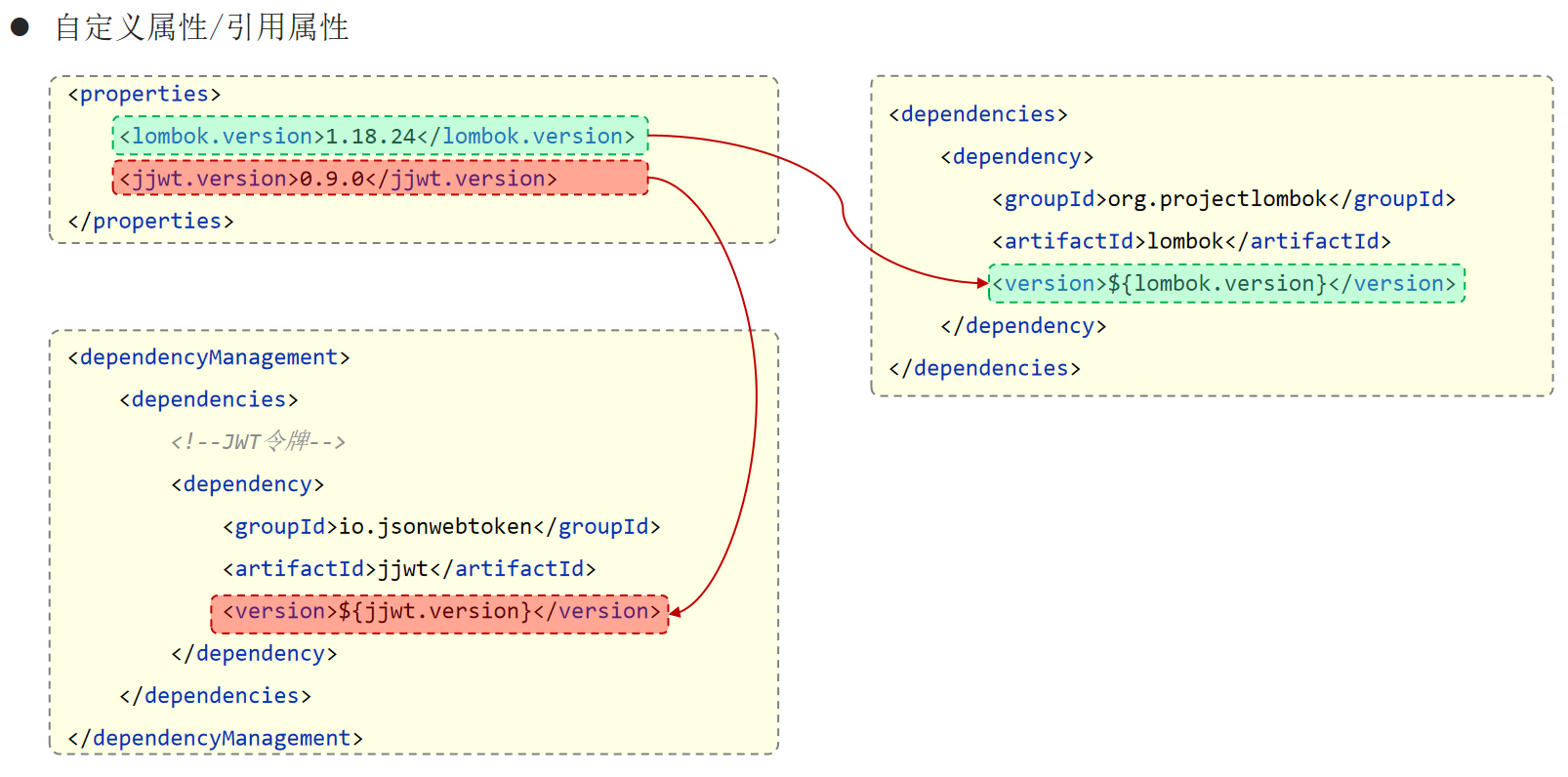
自定义属性/引用属性
1
2
3
4
5
6
7
8
9
10
11
12
13
14
15
16
17
18
19
20
21
22
23
24
25
26
27
28
29
30
31
32
33
34
35
36
37
38
39
40
41
42
43
44
45
46
47
48
49
50
51
52
53
54
55
56
57
58
59
60
61
62
63
64
65
66
67
68
69
70
71
72
73
74
75
76
77
78
79
80
81
82
83
84
85
86
87
88
89
90
91
<?xml version="1.0" encoding="UTF-8" ?> <project xmlns ="http://maven.apache.org/POM/4.0.0" xmlns:xsi ="http://www.w3.org/2001/XMLSchema-instance" xsi:schemaLocation ="http://maven.apache.org/POM/4.0.0 http://maven.apache.org/xsd/maven-4.0.0.xsd" > <modelVersion > 4.0.0</modelVersion > <parent > <groupId > org.springframework.boot</groupId > <artifactId > spring-boot-starter-parent</artifactId > <version > 3.3.4</version > <relativePath /> </parent > <groupId > com.itheima</groupId > <artifactId > tlias-parent</artifactId > <version > 1.0-SNAPSHOT</version > <packaging > pom</packaging > <properties > <maven.compiler.source > 21</maven.compiler.source > <maven.compiler.target > 21</maven.compiler.target > <project.build.sourceEncoding > UTF-8</project.build.sourceEncoding > <lombok.version > 1.18.34</lombok.version > <jjwt.version > 0.12.3</jjwt.version > <aliyun.oss.version > 3.17.4</aliyun.oss.version > <jaxb.version > 2.3.1</jaxb.version > <activation.version > 1.1.1</activation.version > <jaxb.runtime.version > 2.3.3</jaxb.runtime.version > </properties > <dependencies > <dependency > <groupId > org.projectlombok</groupId > <artifactId > lombok</artifactId > <version > ${lombok.version}</version > </dependency > </dependencies > <dependencyManagement > <dependencies > <dependency > <groupId > io.jsonwebtoken</groupId > <artifactId > jjwt</artifactId > <version > ${jjwt.version}</version > </dependency > <dependency > <groupId > com.aliyun.oss</groupId > <artifactId > aliyun-sdk-oss</artifactId > <version > ${aliyun.oss.version}</version > </dependency > <dependency > <groupId > javax.xml.bind</groupId > <artifactId > jaxb-api</artifactId > <version > ${jaxb.version}</version > </dependency > <dependency > <groupId > javax.activation</groupId > <artifactId > activation</artifactId > <version > ${activation.version}</version > </dependency > <dependency > <groupId > org.glassfish.jaxb</groupId > <artifactId > jaxb-runtime</artifactId > <version > ${jaxb.runtime.version}</version > </dependency > </dependencies > </dependencyManagement > </project >
<dependencyManagement>与<dependencies>的区别:
<dependencies>是直接依赖,在父工程配置了依赖,子工程会直接继承下来。 <dependencyManagement>是统一管理依赖版本,不会直接依赖,还需要在子工程中引入所需依赖(无需指定版本)。
聚合 打包工程步骤:
对所有的子模块执行install下载到本地仓库。(非常繁琐)
对主模块执行package进行打包。
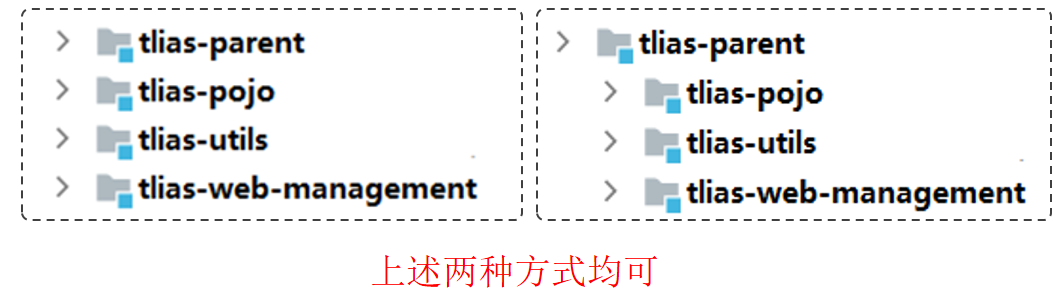
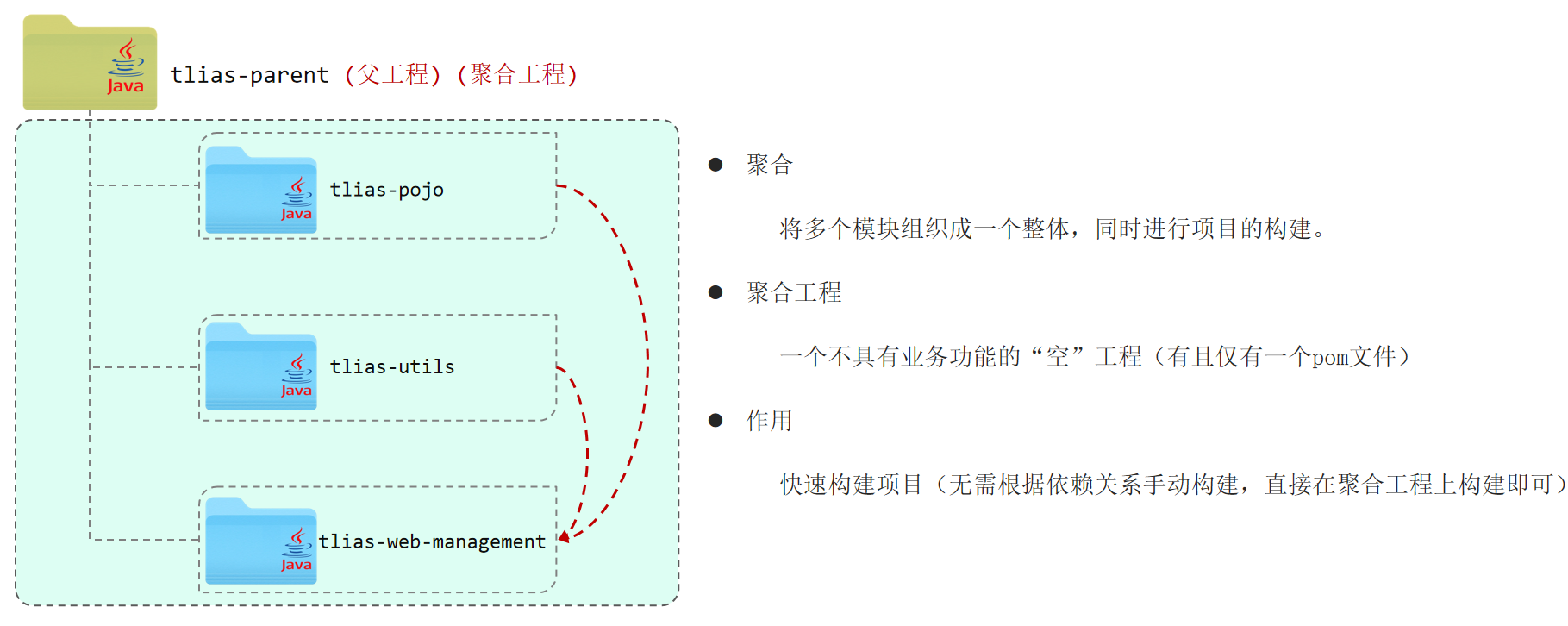
聚合:将多个模块组织成一个整体,同时进行项目的构建。
聚合工程: 一个不具有业务功能的“空”工程(有且仅有一个pom文件)。
作用:快速构建项目(无需根据依赖关系手动构建,直接在聚合工程上构建即可)。
Maven中可以通过<modules>设置当前聚合工程所包含的子模块名称。
在tlias-parent的pom.xml文件中:
1 2 3 4 5 6 <modules > <module > ../tlias-pojo</module > <module > ../tlias-utils</module > <module > ../tlias-web-management</module > </modules >
聚合其他模块之后,可以通过对tlias-parent进行操作,来对所有模块进行处理。对tlias-parent执行clean会将所有模块进行清理。对tlias-parent执行package会对所有模块进行打包操作。
1
2
3
4
5
6
7
[INFO] Reactor Summary:1 .0 -SNAPSHOT .......................... SUCCESS [ 0 .169 s]1 .0 -SNAPSHOT ............................ SUCCESS [ 0 .181 s]1 .0 -SNAPSHOT ........................... SUCCESS [ 0 .115 s]0 .0 .1 -SNAPSHOT ................ SUCCESS [ 0 .461 s]
注意:聚合工程中所包含的模块,在构建时,会自动根据模块间的依赖关系设置构建顺序,与聚合工程中模块的配置书写位置无关。
继承和聚合 作用 聚合用于快速构建项目。
继承用于简化依赖配置、统一管理依赖。
相同点 聚合与继承的pom.xml文件打包方式均为pom,可以将两种关系制作到同一个pom文件中。
聚合与继承均属于设计型模块,并无实际的模块内容。
不同点 聚合是在聚合工程中配置关系,聚合可以感知到参与聚合的模块有哪些。
继承是在子模块中配置关系,父模块无法感知哪些子模块继承了自己。
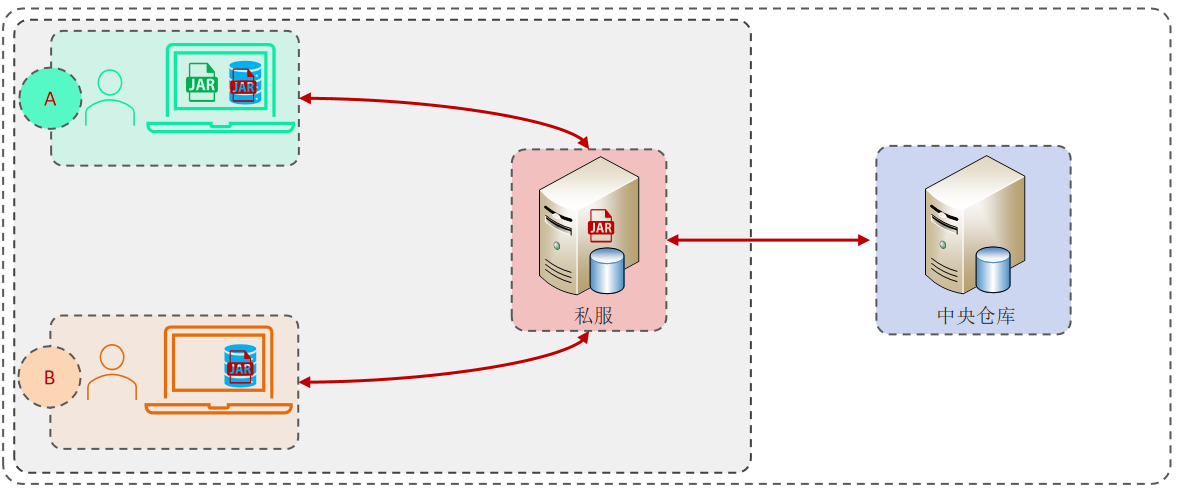
私服 私服是一种特殊的远程仓库,它是架设在局域网内的仓库服务,用来代理位于外部的中央仓库,用于解决团队内部的资源共享与资源同步问题。
依赖查找顺序:本地仓库,私服,中央仓库。
注意:私服在企业项目开发中,一个项目/公司,只需要一台即可(无需我们自己搭建,会使用即可)。
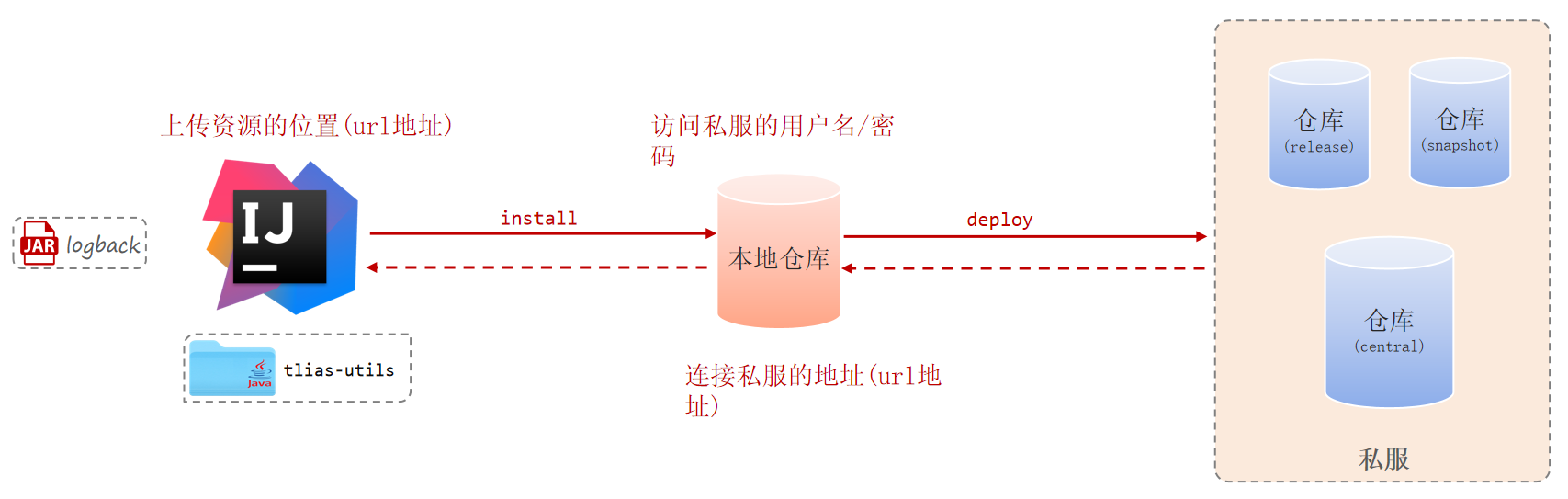
资源上传与下载
项目版本:
RELEASE(发行版本):功能趋于稳定、当前更新停止,可以用于发行的版本 ,存储在私服中的RELEASE仓库中。
SNAPSHOT(快照版本):功能不稳定、尚处于开发中的版本,即快照版本 ,存储在私服的SNAPSHOT仓库中。
1.设置私服的访问用户名/密码(settings.xml中的servers中配置)。
1 2 3 4 5 6 7 8 9 10 <server > <id > maven-releases</id > <username > admin</username > <password > admin</password > </server > <server > <id > maven-snapshots</id > <username > admin</username > <password > admin</password > </server >
2.IDEA的maven工程的pom文件中配置上传(发布)地址。
1 2 3 4 5 6 7 8 9 10 11 12 <distributionManagement > <repository > <id > maven-releases</id > <url > http://192.168.150.101:8081/repository/maven-releases/</url > </repository > <snapshotRepository > <id > maven-snapshots</id > <url > http://192.168.150.101:8081/repository/maven-snapshots/</url > </snapshotRepository > </distributionManagement >
3.设置私服依赖下载的仓库组地址(settings.xml中的mirrors、profiles中配置)。
1 2 3 4 5 <mirror > <id > maven-public</id > <mirrorOf > *</mirrorOf > <url > http://192.168.150.101:8081/repository/maven-public/</url > </mirror >
1 2 3 4 5 6 7 8 9 10 11 12 13 14 15 16 17 18 <profile > <id > allow-snapshots</id > <activation > <activeByDefault > true</activeByDefault > </activation > <repositories > <repository > <id > maven-public</id > <url > http://192.168.150.101:8081/repository/maven-public/</url > <releases > <enabled > true</enabled > </releases > <snapshots > <enabled > true</enabled > </snapshots > </repository > </repositories > </profile >
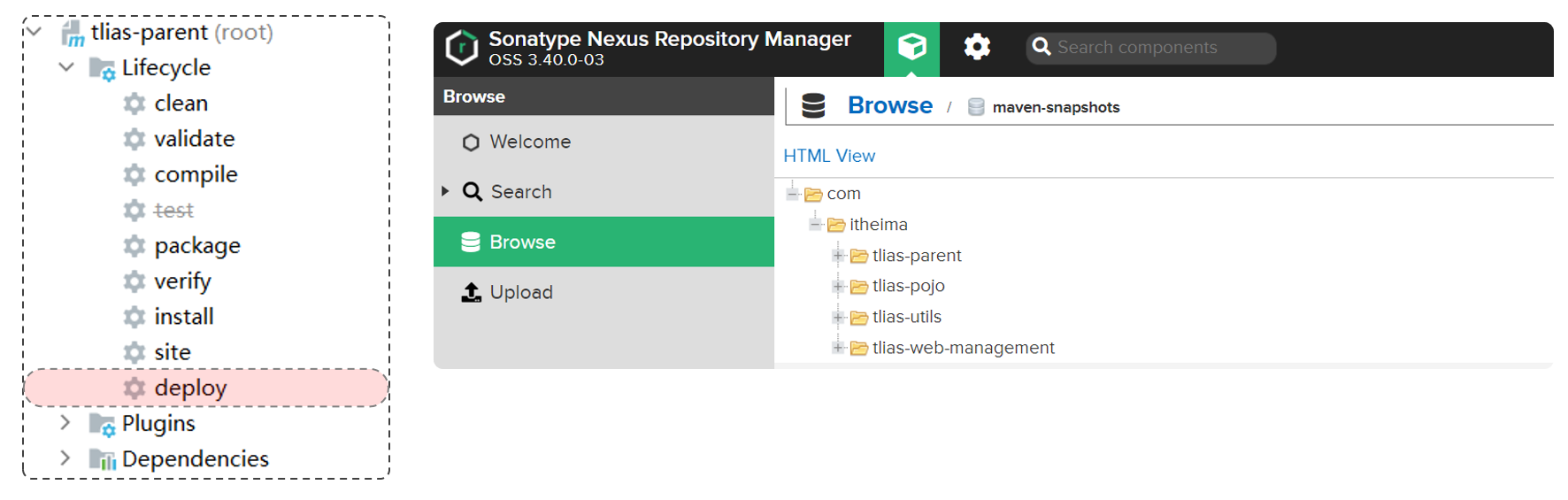
使用deploy上传。