网络编程
基本的通信架构有2种形式:CS架构(Client客户端/Server服务端) 、BS架构(Browser浏览器/Server服务端)。
CS架构:
- 客户端:需要程序员开发。用户需要安装。
- 服务端:需要程序员开发实现。
BS架构
- 客户端:不需要程序员开发实现。用户需要安装浏览器。
- 服务端:需要程序员开发实现。
网络通信的三要素:
IP:设备在网络中的地址,是唯一的标识。
192.168. 开头的就是常见的局域网地址,范围即为192.168.0.0–192.168.255.255,专门为组织机构内部使用。
127.0.0.1、localhost:代表本机IP,只会寻找当前所在的主机。
ipconfig:查看本机IP地址。
ping IP地址:检查网络是否连通。
端口:应用程序在设备中唯一的标识。
端口标记正在计算机设备上运行的应用程序的,被规定为一个16位的二进制,范围是0~65535。
分类:
周知端口:0~1023,被预先定义的知名应用占用(如:HTTP占用 80,FTP占用21) 。
注册端口:1024~49151,分配给用户进程或某些应用程序。
动态端口:49152~65535,之所以称为动态端口,是因为它一般不固定分配某种进程,而是动态分配。
注意:自己开发的程序一般选择使用注册端口,且一个设备中不能出现两个程序的端口号一样,否则出错。
协议:连接和数据在网络中传输的规则。
UDP(User Datagram Protocol):用户数据报协议。无连接、不可靠通信。一次最多发送64K数据。
TCP(Transmission Control Protocol):传输控制协议。面向连接、可靠通信(三次握手建立连接,传输数据进行确认,四次挥手断开连接)。
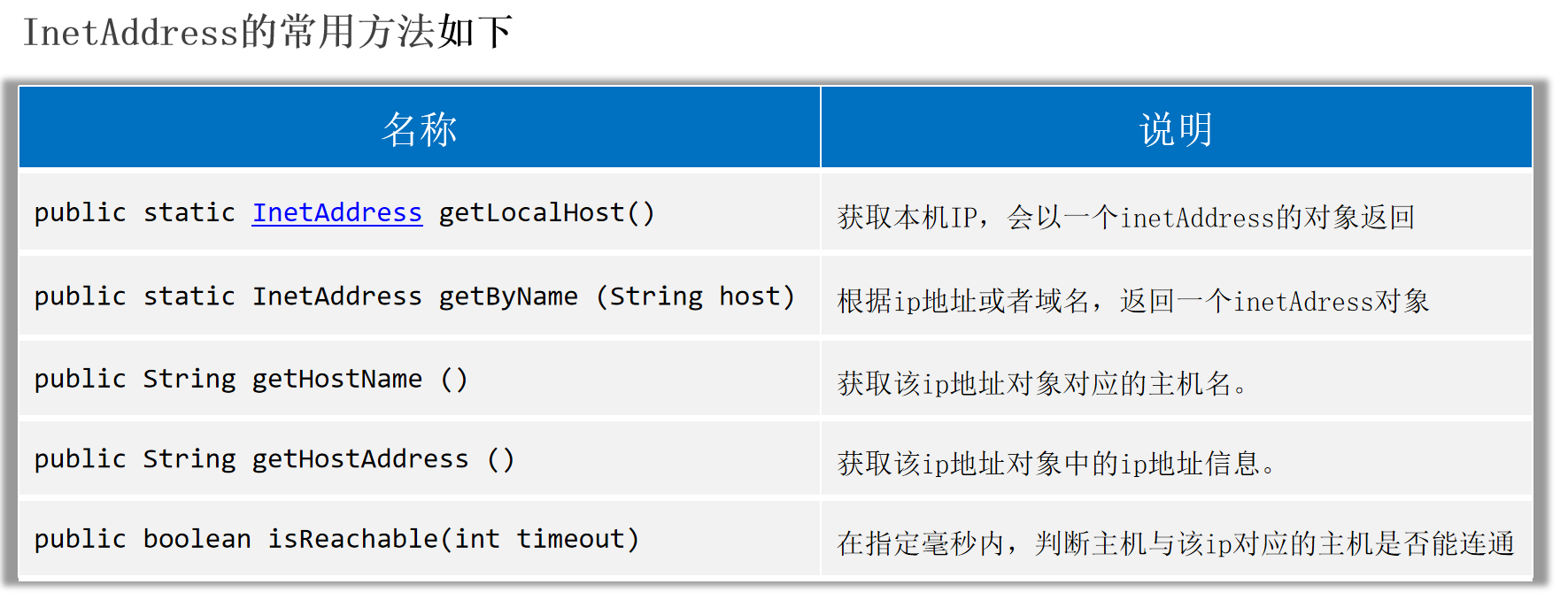
InetAddress
InetAddress代表IP地址。
1
2
3
4
5
6
7
8
9
10
11
12
13
| public static void main(String[] args) throws Exception {
InetAddress ip1 = InetAddress.getLocalHost();
System.out.println(ip1.getHostName());
System.out.println(ip1.getHostAddress());
InetAddress ip2 = InetAddress.getByName("www.baidu.com");
System.out.println(ip2.getHostName());
System.out.println(ip2.getHostAddress());
System.out.println(ip2.isReachable(6000));
}
|
UDP通信
特点:无连接、不可靠通信。不事先建立连接;发送端每次把要发送的数据(限制在64KB内)、接收端IP、等信息封装成一个数据包,发出去就不管了。
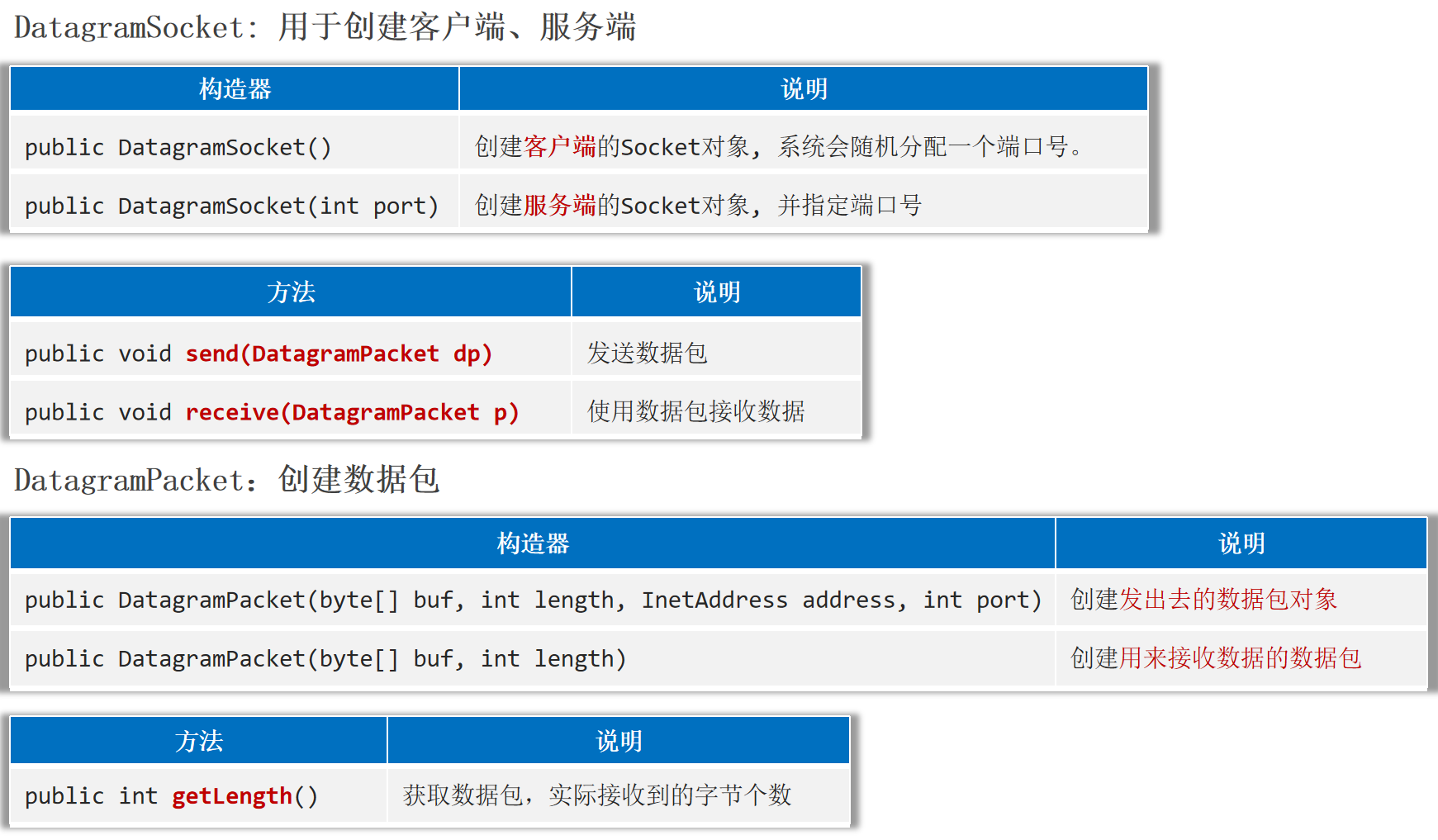
DatagramSocket、DatagramPacket
Java提供了一个java.net.DatagramSocket类来实现UDP通信。
1
2
3
4
5
6
7
8
9
10
11
12
13
14
15
16
17
18
19
20
21
22
23
24
25
26
27
|
public class UDP_Client {
public static void main(String[] args) throws Exception {
DatagramSocket socket = new DatagramSocket();
Scanner sc = new Scanner(System.in);
while(true) {
System.out.println("请发送数据:");
String msg = sc.nextLine();
if("exit".equals(msg)) {
System.out.println("成功退出");
socket.close();
break;
}
byte[] bytes = msg.getBytes();
DatagramPacket packet = new DatagramPacket(bytes,
bytes.length,
InetAddress.getLocalHost(),
6666);
socket.send(packet);
}
}
}
|
1
2
3
4
5
6
7
8
9
10
11
12
13
14
15
16
17
18
19
20
21
22
23
24
|
public class UDP_Server {
public static void main(String[] args) throws Exception {
System.out.println("启动服务器");
DatagramSocket socket = new DatagramSocket(6666);
byte[] bytes = new byte[1024 * 64];
DatagramPacket packet = new DatagramPacket(bytes, bytes.length);
while(true) {
socket.receive(packet);
int len = packet.getLength();
String rs = new String(packet.getData(), 0, len);
System.out.println("数据:" + rs);
System.out.println("IP地址:" +packet.getAddress().getHostAddress());
System.out.println("端口号:" + packet.getPort());
System.out.println("-----------------------");
}
}
}
|
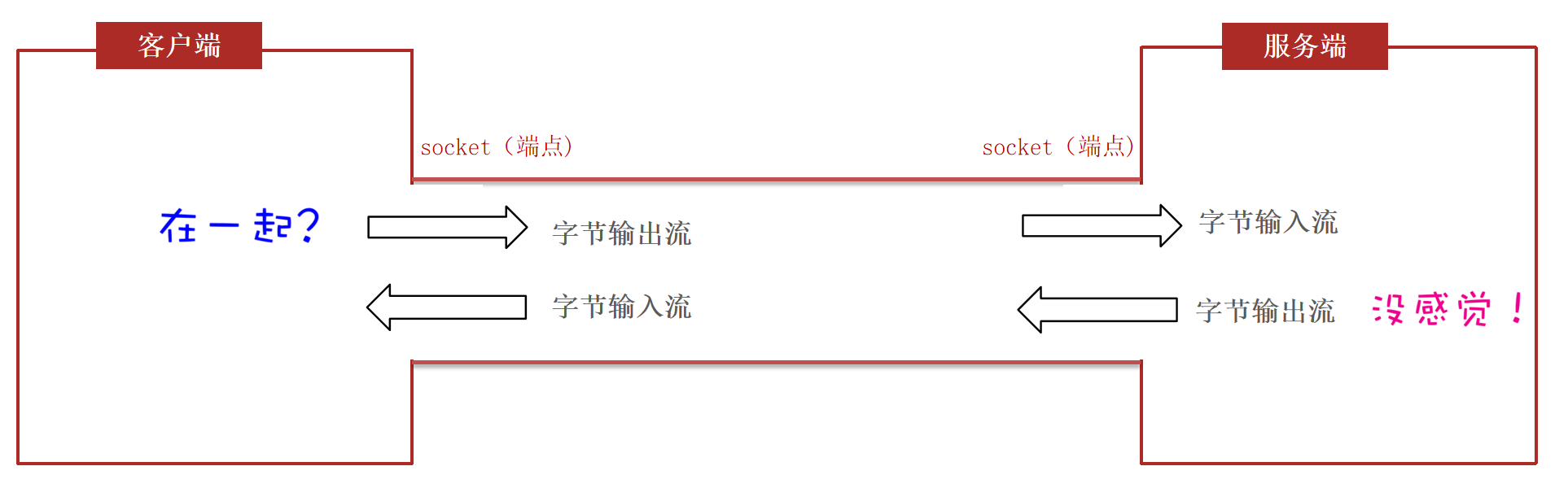
TCP通信
特点:面向连接、可靠通信。
通信双方事先会采用三次握手方式建立可靠连接,实现端到端的通信;底层能保证数据成功传给服务端。
Java提供了一个java.net.Socket类来实现TCP通信。
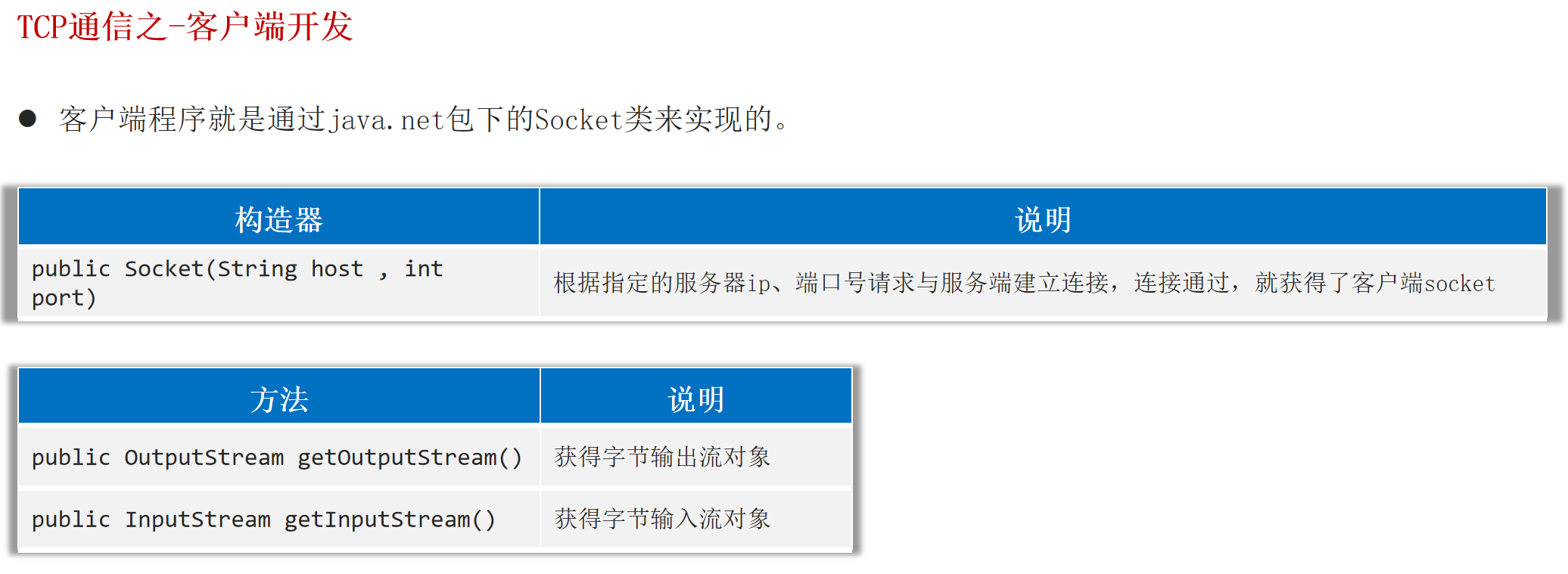
客户端Socket
客户端程序是通过java.net包下的Socket类来实现的。
1
2
3
4
5
6
7
8
9
10
11
12
13
14
15
16
17
18
19
20
21
22
23
24
25
26
|
public class TCP_Client {
public static void main(String[] args) throws Exception {
Socket socket = new Socket("127.0.0.1", 8888);
OutputStream os = socket.getOutputStream();
DataOutputStream dos = new DataOutputStream(os);
Scanner sc = new Scanner(System.in);
while(true) {
System.out.println("请发送数据:");
String msg = sc.nextLine();
if("exit".equals(msg)) {
System.out.println("成功退出");
dos.close();
socket.close();
break;
}
dos.writeUTF(msg);
dos.flush();
}
}
}
|
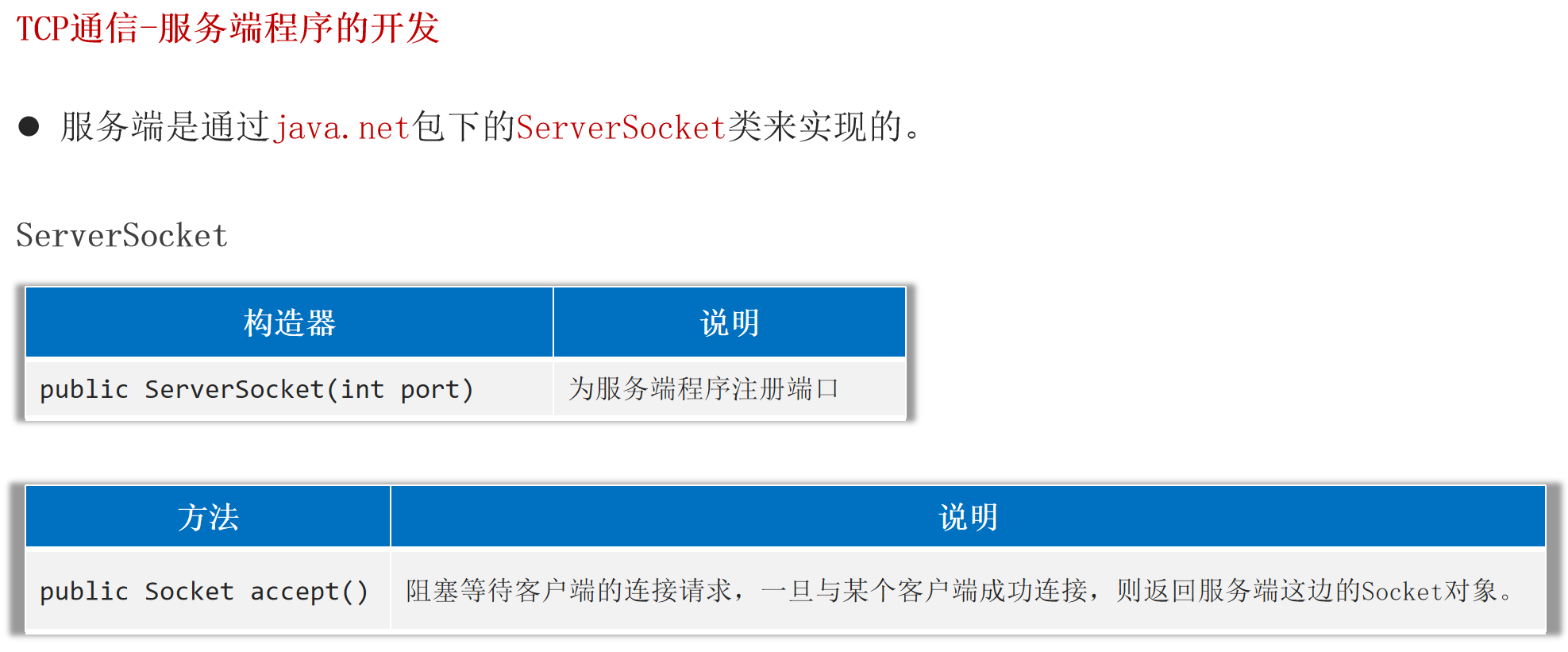
服务端ServerSocket
服务端是通过java.net包下的ServerSocket类来实现的。
1
2
3
4
5
6
7
8
9
10
11
12
13
14
15
16
17
18
19
20
21
22
23
24
25
26
27
|
public class TCP_Server {
public static void main(String[] args) throws Exception {
System.out.println("启动服务器");
ServerSocket serverSocket = new ServerSocket(8888);
Socket socket = serverSocket.accept();
InputStream is = socket.getInputStream();
DataInputStream dis = new DataInputStream(is);
while(true) {
try {
String rs = dis.readUTF();
System.out.println(rs);
} catch (Exception e) {
System.out.println(socket.getRemoteSocketAddress() + "离线了");
dis.close();
socket.close();
break;
}
}
}
}
|
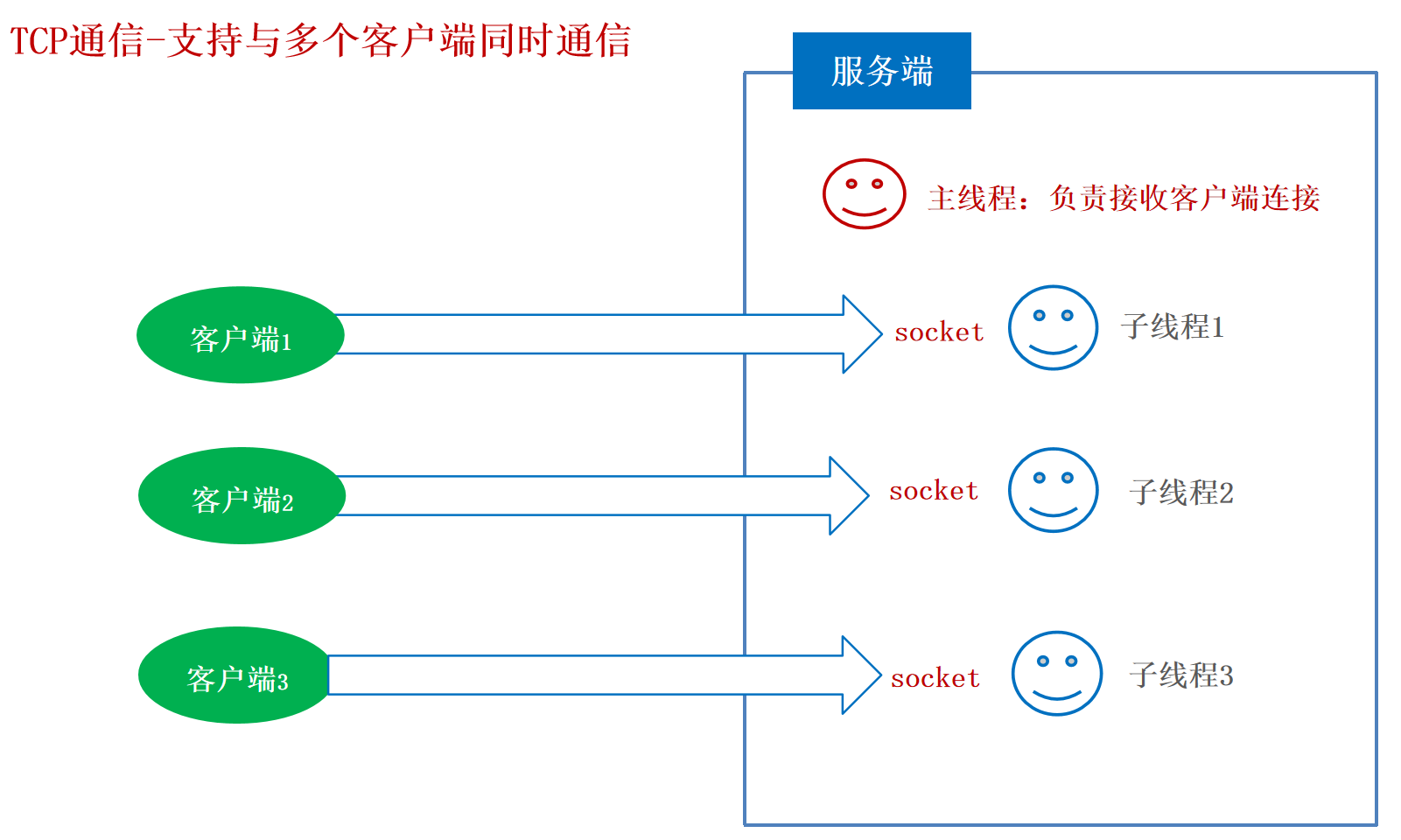
与多个客户端同时通信
方法:主线程定义循环负责接收客户端Socket管道连接。每接收到一个Socket通信管道后分配一个独立的线程负责处理它。
1
2
3
4
5
6
7
8
9
10
11
12
13
14
15
16
17
18
19
20
21
22
23
24
25
26
27
|
public class ServerReaderThread extends Thread {
private Socket socket;
public ServerReaderThread(Socket socket) {
this.socket = socket;
}
@Override
public void run() {
try {
InputStream is = socket.getInputStream();
DataInputStream dis = new DataInputStream(is);
while(true) {
try {
String msg = dis.readUTF();
System.out.println(msg);
} catch (Exception e) {
System.out.println("下线:" + socket.getRemoteSocketAddress());
dis.close();
socket.close();
break;
}
}
} catch (Exception e) {
e.printStackTrace();
}
}
}
|
1
2
3
4
5
6
7
8
9
10
11
12
13
14
15
|
public class TCP_Server2 {
public static void main(String[] args) throws Exception {
System.out.println("启动服务器");
ServerSocket serverSocket = new ServerSocket(8888);
while(true) {
Socket socket = serverSocket.accept();
System.out.println("上线:" + socket.getRemoteSocketAddress());
new ServerReaderThread(socket).start();
}
}
}
|
案例:群聊
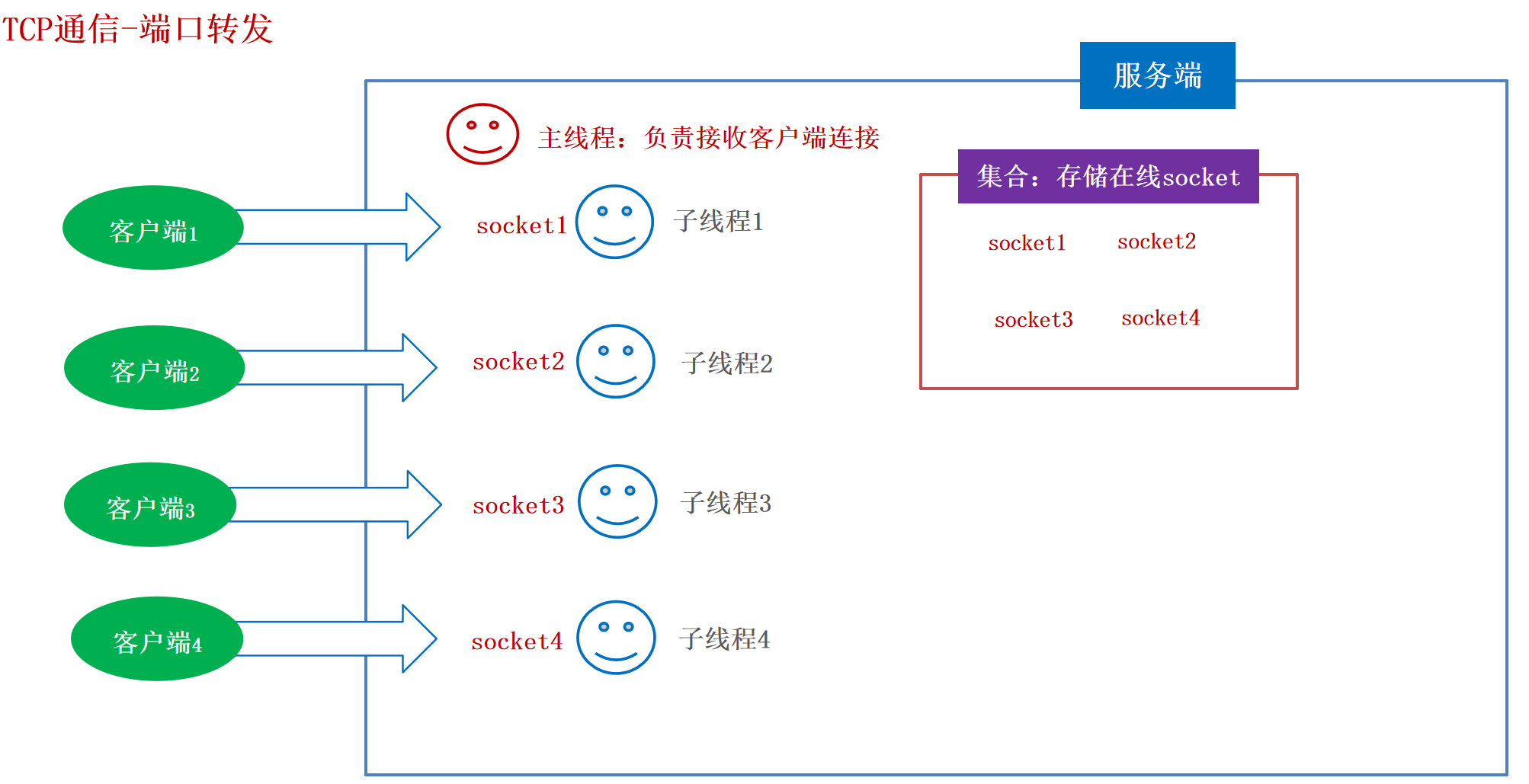
群聊是指一个客户端把消息发出去,其他在线的全部客户端都可以收到消息。
方法:需要用到端口转发的设计思想。服务端需要把在线的Socket管道存储起来,一旦收到一个消息要推送给其他管道。
1
2
3
4
5
6
7
8
9
10
11
12
13
14
15
16
17
18
19
20
21
22
23
24
25
26
27
28
29
30
31
32
33
34
35
36
37
38
39
40
|
public class ServerChatThread extends Thread {
private Socket socket;
public ServerChatThread(Socket socket) {
this.socket = socket;
}
@Override
public void run() {
try {
InputStream is = socket.getInputStream();
DataInputStream dis = new DataInputStream(is);
while(true) {
try {
String msg = dis.readUTF();
System.out.println(msg);
sendMsgToAll(msg);
} catch (Exception e) {
System.out.println("下线:" + socket.getRemoteSocketAddress());
Chat_Server.onLineSockets.remove(socket);
dis.close();
socket.close();
break;
}
}
} catch (Exception e) {
e.printStackTrace();
}
}
private void sendMsgToAll(String msg) throws Exception {
for(Socket onLineSocket : Chat_Server.onLineSockets) {
OutputStream os = onLineSocket.getOutputStream();
DataOutputStream dos = new DataOutputStream(os);
dos.writeUTF(msg);
dos.flush();
}
}
}
|
1
2
3
4
5
6
7
8
9
10
11
12
13
14
15
16
17
18
|
public class Chat_Server {
public static List<Socket> onLineSockets = new ArrayList<>();
public static void main(String[] args) throws Exception {
System.out.println("启动服务器");
ServerSocket serverSocket = new ServerSocket(8888);
while(true) {
Socket socket = serverSocket.accept();
onLineSockets.add(socket);
System.out.println("上线:" + socket.getRemoteSocketAddress());
new ServerChatThread(socket).start();
}
}
}
|
1
2
3
4
5
6
7
8
9
10
11
12
13
14
15
16
17
18
19
20
21
22
23
24
25
26
27
|
public class ClientChatThread extends Thread {
private Socket socket;
public ClientChatThread(Socket socket) {
this.socket = socket;
}
@Override
public void run() {
try {
InputStream is = socket.getInputStream();
DataInputStream dis = new DataInputStream(is);
while(true) {
try {
String msg = dis.readUTF();
System.out.println(msg);
} catch (Exception e) {
System.out.println("自己下线:" + socket.getRemoteSocketAddress());
dis.close();
socket.close();
break;
}
}
} catch (Exception e) {
e.printStackTrace();
}
}
}
|
1
2
3
4
5
6
7
8
9
10
11
12
13
14
15
16
17
18
19
20
21
22
23
24
25
|
public class Chat_Client {
public static void main(String[] args) throws Exception {
Socket socket = new Socket("127.0.0.1", 8888);
new ClientChatThread(socket).start();
OutputStream os = socket.getOutputStream();
DataOutputStream dos = new DataOutputStream(os);
Scanner sc = new Scanner(System.in);
while(true) {
System.out.println("请发送数据:");
String msg = sc.nextLine();
if("exit".equals(msg)) {
System.out.println("成功退出");
dos.close();
socket.close();
break;
}
dos.writeUTF(msg);
dos.flush();
}
}
}
|
案例:BS架构
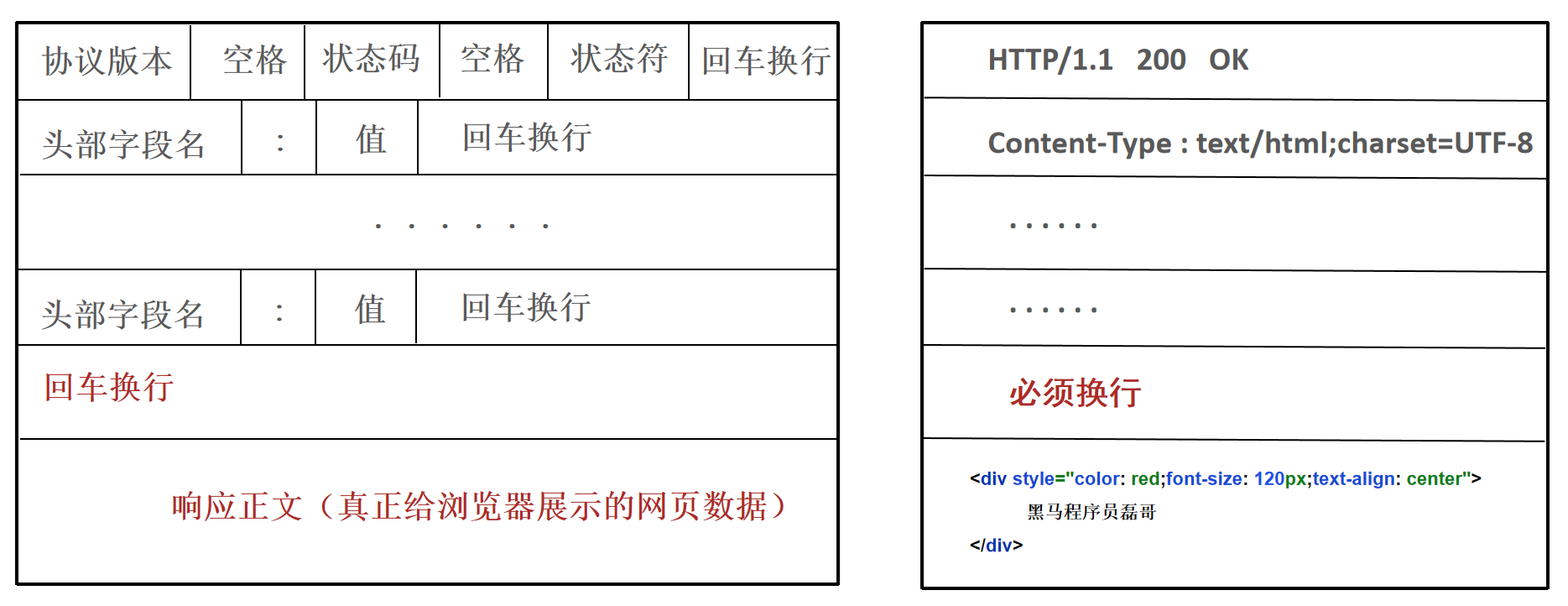
基本原理:客户端使用浏览器发起请求(不需要开发客户端)。服务端必须按照HTTP协议响应数据。
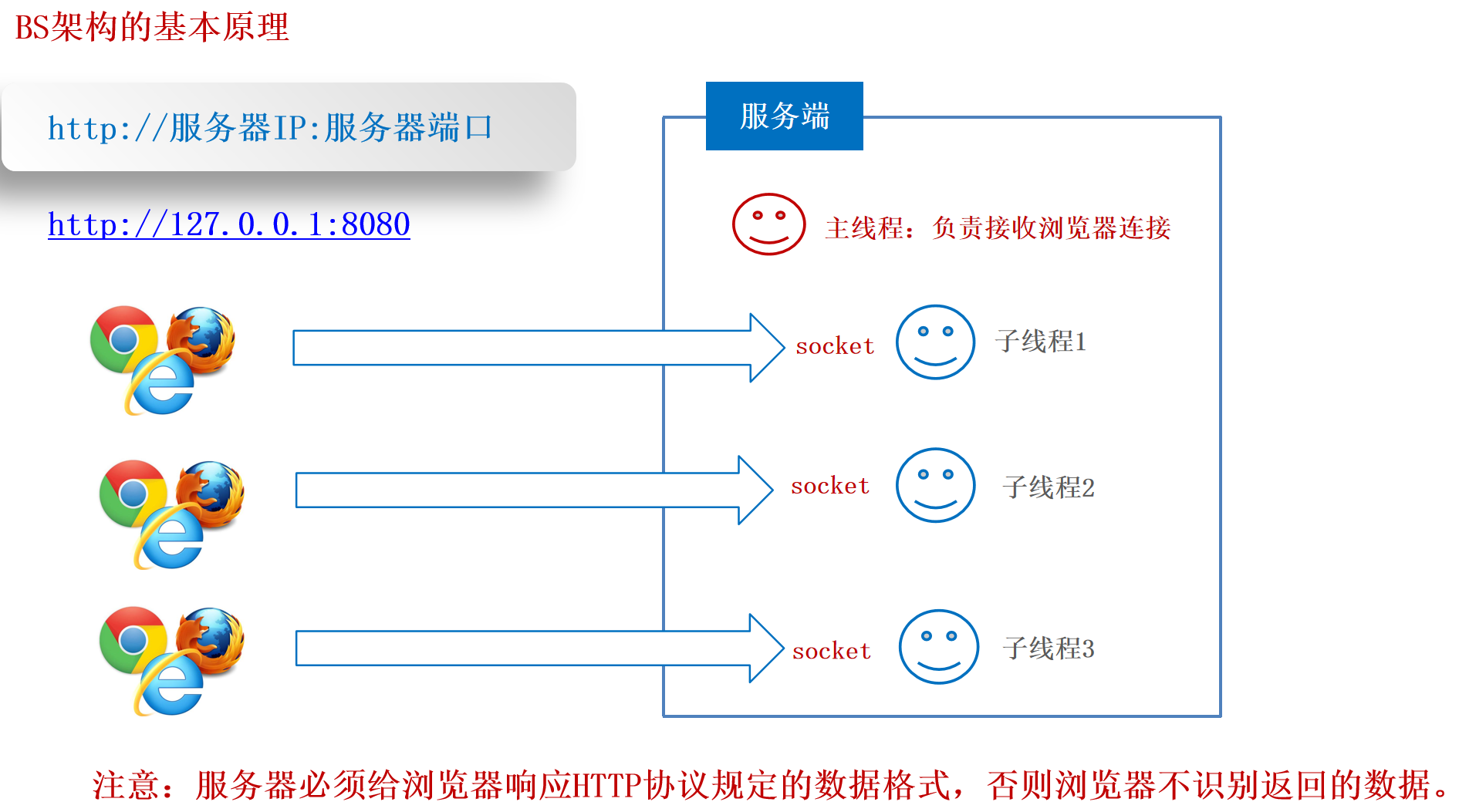
注意:服务器必须给浏览器响应HTTP协议规定的数据格式,否则浏览器不识别返回的数据。
HTTP协议规定:响应给浏览器的数据格式必须满足如下格式。
1
2
3
4
5
6
7
8
9
10
11
12
13
14
15
16
17
18
19
20
21
22
23
24
25
26
27
28
29
30
31
|
public class ServerBSThread extends Thread {
private Socket socket;
public ServerBSThread(Socket socket) {
this.socket = socket;
}
@Override
public void run() {
try {
OutputStream os = socket.getOutputStream();
PrintStream ps = new PrintStream(os);
ps.println("HTTP/1.1 200 OK");
ps.println("Content-Type: text/html; charset=utf-8");
ps.println();
ps.println("<div style='color:red; font-size:120px; text-align:center'> surourou666 </div>");
socket.close();
} catch (Exception e) {
e.printStackTrace();
}
}
}
|
1
2
3
4
5
6
7
8
9
10
11
12
13
14
15
|
public class BS_Server {
public static void main(String[] args) throws Exception {
System.out.println("启动服务器");
ServerSocket serverSocket = new ServerSocket(8888);
while(true) {
Socket socket = serverSocket.accept();
System.out.println("上线:" + socket.getRemoteSocketAddress());
new ServerBSThread(socket).start();
}
}
}
|
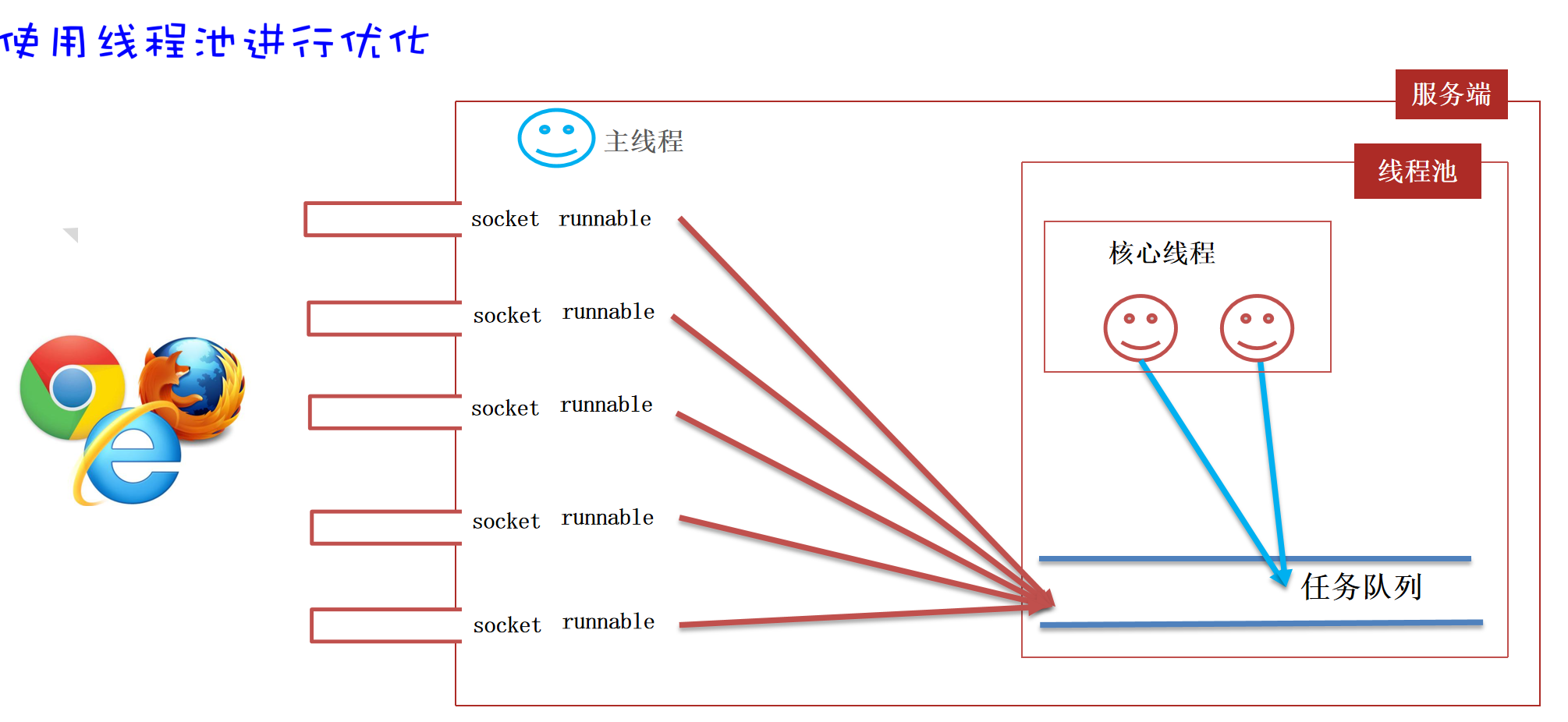
案例:BS架构(使用线程池优化)
每次请求都开一个新线程,在高并发时,容易引起宕机,所以使用线程池进行优化。
1
2
3
4
5
6
7
8
9
10
11
12
13
14
15
16
17
18
19
20
21
22
23
24
25
26
27
28
29
30
31
32
|
public class ServerBSpoolRunnable implements Runnable {
private Socket socket;
public ServerBSpoolRunnable(Socket socket) {
this.socket = socket;
}
@Override
public void run() {
try {
OutputStream os = socket.getOutputStream();
PrintStream ps = new PrintStream(os);
ps.println("HTTP/1.1 200 OK");
ps.println("Content-Type: text/html; charset=utf-8");
ps.println();
ps.println("<div style='color:red; font-size:120px; text-align:center'> surourou666 </div>");
socket.close();
} catch (Exception e) {
e.printStackTrace();
}
}
}
|
1
2
3
4
5
6
7
8
9
10
11
12
13
14
15
16
17
18
19
20
| public class BSpool_Server {
public static void main(String[] args) throws Exception {
System.out.println("启动服务器");
ServerSocket serverSocket = new ServerSocket(8888);
ThreadPoolExecutor pool = new ThreadPoolExecutor(16*2, 16*2, 0, TimeUnit.SECONDS,
new ArrayBlockingQueue<>(8),
Executors.defaultThreadFactory(),
new ThreadPoolExecutor.AbortPolicy());
while(true) {
Socket socket = serverSocket.accept();
System.out.println("上线:" + socket.getRemoteSocketAddress());
pool.execute(new ServerBSpoolRunnable(socket));
}
}
}
|