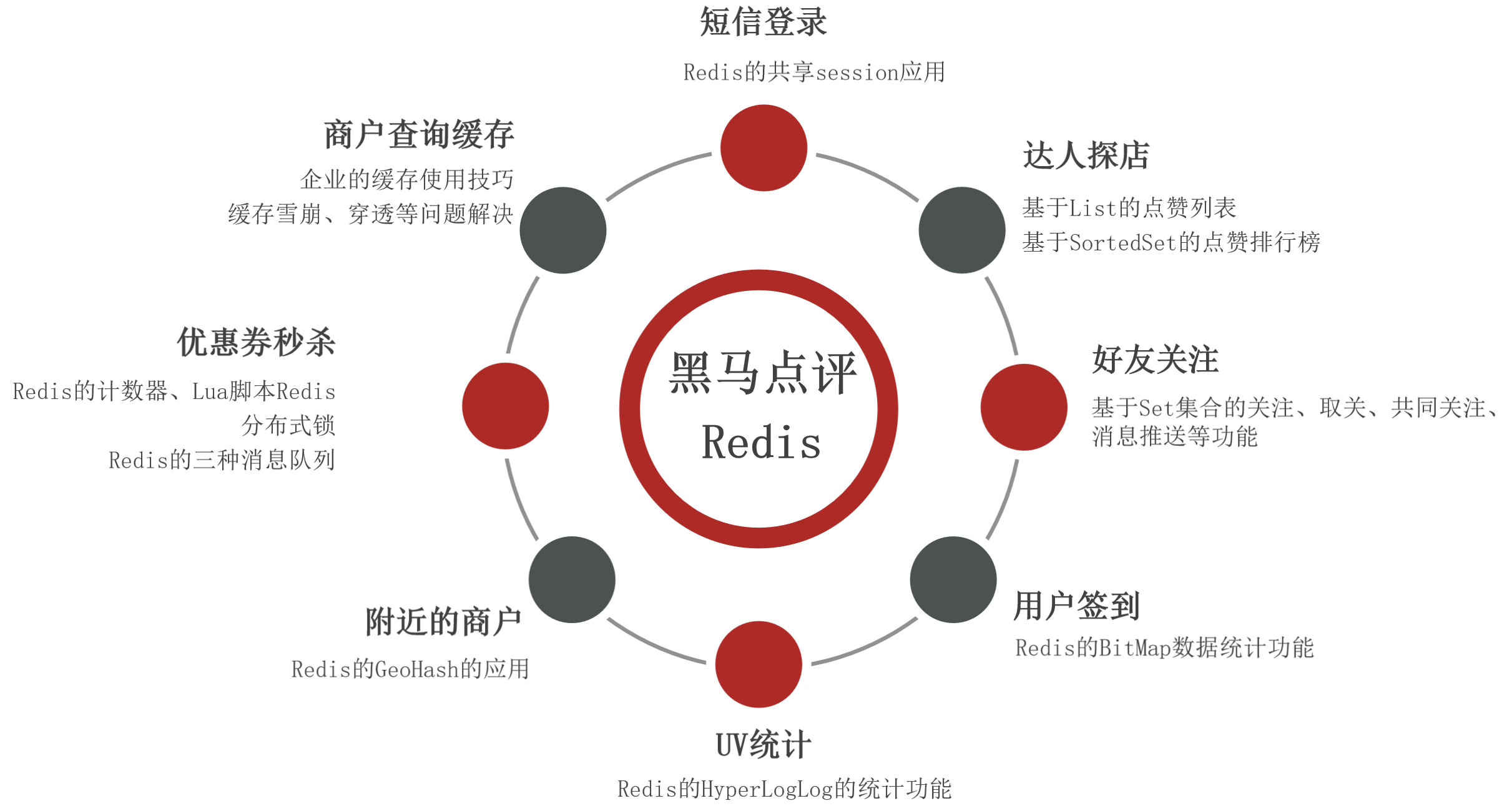
实战篇 黑马点评
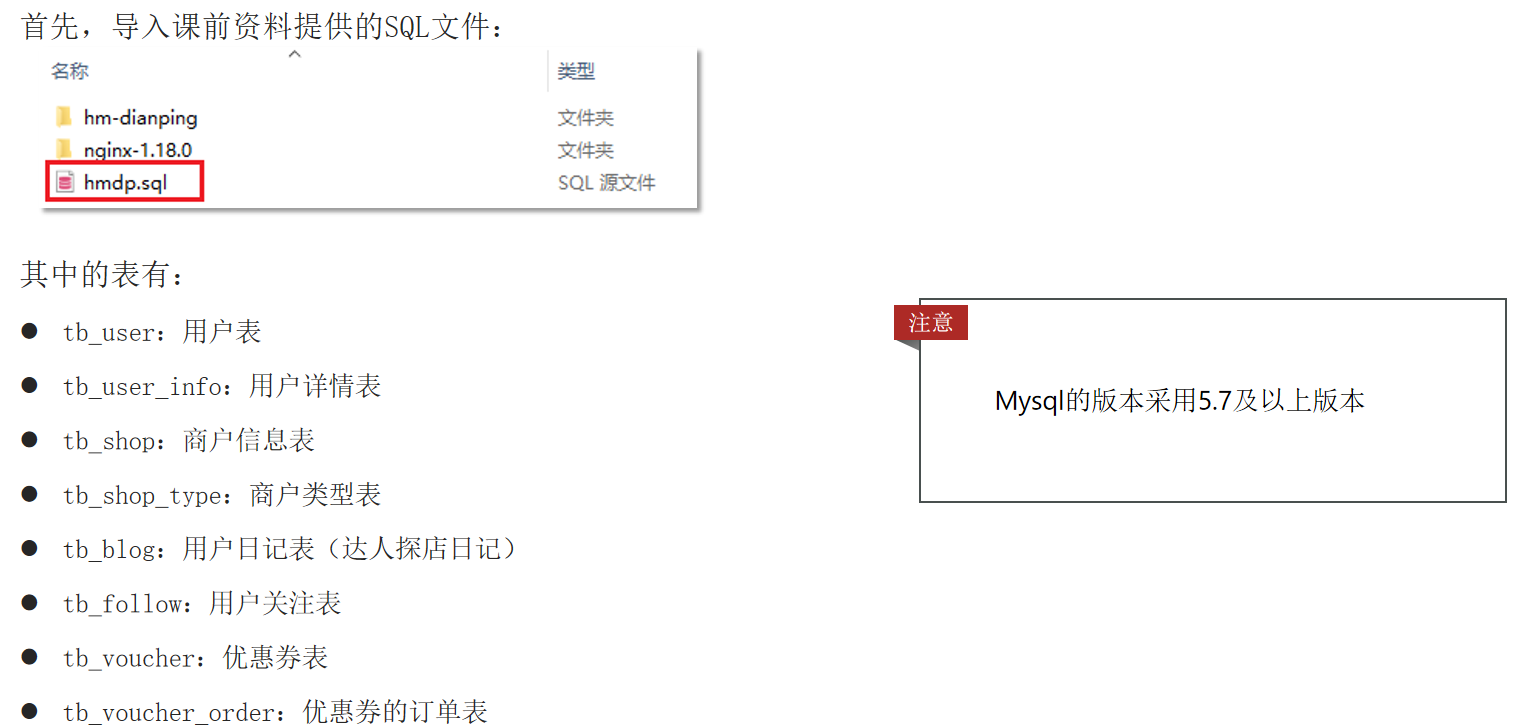
导入黑马点评项目 数据库
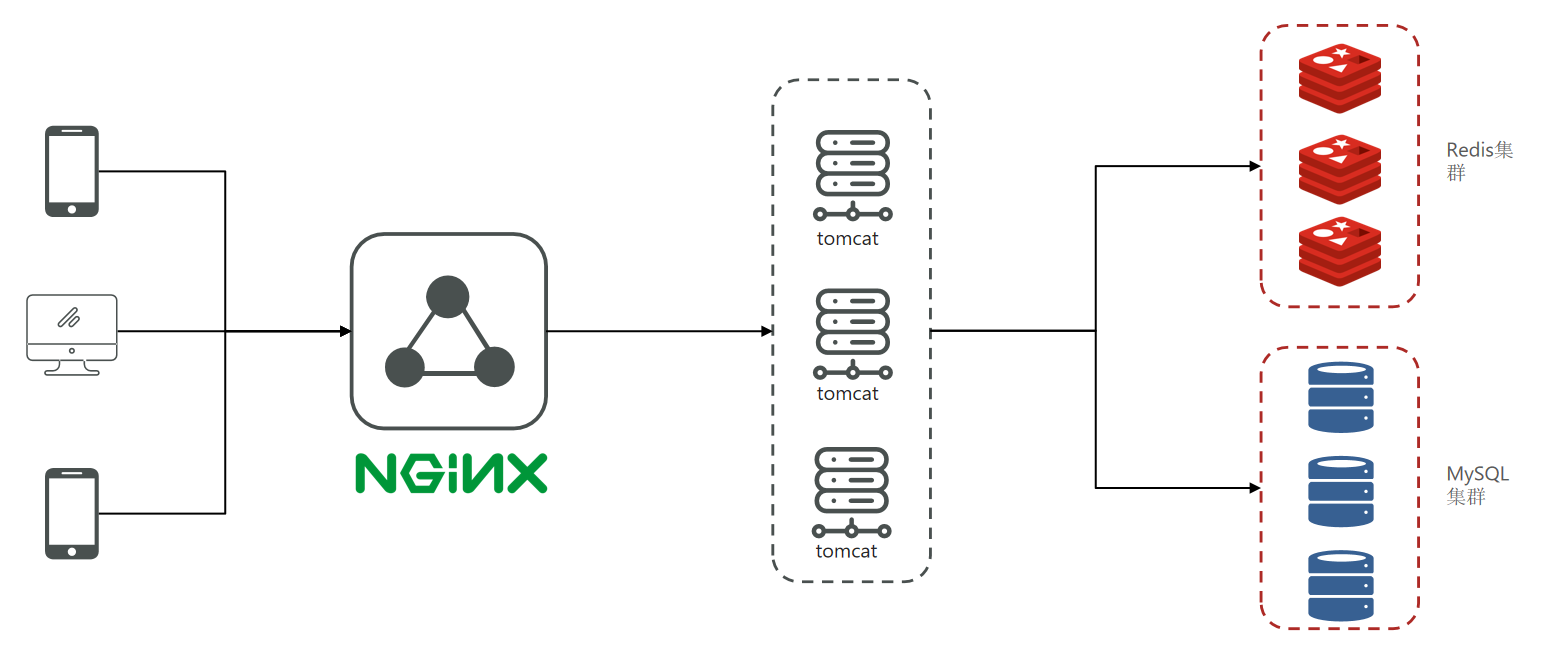
黑马点评项目框架
导入后端项目 利用idea打开项目源码hm-dianping。
1.修改yaml文件下datasource的password,redis下的host和password。
1
2
3
4
5
6
7
8
9
10
spring: datasource: driver-class-name: com.mysql.jdbc.Driver url: jdbc:mysql://127.0.0.1:3306/hmdp?useSSL=false&serverTimezone=UTC username: root password: redis: host: localhost port: 6379 password:
2.修改pom.xml文件,讲lombok的版本修改为1.18.30版本。
参考链接:【已解决】java: java.lang.NoSuchFieldError: Class com.sun.tools.javac.tree.JCTree$JCImport does not have-CSDN博客
解决:将Lombok库升级到1.18.30或更高版本。该版本已经修复了这个问题。
1 2 3 4 5 6 <dependency > <groupId > org.projectlombok</groupId > <artifactId > lombok</artifactId > <version > 1.18.30</version > <optional > true</optional > </dependency >
1 2 3 4 5 6 7 8 9 10 11 12 13 14 15 16 17 <build > <plugins > <plugin > <groupId > org.springframework.boot</groupId > <artifactId > spring-boot-maven-plugin</artifactId > <configuration > <excludes > <exclude > <groupId > org.projectlombok</groupId > <artifactId > lombok</artifactId > <version > 1.18.30</version > </exclude > </excludes > </configuration > </plugin > </plugins > </build >
3.启动项目后,在浏览器访问:http://localhost:8081/shop-type/list ,如果可以看到数据则证明运行没有问题。
导入前端项目 打开前端项目所在的nginx文件夹,将其复制到任意目录,要确保该目录不包含中文、特殊字符和空格。在nginx所在目录下打开一个CMD窗口,输入命令:start nginx.exe,或者直接点击nginx.exe运行。
打开chrome浏览器,打开开发者工具手机模式:访问: http://127.0.0.1:8080 ,即可看到页面。
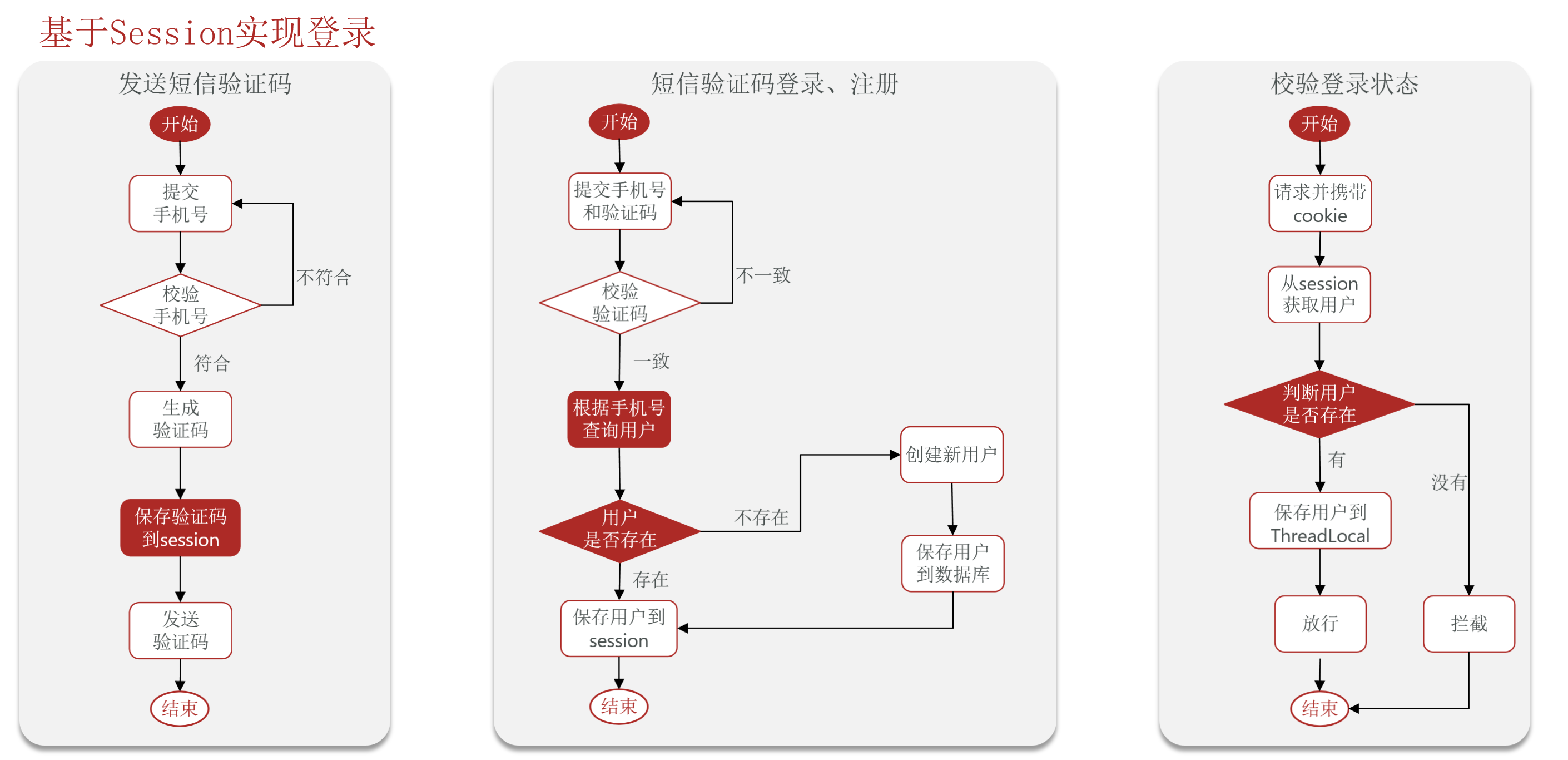
短信登录 基于Session实现登录
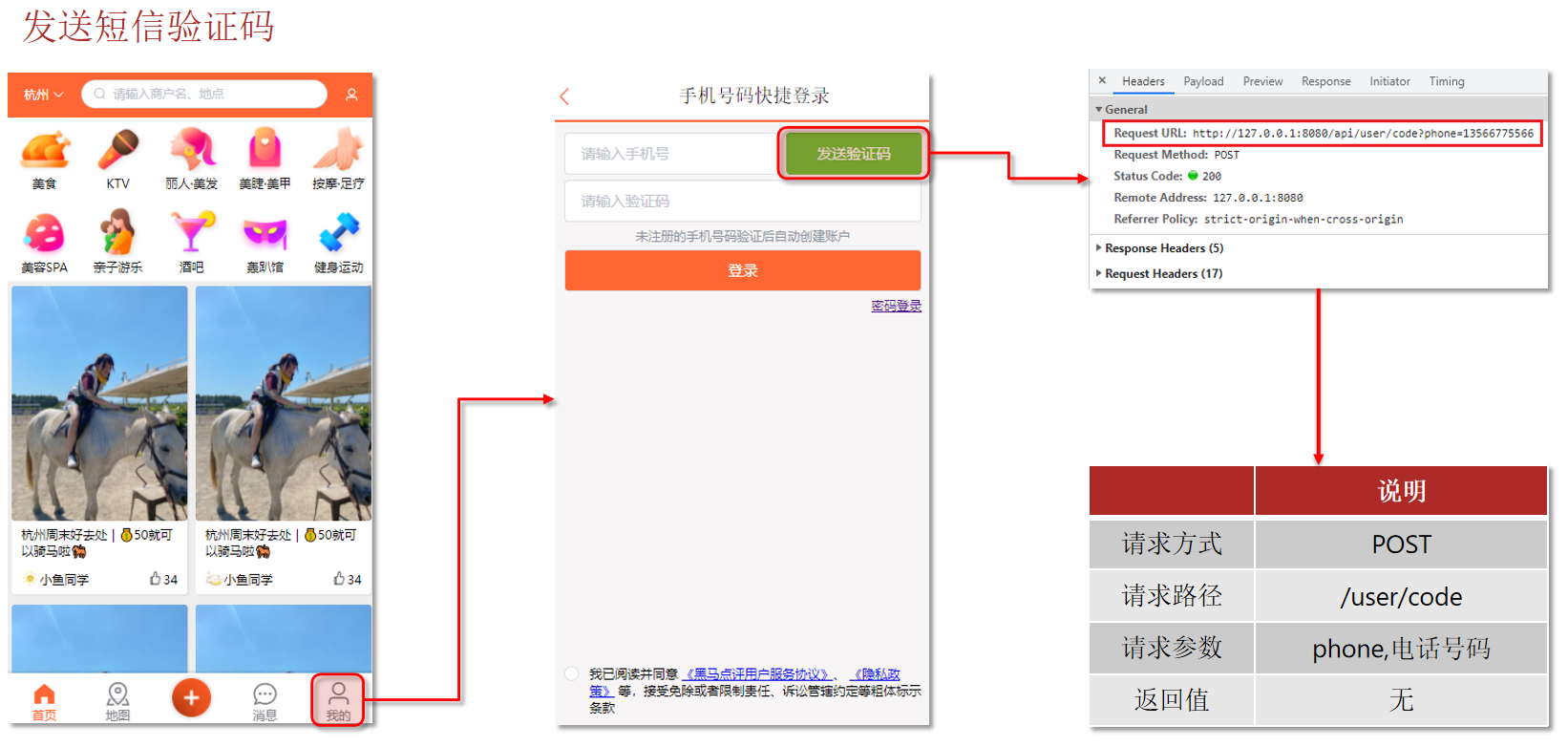
发送短信验证码
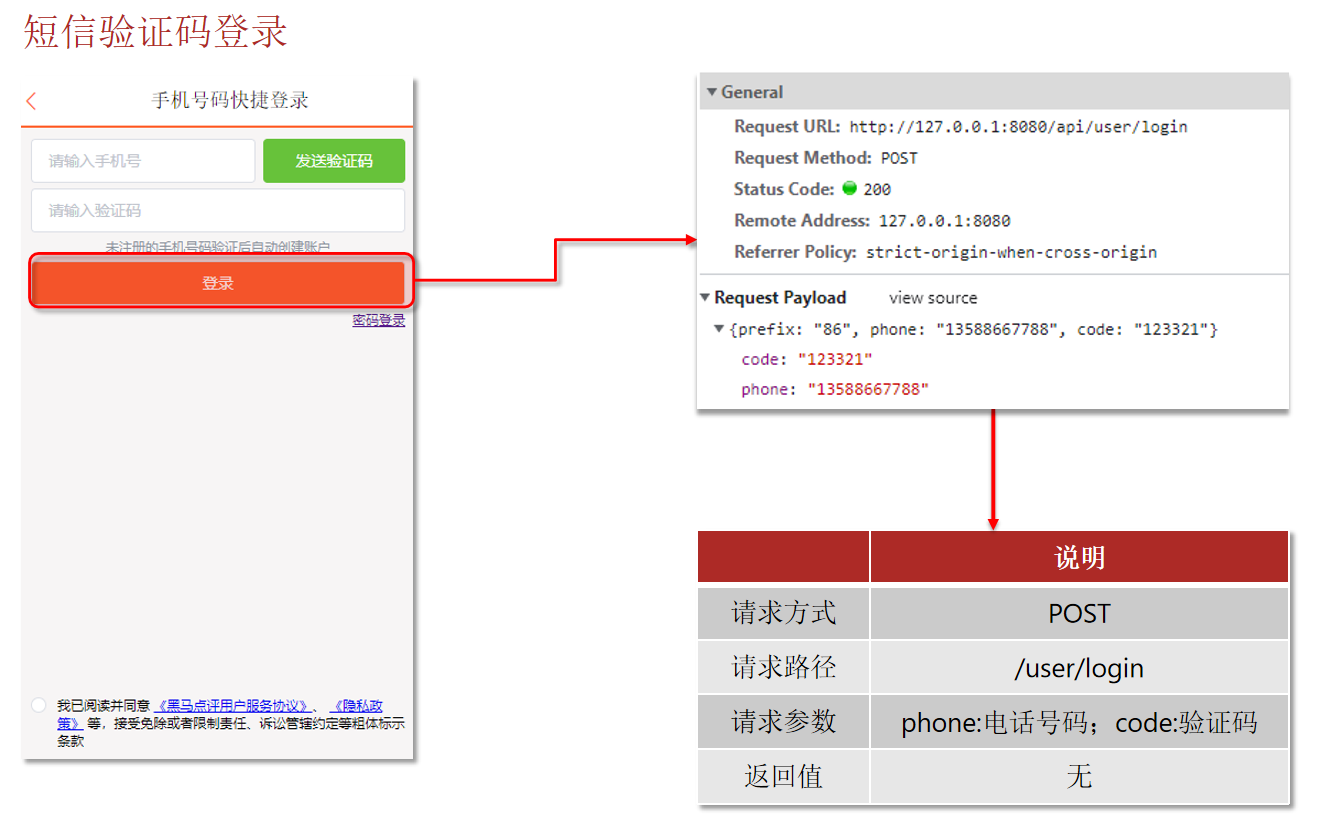
短信验证码登录
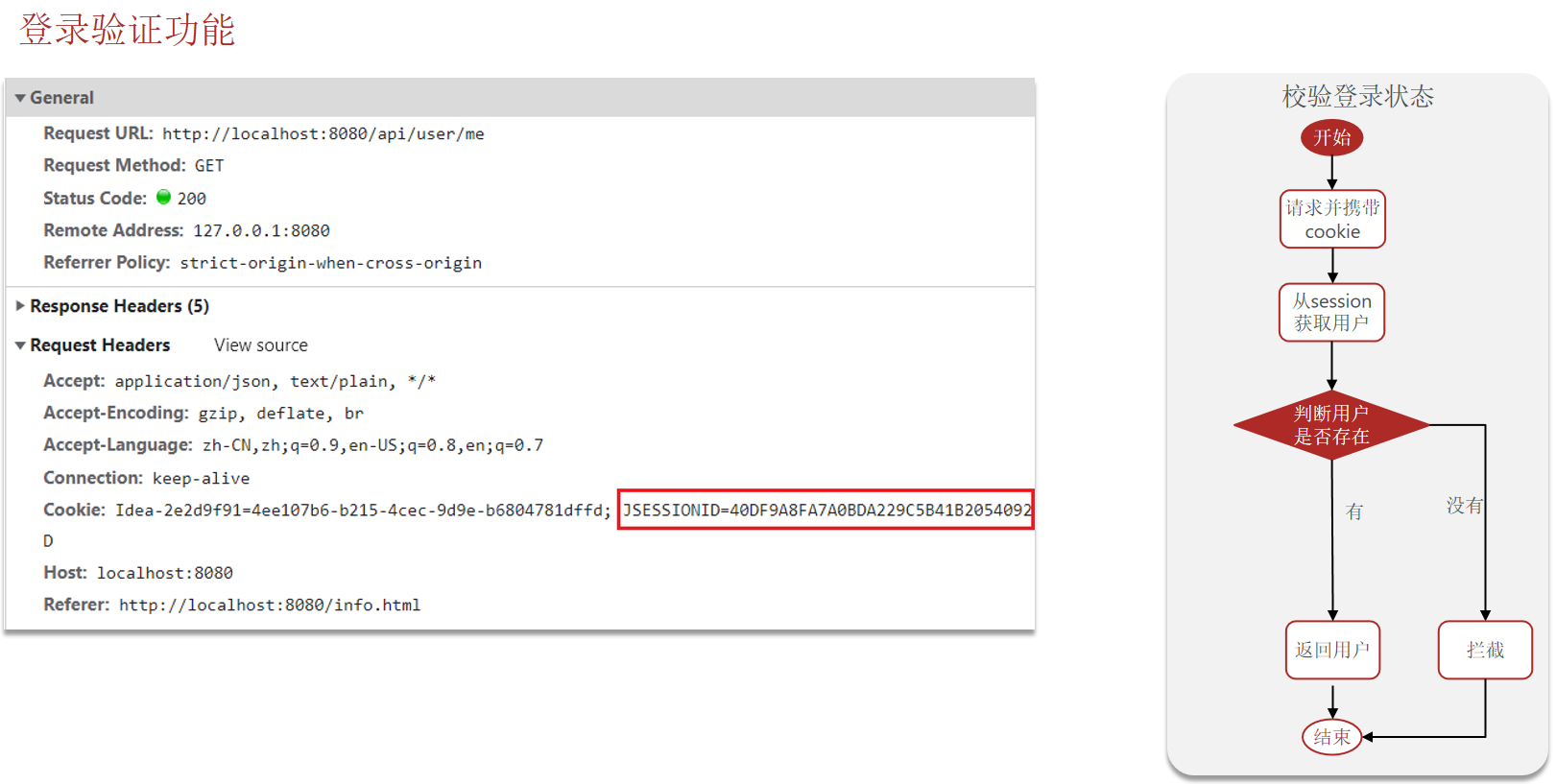
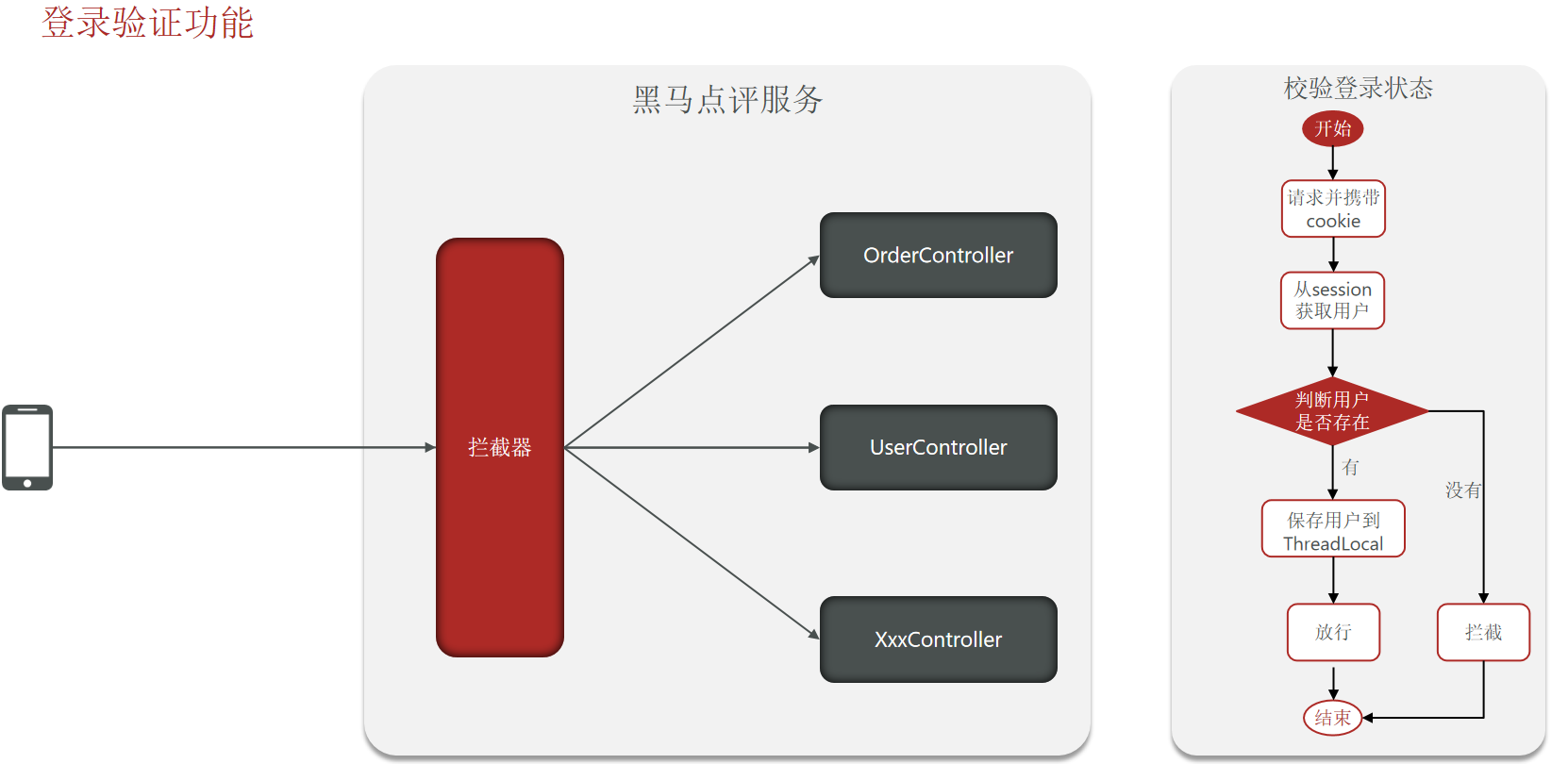
登录验证功能
代码实现 1.UserController中实现发送验证码,登录,和/me访问自己的功能。
其中,/me只需要从当前线程ThreadLocal中获取当前用户并且返回。
1
2
3
4
5
6
7
8
9
10
11
12
13
14
15
16
17
18
19
20
21
22
23
24
25
26
27
28
29
30
31
32
33
34
35
36
37
38
39
40
41
42
43
44
45
46
47
48
49
50
51
52
53
54
package com.hmdp.controller;@Slf4j @RestController @RequestMapping("/user") public class UserController {@Resource private IUserService userService;@Resource private IUserInfoService userInfoService;@PostMapping("code") public Result sendCode (@RequestParam("phone") String phone, HttpSession session) {return userService.sendCode(phone, session);@PostMapping("/login") public Result login (@RequestBody LoginFormDTO loginForm, HttpSession session) {return userService.login(loginForm, session);@PostMapping("/logout") public Result logout () {return Result.fail("功能未完成" );@GetMapping("/me") public Result me () {return Result.ok(UserHolder.getUser());@GetMapping("/info/{id}") public Result info (@PathVariable("id") Long userId) {UserInfo info = userInfoService.getById(userId);if (info == null ) {return Result.ok();null );null );return Result.ok(info);
2.IUserService。
1
2
3
4
5
6
7
8
package com.hmdp.service;public interface IUserService extends IService <User> {sendCode (String phone, HttpSession session) ;login (LoginFormDTO loginForm, HttpSession session) ;
3.UserServiceImpl。
1
2
3
4
5
6
7
8
9
10
11
12
13
14
15
16
17
18
19
20
21
22
23
24
25
26
27
28
29
30
31
32
33
34
35
36
37
38
39
40
41
42
43
44
45
46
47
48
49
50
51
52
53
54
55
56
57
58
59
60
61
62
63
64
65
66
67
package com.hmdp.service.impl;@Slf4j @Service public class UserServiceImpl extends ServiceImpl <UserMapper, User> implements IUserService {@Override public Result sendCode (String phone, HttpSession session) {if (RegexUtils.isPhoneInvalid(phone)){return Result.fail("手机号格式错误" );String code = RandomUtil.randomString(6 );"code" ,code);"发送短信验证码成功,验证码:{}" , code);return Result.ok();@Override public Result login (LoginFormDTO loginForm, HttpSession session) {String phone = loginForm.getPhone();if (RegexUtils.isPhoneInvalid(phone)){return Result.fail("手机号格式错误" );Object cacheCode = session.getAttribute("code" );String code = loginForm.getCode();if (cacheCode == null || !cacheCode.equals(code)){return Result.fail("验证码错误" );User user = query().eq("phone" , phone).one();if (user == null ){"user" , BeanUtil.copyProperties(user, UserDTO.class));return Result.ok();private User createUserWithPhone (String phone) {User user = new User ();10 ));return user;
4.LoginInterceptor,设置拦截器进行拦截。
1
2
3
4
5
6
7
8
9
10
11
12
13
14
15
16
17
18
19
20
21
22
23
24
25
26
27
28
29
30
31
package com.hmdp.utils;public class LoginInterceptor implements HandlerInterceptor {@Override public boolean preHandle (HttpServletRequest request, HttpServletResponse response, Object handler) throws Exception {HttpSession session = request.getSession();Object user = session.getAttribute("user" );if (user == null ) {401 );return false ;return true ;@Override public void postHandle (HttpServletRequest request, HttpServletResponse response, Object handler, ModelAndView modelAndView) throws Exception {
5.MvcConfig,注册拦截器。
1
2
3
4
5
6
7
8
9
10
11
12
13
14
15
16
17
18
package com.hmdp.config;@Configuration public class MvcConfig implements WebMvcConfigurer {@Override public void addInterceptors (InterceptorRegistry registry) {new LoginInterceptor ())"/shop/**" ,"/voucher/**" ,"/shop-type/**" ,"/upload/**" ,"/blog/hot" ,"/user/code" ,"/user/login"
参考链接 1.Cookie。
前端安全系列(二):如何防止CSRF攻击? - 美团技术团队
为什么token能够防止CSRF(修正版)_token防止csrf-CSDN博客
2.localstorage、sessionstorage、cookie的区别。
Cookie、LocalStorage和SessionStorage:一次非常详细的对比!_cookie localstorage sessionstorage-CSDN博客
3.HttpSession。
HttpSession详解(简称session)-CSDN博客
Java Web之HttpSession详解-CSDN博客
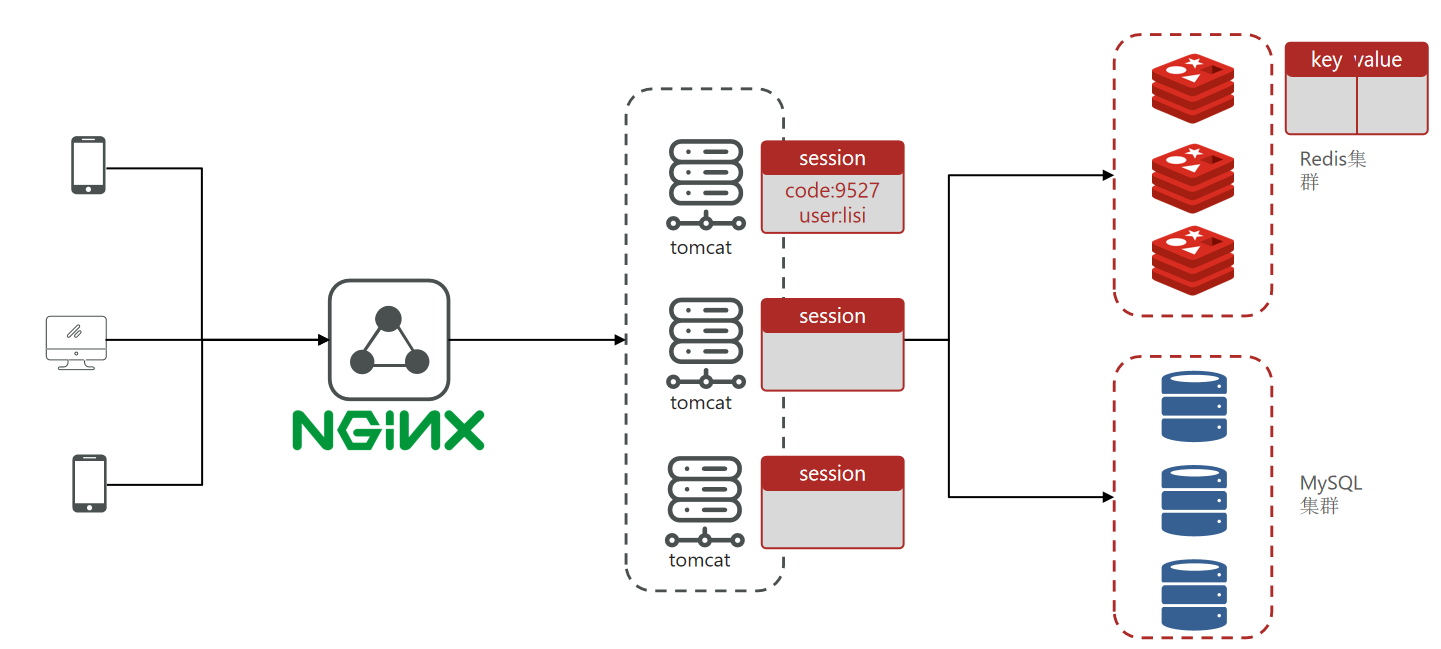
集群的session共享问题 session共享问题:多台Tomcat并不共享session存储空间,当请求切换到不同tomcat服务时导致数据丢失的问题。
session的替代方案应该满足:
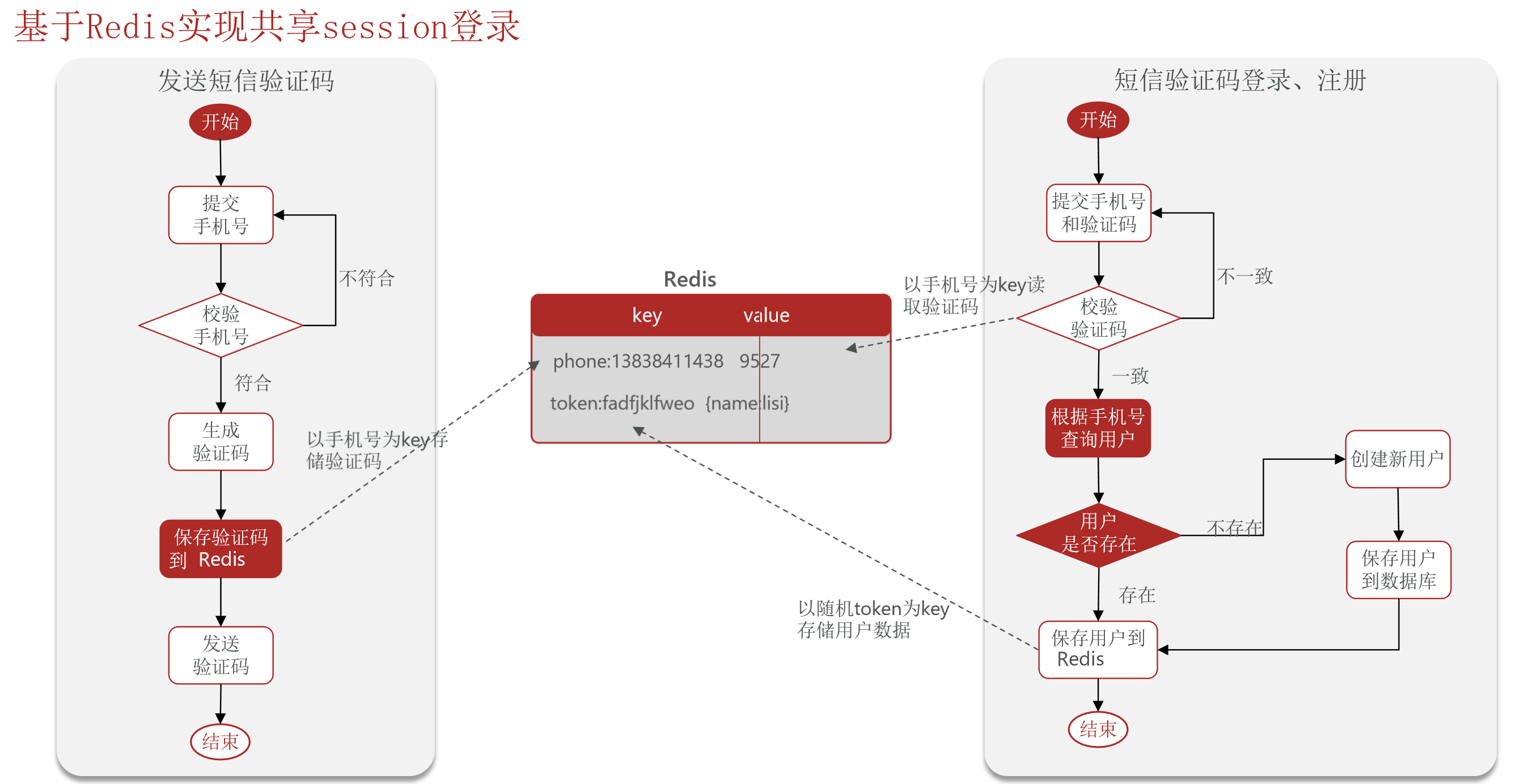
基于Redis实现共享session登录
Redis代替session需要考虑的问题:
选择合适的数据结构
选择合适的key
选择合适的存储粒度
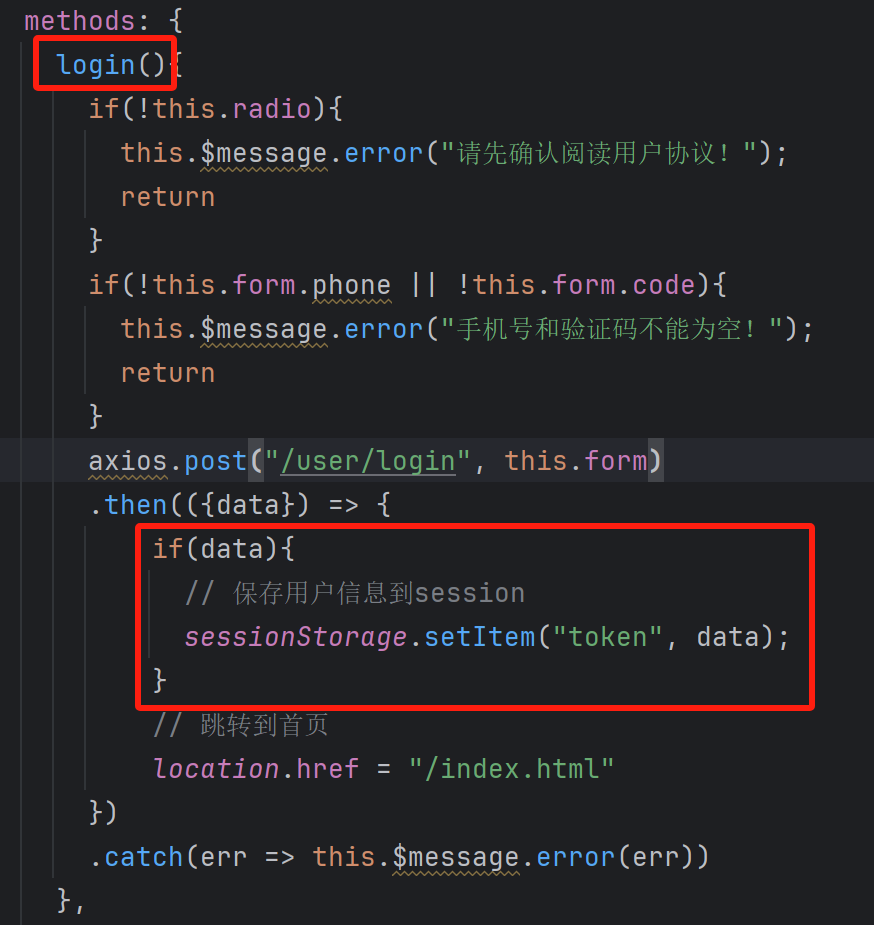
前端页面携带token 前端login.html页面。发送登录请求时保存用户信息到session。
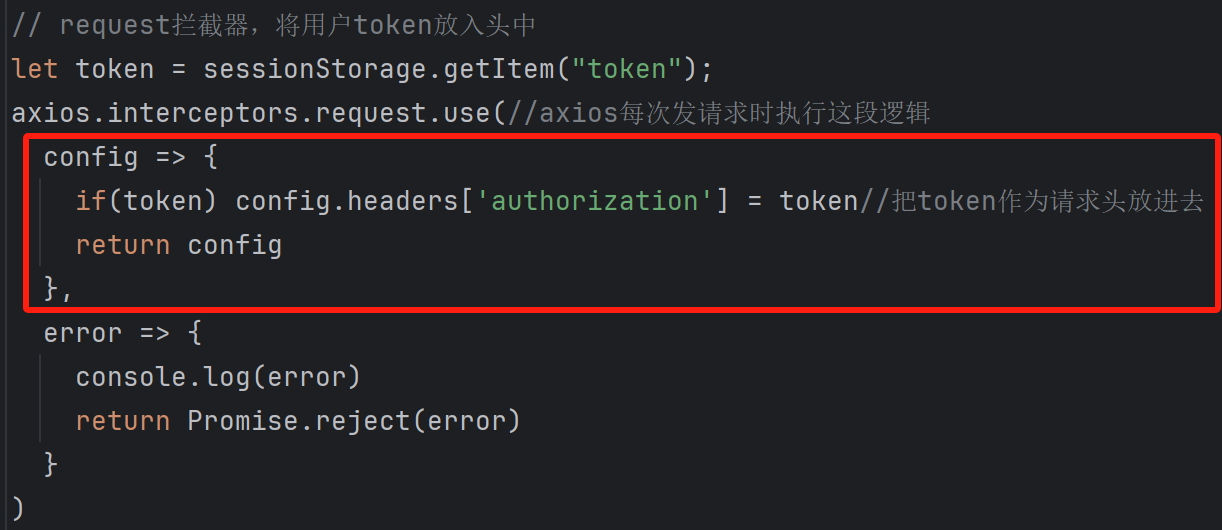
前端common.js文件。每次发送请求时讲token作为放入请求头。
代码实现 1.UserServiceImpl,使用Redis存储登录信息。
将验证码保存到Redis中,key值为login:code+手机号码。
随机生成token,将新用户保存到Redis中key值为login:token+token值。并设置有效期。需要将token值返回给前端,前端会将token保存到sessionStorage,在以后每次的请求中都会携带请求头authorization,值为token的值回到后端。后续后端拦截器每次要验证请求头authorization的值是否为token的值。
1
2
3
4
5
6
7
8
9
10
11
12
13
14
15
16
17
18
19
20
21
22
23
24
25
26
27
28
29
30
31
32
33
34
35
36
37
38
39
40
41
42
43
44
45
46
47
48
49
50
51
52
53
54
55
56
57
58
59
60
61
62
63
64
65
66
67
68
69
70
71
72
73
74
75
76
77
78
79
80
81
82
83
84
package com.hmdp.service.impl;@Slf4j @Service public class UserServiceImpl extends ServiceImpl <UserMapper, User> implements IUserService {@Resource private StringRedisTemplate stringRedisTemplate;@Override public Result sendCode (String phone, HttpSession session) {if (RegexUtils.isPhoneInvalid(phone)){return Result.fail("手机号格式错误" );String code = RandomUtil.randomString(6 );"发送短信验证码成功,验证码:{}" , code);return Result.ok();@Override public Result login (LoginFormDTO loginForm, HttpSession session) {String phone = loginForm.getPhone();if (RegexUtils.isPhoneInvalid(phone)){return Result.fail("手机号格式错误" );String cacheCode = stringRedisTemplate.opsForValue().get(LOGIN_CODE_KEY + phone);String code = loginForm.getCode();if (cacheCode == null || !cacheCode.equals(code)){return Result.fail("验证码错误" );User user = query().eq("phone" , phone).one();if (user == null ){String token = UUID.randomUUID().toString(true );UserDTO userDTO = BeanUtil.toBean(user, UserDTO.class);new HashMap <>(),true ).String tokenKey = LOGIN_USER_KEY + token;return Result.ok(token);private User createUserWithPhone (String phone) {User user = new User ();10 ));return user;
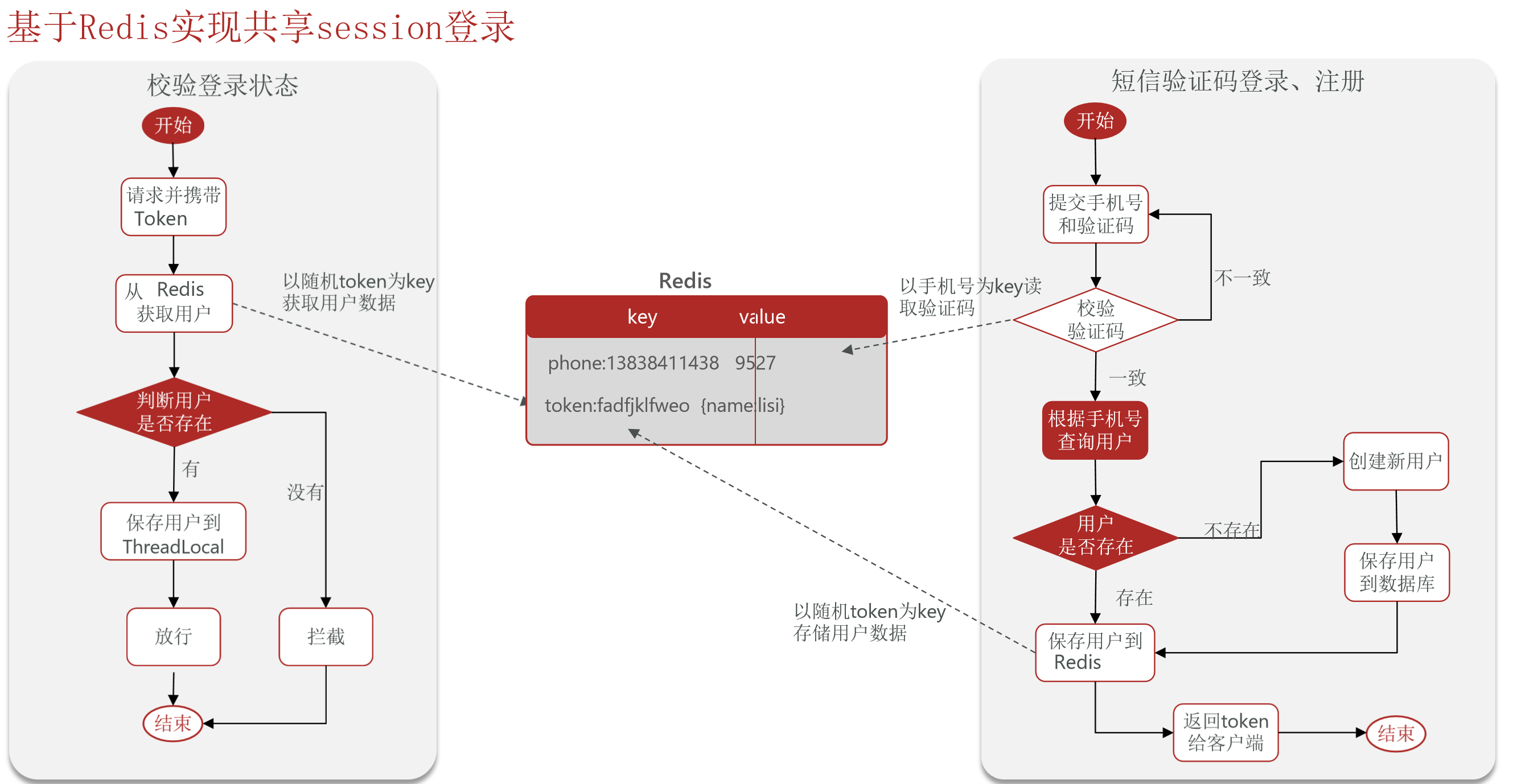
2.LoginInterceptor。拦截器判断token是否存在,通过token从Redis中获取用户信息,并将保存用户信息到ThreadLocal。刷新Redis中的token有效期。
1
2
3
4
5
6
7
8
9
10
11
12
13
14
15
16
17
18
19
20
21
22
23
24
25
26
27
28
29
30
31
32
33
34
35
36
37
38
39
40
41
42
43
44
45
46
47
48
49
50
51
52
53
54
55
package com.hmdp.utils;@Slf4j public class LoginInterceptor implements HandlerInterceptor {private StringRedisTemplate stringRedisTemplate;public LoginInterceptor (StringRedisTemplate stringRedisTemplate) {this .stringRedisTemplate = stringRedisTemplate;@Override public boolean preHandle (HttpServletRequest request, HttpServletResponse response, Object handler) throws Exception {String token = request.getHeader("authorization" );if (StrUtil.isBlank(token)) {401 );"info" );return false ;String key = RedisConstants.LOGIN_USER_KEY + token;if (userMap.isEmpty()) {401 );return false ;UserDTO userDTO = BeanUtil.fillBeanWithMap(userMap, new UserDTO (), false );return true ;@Override public void postHandle (HttpServletRequest request, HttpServletResponse response, Object handler, ModelAndView modelAndView) throws Exception {
3.MvcConfig,要注入StringRedisTemplate。
1
2
3
4
5
6
7
8
9
10
11
12
13
14
15
16
17
18
19
20
21
22
23
24
25
package com.hmdp.config;@Configuration public class MvcConfig implements WebMvcConfigurer {@Resource private StringRedisTemplate stringRedisTemplate;@Override public void addInterceptors (InterceptorRegistry registry) {new LoginInterceptor (stringRedisTemplate))"/shop/**" ,"/voucher/**" ,"/shop-type/**" ,"/upload/**" ,"/blog/hot" ,"/user/code" ,"/user/login"
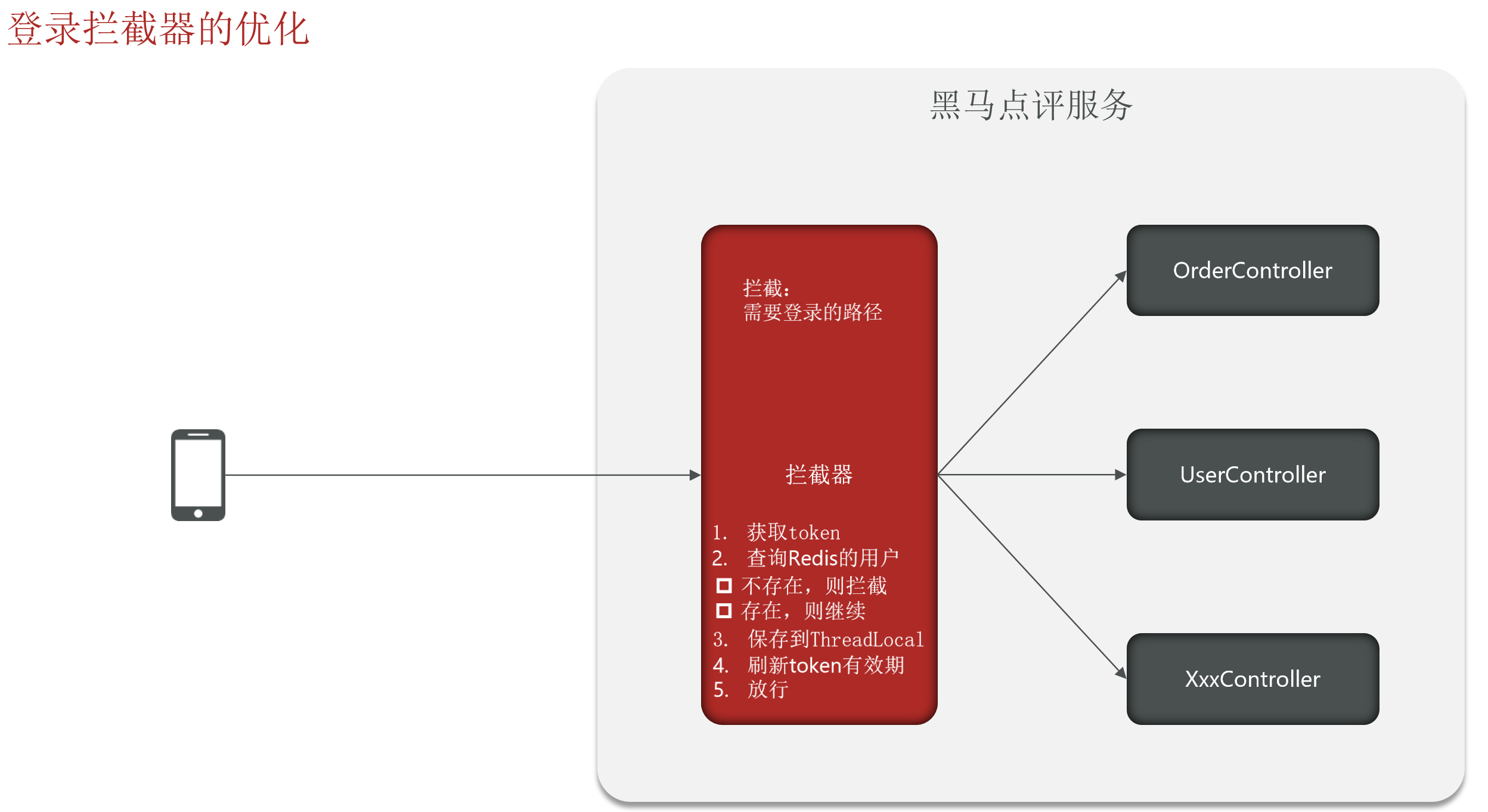
登录拦截器的优化 登录拦截器优化前:
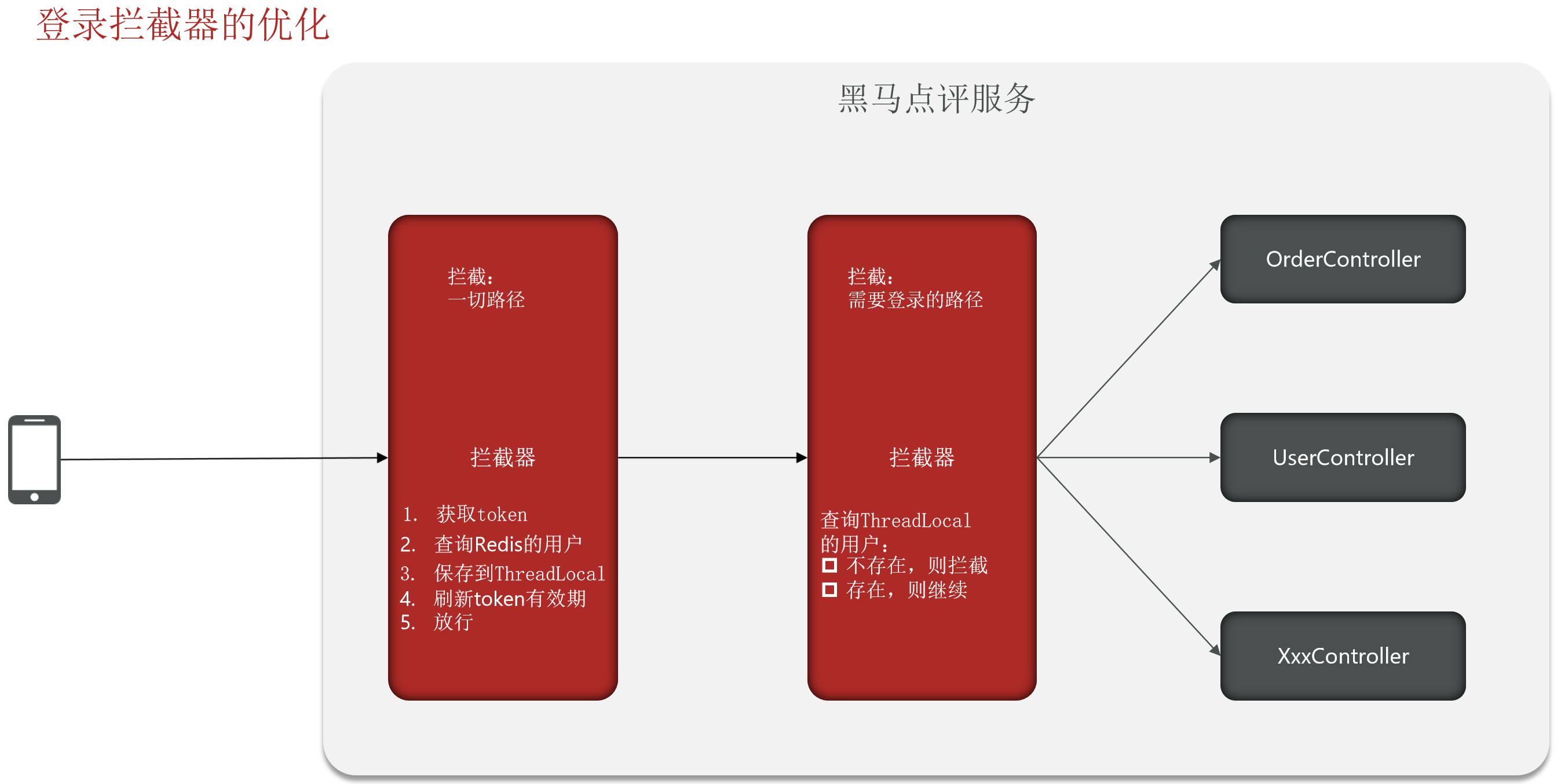
登录拦截器优化后:
优化方法:使用RefreshTokenInterceptor拦截一切路径,在这里刷新token有效期。
1.RefreshTokenInterceptor。
1
2
3
4
5
6
7
8
9
10
11
12
13
14
15
16
17
18
19
20
21
22
23
24
25
26
27
28
29
30
31
32
33
34
35
36
37
38
39
40
41
42
43
44
45
46
47
48
49
50
package com.hmdp.utils;@Slf4j public class RefreshTokenInterceptor implements HandlerInterceptor {private StringRedisTemplate stringRedisTemplate;public RefreshTokenInterceptor (StringRedisTemplate stringRedisTemplate) {this .stringRedisTemplate = stringRedisTemplate;@Override public boolean preHandle (HttpServletRequest request, HttpServletResponse response, Object handler) throws Exception {String token = request.getHeader("authorization" );if (StrUtil.isBlank(token)) {return true ;String key = RedisConstants.LOGIN_USER_KEY + token;if (userMap.isEmpty()) {return false ;UserDTO userDTO = BeanUtil.fillBeanWithMap(userMap, new UserDTO (), false );return true ;@Override public void postHandle (HttpServletRequest request, HttpServletResponse response, Object handler, ModelAndView modelAndView) throws Exception {
2.LoginInterceptor拦截需要进行登录验证的路径,判断是否存在用户。
1
2
3
4
5
6
7
8
9
10
11
12
13
14
15
16
17
18
package com.hmdp.utils;@Slf4j public class LoginInterceptor implements HandlerInterceptor {@Override public boolean preHandle (HttpServletRequest request, HttpServletResponse response, Object handler) throws Exception {if (UserHolder.getUser() == null ){401 );return false ;return true ;
3.MvcConfig,注册两个拦截器。
1
2
3
4
5
6
7
8
9
10
11
12
13
14
15
16
17
18
19
20
21
22
23
24
25
26
27
28
29
30
31
package com.hmdp.config;@Configuration public class MvcConfig implements WebMvcConfigurer {@Resource private StringRedisTemplate stringRedisTemplate;@Override public void addInterceptors (InterceptorRegistry registry) {new LoginInterceptor ())"/shop/**" ,"/voucher/**" ,"/shop-type/**" ,"/upload/**" ,"/blog/hot" ,"/user/code" ,"/user/login" 1 );new RefreshTokenInterceptor (stringRedisTemplate))"/**" ).order(0 );
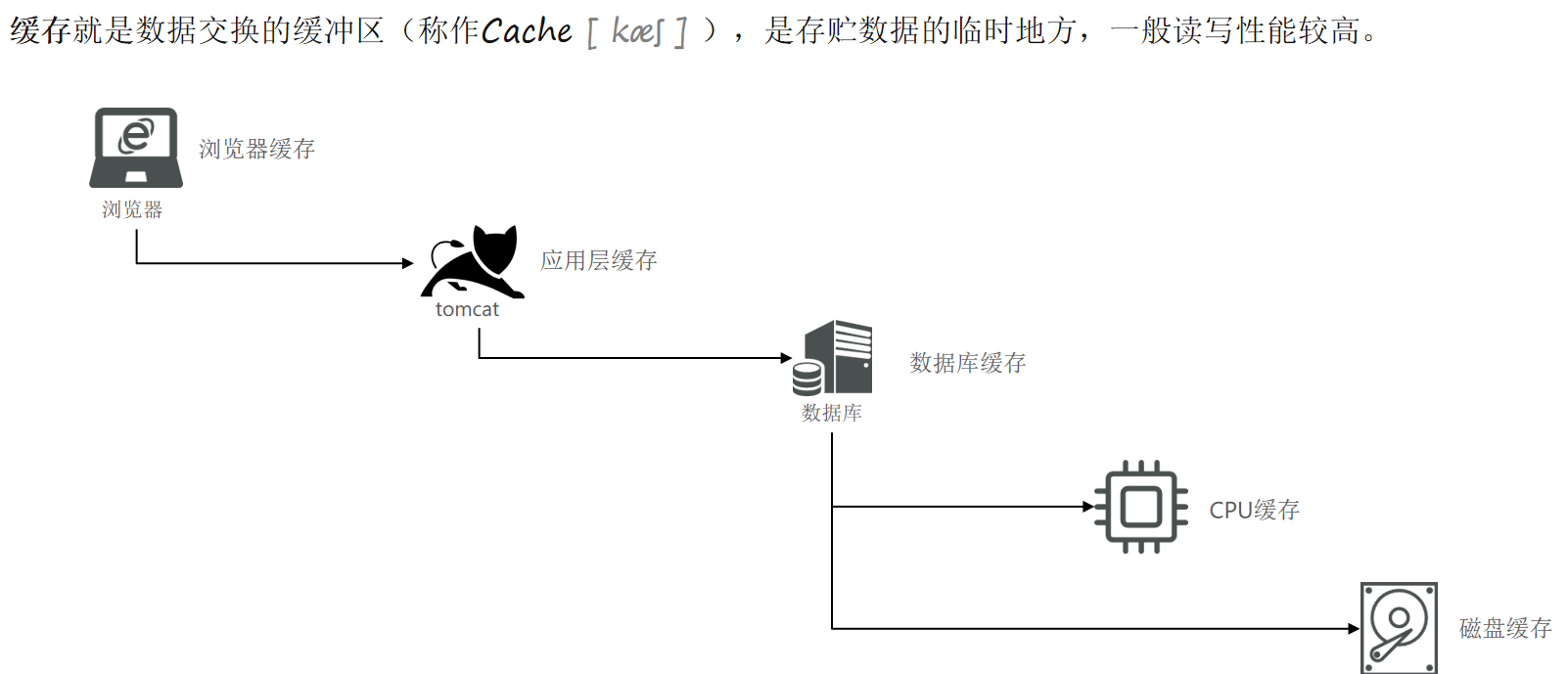
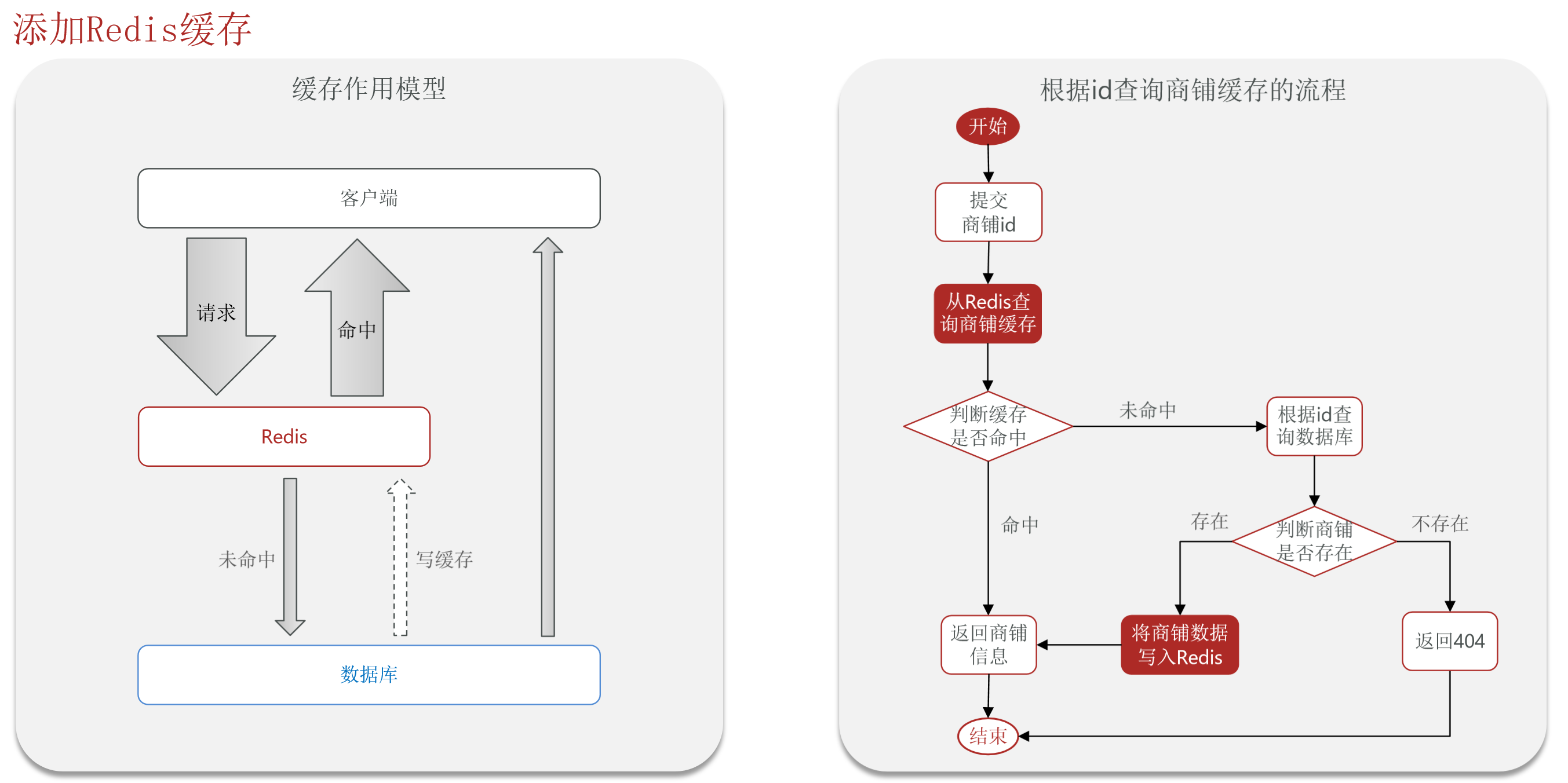
商户查询缓存 缓存 缓存就是数据交换的缓冲区(称作Cache),是存贮数据的临时地方,一般读写性能较高。
缓存的作用:降低后端负载,提高读写效率,降低响应时间。
缓存的成本:数据一致性成本、代码维护成本、运维成本。
添加Redis缓存
给根据id查询商铺添加缓存 1.ShopController。
1 2 3 4 5 6 7 8 9 @GetMapping("/{id}") public Result queryShopById (@PathVariable("id") Long id) {return shopService.queryById(id);
2.IShopService。
1 Result queryById (Long id) ;
3.ShopServiceImpl。
1
2
3
4
5
6
7
8
9
10
11
12
13
14
15
16
17
18
19
20
21
22
23
24
25
26
27
28
29
30
31
32
33
34
package com.hmdp.service.impl;@Service public class ShopServiceImpl extends ServiceImpl <ShopMapper, Shop> implements IShopService {@Resource private StringRedisTemplate stringRedisTemplate;public ShopServiceImpl (StringRedisTemplate stringRedisTemplate) {@Override public Result queryById (Long id) {String key = CACHE_SHOP_KEY + id;String shopJson = stringRedisTemplate.opsForValue().get(key);if (StrUtil.isNotBlank(shopJson)){Shop shop = JSONUtil.toBean(shopJson, Shop.class);return Result.ok(shop);Shop shop = getById(id);if (shop == null ){return Result.fail("店铺不存在" );return Result.ok(shop);
给店铺类型查询业务添加缓存 需求:修改ShopTypeController中的queryTypeList方法,添加查询缓存。
参考链接:
【黑马点评】给店铺类型查询业务添加缓存【业务实现】_黑马点评商品类型-CSDN博客
【黑马点评】实战篇-作业-店铺类型缓存-List实现 - chendsome - 博客园
1.ShopTypeController。
1
2
3
4
5
6
@GetMapping("list") public Result queryTypeList () {return typeService.queryTypeList();
2.IShopTypeService。
3.ShopTypeServiceImpl。
1
2
3
4
5
6
7
8
9
10
11
12
13
14
15
16
17
18
19
20
21
22
23
24
25
26
27
28
29
30
package com.hmdp.service.impl;@Service public class ShopTypeServiceImpl extends ServiceImpl <ShopTypeMapper, ShopType> implements IShopTypeService {@Resource private StringRedisTemplate stringRedisTemplate;@Override public Result queryTypeList () {String shopType = stringRedisTemplate.opsForValue().get(RedisConstants.CACHE_SHOPTYPE_KEY);if (StrUtil.isNotBlank(shopType)) {return Result.ok(shopTypes);"sort" ).list();if (shopTypes == null ) {return Result.fail("分类不存在" );return Result.ok(shopTypes);
缓存更新策略
内存淘汰 超时剔除 主动更新
说明 不用自己维护,利用Redis的内存淘汰机制,当内存不足时自动淘汰部分数据。下次查询时更新缓存。
给缓存数据添加TTL时间,到期后自动删除缓存。下次查询时更新缓存。
编写业务逻辑,在修改数据库的同时,更新缓存。
一致性 差
一般
好
维护成本 无
低
高
业务场景:
低一致性 需求:使用内存淘汰 机制。例如店铺类型的查询缓存。高一致性 需求:主动更新 ,并以超时剔除 作为兜底方案。例如店铺详情查询的缓存。
主动更新策略 1. Cache Aside Pattern 由缓存的调用者,在更新数据库的同时更新缓存。
操作缓存和数据库时有三个问题需要考虑:
删除缓存还是更新缓存:选择删除缓存 。
更新缓存:每次更新数据库都更新缓存,无效写操作较多。
删除缓存:更新数据库时让缓存失效,查询时再更新缓存 。
如何保证缓存与数据库的操作的同时成功或失败?
单体系统,将缓存与数据库操作放在一个事务。
分布式系统,利用TCC等分布式事务方案。
先操作缓存还是先操作数据库:先写数据库,然后再删除缓存 。
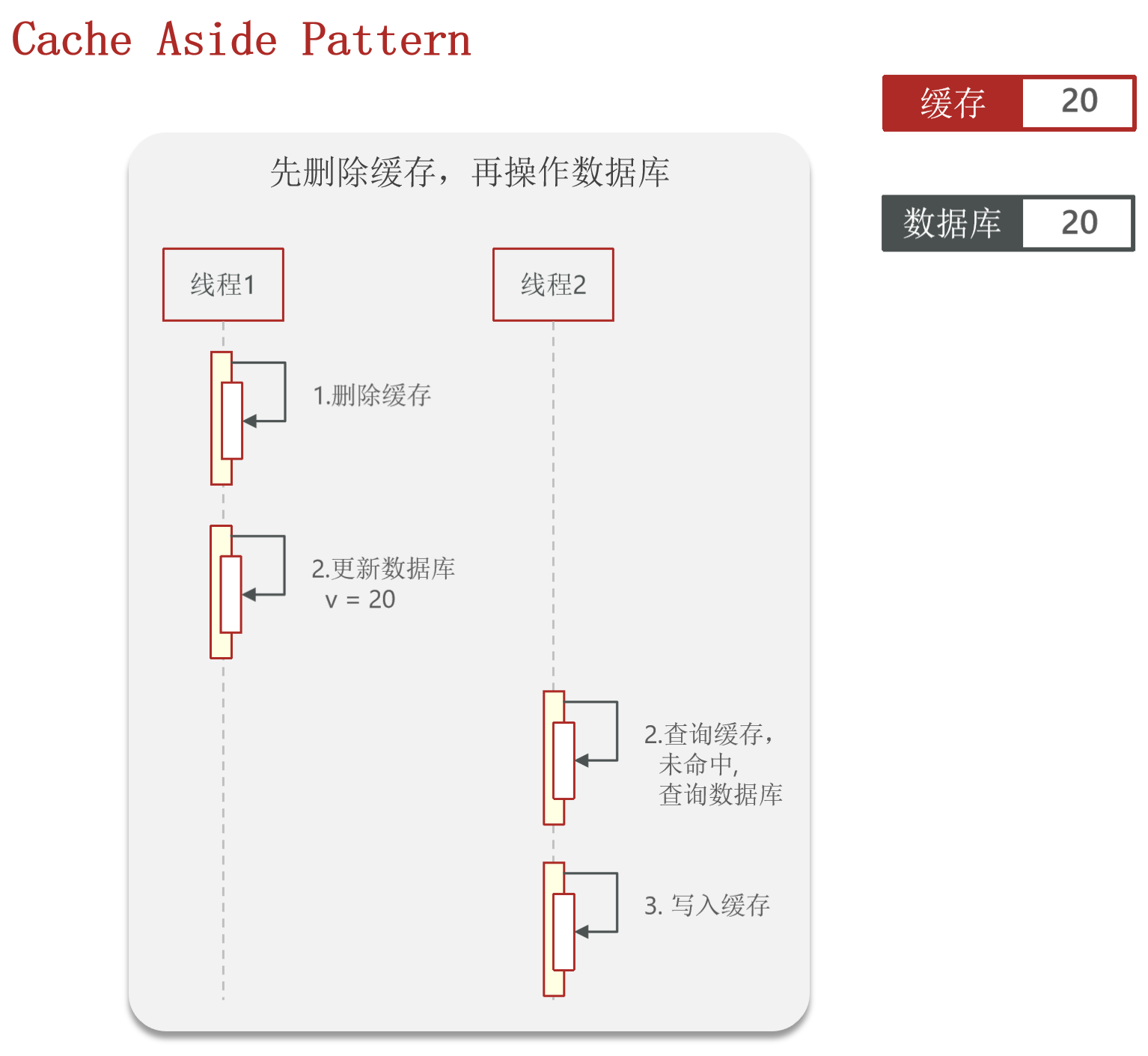
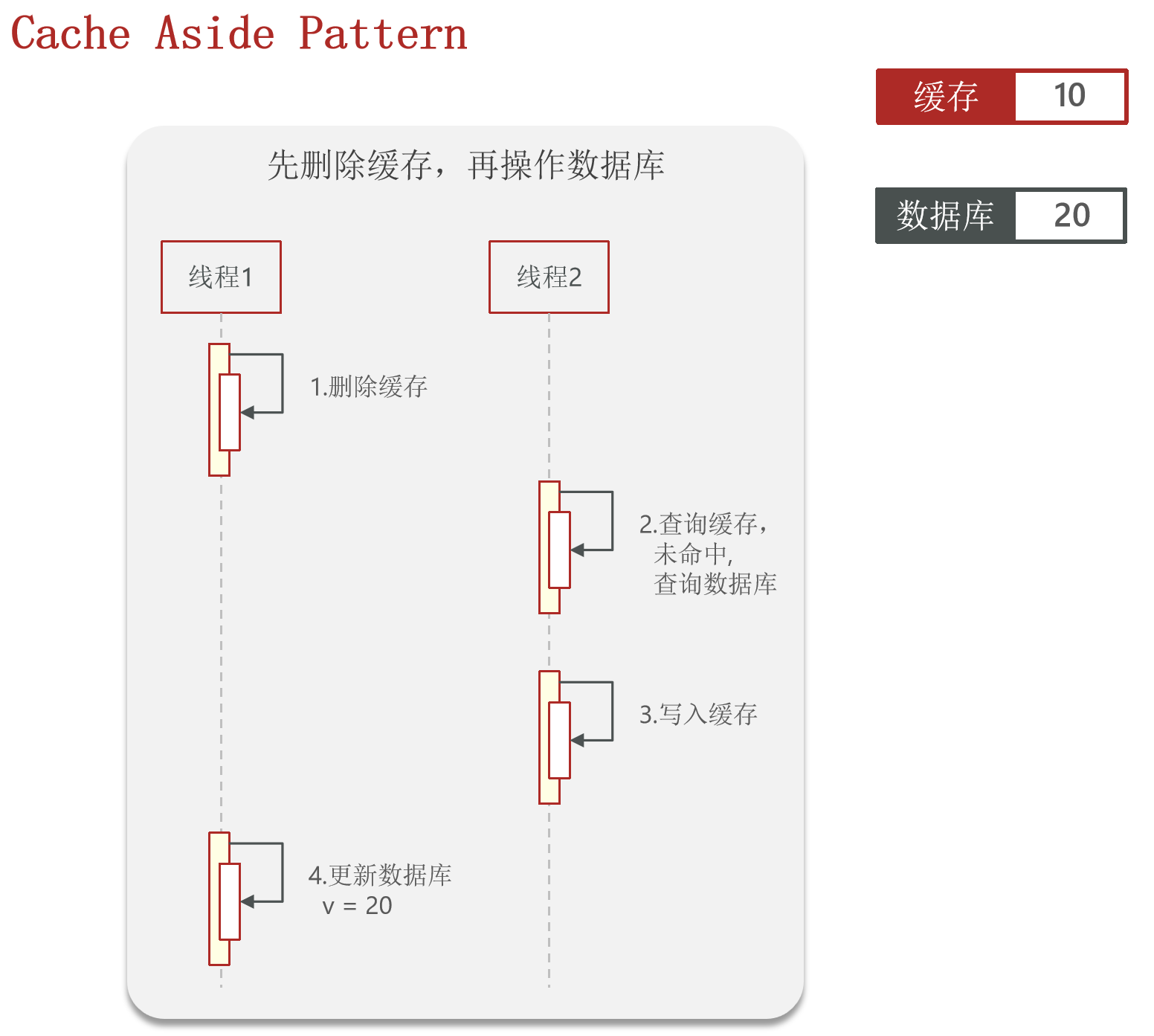
先删除缓存,再操作数据库。
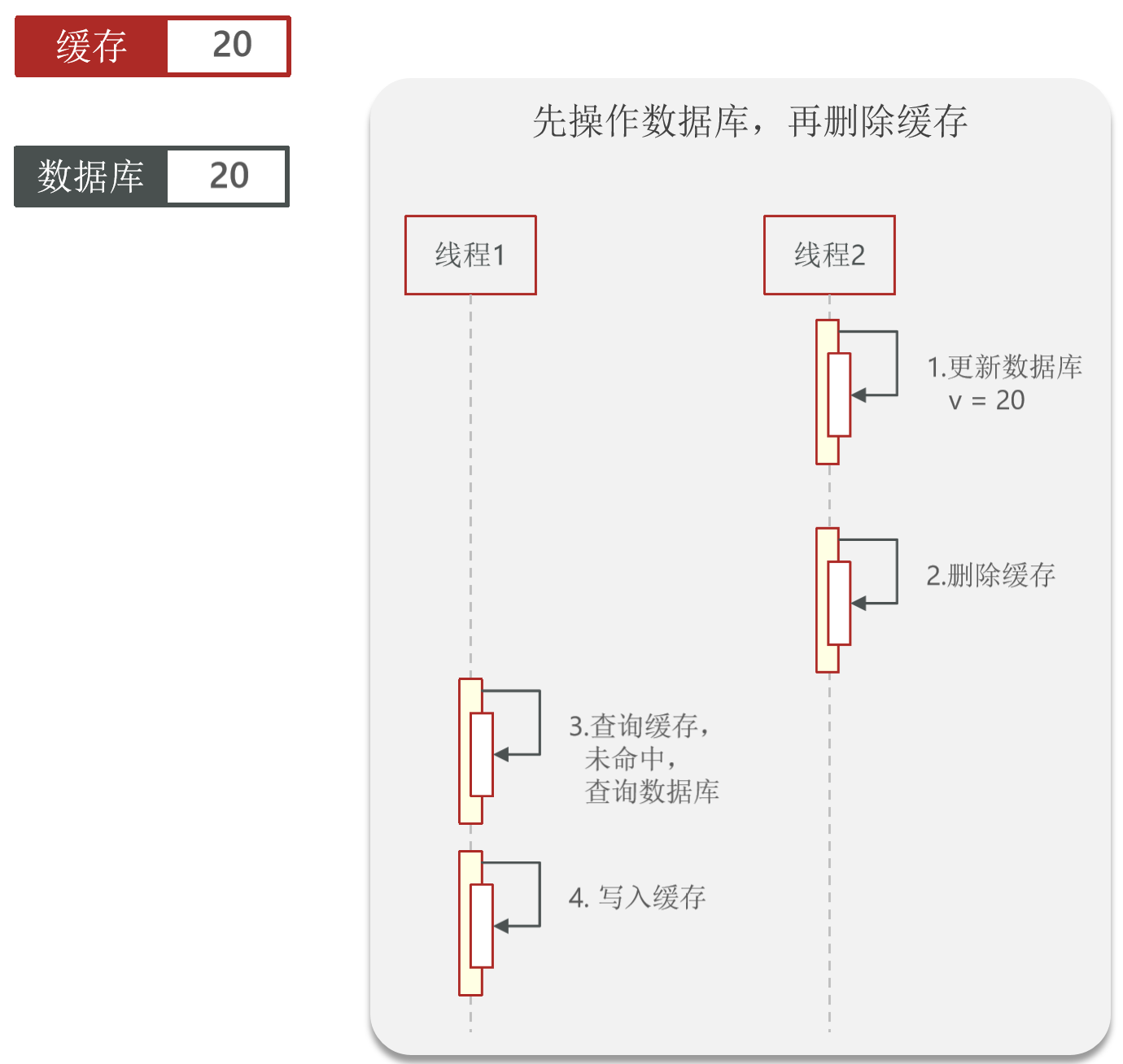
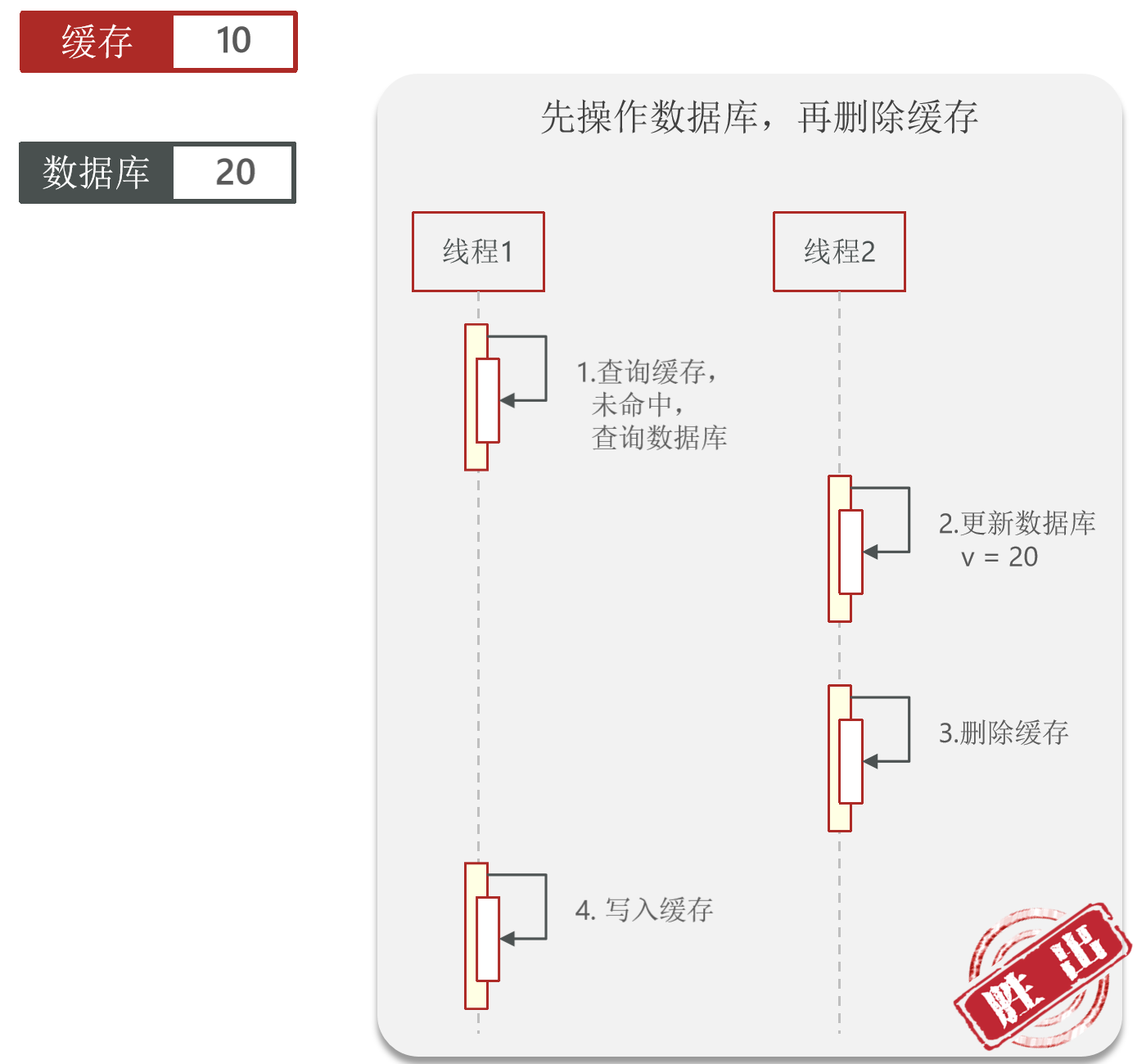
先操作数据库,再删除缓存。
案例:
1.一开始缓存和数据库均为10,正常操作的流程如下:线程1删除缓存后更新数据库为20,此时线程2查询缓存,未命中之后查询数据库,得到的值为20,将该值写入缓存。在这种情况下两次得到的值都是正确的。
2.一开始缓存和数据库均为10,线程1执行先删除缓存再更新数据库的操作。当线程1删除缓存后,更新数据库之前,此时线程2查询缓存,未命中并查询数据库,得到的值为20,并将20写入缓存。在线程2操作完毕之后,线程1更新数据库为20,此时缓存和数据库的值不一样,就造成了数据不一致的情况。
这种情况发生的可能性会比较高,因为更新数据库的操作会比较长,此时线程2更容易进来执行。
3.开始缓存和数据库均为10,正常操作的流程如下:线程2更新数据库为20,然后再将缓存删除,此时线程1查询缓存,未命中之后查询数据库,得到的值为20,将该值写入缓存。在这种情况下两次得到的值都是正确的。
4.一开始缓存和数据库均为10,线程2执行先更新数据库再删除缓存的操作。首先线程1查询缓存,未命中并查询数据库值为10。此时线程2更新数据库为20,并删除缓存。此时切换到线程1执行写入缓存的操作,因为之前线程1查询缓存结果为10,此时写入缓存的值为10。此时缓存和数据库的值不一样,就造成了数据不一致的情况。
这种情况发生的可能性非常低,因为写入缓存的操作非常快,而更新数据库的操作时间较长,此时几乎不会切换到线程2执行更新数据库操作之后再切换到进程1更新缓存,而是直接在线程1更新缓存。
综上分析,选择先操作数据库,再删除缓存 的方式进行更新。
2. Read/Write Through Pattern 缓存与数据库整合为一个服务,由服务来维护一致性 。调用者调用该服务,无需关心缓存一致性问题。
3. Write Behind Caching Pattern 调用者只操作缓存 ,由其它线程异步的将缓存数据持久化到数据库 ,保证最终一致。
缓存更新策略的最佳实践方案
低一致性需求:使用Redis自带的内存淘汰 机制。
高一致性需求:主动更新 ,并以超时剔除 作为兜底方案。
读操作:
缓存命中则直接返回。
缓存未命中则查询数据库,并写入缓存,设定超时时间。
写操作:
先写数据库,然后再删除缓存 。要确保数据库与缓存操作的原子性 。
给查询商铺的缓存添加超时剔除和主动更新的策略 修改ShopController中的业务逻辑,满足下面的需求:
根据id查询店铺时,如果缓存未命中,则查询数据库,将数据库结果写入缓存,并设置超时时间。
ShopServiceImpl中queryById设置超时时间:
1
2
3
4
5
6
7
8
9
10
11
12
13
14
15
16
17
18
19
20
21
22
@Override public Result queryById (Long id) {String key = CACHE_SHOP_KEY + id;String shopJson = stringRedisTemplate.opsForValue().get(key);if (StrUtil.isNotBlank(shopJson)){Shop shop = JSONUtil.toBean(shopJson, Shop.class);return Result.ok(shop);Shop shop = getById(id);if (shop == null ){return Result.fail("店铺不存在" );return Result.ok(shop);
测试方法 :查看Redis下过期时间是否更新。
1.ShopController。
1
2
3
4
5
6
@PutMapping public Result updateShop (@RequestBody Shop shop) {return shopService.update(shop);
2.IShopService。
1 Result update (Shop shop) ;
3.ShopServiceImpl。
1
2
3
4
5
6
7
8
9
10
11
12
13
14
@Override @Transactional public Result update (Shop shop) {Long id = shop.getId();if (id == null ){return Result.fail("店铺id不能为空" );return Result.ok();
测试方法 :
通过Postman更新店铺:http://localhost:8080/api/shop,使用PUT方法,使用raw填写JSON修改数据:
1
2
3
4
5
6
7
8
9
10
11
12
{ "area" : "大关" , "openHours" : "10:00-22:00" , "sold" : 4215 , "address" : "金华路锦昌文华苑29号" , "comments" : 3035 , "avgPrice" : 80 , "score" : 37 , "name" : "101茶餐厅" , "typeId" : 1 , "id" : 1 }
修改之后再次查看数据,会发现缓存已经被删除。此时重新查询数据库,并写入缓存。以后再访问则直接访问缓存。
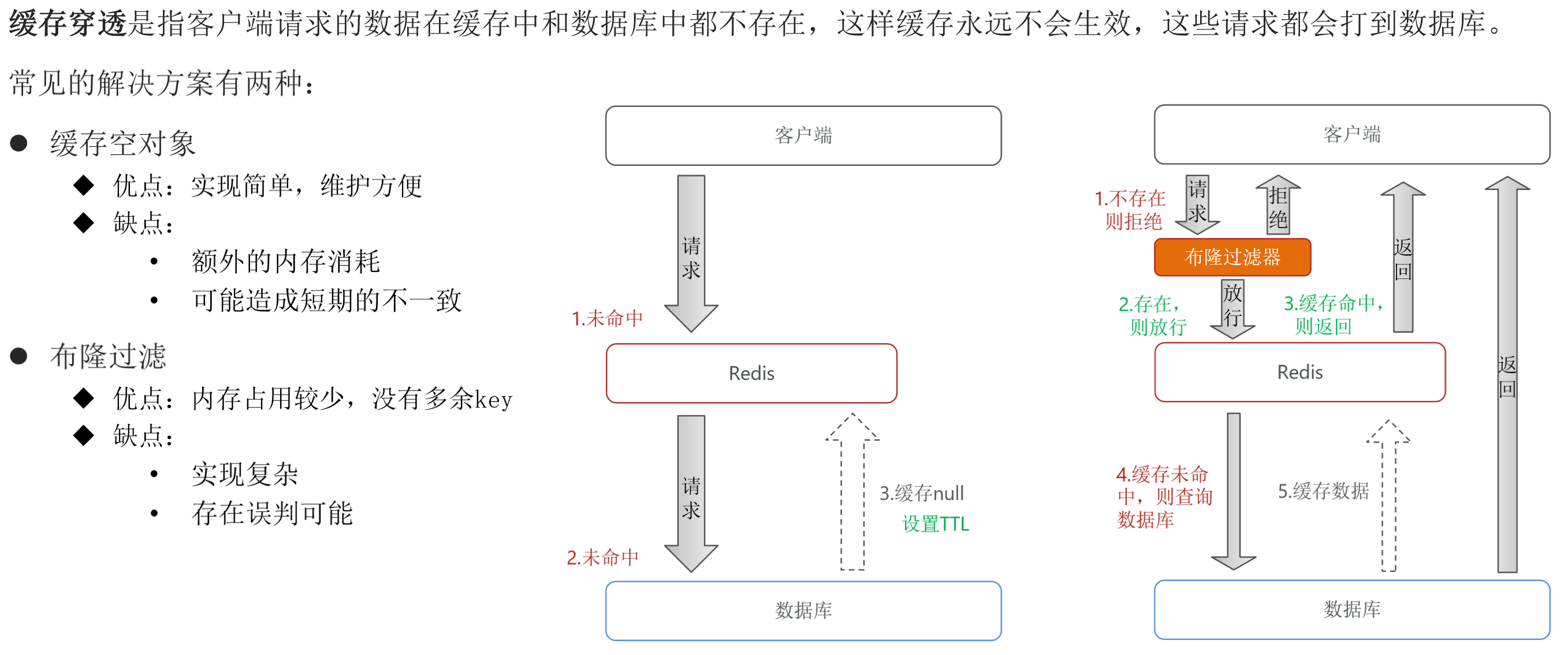
缓存穿透 缓存穿透 是指客户端请求的数据在缓存中和数据库中都不存在,这样缓存永远不会生效,这些请求都会打到数据库 。
常见的解决方案有两种:
缓存空对象
布隆过滤
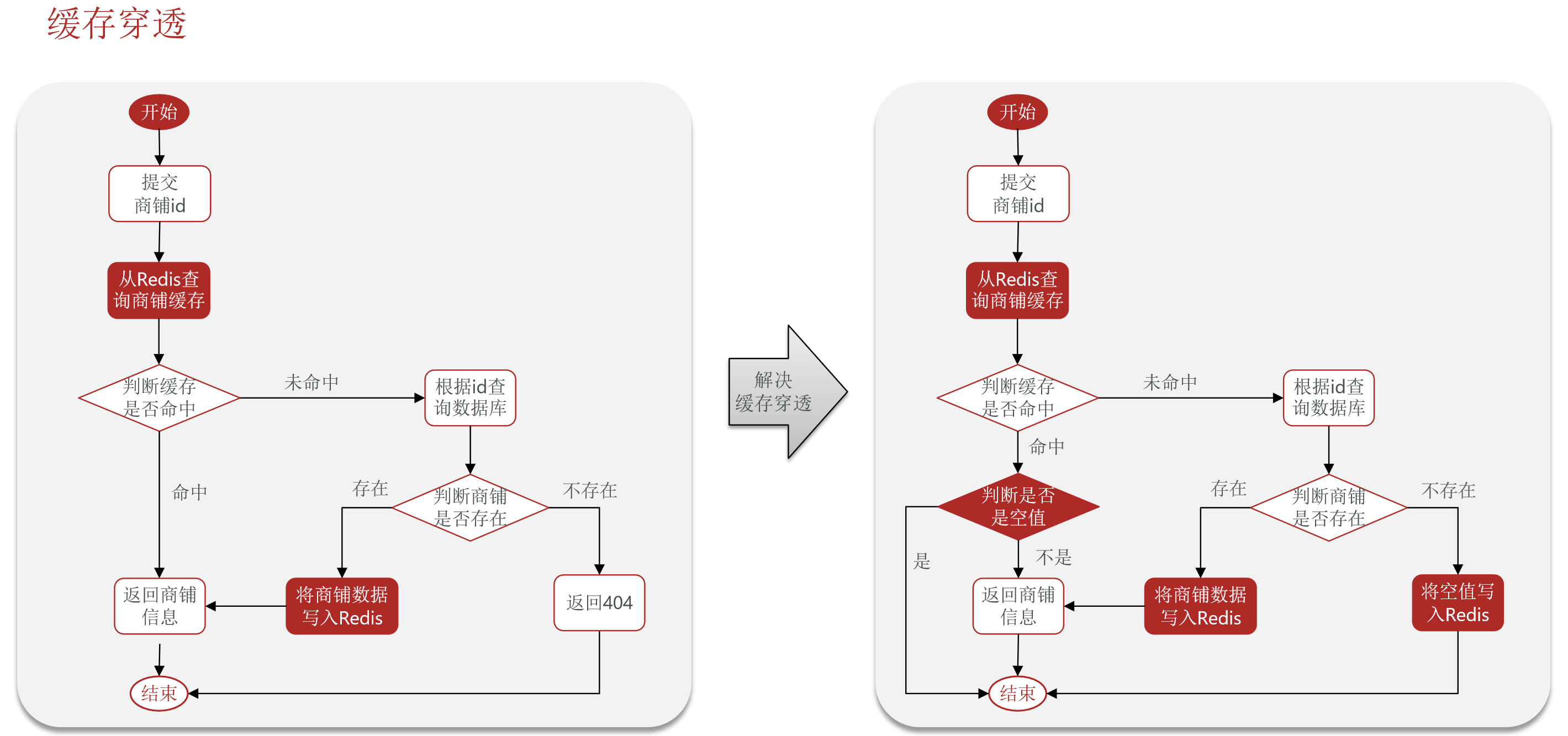
使用缓存空对象解决缓存穿透
1
2
3
4
5
6
7
8
9
10
11
12
13
14
15
16
17
18
19
20
21
22
23
24
25
26
27
28
29
@Override public Result queryById (Long id) {String key = CACHE_SHOP_KEY + id;String shopJson = stringRedisTemplate.opsForValue().get(key);if (StrUtil.isNotBlank(shopJson)){Shop shop = JSONUtil.toBean(shopJson, Shop.class);return Result.ok(shop);if (shopJson != null ){return Result.fail("店铺信息不存在" );Shop shop = getById(id);if (shop == null ){"" , CACHE_NULL_TTL, TimeUnit.MINUTES);return Result.fail("店铺不存在" );return Result.ok(shop);
测试方法:
访问不存在的店铺id为0,链接:http://localhost:8080/api/shop/0
第一次访问时,查询了数据库,并将空值存入缓存。后续访问均不查询数据库,直接访问缓存,直到缓存过期再重新访问数据库。
总结 缓存穿透产生的原因:用户请求的数据在缓存中和数据库中都不存在,不断发起这样的请求,给数据库带来巨大压力。
缓存穿透的解决方案有哪些?
缓存null值
布隆过滤
增强id的复杂度,避免被猜测id规律
做好数据的基础格式校验
加强用户权限校验
做好热点参数的限流
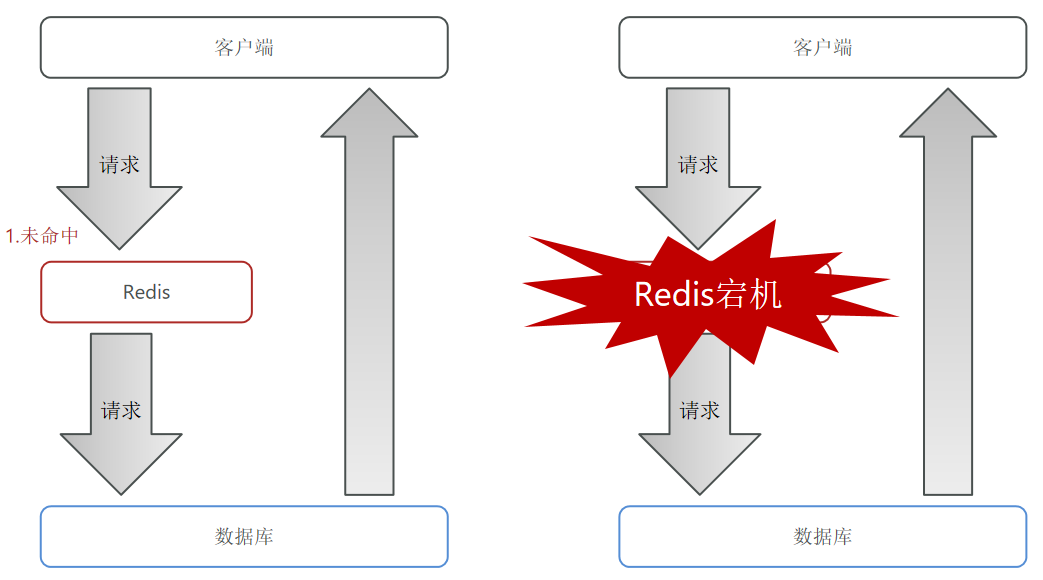
缓存雪崩 缓存雪崩是指在同一时段大量的缓存key同时失效或者Redis服务宕机,导致大量请求到达数据库,带来巨大压力。
解决方案:
给不同的Key的TTL添加随机值(针对key同时失效。在批量导入key的时候,给TTL后面加入随机数,比如设置有效期为30分钟,可以随机加上1-5分钟,使得TTL在30-35之间波动,可以使key失效的时间在一个时间段内,而不是一起失效。)
利用Redis集群提高服务的可用性(针对Redis服务宕机,比如Redis哨兵机制)
给缓存业务添加降级限流策略(提前做好容错处理,当发现Redis故障时,及时做服务降级,快速失败拒绝服务。而不是把请求压到数据库,这样子做牺牲部分服务,保护数据库。)
给业务添加多级缓存(浏览器、nginx、redis、jvm、数据库多个层面进行缓存。)
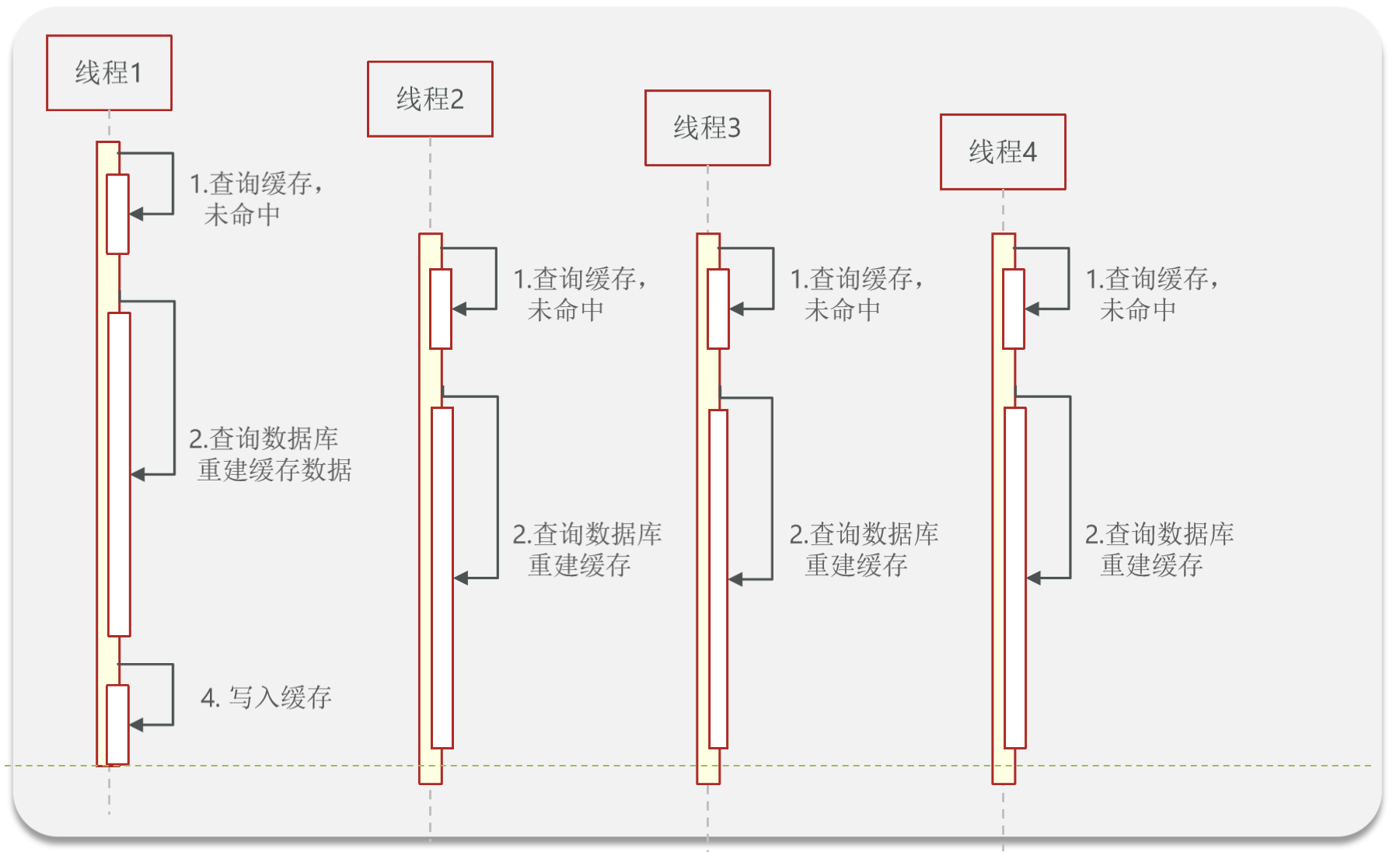
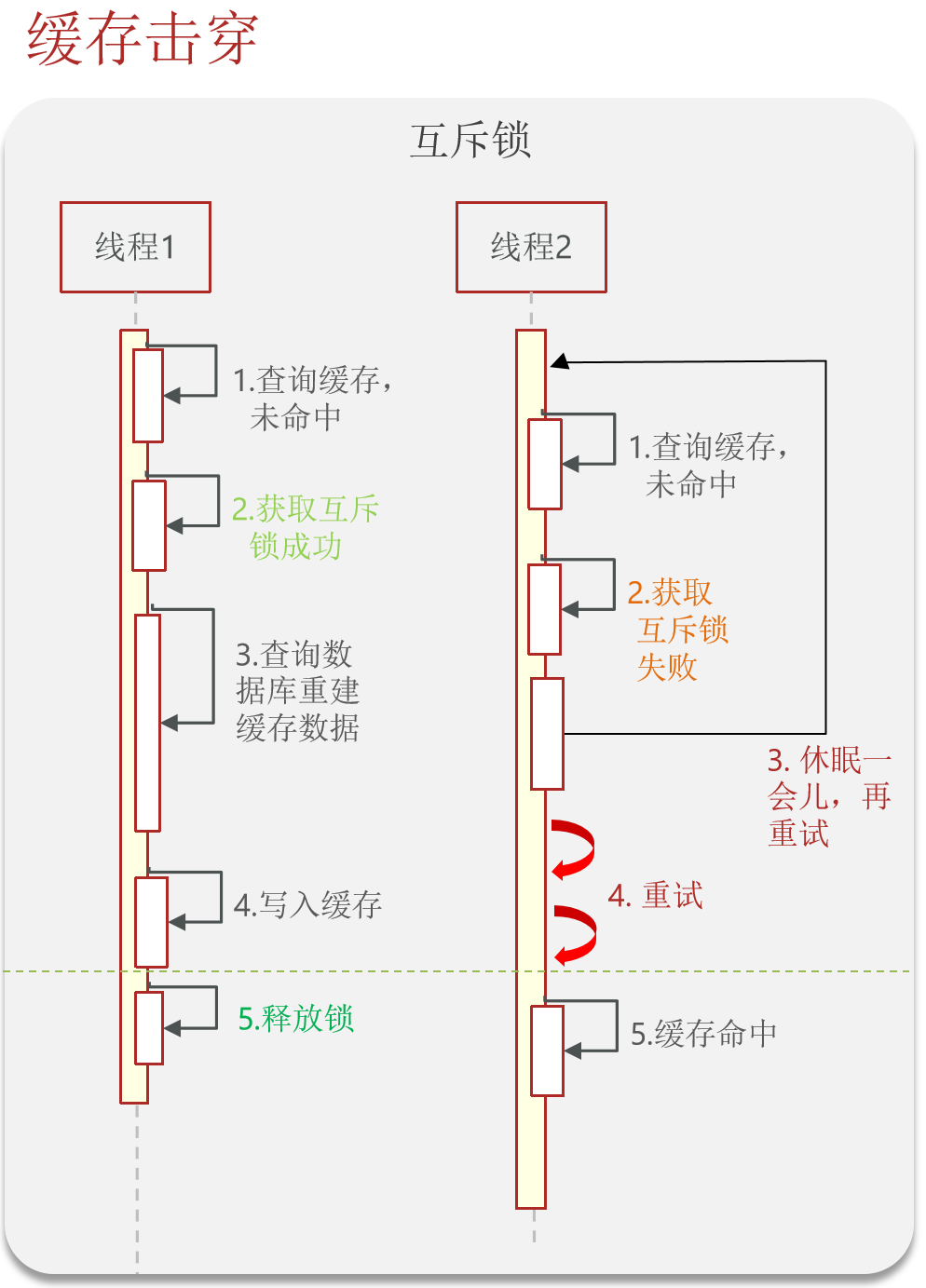
缓存击穿 缓存击穿问题 也叫热点Key问题 ,就是一个被高并发访问并且缓存重建业务较复杂的key突然失效了,无数的请求访问会在瞬间给数据库带来巨大的冲击。
常见的解决方案有两种:
解决方案 优点 缺点
互斥锁 没有额外的内存消耗保证一致性实现简单
线程需要等待,性能受影响可能有死锁风险
逻辑过期 线程无需等待,性能较好
不保证一致性有额外内存消耗实现复杂
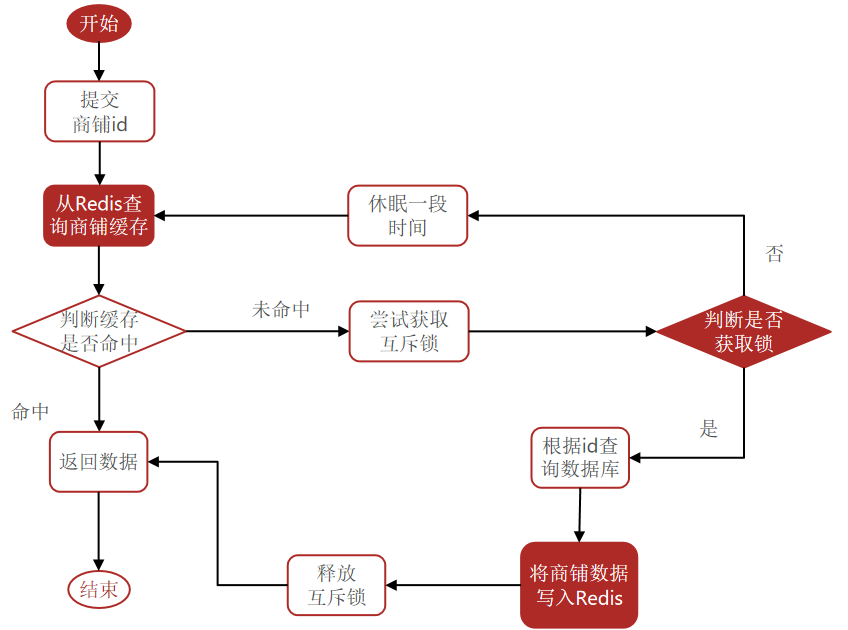
互斥锁
代码 案例:基于互斥锁方式解决缓存击穿问题
需求:修改根据id查询商铺的业务,基于互斥锁方式来解决缓存击穿问题。
1
2
3
4
5
6
7
8
9
10
11
12
13
14
15
16
17
18
19
20
21
22
23
24
25
26
27
28
29
30
31
32
33
34
35
36
37
38
39
40
41
42
43
44
45
46
47
48
49
50
51
52
53
54
55
56
57
58
59
60
61
62
63
64
65
66
67
68
69
70
71
72
73
74
75
76
77
78
79
80
81
82
83
84
85
86
87
88
89
90
91
92
93
94
95
96
97
98
99
100
101
102
103
104
105
106
107
108
109
110
111
112
113
114
115
116
117
118
119
120
121
122
123
124
125
126
127
128
129
130
131
132
133
134
135
136
137
138
139
140
141
142
package com.hmdp.service.impl;@Service public class ShopServiceImpl extends ServiceImpl <ShopMapper, Shop> implements IShopService {@Resource private StringRedisTemplate stringRedisTemplate;public ShopServiceImpl (StringRedisTemplate stringRedisTemplate) {@Override public Result queryById (Long id) {Shop shop = queryWithMutex(id);if (shop == null ){return Result.fail("店铺不存在!" );return Result.ok(shop);public Shop queryWithMutex (Long id) {String key = CACHE_SHOP_KEY + id;String shopJson = stringRedisTemplate.opsForValue().get(key);if (StrUtil.isNotBlank(shopJson)){return JSONUtil.toBean(shopJson, Shop.class);if (shopJson != null ){return null ;String lockKey = null ;Shop shop = null ;try {boolean isLock = tryLock(lockKey);if (!isLock){50 );return queryWithMutex(id);if (StrUtil.isNotBlank(shopJson)){return JSONUtil.toBean(shopJson, Shop.class);200 );if (shop == null ){"" , CACHE_NULL_TTL, TimeUnit.MINUTES);return null ;catch (InterruptedException e) {finally {return shop;public Shop queryWithPassThrough (Long id) {String key = CACHE_SHOP_KEY + id;String shopJson = stringRedisTemplate.opsForValue().get(key);if (StrUtil.isNotBlank(shopJson)){return JSONUtil.toBean(shopJson, Shop.class);if (shopJson != null ){return null ;Shop shop = getById(id);if (shop == null ){"" , CACHE_NULL_TTL, TimeUnit.MINUTES);return null ;return shop;private boolean tryLock (String key) {Boolean flag = stringRedisTemplate.opsForValue().setIfAbsent(key, "1" , 10 , TimeUnit.SECONDS);return BooleanUtil.isTrue(flag);private void unlock (String key) {@Override @Transactional public Result update (Shop shop) {Long id = shop.getId();if (id == null ){return Result.fail("店铺id不能为空" );return Result.ok();
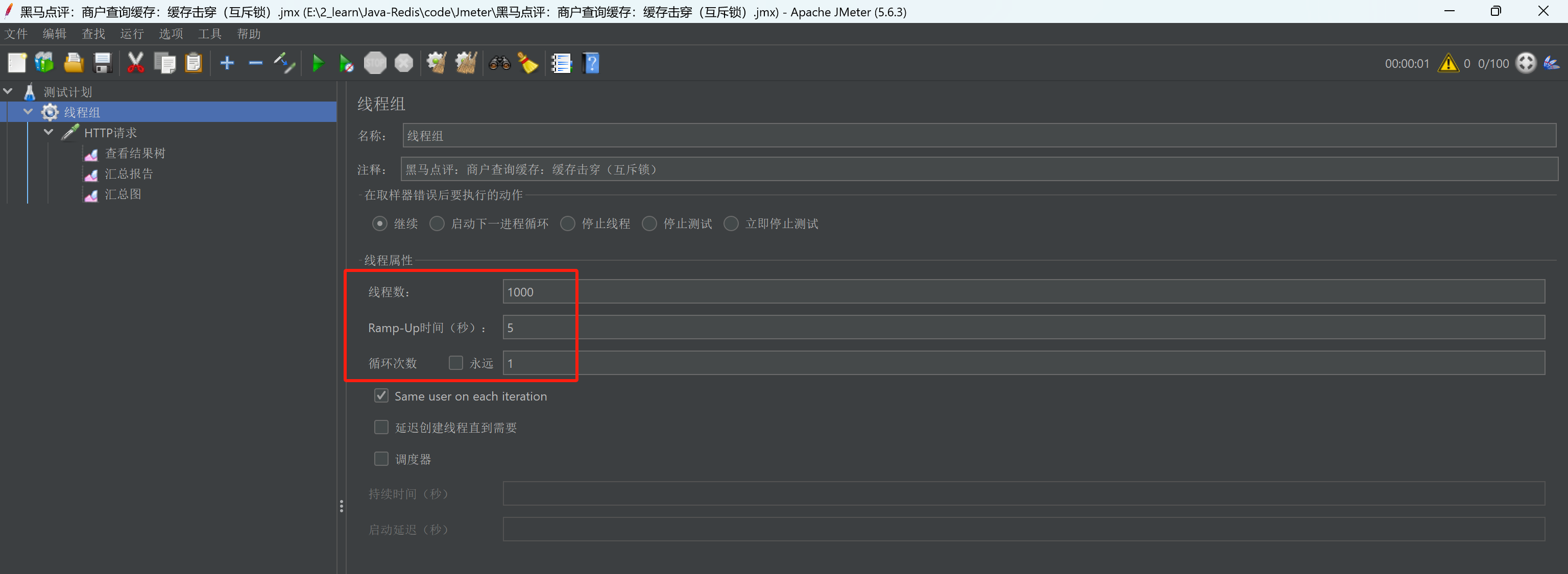
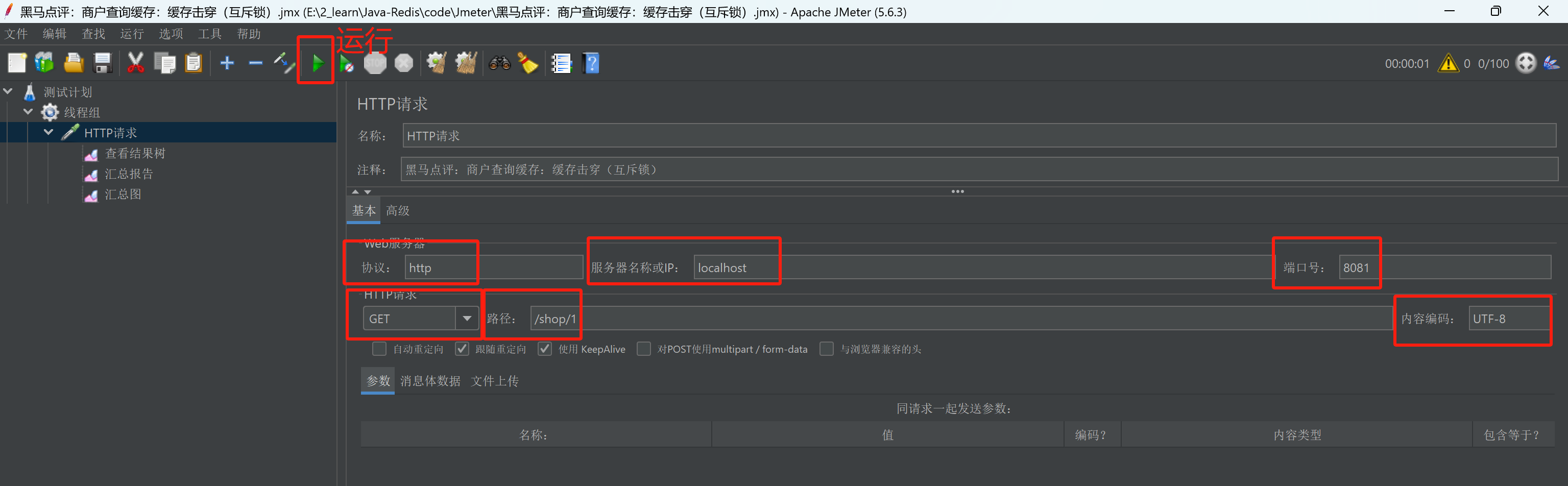
测试 1.使用Jmeter进行测试,定义线程组,设置1000个线程,执行时间为5s。
2.填写HTTP请求,然后点击运行。
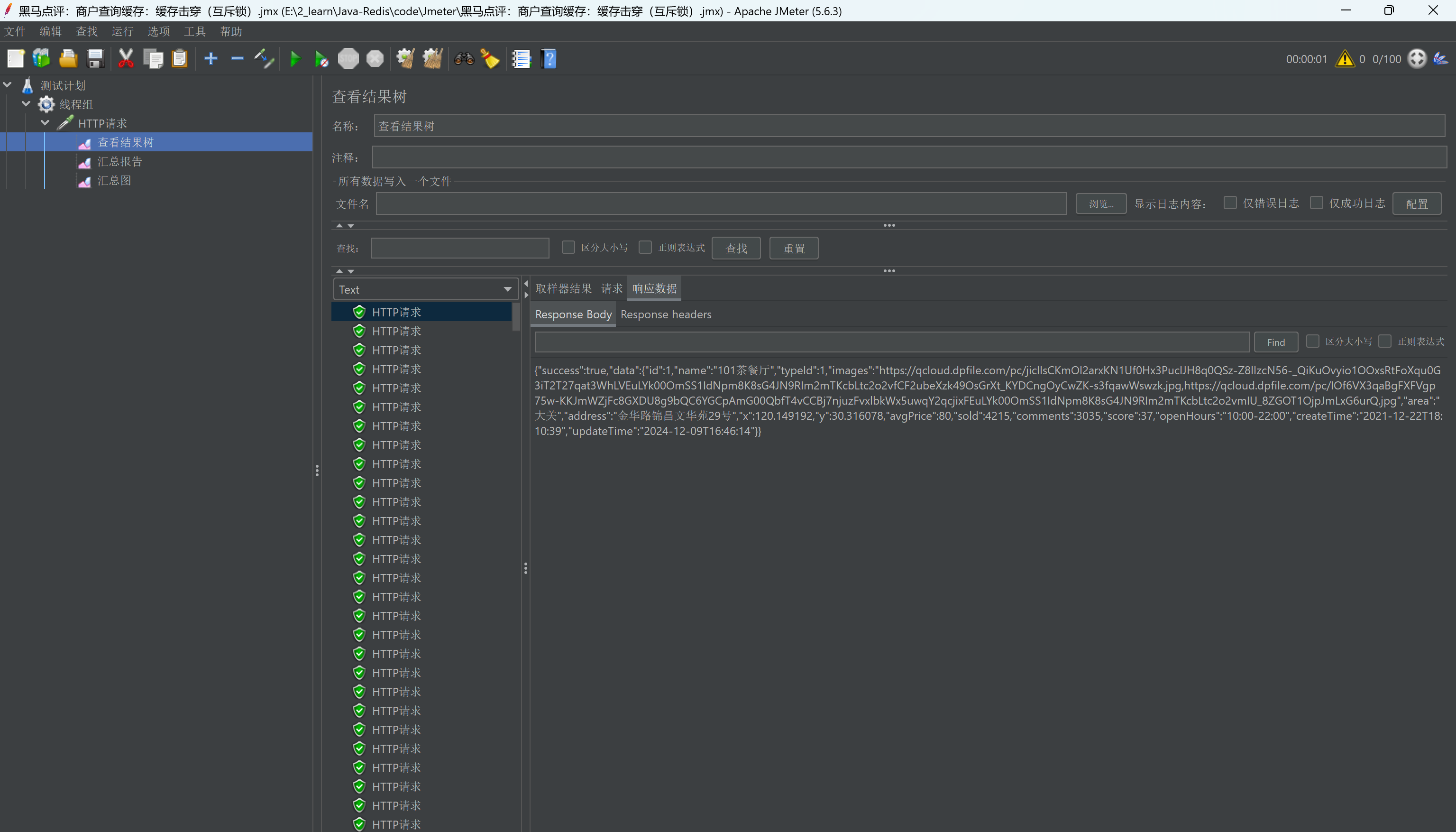
3.运行结束后在查看结果树中查看运行的结果。
4.查看后台程序,可以发现访问数据库语句只执行了一条,说明互斥锁程序没有问题。
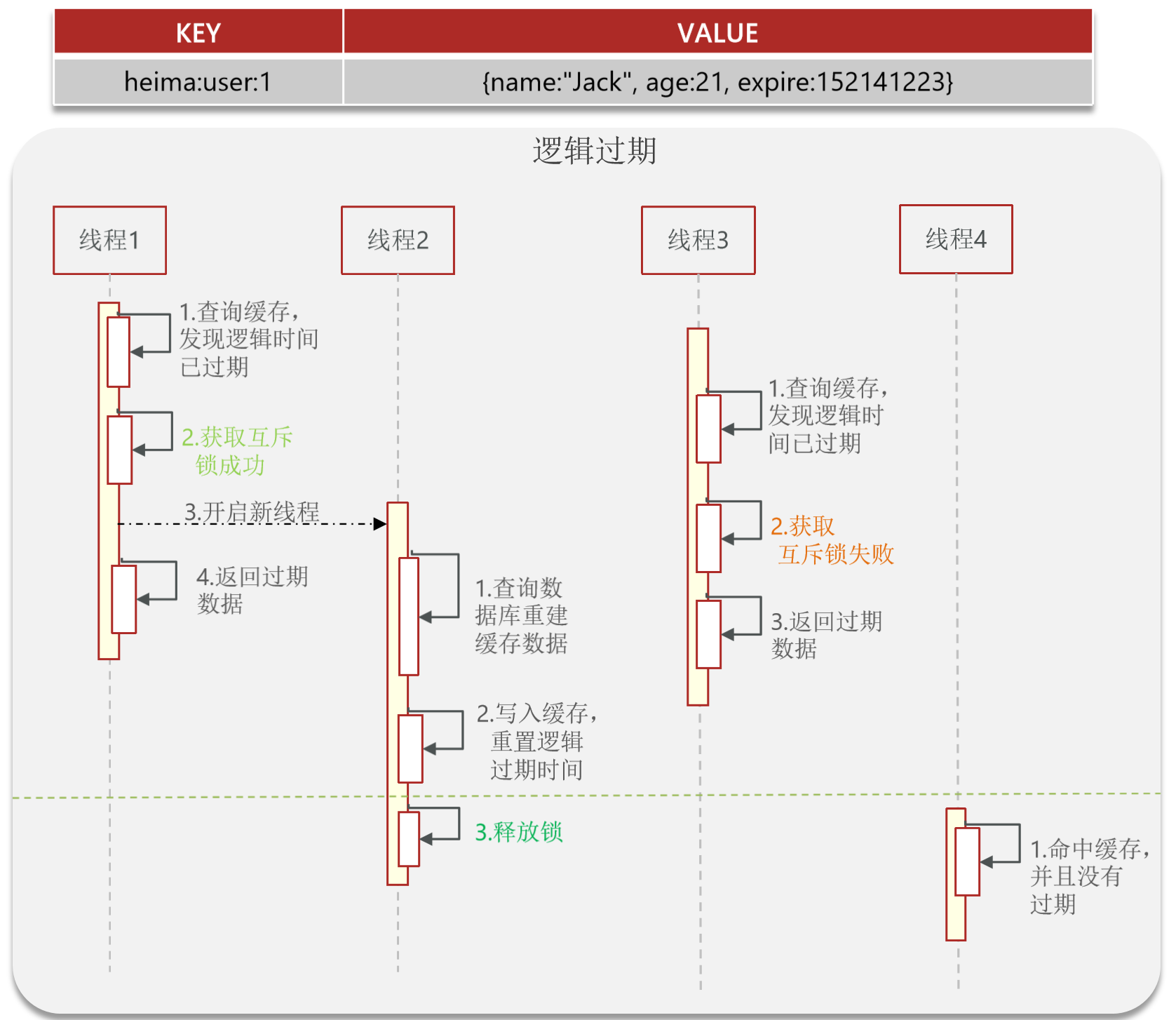
逻辑过期
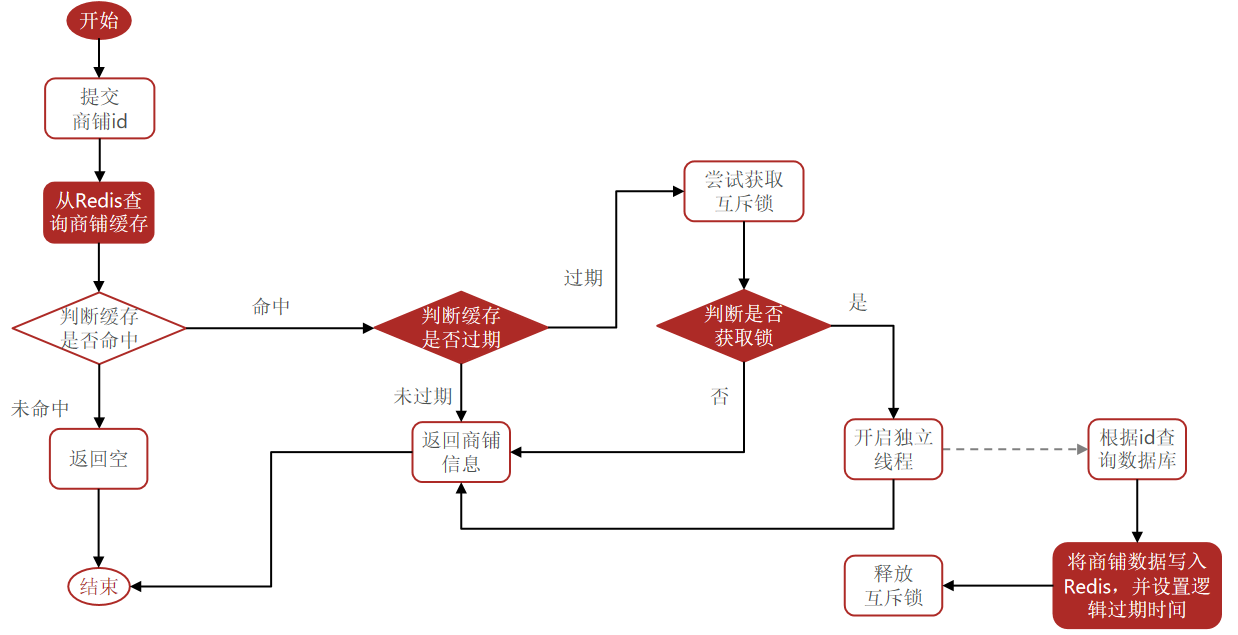
代码 案例:基于逻辑过期方式解决缓存击穿问题
需求:修改根据id查询商铺的业务,基于逻辑过期方式来解决缓存击穿问题。
注意: 因为会在测试时,提前准备好数据,所以上述如果访问缓存不命中的话,直接返回空,然后在test方法中,调用ShopServiceImpl的saveShop2Redis方法提前在缓存中准备好数据。
1
2
3
4
5
6
7
8
9
10
11
12
package com.hmdp;@SpringBootTest class HmDianPingApplicationTests {@Resource private ShopServiceImpl shopService;@Test void testSaveShop () throws InterruptedException {1L , 10L );
ShopServiceImpl。
1
2
3
4
5
6
7
8
9
10
11
12
13
14
15
16
17
18
19
20
21
22
23
24
25
26
27
28
29
30
31
32
33
34
35
36
37
38
39
40
41
42
43
44
45
46
47
48
49
50
51
52
53
54
55
56
57
58
59
60
61
62
63
64
65
66
67
68
69
70
71
72
73
74
75
76
77
78
79
80
81
82
83
84
85
86
87
88
89
90
91
92
93
94
95
96
97
98
99
100
101
102
103
104
105
106
107
108
109
110
111
112
113
114
115
116
117
118
119
120
121
122
123
124
125
126
127
128
129
130
131
132
133
134
135
136
137
138
139
140
141
142
143
144
145
146
147
148
149
150
151
152
153
154
155
156
157
158
159
160
161
162
163
164
165
166
167
168
169
170
171
172
173
174
175
176
177
178
179
180
181
182
183
184
185
186
187
188
189
190
191
192
193
194
195
196
197
198
199
200
201
202
203
204
205
206
207
208
209
210
211
212
213
214
215
216
217
218
219
220
221
package com.hmdp.service.impl;@Service public class ShopServiceImpl extends ServiceImpl <ShopMapper, Shop> implements IShopService {@Resource private StringRedisTemplate stringRedisTemplate;public ShopServiceImpl (StringRedisTemplate stringRedisTemplate) {@Override public Result queryById (Long id) {Shop shop = queryWithLogicalExpire(id);if (shop == null ){return Result.fail("店铺不存在!" );return Result.ok(shop);private static final ExecutorService CACHE_REBUILD_EXECUTOR = Executors.newFixedThreadPool(10 );public Shop queryWithLogicalExpire (Long id) {String key = CACHE_SHOP_KEY + id;String shopJson = stringRedisTemplate.opsForValue().get(key);if (StrUtil.isBlank(shopJson)){return null ;RedisData redisData = JSONUtil.toBean(shopJson, RedisData.class);Shop shop = JSONUtil.toBean((JSONObject) redisData.getData(), Shop.class);LocalDateTime expireTime = redisData.getExpireTime();if (expireTime.isAfter(LocalDateTime.now())){return shop;String lockKey = LOCK_SHOP_KEY + id;boolean isLock = tryLock(lockKey);if (isLock){if (expireTime.isAfter(LocalDateTime.now())){return shop;try {this .saveShop2Redis(id, 20L );catch (Exception e) {finally {return shop;public Shop queryWithMutex (Long id) {String key = CACHE_SHOP_KEY + id;String shopJson = stringRedisTemplate.opsForValue().get(key);if (StrUtil.isNotBlank(shopJson)){return JSONUtil.toBean(shopJson, Shop.class);if (shopJson != null ){return null ;String lockKey = null ;Shop shop = null ;try {boolean isLock = tryLock(lockKey);if (!isLock){50 );return queryWithMutex(id);if (StrUtil.isNotBlank(shopJson)){return JSONUtil.toBean(shopJson, Shop.class);200 );if (shop == null ){"" , CACHE_NULL_TTL, TimeUnit.MINUTES);return null ;catch (InterruptedException e) {finally {return shop;public Shop queryWithPassThrough (Long id) {String key = CACHE_SHOP_KEY + id;String shopJson = stringRedisTemplate.opsForValue().get(key);if (StrUtil.isNotBlank(shopJson)){return JSONUtil.toBean(shopJson, Shop.class);if (shopJson != null ){return null ;Shop shop = getById(id);if (shop == null ){"" , CACHE_NULL_TTL, TimeUnit.MINUTES);return null ;return shop;private boolean tryLock (String key) {Boolean flag = stringRedisTemplate.opsForValue().setIfAbsent(key, "1" , 10 , TimeUnit.SECONDS);return BooleanUtil.isTrue(flag);private void unlock (String key) {public void saveShop2Redis (Long id, Long expireSeconds) throws InterruptedException {Shop shop = getById(id);200 );RedisData redisData = new RedisData ();@Override @Transactional public Result update (Shop shop) {Long id = shop.getId();if (id == null ){return Result.fail("店铺id不能为空" );return Result.ok();
测试 1.使用Jmeter进行测试,定义线程组,设置200个线程,执行时间为1s。
2.填写HTTP请求(和上述互斥锁的一样),然后点击运行。
3.运行结束后在查看结果树中查看运行的结果。
4.查看后台程序,可以发现访问数据库语句只执行了一条,说明互斥锁程序没有问题。
执行流程分析:提前预存好的缓存很快过期(有效期10s),运行Jmeter测试后,当Java程序命中缓存判断缓存失效后,会先返回当前结果,然后再访问数据库更新缓存。所以一开始的Jmeter线程读取到的是过期数据,等过了一段时间完成缓存更新后,Jmeter线程读取到的即为最新数据。
缓存工具封装 基于StringRedisTemplate封装一个缓存工具类,满足下列需求:
方法1:将任意Java对象序列化为json并存储在string类型的key中,并且可以设置TTL过期时间。
方法2:将任意Java对象序列化为json并存储在string类型的key中,并且可以设置逻辑过期时间,用于处理缓存击穿问题。
方法3:根据指定的key查询缓存,并反序列化为指定类型,利用缓存空值的方式解决缓存穿透问题。
方法4:根据指定的key查询缓存,并反序列化为指定类型,需要利用逻辑过期解决缓存击穿问题。
1.缓存工具类:CacheClient。
1
2
3
4
5
6
7
8
9
10
11
12
13
14
15
16
17
18
19
20
21
22
23
24
25
26
27
28
29
30
31
32
33
34
35
36
37
38
39
40
41
42
43
44
45
46
47
48
49
50
51
52
53
54
55
56
57
58
59
60
61
62
63
64
65
66
67
68
69
70
71
72
73
74
75
76
77
78
79
80
81
82
83
84
85
86
87
88
89
90
91
92
93
94
95
96
97
98
99
100
101
102
103
104
105
106
107
108
109
110
111
112
113
114
115
116
117
118
119
120
121
122
123
package com.hmdp.utils;@Slf4j @Component public class CacheClient {private final StringRedisTemplate stringRedisTemplate;public CacheClient (StringRedisTemplate stringRedisTemplate) {this .stringRedisTemplate = stringRedisTemplate;public void set (String key, Object value, Long time, TimeUnit unit) {public void setWithLogicalExpire (String key, Object value, Long time, TimeUnit unit) {RedisData redisData = new RedisData ();public <R, ID> R queryWithPassThrough (String keyPrefix, ID id, Class<R> type, Function<ID, R> dbFallback, Long time, TimeUnit unit) {String key = keyPrefix + id;String json = stringRedisTemplate.opsForValue().get(key);if (StrUtil.isNotBlank(json)) {return JSONUtil.toBean(json, type);if (json != null ) {return null ;R r = dbFallback.apply(id);if (r == null ) {"" , CACHE_NULL_TTL, TimeUnit.MINUTES);return null ;this .set(key, r, time, unit);return r;private static final ExecutorService CACHE_REBUILD_EXECUTOR = Executors.newFixedThreadPool(10 );public <R, ID> R queryWithLogicalExpire (String keyPrefix, ID id, Class<R> type, Function<ID, R> dbFallback, Long time, TimeUnit unit) {String key = keyPrefix + id;String json = stringRedisTemplate.opsForValue().get(key);if (StrUtil.isBlank(json)){return null ;RedisData redisData = JSONUtil.toBean(json, RedisData.class);R r = JSONUtil.toBean((JSONObject) redisData.getData(), type);LocalDateTime expireTime = redisData.getExpireTime();if (expireTime.isAfter(LocalDateTime.now())){return r;String lockKey = LOCK_SHOP_KEY + id;boolean isLock = tryLock(lockKey);if (isLock){if (expireTime.isAfter(LocalDateTime.now())){return r;try {R r1 = dbFallback.apply(id);this .setWithLogicalExpire(key, r1, time, unit);catch (Exception e) {finally {return r;private boolean tryLock (String key) {Boolean flag = stringRedisTemplate.opsForValue().setIfAbsent(key, "1" , 10 , TimeUnit.SECONDS);return BooleanUtil.isTrue(flag);private void unlock (String key) {
2.使用缓存工具类。
1
2
3
4
5
6
7
8
9
10
11
12
13
14
15
16
17
18
19
20
21
22
23
24
25
26
27
28
29
30
31
32
33
34
35
36
37
38
39
40
41
@Service public class ShopServiceImpl extends ServiceImpl <ShopMapper, Shop> implements IShopService {@Resource private StringRedisTemplate stringRedisTemplate;@Resource private CacheClient cacheClient;public ShopServiceImpl (StringRedisTemplate stringRedisTemplate) {@Override public Result queryById (Long id) {Shop shop = cacheClient.queryWithLogicalExpire(this ::getById, 20L , TimeUnit.SECONDS);if (shop == null ){return Result.fail("店铺不存在!" );return Result.ok(shop);