数据统计 图形报表 Apache ECharts 介绍 Apache ECharts是一款基于Javascript的数据可视化图表库,提供直观,生动,可交互,可个性化定制的数据可视化图表。
官网地址:https://echarts.apache.org/zh/index.html
效果:通过直观的图表来展示数据。
入门案例 Apache Echarts官方提供的快速入门:https://echarts.apache.org/handbook/zh/get-started/
总结:使用Echarts,重点在于研究当前图表所需的数据格式。通常是需要后端提供符合格式要求的动态数据,然后响应给前端来展示图表。
注意:需要官网下载echarts.js文件,并通过<script src="echarts.js"></script>引入才能使用。
1
2
3
4
5
6
7
8
9
10
11
12
13
14
15
16
17
18
19
20
21
22
23
24
25
26
27
28
29
30
31
32
33
34
35
36
37
38
39
40
41
42
<!DOCTYPE html > <html > <head > <meta charset ="utf-8" /> <title > ECharts</title > <script src ="echarts.js" > </script > </head > <body > <div id ="main" style ="width: 600px;height:400px;" > </div > <script type ="text/javascript" > var myChart = echarts.init (document .getElementById ('main' )); var option = { title : { text : 'ECharts 入门示例' }, tooltip : {}, legend : { data : ['销量' ] }, xAxis : { data : ['衬衫' , '羊毛衫' , '雪纺衫' , '裤子' , '高跟鞋' , '袜子' ] }, yAxis : {}, series : [ { name : '销量' , type : 'bar' , data : [5 , 20 , 36 , 10 , 10 , 20 ] } ] }; myChart.setOption (option); </script > </body > </html >
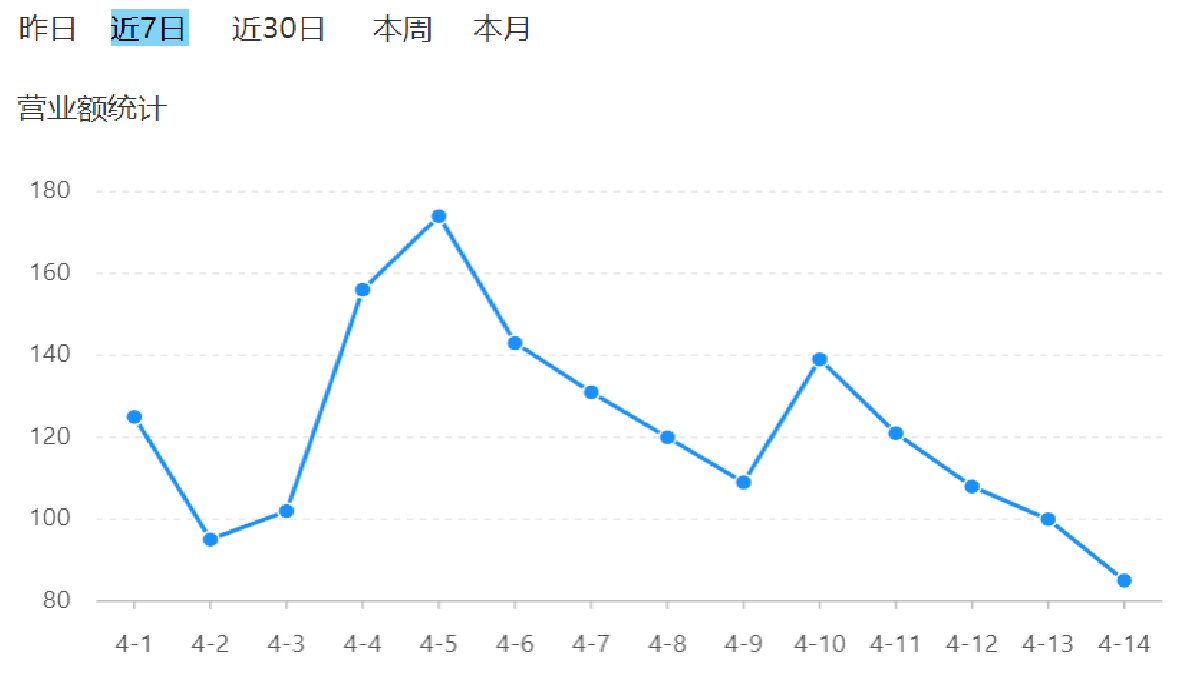
营业额统计 产品原型
业务规则:
营业额指订单状态为已完成的订单金额合计。
基于可视化报表的折线图展示营业额数据,X轴为日期,Y轴为营业额。
根据时间选择区间,展示每天的营业额数据。
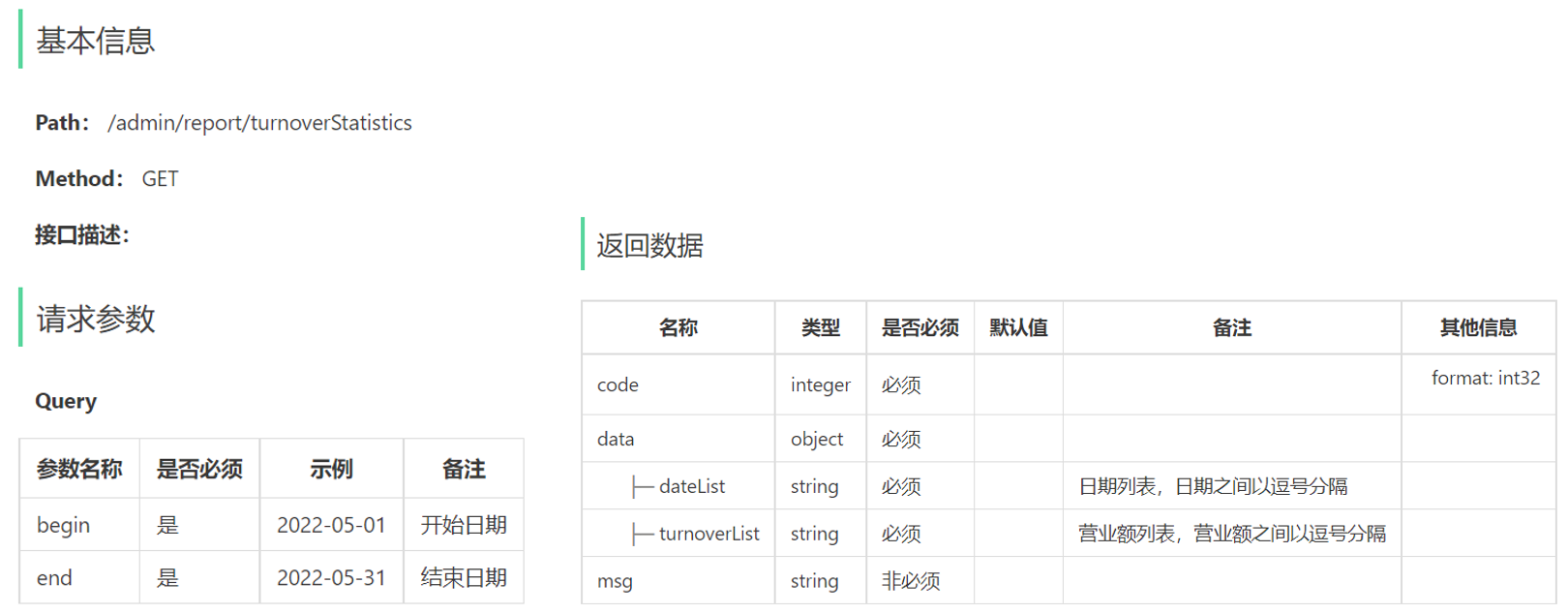
接口设计
代码开发 根据接口定义设计对应的VO。
1
2
3
4
5
6
7
8
9
10
11
12
13
package com.sky.vo;@Data @Builder @NoArgsConstructor @AllArgsConstructor public class TurnoverReportVO implements Serializable {private String dateList;private String turnoverList;
根据接口定义创建ReportController。
1
2
3
4
5
6
7
8
9
10
11
12
13
14
15
16
17
18
19
20
21
package com.sky.controller.admin;@RestController() @RequestMapping("/admin/report") @Api(tags = "数据统计相关接口") @Slf4j public class ReportController {@Autowired private ReportService reportService;@GetMapping("turnoverStatistics") @ApiOperation("营业额统计") public Result<TurnoverReportVO> turnoverStatistics ( @DateTimeFormat(pattern = "yyyy-MM-dd") LocalDate begin, @DateTimeFormat(pattern = "yyyy-MM-dd") LocalDate end) {"营业额数据统计:{},{}" , begin, end);return Result.success(reportService.getTurnoverStatistics(begin, end));
创建ReportService接口,声明getTurnover方法。
1
2
3
4
5
6
7
package com.sky.service;@Service public interface ReportService {getTurnoverStatistics (LocalDate begin, LocalDate end) ;
创建ReportServiceImpl实现类,实现getTurnover方法。
1
2
3
4
5
6
7
8
9
10
11
12
13
14
15
16
17
18
19
20
21
22
23
24
25
26
27
28
29
30
31
32
33
34
35
36
37
38
39
40
41
42
43
44
45
46
47
48
49
50
51
package com.sky.service.impl;@Service @Slf4j public class ReportServiceImpl implements ReportService {@Autowired private OrderService orderService;@Autowired private OrderMapper orderMapper;@Override public TurnoverReportVO getTurnoverStatistics (LocalDate begin, LocalDate end) {new ArrayList <>();while (!begin.equals(end)) {1 );new ArrayList <>();for (LocalDate date : dateList) {LocalDateTime beginTime = LocalDateTime.of(date, LocalTime.MIN);LocalDateTime endTime = LocalDateTime.of(date, LocalTime.MAX);Map map = new HashMap ();"begin" , beginTime);"end" , endTime);"status" , Orders.COMPLETED);Double turnover = orderMapper.sumByMap(map);null ? 0 : turnover;return TurnoverReportVO.builder()"," ))"," ))
在OrderMapper接口声明sumByMap方法。
1 2 sumByMap (Map map) ;
在OrderMapper.xml文件中编写动态SQL。
1 2 3 4 5 6 7 8 9 10 11 12 13 14 <select id ="sumByMap" resultType ="java.lang.Double" > <where > <if test ="begin != null" > > #{begin}</if > <if test ="end != null" > < #{end}</if > <if test ="status != null" > </if > </where > </select >
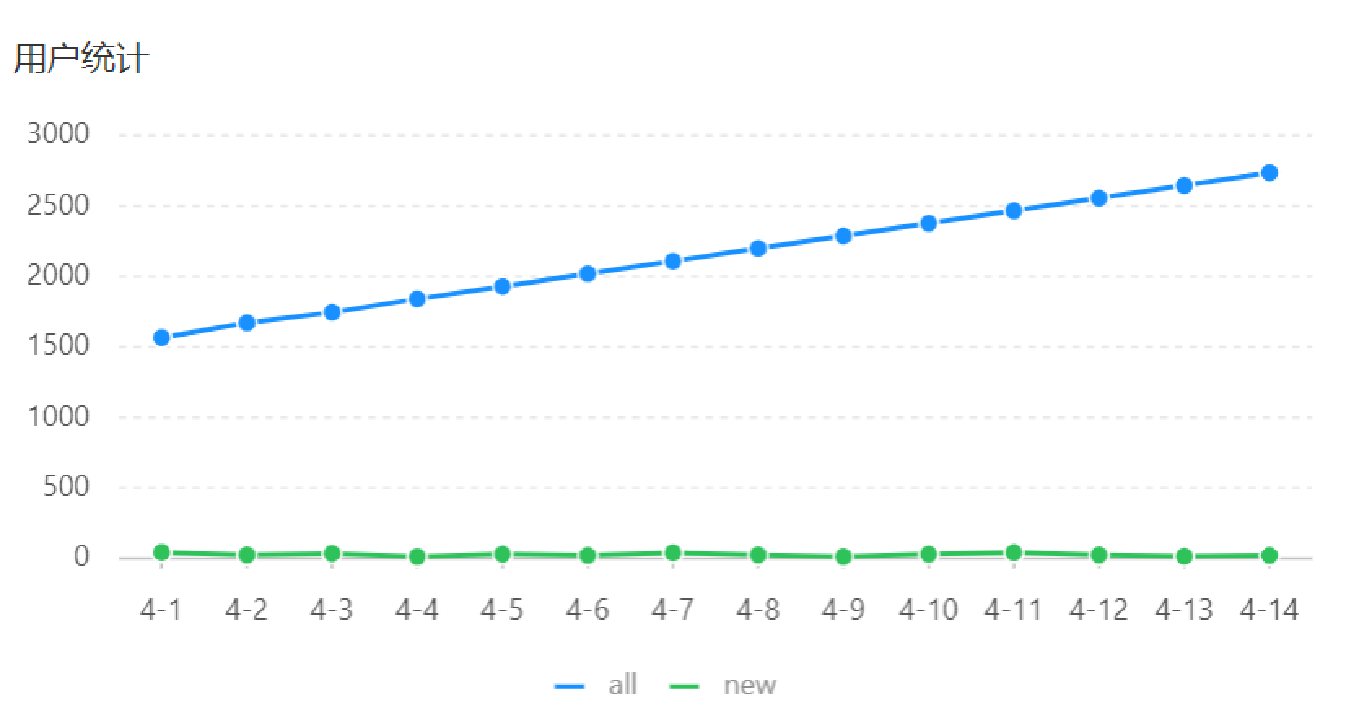
用户统计 产品原型
业务规则:
基于可视化报表的折线图展示用户数据,X轴为日期,Y轴为用户数。
根据时间选择区间,展示每天的用户总量和新增用户量数据。
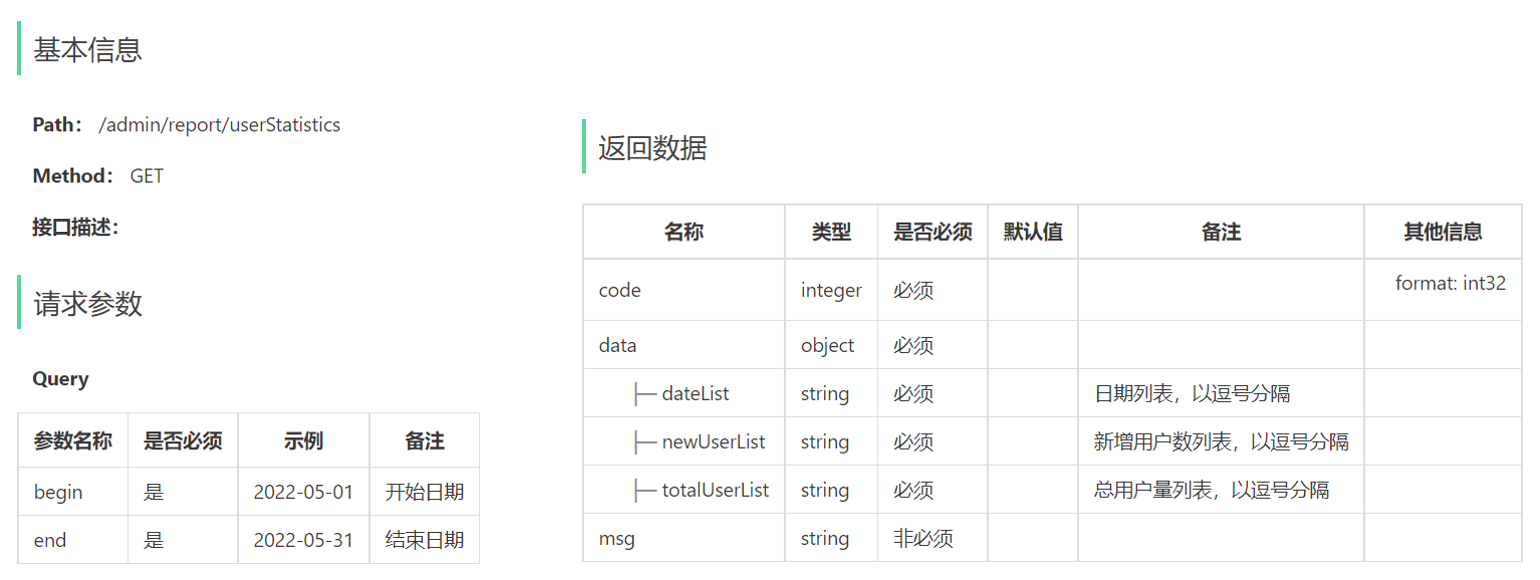
接口设计
代码开发 根据用户统计接口的返回结果设计VO。
1
2
3
4
5
6
7
8
9
10
11
12
13
14
15
16
package com.sky.vo;@Data @Builder @NoArgsConstructor @AllArgsConstructor public class UserReportVO implements Serializable {private String dateList;private String totalUserList;private String newUserList;
根据接口定义,在ReportController中创建userStatistics方法。
1 2 3 4 5 6 7 8 9 @GetMapping("userStatistics") @ApiOperation("用户统计") public Result<UserReportVO> userStatistics ( @DateTimeFormat(pattern = "yyyy-MM-dd") LocalDate begin, @DateTimeFormat(pattern = "yyyy-MM-dd") LocalDate end) {"用户统计数据:{},{}" , begin, end);return Result.success(reportService.getUserStatistics(begin, end));
在ReportService接口中声明getUserStatistics方法。
1 2 getUserStatistics (LocalDate begin, LocalDate end) ;
在ReportServiceImpl实现类中实现getUserStatistics方法。
1
2
3
4
5
6
7
8
9
10
11
12
13
14
15
16
17
18
19
20
21
22
23
24
25
26
27
28
29
30
31
32
33
34
35
36
37
38
39
40
41
42
@Autowired private UserMapper userMapper;@Override public UserReportVO getUserStatistics (LocalDate begin, LocalDate end) {new ArrayList <>();while (!begin.equals(end)) {1 );new ArrayList <>();new ArrayList <>();for (LocalDate date : dateList) {LocalDateTime beginTime = LocalDateTime.of(date, LocalTime.MIN);LocalDateTime endTime = LocalDateTime.of(date, LocalTime.MAX);Map map = new HashMap ();"end" , endTime);Integer totalUser = userMapper.countByMap(map);"begin" , beginTime);Integer newUser = userMapper.countByMap(map);return UserReportVO.builder()"," ))"," ))"," ))
在ReportServiceImpl实现类中创建私有方法getUserCount。(这个用不用都可以)
1 2 3 4 5 6 7 8 9 10 11 12 13 14 15 16 17 18 private Integer getUserCount (LocalDateTime beginTime, LocalDateTime endTime) {Map map = new HashMap ();"begin" ,beginTime);"end" , endTime);return userMapper.countByMap(map);
在UserMapper接口中声明countByMap方法。
1 2 countByMap (Map map) ;
在UserMapper.xml文件中编写动态SQL。
1 2 3 4 5 6 7 8 9 10 11 <select id ="countByMap" resultType ="java.lang.Integer" > <where > <if test ="begin != null" > > #{begin}</if > <if test ="end != null" > < #{end}</if > </where > </select >
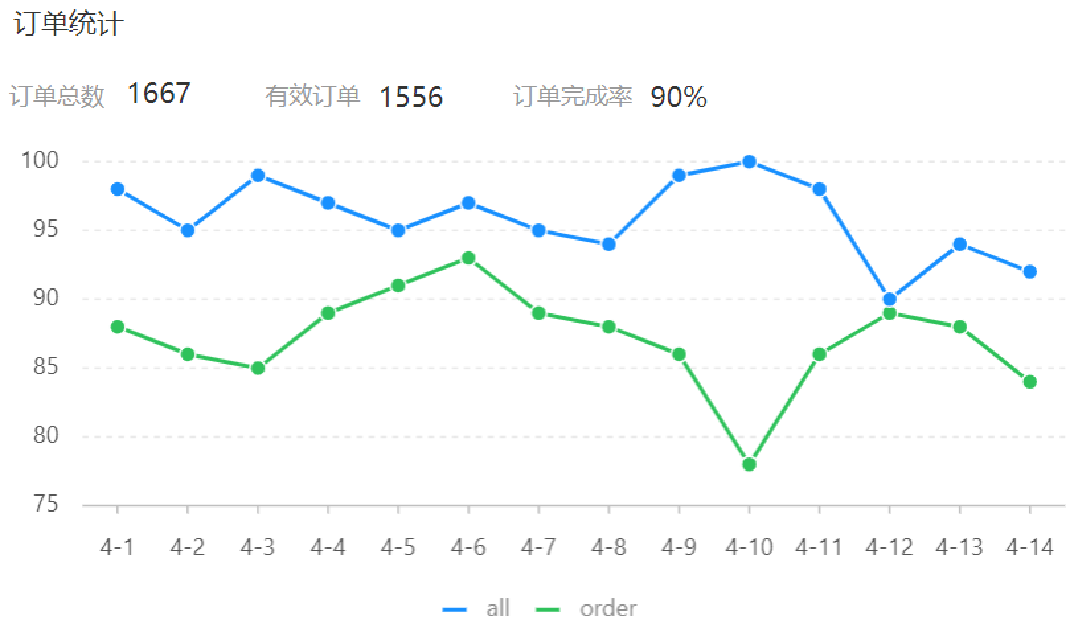
订单统计 产品原型
业务规则:
有效订单指状态为 “已完成” 的订单。
基于可视化报表的折线图展示订单数据,X轴为日期,Y轴为订单数量。
根据时间选择区间,展示每天的订单总数和有效订单数。
展示所选时间区间内的有效订单数、总订单数、订单完成率,订单完成率 = 有效订单数 / 总订单数 * 100%。
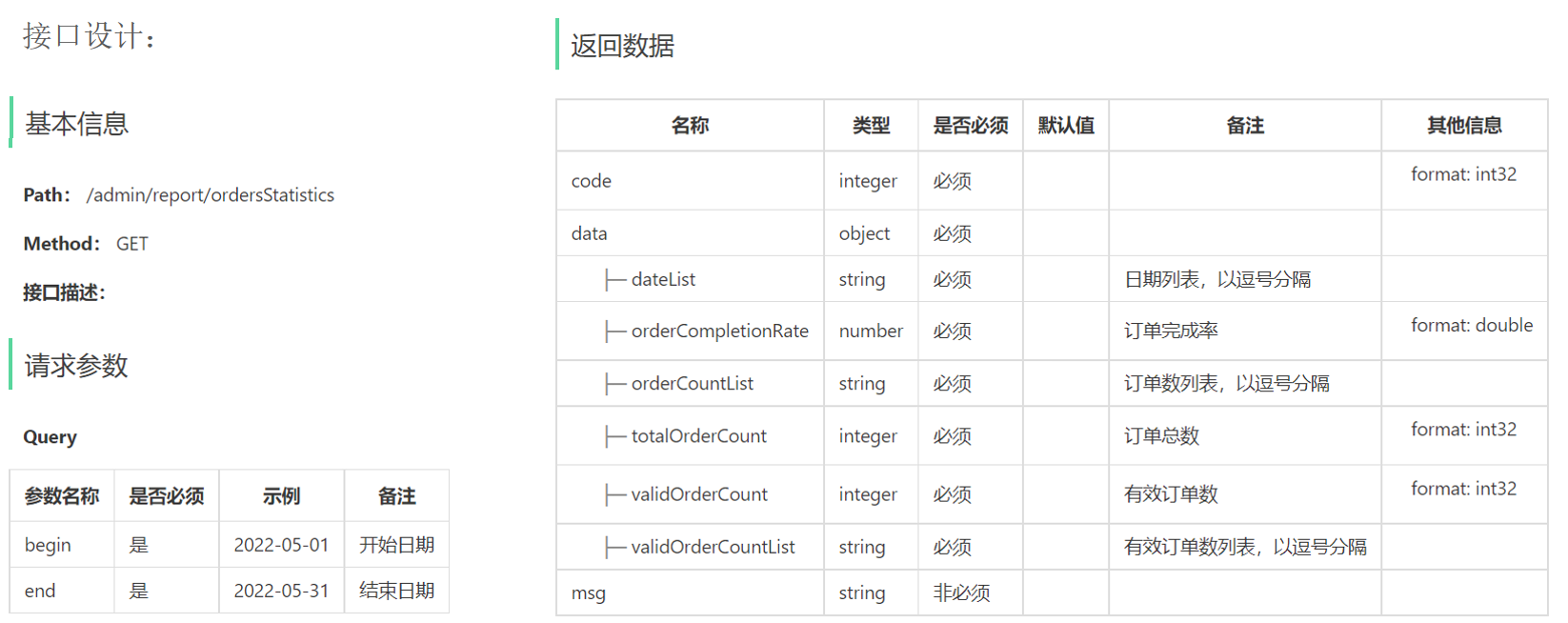
接口设计
代码开发 根据订单统计接口的返回结果设计VO。
1
2
3
4
5
6
7
8
9
10
11
12
13
14
15
16
17
18
19
20
21
22
23
24
25
package com.sky.vo;@Data @Builder @NoArgsConstructor @AllArgsConstructor public class OrderReportVO implements Serializable {private String dateList;private String orderCountList;private String validOrderCountList;private Integer totalOrderCount;private Integer validOrderCount;private Double orderCompletionRate;
在ReportController中根据订单统计接口创建orderStatistics方法。
1 2 3 4 5 6 7 8 9 @GetMapping("ordersStatistics") @ApiOperation("订单统计") public Result<OrderReportVO> ordersStatistics ( @DateTimeFormat(pattern = "yyyy-MM-dd") LocalDate begin, @DateTimeFormat(pattern = "yyyy-MM-dd") LocalDate end) {"用户统计数据:{},{}" , begin, end);return Result.success(reportService.getOrdersStatistics(begin, end));
在ReportService接口中声明getOrderStatistics方法。
1 2 getOrdersStatistics (LocalDate begin, LocalDate end) ;
在ReportServiceImpl实现类中实现getOrderStatistics方法。
1 2 3 4 5 6 7 8 9 10 11 12 13 14 15 16 17 18 19 20 21 22 23 24 25 26 27 28 29 30 31 32 33 34 35 36 37 38 39 40 41 42 43 44 45 46 47 48 49 50 @Override public OrderReportVO getOrdersStatistics (LocalDate begin, LocalDate end) {new ArrayList <>();while (!begin.equals(end)) {1 );new ArrayList <>();new ArrayList <>();for (LocalDate date : dateList) {LocalDateTime beginTime = LocalDateTime.of(date, LocalTime.MIN);LocalDateTime endTime = LocalDateTime.of(date, LocalTime.MAX);Integer orderCount = getOrderCount(beginTime, endTime, null );Integer validOrderCount = getOrderCount(beginTime, endTime, Orders.COMPLETED);Integer totalOrderCount = orderCountList.stream().reduce(Integer::sum).get();Integer validOrderCount = validOrderCountList.stream().reduce(Integer::sum).get();Double orderCompletionRate = 0.0 ;if (totalOrderCount != 0 ){return OrderReportVO.builder()"," ))"," ))"," ))
在ReportServiceImpl实现类中提供私有方法getOrderCount。
1 2 3 4 5 6 7 8 private Integer getOrderCount (LocalDateTime begin, LocalDateTime end, Integer status) {Map map = new HashMap ();"begin" , begin);"end" , end);"status" , status);return orderMapper.countByMap(map);
在OrderMapper接口中声明countByMap方法。
1 2 countByMap (Map map) ;
在OrderMapper.xml文件中编写动态SQL。
1 2 3 4 5 6 7 8 9 10 11 12 13 14 <select id ="countByMap" resultType ="java.lang.Integer" > <where > <if test ="begin != null" > > #{begin}</if > <if test ="end != null" > < #{end}</if > <if test ="status != null" > </if > </where > </select >
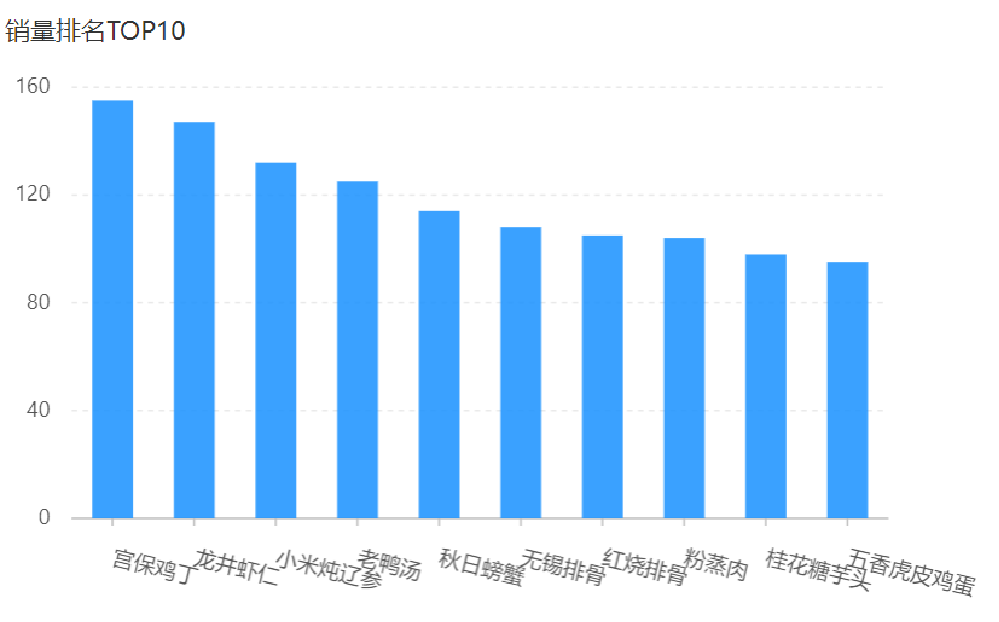
销量排名Top10 产品原型
业务规则:
根据时间选择区间,展示销量前10的商品(包括菜品和套餐)。
基于可视化报表的柱状图降序展示商品销量。
此处的销量为商品销售的份数。
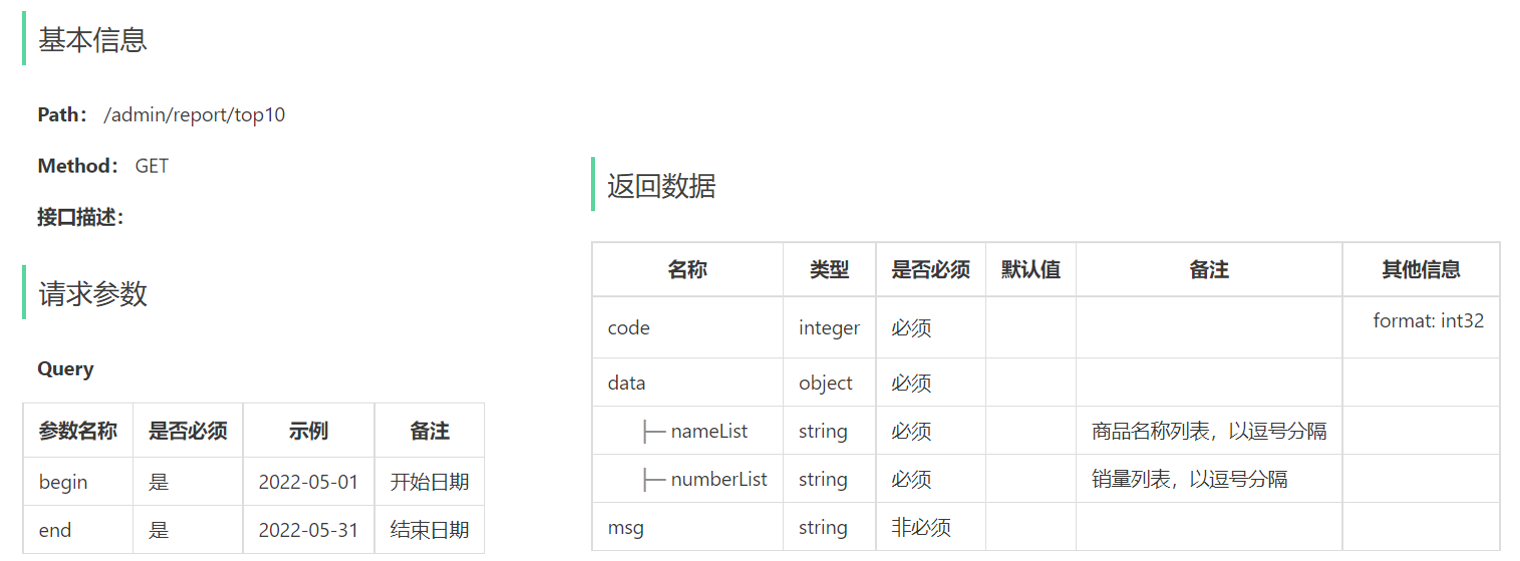
接口设计
代码开发 根据销量排名接口的返回结果设计VO。
1
2
3
4
5
6
7
8
9
10
11
12
13
package com.sky.vo;@Data @Builder @NoArgsConstructor @AllArgsConstructor public class SalesTop10ReportVO implements Serializable {private String nameList;private String numberList;
在ReportController中根据销量排名接口创建top10方法。
1 2 3 4 5 6 7 8 9 @GetMapping("/top10") @ApiOperation("销售排名top10") public Result<SalesTop10ReportVO> top10 ( @DateTimeFormat(pattern = "yyyy-MM-dd") LocalDate begin, @DateTimeFormat(pattern = "yyyy-MM-dd") LocalDate end) {"销售排名top10:{},{}" , begin, end);return Result.success(reportService.getSalesTop10(begin, end));
在ReportService接口中声明getSalesTop10方法。
1 2 getSalesTop10 (LocalDate begin, LocalDate end) ;
在ReportServiceImpl实现类中实现getSalesTop10方法。
1 2 3 4 5 6 7 8 9 10 11 12 13 14 15 16 17 18 @Override public SalesTop10ReportVO getSalesTop10 (LocalDate begin, LocalDate end) {LocalDateTime beginTime = LocalDateTime.of(begin, LocalTime.MIN);LocalDateTime endTime = LocalDateTime.of(end, LocalTime.MAX);String nameList = StringUtils.join(names, "," );String numberList = StringUtils.join(numbers, "," );return SalesTop10ReportVO.builder()
在OrderMapper接口中声明getSalesTop10方法。
1 2 getSalesTop10 (LocalDateTime begin, LocalDateTime end) ;
在OrderMapper.xml文件中编写动态SQL。
1 2 3 4 5 6 7 8 9 10 11 12 13 14 <select id ="getSalesTop10" resultType ="com.sky.dto.GoodsSalesDTO" > <if test ="begin != null" > > #{begin}</if > <if test ="end != null" > < #{end}</if > </select >
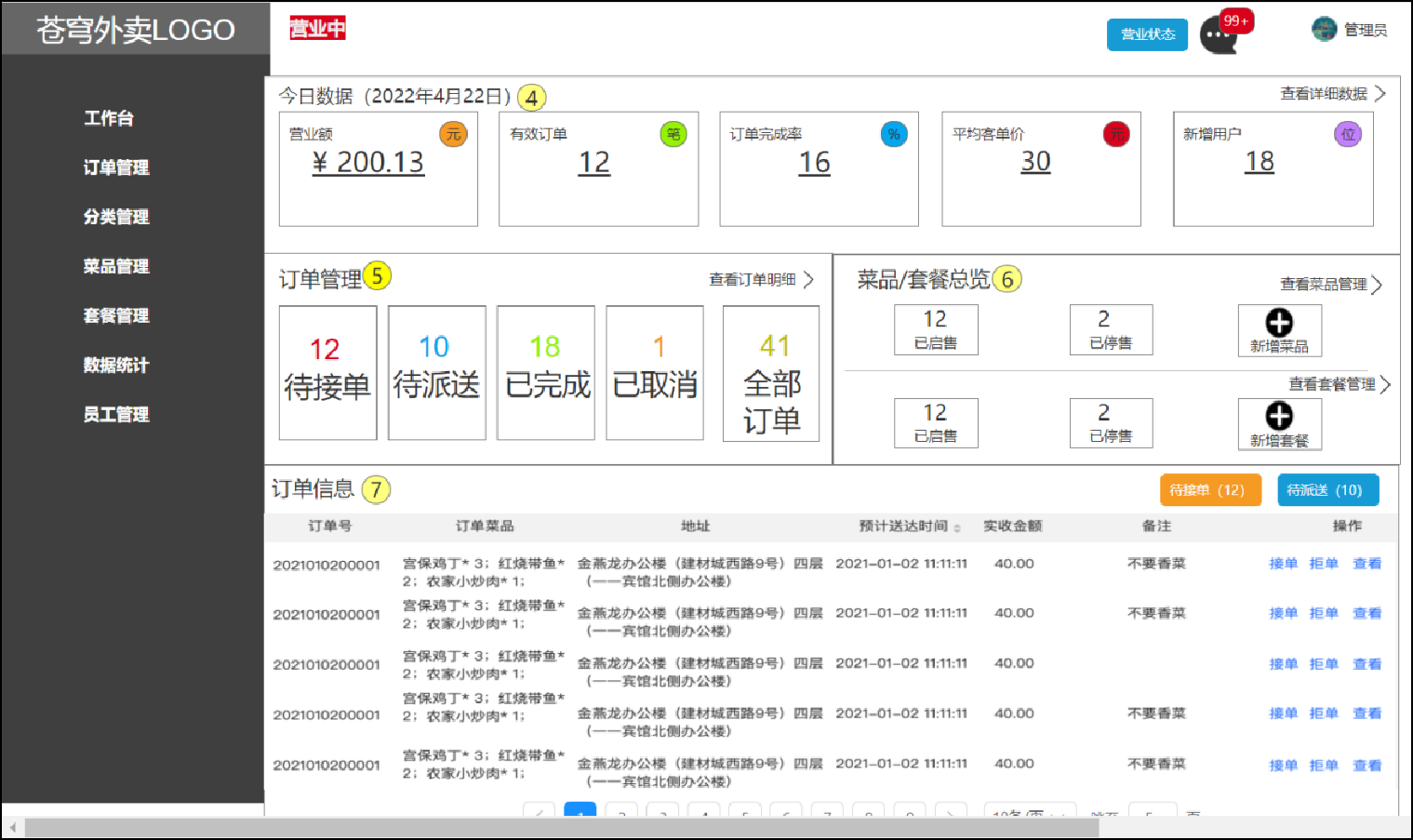
Excel报表 工作台 产品原型 工作台是系统运营的数据看板,并提供快捷操作入口,可以有效提高商家的工作效率。
工作台展示的数据:
名词解释:
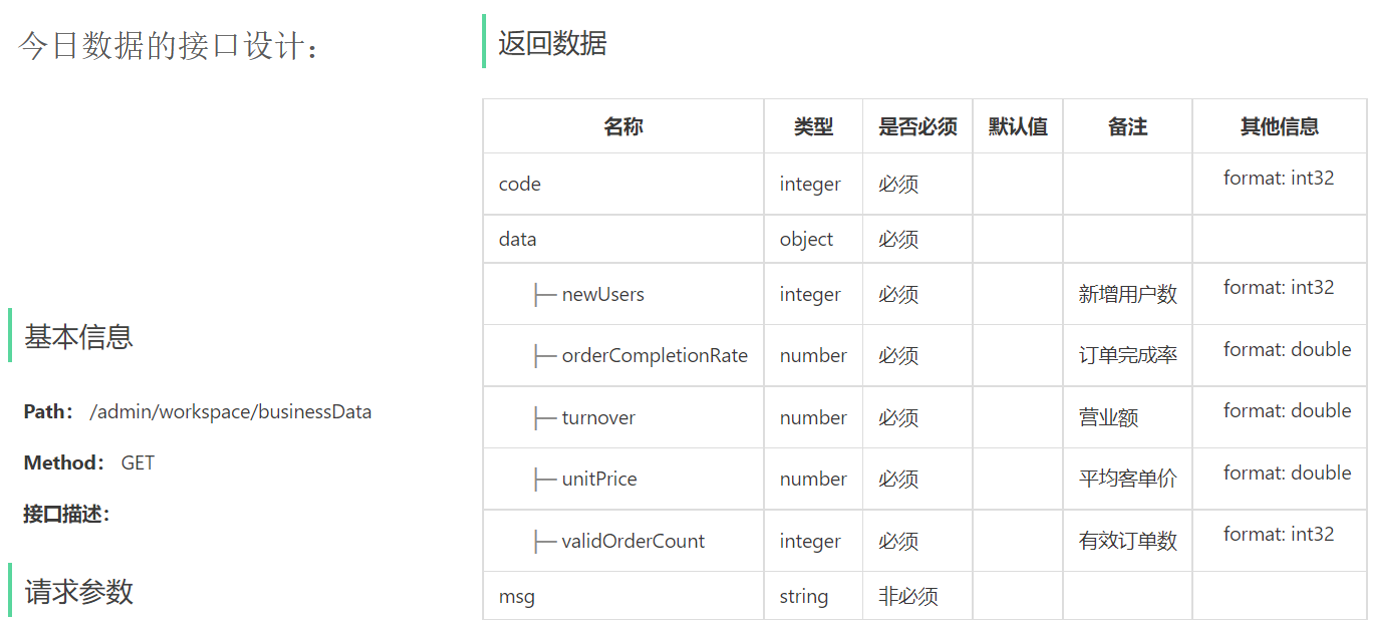
营业额:已完成订单的总金额。
有效订单:已完成订单的数量。
订单完成率:有效订单数 / 总订单数 * 100%。
平均客单价:营业额 / 有效订单数。
新增用户:新增用户的数量。
接口设计 1.今日数据接口。
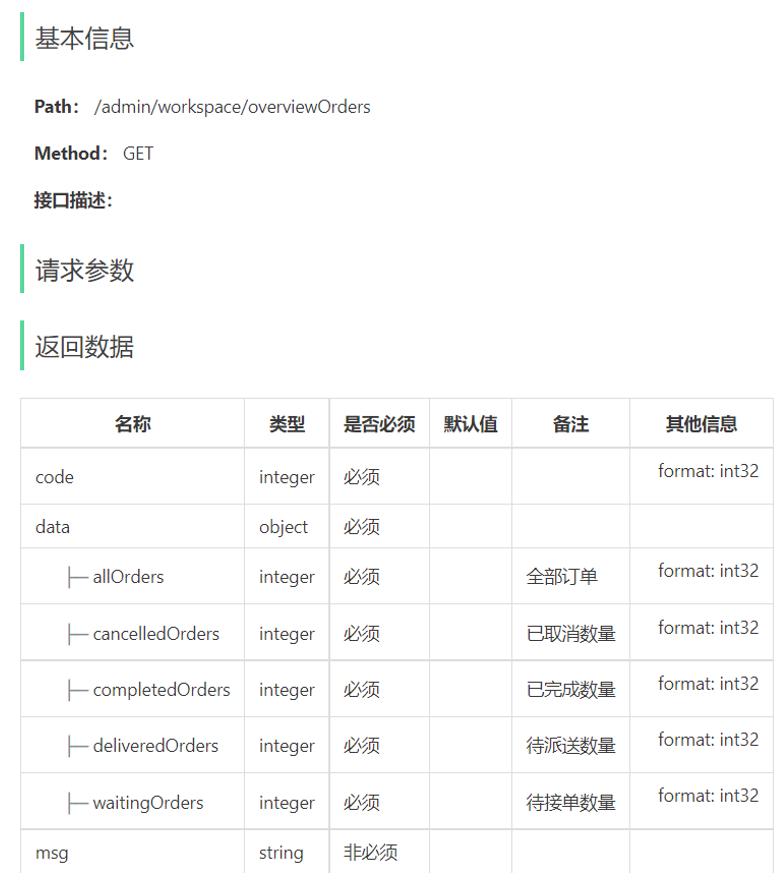
2.订单管理接口。
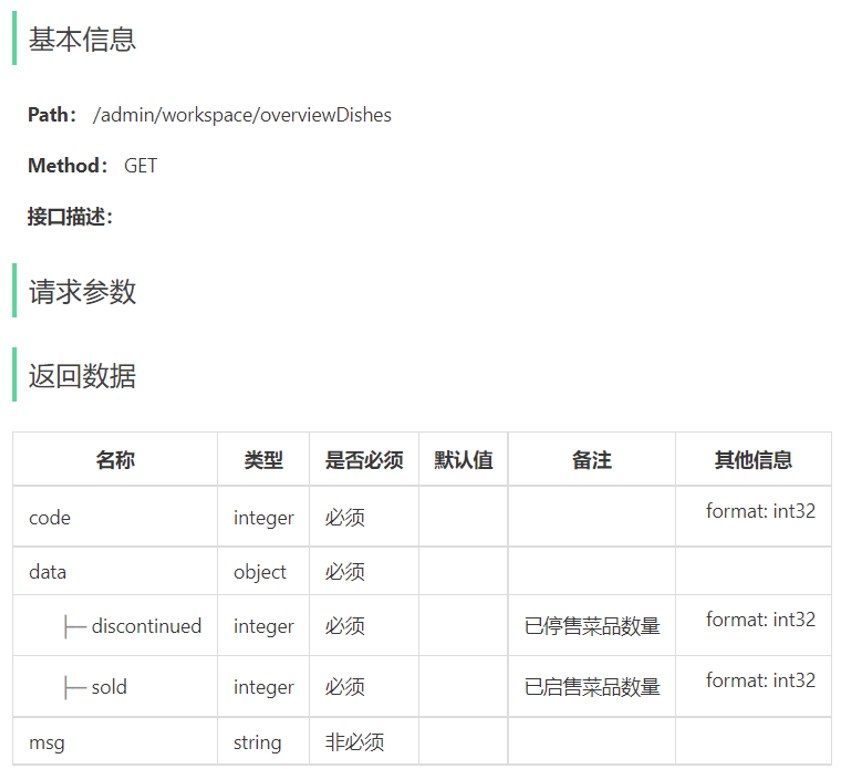
3.菜品总览接口。
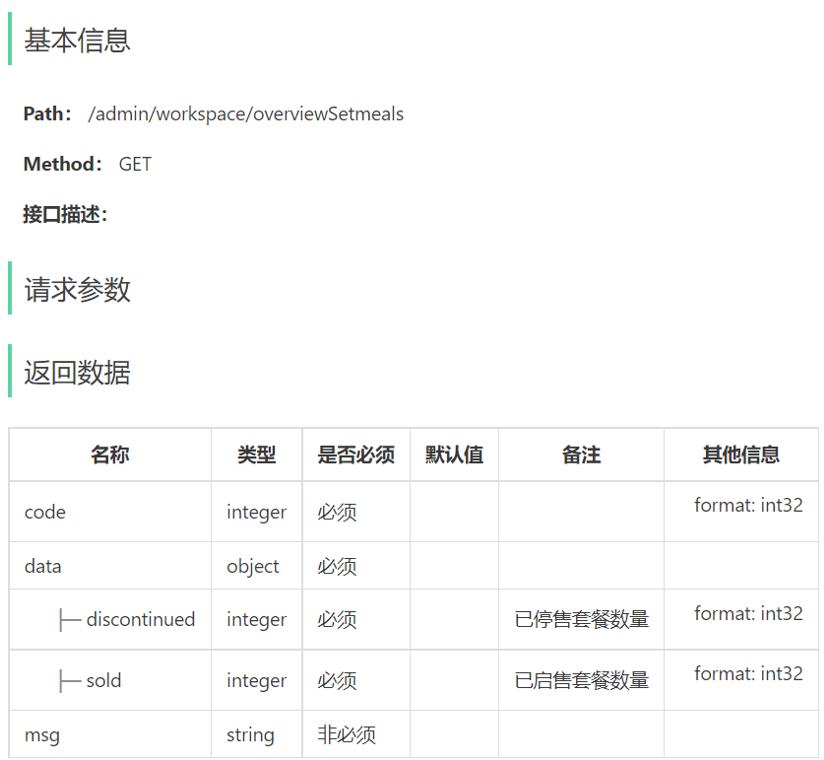
4.套餐总览接口。
5.订单搜索(已完成)。
6.各个状态的订单数量统计(已完成)。
代码开发 1.WorkSpaceController。
1
2
3
4
5
6
7
8
9
10
11
12
13
14
15
16
17
18
19
20
21
22
23
24
25
26
27
28
29
30
31
32
33
34
35
36
37
38
39
40
41
42
43
44
45
46
package com.sky.controller.admin;@RestController @RequestMapping("/admin/workspace") @Slf4j @Api(tags = "工作台相关接口") public class WorkSpaceController {@Autowired private WorkspaceService workspaceService;@GetMapping("/businessData") @ApiOperation("工作台今日数据查询") public Result<BusinessDataVO> businessData () {LocalDateTime begin = LocalDateTime.now().with(LocalTime.MIN);LocalDateTime end = LocalDateTime.now().with(LocalTime.MAX);BusinessDataVO businessDataVO = workspaceService.getBusinessData(begin, end);return Result.success(businessDataVO);@GetMapping("/overviewOrders") @ApiOperation("查询订单管理数据") public Result<OrderOverViewVO> orderOverView () {return Result.success(workspaceService.getOrderOverView());@GetMapping("/overviewDishes") @ApiOperation("查询菜品总览") public Result<DishOverViewVO> dishOverView () {return Result.success(workspaceService.getDishOverView());@GetMapping("/overviewSetmeals") @ApiOperation("查询套餐总览") public Result<SetmealOverViewVO> setmealOverView () {return Result.success(workspaceService.getSetmealOverView());
2.WorkspaceService。
1
2
3
4
5
6
7
8
9
10
11
12
13
14
15
16
package com.sky.service;public interface WorkspaceService {getBusinessData (LocalDateTime begin, LocalDateTime end) ;getOrderOverView () ;getDishOverView () ;getSetmealOverView () ;
3.WorkspaceServiceImpl。
1
2
3
4
5
6
7
8
9
10
11
12
13
14
15
16
17
18
19
20
21
22
23
24
25
26
27
28
29
30
31
32
33
34
35
36
37
38
39
40
41
42
43
44
45
46
47
48
49
50
51
52
53
54
55
56
57
58
59
60
61
62
63
64
65
66
67
68
69
70
71
72
73
74
75
76
77
78
79
80
81
82
83
84
85
86
87
88
89
90
91
92
93
94
95
96
97
98
99
100
101
102
103
104
105
106
107
108
109
110
111
112
113
114
115
116
117
118
119
120
121
122
123
124
125
126
package com.sky.service.impl;@Service @Slf4j public class WorkspaceServiceImpl implements WorkspaceService {@Autowired private OrderMapper orderMapper;@Autowired private UserMapper userMapper;@Autowired private DishMapper dishMapper;@Autowired private SetmealMapper setmealMapper;public BusinessDataVO getBusinessData (LocalDateTime begin, LocalDateTime end) {Map map = new HashMap ();"begin" ,begin);"end" ,end);Integer totalOrderCount = orderMapper.countByMap(map);"status" , Orders.COMPLETED);Double turnover = orderMapper.sumByMap(map);null ? 0.0 : turnover;Integer validOrderCount = orderMapper.countByMap(map);Double unitPrice = 0.0 ;Double orderCompletionRate = 0.0 ;if (totalOrderCount != 0 && validOrderCount != 0 ){Integer newUsers = userMapper.countByMap(map);return BusinessDataVO.builder()public OrderOverViewVO getOrderOverView () {Map map = new HashMap ();"begin" , LocalDateTime.now().with(LocalTime.MIN));"status" , Orders.TO_BE_CONFIRMED);Integer waitingOrders = orderMapper.countByMap(map);"status" , Orders.CONFIRMED);Integer deliveredOrders = orderMapper.countByMap(map);"status" , Orders.COMPLETED);Integer completedOrders = orderMapper.countByMap(map);"status" , Orders.CANCELLED);Integer cancelledOrders = orderMapper.countByMap(map);"status" , null );Integer allOrders = orderMapper.countByMap(map);return OrderOverViewVO.builder()public DishOverViewVO getDishOverView () {Map map = new HashMap ();"status" , StatusConstant.ENABLE);Integer sold = dishMapper.countByMap(map);"status" , StatusConstant.DISABLE);Integer discontinued = dishMapper.countByMap(map);return DishOverViewVO.builder()public SetmealOverViewVO getSetmealOverView () {Map map = new HashMap ();"status" , StatusConstant.ENABLE);Integer sold = setmealMapper.countByMap(map);"status" , StatusConstant.DISABLE);Integer discontinued = setmealMapper.countByMap(map);return SetmealOverViewVO.builder()
4.DishMapper。
1 2 countByMap (Map map) ;
5.DishMapper.xml。
1 2 3 4 5 6 7 8 9 10 11 <select id ="countByMap" resultType ="java.lang.Integer" > <where > <if test ="status != null" > </if > <if test ="categoryId != null" > </if > </where > </select >
6.SetmealMapper。
1 2 countByMap (Map map) ;
7.SetmealMapper.xml。
1 2 3 4 5 6 7 8 9 10 11 <select id ="countByMap" resultType ="java.lang.Integer" > <where > <if test ="status != null" > </if > <if test ="categoryId != null" > </if > </where > </select >
Apache POI 介绍 Apache POI是一个处理Miscrosoft Office各种文件格式的开源项目。简单来说就是,我们可以使用POI在Java程序中对Miscrosoft Office各种文件进行读写操作。
一般情况下,POI都是用于操作Excel文件。
Apache POI的应用场景:
银行网银系统导出交易明细。
各种业务系统导出Excel报表。
批量导入业务数据。
入门案例 Apache POI的maven坐标。
1 2 3 4 5 6 7 8 9 10 <dependency > <groupId > org.apache.poi</groupId > <artifactId > poi</artifactId > <version > 3.16</version > </dependency > <dependency > <groupId > org.apache.poi</groupId > <artifactId > poi-ooxml</artifactId > <version > 3.16</version > </dependency >
将数据写入Excel文件。
1
2
3
4
5
6
7
8
9
10
11
12
13
14
15
16
17
18
19
20
21
22
23
24
25
26
27
28
29
30
31
32
33
34
35
36
37
38
package com.sky.test;public class POITest {public static void write () throws Exception {XSSFWorkbook excel = new XSSFWorkbook ();XSSFSheet sheet = excel.createSheet("info" );XSSFRow row = sheet.createRow(1 );1 ).setCellValue("姓名" );2 ).setCellValue("城市" );2 );1 ).setCellValue("张三" );2 ).setCellValue("北京" );3 );1 ).setCellValue("李四" );2 ).setCellValue("深圳" );FileOutputStream out = new FileOutputStream (new File ("E:\\2_learn\\Java-waimai\\code\\info.xlsx" ));public static void main (String[] args) throws Exception {
读取Excel文件中的数据。
1 2 3 4 5 6 7 8 9 10 11 12 13 14 15 16 17 18 19 20 21 22 23 24 25 26 27 28 29 30 public static void read () throws Exception {InputStream in = new FileInputStream (new File ("E:\\2_learn\\Java-waimai\\code\\info.xlsx" ));XSSFWorkbook excel = new XSSFWorkbook (in);XSSFSheet sheet = excel.getSheetAt(0 );int lastRowNum = sheet.getLastRowNum();for (int i = 1 ; i <= lastRowNum; i++) {XSSFRow row = sheet.getRow(i);String cellValue1 = row.getCell(1 ).getStringCellValue();String cellValue2 = row.getCell(2 ).getStringCellValue();" " + cellValue2);public static void main (String[] args) throws Exception {
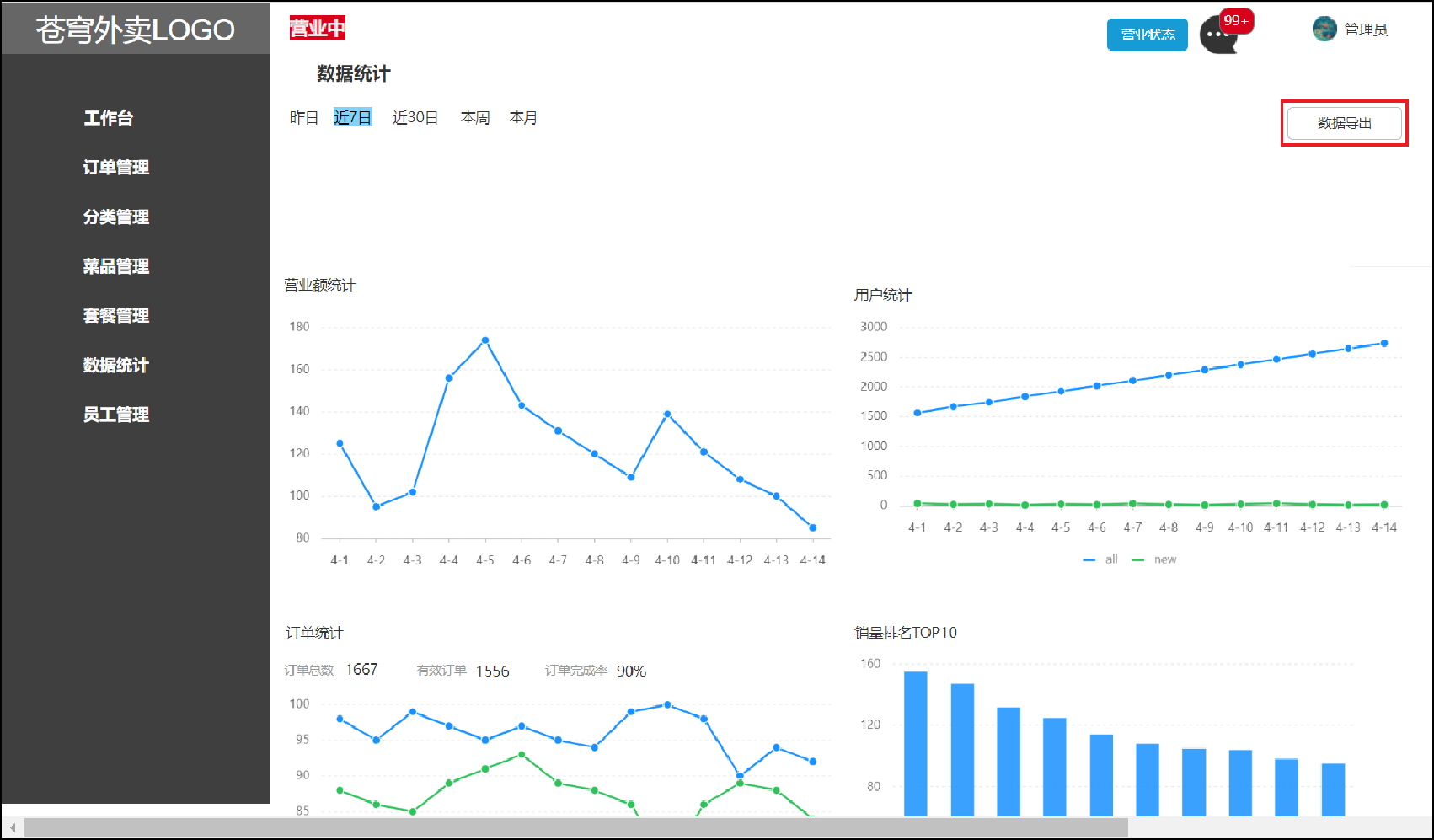
导出运营数据Excel报表 产品原型
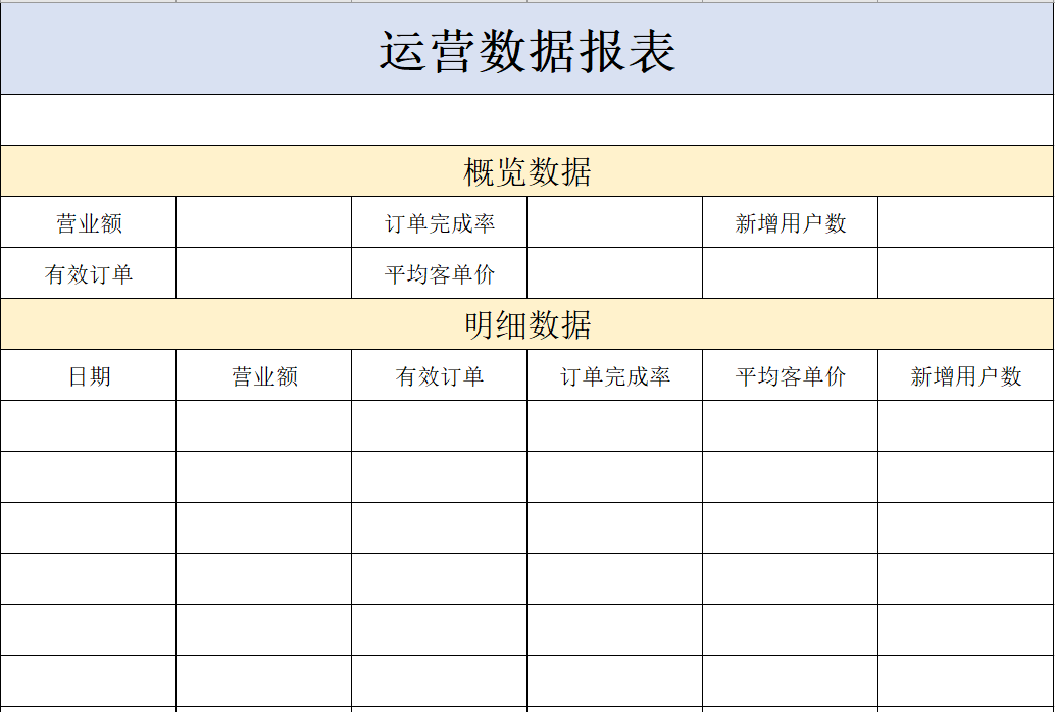
导出的Excel报表格式:
业务规则:
导出Excel形式的报表文件。
导出最近30天的运营数据。
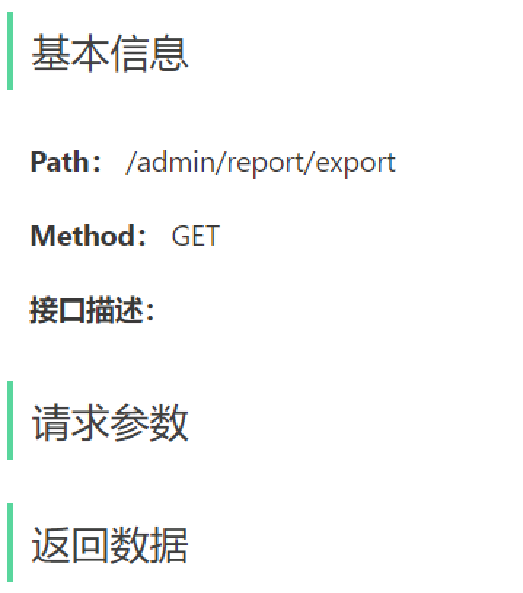
接口设计
【注意】 当前接口没有返回数据,因为报表导出功能本质上是文件下载,服务端会通过输出流将Excel文件下载到客户端浏览器。
代码开发 实现步骤:
设计Excel模板文件。
查询近30天的运营数据。
将查询到的运营数据写入模板文件。
通过输出流将Excel文件下载到客户端浏览器。
1.根据接口定义,在ReportController中创建export方法。
1 2 3 4 5 6 7 @GetMapping("/export") @ApiOperation("导出运营数据报表") public void export (HttpServletResponse response) {
2.在ReportService接口中声明导出运营数据报表的方法。
1 2 void exportBusinessData (HttpServletResponse response) ;
3.在ReportServiceImpl实现类中实现导出运营数据报表的方法。
1
2
3
4
5
6
7
8
9
10
11
12
13
14
15
16
17
18
19
20
21
22
23
24
25
26
27
28
29
30
31
32
33
34
35
36
37
38
39
40
41
42
43
44
45
46
47
48
49
50
51
52
53
54
55
56
57
58
59
60
61
62
63
64
65
66
67
68
@Autowired private WorkspaceService workspaceService;@Override public void exportBusinessData (HttpServletResponse response) {LocalDate dateBegin = LocalDate.now().minusDays(30 );LocalDate dateEnd = LocalDate.now().minusDays(1 );BusinessDataVO businessDataVO = workspaceService.getBusinessData(InputStream in = this .getClass().getClassLoader().getResourceAsStream("template/运营数据报表模板.xlsx" );try {XSSFWorkbook excel = new XSSFWorkbook (in);XSSFSheet sheet = excel.getSheet("Sheet1" );1 ).getCell(1 ).setCellValue("时间" + dateBegin + "至" + dateEnd);XSSFRow row = sheet.getRow(3 );2 ).setCellValue(businessDataVO.getTurnover());4 ).setCellValue(businessDataVO.getOrderCompletionRate());6 ).setCellValue(businessDataVO.getNewUsers());4 );2 ).setCellValue(businessDataVO.getValidOrderCount());4 ).setCellValue(businessDataVO.getUnitPrice());for (int i = 0 ; i < 30 ; i++){LocalDate date = dateBegin.plusDays(i);BusinessDataVO businessData = workspaceService.getBusinessData(7 + i);1 ).setCellValue(date.toString());2 ).setCellValue(businessData.getTurnover());3 ).setCellValue(businessData.getValidOrderCount());4 ).setCellValue(businessData.getOrderCompletionRate());5 ).setCellValue(businessData.getUnitPrice());6 ).setCellValue(businessData.getNewUsers());ServletOutputStream out = response.getOutputStream();catch (Exception e) {