JavaWeb后端开发:MySQL和MyBatis

MySQL

MySQL概述

MySQL安装

官网下载地址:https://dev.mysql.com/downloads/mysql/

1.下载mysql-9.0.1-winx64.msimysql-9.0.1-winx64.zip两个安装包,下载两者中的任何一个都可以,将zip解压后可以得到MySQL的软件本体了(就是一个文件夹),把它放在安装的位置 。

2.配置环境变量

新建系统变量:MYSQL_HOME,值为安装目录。

系统变量的Path中新建:%MYSQL_HOME%\bin

3.验证是否安装成功:命令行输入mysql,出现以下结果则表明安装成功。

1
2
C:\Users\srr18>mysql
ERROR 1045 (28000): Access denied for user 'ODBC'@'localhost' (using password: NO)

如果提示mysql不是内部或外部命令,也不是可运行的程序或批处理文件则表示添加添加失败,请重新检查步骤并重试。

初始化MySQL

管理员身份打开命令行窗口:

1
mysqld --initialize-insecure

稍微等待一会,如果出现没有出现报错信息,则证明data目录初始化成功,查看MySQL目录下已经有data目录生成。

注意:若出现 Errcode:13 -Permission denied错误,则是由于权限不足导致的,以管理员方式运行cmd即可。

注册MySQL服务

命令行(必须以管理员身份启动)中:

1
mysqld -install

显示Service successfully installed.则表示安装好MySQL服务。

启动MySQL服务

命令行输入:

1
2
net start mysql  // 启动mysql服务
net stop mysql // 停止mysql服务
修改默认账户密码

在命令行里输入mysql admin -u root password 1234,这里的1234就是指修改后的默认管理员(即root账户)的密码。

1
mysql admin -u root password 1234
登录MySQL
1
mysql -uroot -p1234

上述-p后面是密码,默认的root账号没有密码,可以使用mysql -uroot登录,命令行要求输入密码,直接回车即可。

登录参数:

1
mysql -u用户名 -p密码 -h要连接的mysql服务器的ip地址(默认127.0.0.1) -P端口号(默认3306)
退出MySQL
1
2
exit
quit
MySQL图形化工具DataGrip(IDEA内置有DataGrip)

介绍:DataGripJetBrains旗下的一款数据库管理工具,是管理和开发MySQLOraclePostgreSQL的理想解决方案。

官网: https://www.jetbrains.com/zh-cn/datagrip/
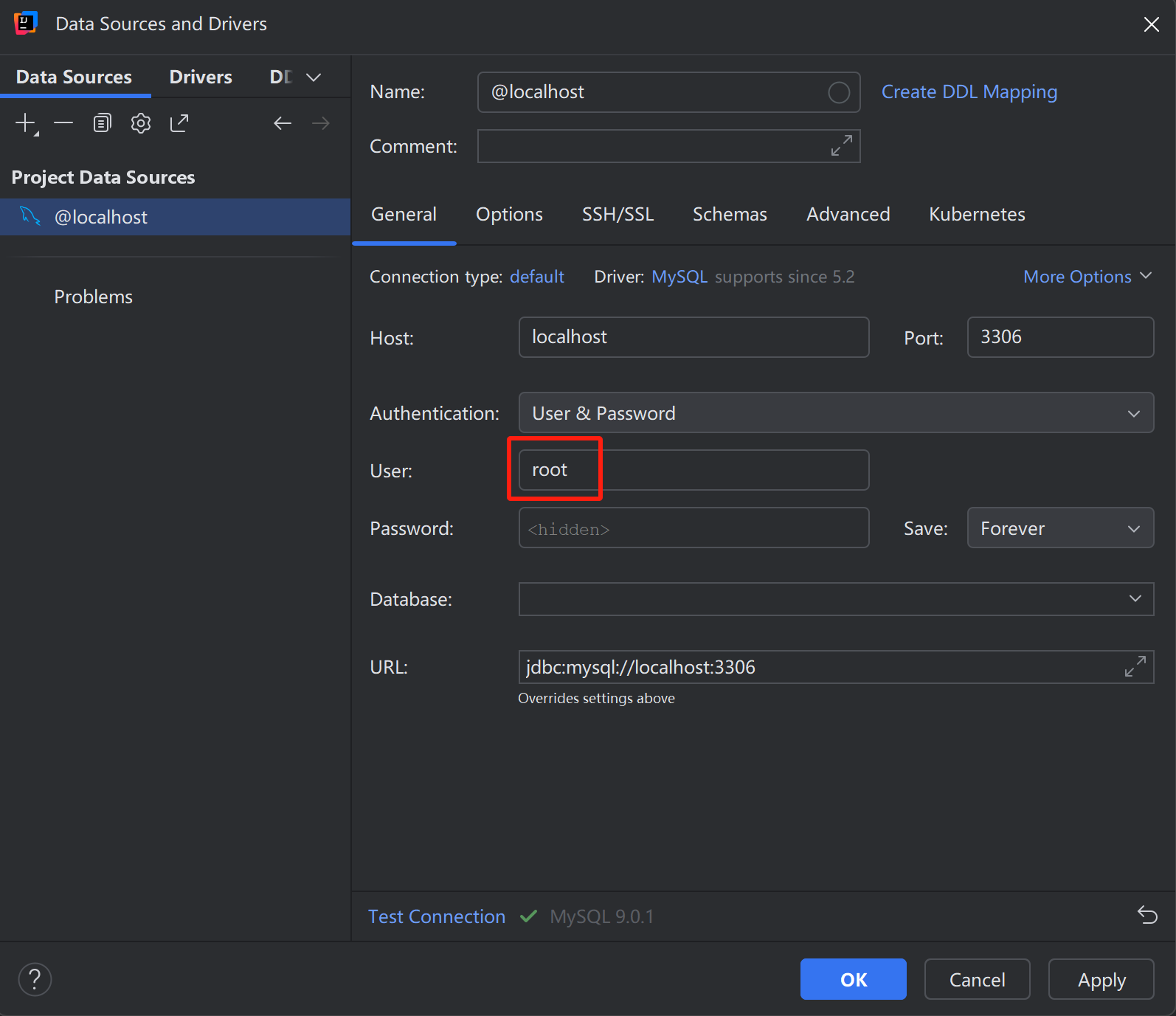
注意:IDEA会提示要下载插件,点击下载插件即可。

点击Test Connection,显示如下则表示连接数据库成功。

1
2
3
4
5
6
DBMS: MySQL (ver. 9.0.1)
Case sensitivity: plain=lower, delimited=lower
Driver: MySQL Connector/J (ver. mysql-connector-j-8.2.0 (Revision: 06a1f724497fd81c6a659131fda822c9e5085b6c), JDBC4.2)

Ping: 42 ms
SSL: yes
MySQL数据模型

关系型数据库(RDBMS): 建立在关系模型基础上,由多张相互连接的二维表组成的数据库。

SQL

SQL:一门操作关系型数据库的编程语言,定义操作所有关系型数据库的统一标准。

SQL语句可以单行或多行书写,以分号结尾

SQL语句可以使用空格/缩进来增强语句的可读性。

MySQL数据库的SQL语句不区分大小写

注释:

单行注释:-- 注释内容# 注释内容MySQL特有)

多行注释: /* 注释内容 */

SQL语句通常被分为四大类:

分类 全称 说明
DDL Data Definition Language 数据定义语言,用来定义数据库对象(数据库,表,字段)
DML Data Manipulation Language 数据操作语言,用来对数据库表中的数据进行增删改
DQL Data Query Language 数据查询语言,用来查询数据库中表的记录
DCL Data Control Language 数据控制语言,用来创建数据库用户、控制数据库的访问权限

数据库设计DDL

DDL英文全称是Data Definition Language,数据定义语言,用来定义数据库对象(数据库、表)。

数据库操作
查询
  • 查询所有数据库:show databases;
  • 查询当前数据库:select database();
使用
  • 使用数据库:use 数据库名 ;
创建
  • 创建数据库:create database [ if not exists ] 数据库名 ;
删除
  • 删除数据库:drop database [ if exists ] 数据库名 ;

注意:上述语法中的database,也可以替换成schema。如:create schema db01;

1
2
3
4
5
6
7
8
-- 查询所有数据库
show databases ;
create database if not exists db01;

use db01;
select database();

drop database if exists db01;
表操作
创建
1
2
3
4
5
create table  表名(
字段1 字段类型 [ 约束 ] [ comment 字段1注释 ] ,
......
字段n 字段类型 [ 约束 ] [ comment 字段n注释 ]
) [ comment 表注释 ] ;

约束:约束是作用于表中字段上的规则,用于限制存储在表中的数据。

约束 描述 关键字
非空约束 限制该字段值不能为null not null
唯一约束 保证字段的所有数据都是唯一、不重复的 unique
主键约束 主键是一行数据的唯一标识,要求非空且唯一 primary key
默认约束 保存数据时,如果未指定该字段值,则采用默认值 default
外键约束 让两张表的数据建立连接,保证数据的一致性和完整性 foreign key

数据类型:MySQL中的数据类型有很多,主要分为三类:数值类型、字符串类型、日期时间类型。

1.数值类型

类型 大小(byte) 有符号(SIGNED)范围 无符号(UNSIGNED)范围 描述 备注
tinyint 1 (-128,127) (0,255) 小整数值
smallint 2 (-32768,32767) (0,65535) 大整数值
mediumint 3 (-8388608,8388607) (0,16777215) 大整数值
int 4 (-2147483648,2147483647) (0,4294967295) 大整数值
bigint 8 (-2^63,2^63-1) (0,2^64-1) 极大整数值
float 4 (-3.402823466 E+38,3.402823466351 E+38) 0 和 (1.175494351 E-38,3.402823466 E+38) 单精度浮点数值 float(5,2):5表示整个数字长度,2 表示小数位个数
double 8 (-1.7976931348623157 E+308,1.7976931348623157 E+308) 0 和 (2.2250738585072014 E-308,1.7976931348623157 E+308) 双精度浮点数值 double(5,2):5表示整个数字长度,2 表示小数位个数
decimal 小数值(精度更高) decimal(5,2):5表示整个数字长度,2 表示小数位个数

2.字符串类型

类型 大小 描述
char 0-255 bytes 定长字符串
varchar 0-65535 bytes 变长字符串
tinyblob 0-255 bytes 不超过255个字符的二进制数据
tinytext 0-255 bytes 短文本字符串
blob 0-65 535 bytes 二进制形式的长文本数据
text 0-65 535 bytes 长文本数据
mediumblob 0-16 777 215 bytes 二进制形式的中等长度文本数据
mediumtext 0-16 777 215 bytes 中等长度文本数据
longblob 0-4 294 967 295 bytes 二进制形式的极大文本数据
longtext 0-4 294 967 295 bytes 极大文本数据

注意:charvarchar的区别:

char(10):最多只能存10个字符,不足10个字符,占用10个字符空间。性能高,浪费空间。

varchar(10)::最多只能存10个字符,不足10个字符,按照实际长度存储。性能低,节省空间。

3.日期时间类型

类型 大小(byte) 范围 格式 描述
date 3 1000-01-01 至 9999-12-31 YYYY-MM-DD 日期值
time 3 -838:59:59 至 838:59:59 HH:MM:SS 时间值或持续时间
year 1 1901 至 2155 YYYY 年份值
datetime 8 1000-01-01 00:00:00 至 9999-12-31 23:59:59 YYYY-MM-DD HH:MM:SS 混合日期和时间值
timestamp 4 1970-01-01 00:00:01 至 2038-01-19 03:14:07 YYYY-MM-DD HH:MM:SS 混合日期和时间值,时间戳
1
2
3
4
5
6
7
8
-- 创建表
create table tb_user(
id int primary key comment 'ID,唯一标识',
username varchar(20) unique not null comment '用户名',
name varchar(10) not null comment '姓名',
age int comment "年龄",
gender char(1) comment '性别'
) comment '用户表';
查询
  • 查询当前数据库所有表:show tables;
  • 查询表结构:desc 表名;
  • 查询建表语句:show create table 表名;

【注意】使用IDEA图形化界面建表,右键表->Navigation->Go to DDL可以查看建表语句。

1
2
3
4
5
6
7
8
9
-- DDL: 查看表结构
-- 查看: 当前数据库下的表
show tables;

-- 查看: 查看指定表结构
desc tb_emp;

-- 查看: 数据库的建表语句
show create table tb_emp;
修改
  • 添加字段:alter table 表名 add 字段名 类型(长度) [comment 注释] [约束];
  • 修改字段类型:alter table 表名 modify 字段名 新数据类型(长度);
  • 修改字段名和字段类型:alter table 表名 change 旧字段名 新字段名 类型 (长度) [comment 注释] [约束];
  • 删除字段:alter table 表名 drop column 字段名;
  • 修改表名:rename table 表名 to 新表名;
1
2
3
4
5
6
7
8
9
10
11
12
13
14
15
-- DDL: 修改表结构
-- 修改: 为表 tb_emp 添加字段 qq varchar(11)
alter table tb_emp add qq varchar(11) comment 'QQ';

-- 修改: 修改 tb_emp 字段类型 qq varchar(13)
alter table tb_emp modify qq varchar(13) comment 'QQ';

-- 修改: 修改 tb_emp 字段名 qq 为 qq_num varchar(13)
alter table tb_emp change qq qq_num varchar(13) comment 'QQ';

-- 修改: 删除 tb_emp 的 qq_num 字段
alter table tb_emp drop column qq_num;

-- 修改: 将tb_emp 表名修改为 emp
rename table tb_emp to emp;
删除
  • 删除表:drop table [ if exists ] 表名;

注意:在删除表时,表中的全部数据也会被删除。

1
drop table if exists tb_emp;

数据库操作DML

DML英文全称是Data Manipulation Language(数据操作语言),用来对数据库中表的数据记录进行增、删、改操作。

添加数据INSERT
  • 指定字段添加数据:insert into 表名 (字段名1, 字段名2) values (值1, 值2);
  • 全部字段添加数据:insert into 表名 values (值1, 值2, ...);
  • 批量添加数据(指定字段):insert into 表名 (字段名1, 字段名2) values (值1, 值2), (值1, 值2);
  • 批量添加数据(全部字段):insert into 表名 values (值1, 值2, ...), (值1, 值2, ...);

注意:

  1. 插入数据时,指定的字段顺序需要与值的顺序是一一对应的。
  2. 字符串日期型数据应该包含在引号中。
  3. 插入的数据大小,应该在字段的规定范围内。
1
2
3
4
5
6
7
8
9
10
11
12
13
14
-- DML : 数据操作语言
-- DML : 插入数据 - insert
-- 1. 为 tb_emp 表的 username, name, gender 字段插入值
insert into tb_emp (username, name, gender, create_time, update_time) values ('srr', 'surourou', 2, now(), now());

-- 2. 为 tb_emp 表的 所有字段插入值
insert into tb_emp (id, username, password, name, gender, image, job, entrydate, create_time, update_time)
values (null, 'srr3','888','surourou', 2, '1.jpg', 2, '2024-10-15', now(), now());
insert into tb_emp values (null,'srr2', '888','surourou', 2, '1.jpg', 2, '2024-10-15', now(), now());

-- 3. 批量为 为 tb_emp 表的 username , name , gender 字段插入数据
insert into tb_emp (username, name, gender, create_time, update_time) values
('srr4', 'surourou', 2, '2024-10-14', now()),
('srr5', 'surourou', 2, '2024-10-13', now());
修改数据UPDATE
  • 修改数据:update 表名 set 字段名1 = 值1 , 字段名2 = 值2 , .... [ where 条件 ] ;

注意:修改语句的条件可以有,也可以没有,如果没有条件,则会修改整张表的所有数据。

1
2
3
4
5
6
-- DML : 更新数据 - update
-- 1. 将 tb_emp 表的ID为1员工 姓名name字段更新为 '张三'
update tb_emp set name = '张三' where id = 1;

-- 2. 将 tb_emp 表的所有员工的入职日期更新为 '2010-01-01'
update tb_emp set entrydate = '2010-01-01';
删除DELETE
  • 删除数据:delete from 表名 [ where 条件 ];

注意:

  1. DELETE语句的条件可以有,也可以没有,如果没有条件,则会删除整张表的所有数据。
  2. DELETE语句不能删除某一个字段的值(如果要操作,可以使用UPDATE,将该字段的值置为NULL)。
1
2
3
4
5
6
-- DML : 删除数据 - delete
-- 1. 删除 tb_emp 表中 ID为1的员工
delete from tb_emp where id = 1;

-- 2. 删除 tb_emp 表中的所有员工
delete from tb_emp;

数据库查询DQL

DQL英文全称是Data Query Language(数据查询语言),用来查询数据库表中的记录。

关键字:SELECT

基本查询
  • 查询多个字段:select 字段1, 字段2, 字段3 from 表名;
  • 查询所有字段(通配符):select * from 表名;
  • 设置别名:select 字段1 [ as 别名1 ] , 字段2 [ as 别名2 ] from 表名;
  • 去除重复记录:select distinct 字段列表 from 表名;

注意:*号代表查询所有字段,在实际开发中尽量少用(不直观、影响效率)。

1
2
3
4
5
6
7
8
9
10
11
12
13
14
15
16
17
18
19
20
21
22
23
24
25
26
27
28
29
30
31
32
33
34
35
36
37
38
39
40
41
42
43
44
45
46
47
-- 先创建表
-- 员工管理
create table emp
(
id int unsigned primary key auto_increment comment 'ID',
username varchar(20) not null unique comment '用户名',
password varchar(32) default '123456' comment '密码',
name varchar(10) not null comment '姓名',
gender tinyint unsigned not null comment '性别, 说明: 1 男, 2 女',
image varchar(300) comment '图像',
job tinyint unsigned comment '职位, 说明: 1 班主任,2 讲师, 3 学工主管, 4 教研主管',
entrydate date comment '入职时间',
create_time datetime not null comment '创建时间',
update_time datetime not null comment '修改时间'
) comment '员工表';

INSERT INTO emp
(id, username, password, name, gender, image, job, entrydate, create_time, update_time)
VALUES (1, 'jinyong', '123456', '金庸', 1, '1.jpg', 4, '2000-01-01', now(), now()),
(2, 'zhangwuji', '123456', '张无忌', 1, '2.jpg', 2, '2015-01-01', now(), now()),
(3, 'yangxiao', '123456', '杨逍', 1, '3.jpg', 2, '2008-05-01', now(), now()),
(4, 'weiyixiao', '123456', '韦一笑', 1, '4.jpg', 2, '2007-01-01', now(), now()),
(5, 'changyuchun', '123456', '常遇春', 1, '5.jpg', 2, '2012-12-05', now(), now()),
(6, 'xiaozhao', '123456', '小昭', 2, '6.jpg', 3, '2013-09-05', now(), now()),
(7, 'jixiaofu', '123456', '纪晓芙', 2, '7.jpg', 1, '2005-08-01', now(), now()),
(8, 'zhouzhiruo', '123456', '周芷若', 2, '8.jpg', 1, '2014-11-09', now(), now()),
(9, 'dingminjun', '123456', '丁敏君', 2, '9.jpg', 1, '2011-03-11', now(), now()),
(10, 'zhaomin', '123456', '赵敏', 2, '10.jpg', 1, '2013-09-05', now(), now()),
(11, 'luzhangke', '123456', '鹿杖客', 1, '11.jpg', 2, '2007-02-01', now(), now()),
(12, 'hebiweng', '123456', '鹤笔翁', 1, '12.jpg', 2, '2008-08-18', now(), now()),
(13, 'fangdongbai', '123456', '方东白', 1, '13.jpg', 1, '2012-11-01', now(), now()),
(14, 'zhangsanfeng', '123456', '张三丰', 1, '14.jpg', 2, '2002-08-01', now(), now()),
(15, 'yulianzhou', '123456', '俞莲舟', 1, '15.jpg', 2, '2011-05-01', now(), now()),
(16, 'songyuanqiao', '123456', '宋远桥', 1, '16.jpg', 2, '2010-01-01', now(), now()),
(17, 'chenyouliang', '12345678', '陈友谅', 1, '17.jpg', NULL, '2015-03-21', now(), now()),
(18, 'zhang1', '123456', '张一', 1, '2.jpg', 2, '2015-01-01', now(), now()),
(19, 'zhang2', '123456', '张二', 1, '2.jpg', 2, '2012-01-01', now(), now()),
(20, 'zhang3', '123456', '张三', 1, '2.jpg', 2, '2018-01-01', now(), now()),
(21, 'zhang4', '123456', '张四', 1, '2.jpg', 2, '2015-01-01', now(), now()),
(22, 'zhang5', '123456', '张五', 1, '2.jpg', 2, '2016-01-01', now(), now()),
(23, 'zhang6', '123456', '张六', 1, '2.jpg', 2, '2012-01-01', now(), now()),
(24, 'zhang7', '123456', '张七', 1, '2.jpg', 2, '2006-01-01', now(), now()),
(25, 'zhang8', '123456', '张八', 1, '2.jpg', 2, '2002-01-01', now(), now()),
(26, 'zhang9', '123456', '张九', 1, '2.jpg', 2, '2011-01-01', now(), now()),
(27, 'zhang10', '123456', '张十', 1, '2.jpg', 2, '2004-01-01', now(), now()),
(28, 'zhang11', '123456', '张十一', 1, '2.jpg', 2, '2007-01-01', now(), now()),
(29, 'zhang12', '123456', '张十二', 1, '2.jpg', 2, '2020-01-01', now(), now());
1
2
3
4
5
6
7
8
9
10
11
12
13
14
15
16
17
18
19
20
21
-- ====================================> DQL <=======================================
-- =================== 基本查询 ======================
-- 1. 查询指定字段 name,entrydate 并返回
select name, entrydate from emp;

-- 2. 查询返回所有字段
-- 方式一: 推荐 , 效率高 . 更直观
select id, username, password, name, gender, image, job, entrydate, create_time, update_time from emp;

-- 方式二:
select * from emp;

-- 3. 查询所有员工的 name,entrydate, 并起别名(姓名、入职日期) --- as 关键字可以省略
select name as 姓名, entrydate as 入职日期 from emp;
select name '姓名', entrydate '入职日期' from emp;
select name `姓名`, entrydate `入职日期` from emp;
select name "姓名", entrydate "入职日期" from emp;
-- 使用单引号'',双引号"",反单引号``都可以。如果没有空格,可以不使用符合。

-- 4. 查询员工有哪几种职位(不要重复) -- distinct
select distinct job from emp;
条件查询
  • 条件查询:select 字段列表 from 表名 where 条件列表 ;
比较运算符 功能
> 大于
>= 大于等于
< 小于
<= 小于等于
= 等于
<> 或 != 不等于
between … and … 在某个范围之内(含最小、最大值)
in(…) 在in之后的列表中的值,多选一
like 占位符 模糊匹配(_匹配单个字符, %匹配任意个字符)
is null 是null
逻辑运算符 功能
and 或 && 并且 (多个条件同时成立)
or 或 || 或者 (多个条件任意一个成立)
not 或 ! 非 , 不是
1
2
3
4
5
6
7
8
9
10
11
12
13
14
15
16
17
18
19
20
21
22
23
24
25
26
27
28
29
30
31
32
33
34
35
36
--  =================== 条件查询 ======================
-- 1. 查询 姓名 为 杨逍 的员工
select * from emp where name = "杨逍";

-- 2. 查询在 id小于等于5 的员工信息
select * from emp where id <= 5;

-- 3. 查询 没有分配职位 的员工信息 -- 判断 null , 用 is null
select * from emp where job is null;

-- 4. 查询 有职位 的员工信息 -- 判断 不是null , 用 is not null
select * from emp where job is not null;

-- 5. 查询 密码不等于 '123456' 的员工信息
select * from emp where password != '123456';
select * from emp where password <> '123456';

-- 6. 查询入职日期 在 '2000-01-01' (包含) 到 '2010-01-01'(包含) 之间的员工信息
select * from emp where entrydate between '2000-01-01' and '2010-01-01';
select * from emp where entrydate >= '2000-01-01' and entrydate <= '2010-01-01';

-- 7. 查询 入职时间 在 '2000-01-01' (包含) 到 '2010-01-01'(包含) 之间 且 性别为女 的员工信息
select * from emp where entrydate between '2001-01-01' and '2010-01-01' and gender = 2;

-- 8. 查询 职位是 2 (讲师), 3 (学工主管), 4 (教研主管) 的员工信息
select * from emp where job = 2 or job = 3 or job = 4;
select * from emp where job in (2,3,4);

-- 9. 查询姓名为两个字的员工信息
select * from emp where name like '__';

-- 10. 查询姓 '张' 的员工信息 ---------> 张%
select * from emp where name like '张%';

-- 11. 查询姓名中包含 '三' 的员工信息
select * from emp where name like '%三%';
分组查询

介绍:将一列数据作为一个整体,进行纵向计算。

1.select 聚合函数(字段列表) from 表名 ;

函数 功能
count 统计数量
max 最大值
min 最小值
avg 平均值
sum 求和

注意:

  1. null值不参与所有聚合函数运算。
  2. 统计数量可以使用:count()count(字段)count(常量),推荐使用count()

2.select 字段列表 from 表名 [ where 条件 ] group by 分组字段名 [ having 分组后过滤条件 ];

wherehaving区别:

执行时机不同:where是分组之前进行过滤,不满足where条件,不参与分组;而having是分组之后对结果进行过滤。

判断条件不同:where不能对聚合函数进行判断,而having可以。

注意:

  1. 分组之后,查询的字段一般为聚合函数分组字段,查询其他字段无任何意义。
  2. 执行顺序:where > 聚合函数 > havingwhere在分组之前执行,having在分组之后执行。
1
2
3
4
5
6
7
8
9
10
11
12
13
14
15
16
17
18
19
20
21
22
23
24
25
26
27
28
29
30
31
--  =================== 分组查询 ======================
-- 聚合函数
-- 1. 统计该企业员工数量 -- count
-- A. count(字段)
select count(id) from emp;
select count(job) from emp; -- null值不参与聚合函数运算,job中的null值不参与计算

-- B. count(*)
select count(*) from emp;

-- C. count(值)
select count(1) from emp;

-- 2. 统计该企业员工 ID 的平均值
select avg(id) from emp;

-- 3. 统计该企业最早入职的员工的入职日期
select min(entrydate) from emp;

-- 4. 统计该企业最近入职的员工的入职日期
select max(entrydate) from emp;

-- 5. 统计该企业员工的 ID 之和
select sum(id) from emp;

-- 分组
-- 1. 根据性别分组 , 统计男性和女性员工的数量 -- count
select gender, count(*) from emp group by gender;

-- 2. 先查询入职时间在 '2015-01-01' (包含) 以前的员工 , 并对结果根据职位分组 , 获取员工数量大于等于2的职位 -- count
select job, count(*) from emp where entrydate <= '2015-01-01' group by job having count(*) >= 2;
排序查询
  • select 字段列表 from 表名 [ where 条件列表 ] [ group by 分组字段 ] order by 字段1 排序方式1 , 字段2 排序方式2 … ;

排序方式:ASC升序(默认值),DESC:降序。

注意:如果是多字段排序,当第一个字段值相同时,才会根据第二个字段进行排序。

1
2
3
4
5
6
7
8
9
10
11
12
13
14
15
--  =================== 排序查询 ======================
-- 1. 根据入职时间, 对员工进行升序排序 -- 排序条件
-- 默认升序, asc可以省略的
select * from emp order by entrydate asc ; -- 默认升序, asc可以省略的
select * from emp order by entrydate ;

-- 2. 根据入职时间, 对员工进行降序排序
select * from emp order by entrydate desc ;

-- 3. 根据 入职时间 对公司的员工进行 升序排序 , 入职时间相同 , 再按照 ID 进行降序排序
select * from emp order by entrydate asc, id desc ;

-- 练习 : 员工管理列表查询 , 根据最后操作时间, 进行倒序排序
-- 条件 : name , gender , entrydate
select * from emp where name like '%张%' and gender = 1 and entrydate between '2000-01-01' and '2010-01-01' order by update_time desc;
分页查询
  • select 字段列表 from 表名 limit 起始索引, 查询记录数 ;

注意:

  • 起始索引从0开始,起始索引 = (查询页码 - 1)* 每页显示记录数
  • 分页查询是数据库的方言,不同的数据库有不同的实现,MySQL中是LIMIT
  • 如果查询的是第一页数据,起始索引可以省略,直接简写为limit 10
1
2
3
4
5
6
7
8
9
10
11
12
13
--  =================== 分页查询 ======================
-- 1. 查询第1页员工数据, 每页展示10条记录
select * from emp limit 0,10;
select * from emp limit 10;

-- 2. 查询第2页员工数据, 每页展示10条记录
select * from emp limit 10,10;

-- 公式 : 页码 ---> 起始索引 -------> 起始索引 = (页码 - 1) * 每页记录数

-- 练习 : 员工管理列表查询 , 根据最后操作时间, 进行倒序排序,显示第1页,每页展示10条记录
-- 条件 : name , gender , entrydate
select * from emp where name like '%张%' and gender = 1 and entrydate between '2000-01-01' and '2010-01-01' order by update_time desc limit 0,10 ;
函数
  • if(表达式, tvalue, fvalue):当表达式为true时,取值tvalue;当表达式为false时,取值fvalue
  • case expr when value1 then result1 [when value2 then value2 ...] [else result] end
1
2
3
4
5
6
7
8
9
10
11
12
13
14
15
16
17
18
19
-- 男性与女性员工的人数统计 (1 : 男性员工 , 2 : 女性员工)
-- 函数: if(条件表达式 , t , f)
select
if(gender = 1, '男性员工' , '女性员工') '性别',
count(*) '人数'
from emp group by gender;

-- 员工职位信息 -- count
-- 函数: case when ... then ... when ... then ... else ... end
-- 函数: case ... when ... then ... when ... then ... else ... end
select
(case when job = 1 then '班主任' when job = 2 then '讲师' when job = 3 then '教研主管' when job = 4 then '学工主管' else '无职位' end ) '职位',
count(*)
from emp group by job;

select
(case job when 1 then '班主任' when 2 then '讲师' when 3 then '教研主管' when 4 then '学工主管' else '无职位' end ) '职位',
count(*)
from emp group by job;

多表查询

一对多(多对一)

案例:员工表和部门表的关系。

实现:在数据库表中多的一方,添加字段,来关联一的一方的主键。
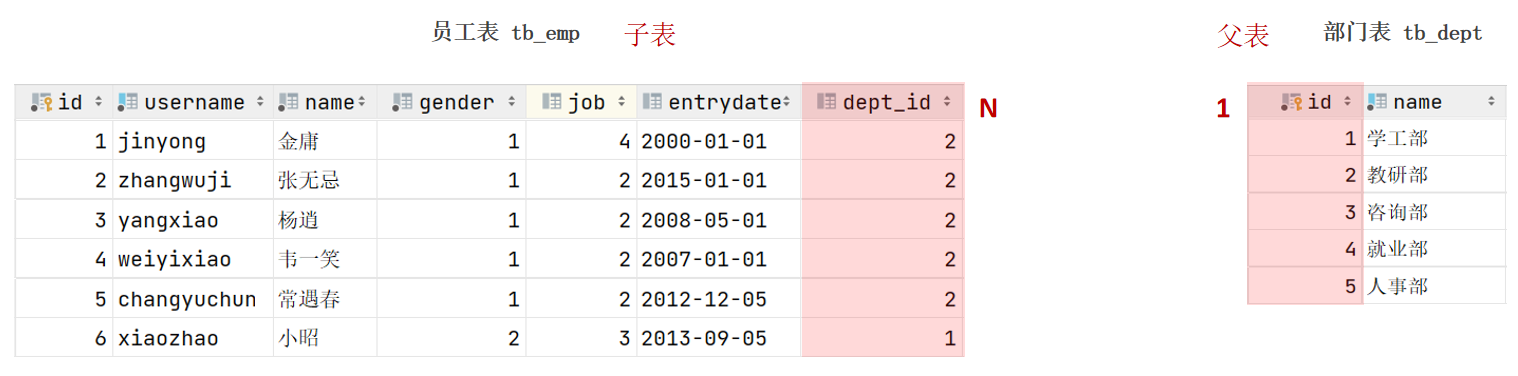
外键

1
2
3
4
5
6
7
8
-- 创建表时指定
create table 表名(
字段名 数据类型,
...
[constraint] [外键名称] foreign key (外键字段名) references 主表 (字段名)
);
-- 建完表后,添加外键
alter table 表名 add constraint 外键名称 foreign key (外键字段名) references 主表(字段名);
  1. 物理外键:使用foreign key定义外键关联另外一张表。

    缺点:影响增、删、改的效率(需要检查外键关系)。仅用于单节点数据库,不适用与分布式、集群场景。容易引发数据库的死锁问题,消耗性能。

  2. 逻辑外键(推荐使用):在业务层逻辑中,解决外键关联。通过逻辑外键,就可以很方便的解决上述问题。

1
2
3
4
5
6
7
8
9
10
11
12
13
14
15
16
17
18
19
20
21
22
23
24
25
26
27
28
29
30
31
32
33
34
35
36
37
38
39
40
41
42
43
44
45
46
47
48
49
50
51
52
53
54
55
56
-- 员工
create table tb_emp
(
id int unsigned primary key auto_increment comment 'ID',
username varchar(20) not null unique comment '用户名',
password varchar(32) default '123456' comment '密码',
name varchar(10) not null comment '姓名',
gender tinyint unsigned not null comment '性别, 说明: 1 男, 2 女',
image varchar(300) comment '图像',
job tinyint unsigned comment '职位, 说明: 1 班主任,2 讲师, 3 学工主管, 4 教研主管',
entrydate date comment '入职时间',
dept_id int unsigned comment '归属的部门ID',
create_time datetime not null comment '创建时间',
update_time datetime not null comment '修改时间'
) comment '员工表';


-- 部门
create table tb_dept
(
id int unsigned primary key auto_increment comment 'ID',
name varchar(10) not null unique comment '部门名称',
create_time datetime not null comment '创建时间',
update_time datetime not null comment '修改时间'
) comment '部门表';

-- 插入测试数据
insert into tb_dept (id, name, create_time, update_time)
values (1, '学工部', now(), now()),
(2, '教研部', now(), now()),
(3, '咨询部', now(), now()),
(4, '就业部', now(), now()),
(5, '人事部', now(), now());

INSERT INTO tb_emp
(id, username, password, name, gender, image, job, entrydate, dept_id, create_time, update_time)
VALUES (1, 'jinyong', '123456', '金庸', 1, '1.jpg', 4, '2000-01-01', 2, now(), now()),
(2, 'zhangwuji', '123456', '张无忌', 1, '2.jpg', 2, '2015-01-01', 2, now(), now()),
(3, 'yangxiao', '123456', '杨逍', 1, '3.jpg', 2, '2008-05-01', 2, now(), now()),
(4, 'weiyixiao', '123456', '韦一笑', 1, '4.jpg', 2, '2007-01-01', 2, now(), now()),
(5, 'changyuchun', '123456', '常遇春', 1, '5.jpg', 2, '2012-12-05', 2, now(), now()),
(6, 'xiaozhao', '123456', '小昭', 2, '6.jpg', 3, '2013-09-05', 1, now(), now()),
(7, 'jixiaofu', '123456', '纪晓芙', 2, '7.jpg', 1, '2005-08-01', 1, now(), now()),
(8, 'zhouzhiruo', '123456', '周芷若', 2, '8.jpg', 1, '2014-11-09', 1, now(), now()),
(9, 'dingminjun', '123456', '丁敏君', 2, '9.jpg', 1, '2011-03-11', 1, now(), now()),
(10, 'zhaomin', '123456', '赵敏', 2, '10.jpg', 1, '2013-09-05', 1, now(), now()),
(11, 'luzhangke', '123456', '鹿杖客', 1, '11.jpg', 1, '2007-02-01', 1, now(), now()),
(12, 'hebiweng', '123456', '鹤笔翁', 1, '12.jpg', 1, '2008-08-18', 1, now(), now()),
(13, 'fangdongbai', '123456', '方东白', 1, '13.jpg', 2, '2012-11-01', 2, now(), now()),
(14, 'zhangsanfeng', '123456', '张三丰', 1, '14.jpg', 2, '2002-08-01', 2, now(), now()),
(15, 'yulianzhou', '123456', '俞莲舟', 1, '15.jpg', 2, '2011-05-01', 2, now(), now()),
(16, 'songyuanqiao', '123456', '宋远桥', 1, '16.jpg', 2, '2010-01-01', 2, now(), now()),
(17, 'chenyouliang', '123456', '陈友谅', 1, '17.jpg', NULL, '2015-03-21', NULL, now(), now());

-- 设置外键
alter table tb_emp add constraint tb_emp_fk_dept_id foreign key (dept_id) references tb_dept(id);
一对一

案例:用户与身份证信息的关系。

关系:一对一关系,多用于单表拆分,将一张表的基础字段放在一张表中,其他字段放在另一张表中,以提升操作效率。

实现:在任意一方加入外键,关联另外一方的主键,并且设置外键为唯一的UNIQUE。

1
2
3
4
5
6
7
8
9
10
11
12
13
14
15
16
17
18
19
20
21
22
23
24
25
26
27
-- 一对一: 用户 与 身份证
create table tb_user(
id int unsigned primary key auto_increment comment 'ID',
name varchar(10) not null comment '姓名',
gender tinyint unsigned not null comment '性别, 1 男 2 女',
phone char(11) comment '手机号',
degree varchar(10) comment '学历'
) comment '用户信息表';
insert into tb_user values (1,'白眉鹰王',1,'18812340001','初中'),(2,'青翼蝠王',1,'18812340002','大专'),(3,'金毛狮王',1,'18812340003','初中'),(4,'紫衫龙王',2,'18812340004','硕士');


create table tb_user_card(
id int unsigned primary key auto_increment comment 'ID',
nationality varchar(10) not null comment '民族',
birthday date not null comment '生日',
idcard char(18) not null comment '身份证号',
issued varchar(20) not null comment '签发机关',
expire_begin date not null comment '有效期限-开始',
expire_end date comment '有效期限-结束',
user_id int unsigned not null unique comment '用户ID',
constraint fk_user_id foreign key (user_id) references tb_user(id) -- 设置外键
) comment '用户信息表';
insert into tb_user_card values (1,'汉','1960-11-06','100000100000100001','朝阳区公安局','2000-06-10',null,1),
(2,'汉','1971-11-06','100000100000100002','静安区公安局','2005-06-10','2025-06-10',2),
(3,'汉','1963-11-06','100000100000100003','昌平区公安局','2006-06-10',null,3),
(4,'回','1980-11-06','100000100000100004','海淀区公安局','2008-06-10','2028-06-10',4);

多对多

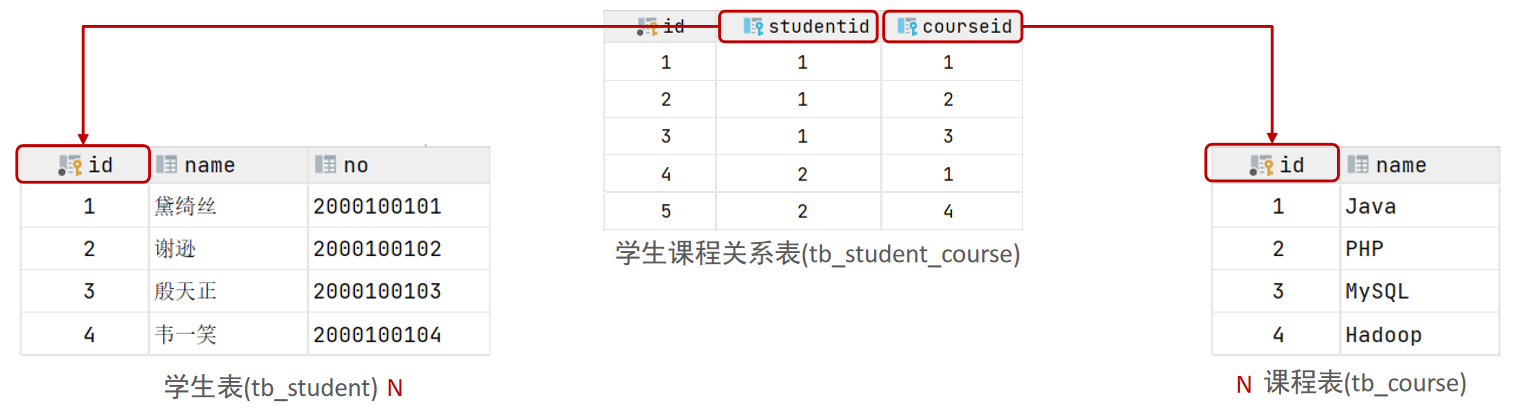
案例:学生与课程的关系。

关系:一个学生可以选修多门课程,一门课程也可以供多个学生选择。

实现:建立第三张中间表,中间表至少包含两个外键,分别关联两方主键。
1
2
3
4
5
6
7
8
9
10
11
12
13
14
15
16
17
18
19
20
21
22
23
24
25
--  多对多: 学生 与 课程
create table tb_student(
id int auto_increment primary key comment '主键ID',
name varchar(10) comment '姓名',
no varchar(10) comment '学号'
) comment '学生表';
insert into tb_student(name, no) values ('黛绮丝', '2000100101'),('谢逊', '2000100102'),('殷天正', '2000100103'),('韦一笑', '2000100104');


create table tb_course(
id int auto_increment primary key comment '主键ID',
name varchar(10) comment '课程名称'
) comment '课程表';
insert into tb_course (name) values ('Java'), ('PHP'), ('MySQL') , ('Hadoop');


create table tb_student_course(
id int auto_increment comment '主键' primary key,
student_id int not null comment '学生ID',
course_id int not null comment '课程ID',
constraint fk_courseid foreign key (course_id) references tb_course (id),
constraint fk_studentid foreign key (student_id) references tb_student (id)
)comment '学生课程中间表';

insert into tb_student_course(student_id, course_id) values (1,1),(1,2),(1,3),(2,2),(2,3),(3,4);
多表查询定义

多表查询:指从多张表中查询数据。

笛卡尔积:笛卡尔乘积是指在数学中,两个集合(A集合和B集合)所有组合情况。(在多表查询时,需要消除无效的笛卡尔积。)

分类:

  • 连接查询

    内连接:相当于查询A、B交集部分数据。

    外连接:

    ​ 左外连接:查询左表所有数据(包括两张表交集部分数据)。

    ​ 右外连接:查询右表所有数据(包括两张表交集部分数据)。

  • 子查询

1
2
3
4
5
6
7
8
9
10
11
12
13
14
15
16
17
18
19
20
21
22
23
24
25
26
27
28
29
30
31
32
33
34
35
36
37
38
39
40
41
42
43
44
45
46
47
48
49
50
51
52
53
54
55
56
-- 多表查询: 数据准备
-- 部门管理
create table tb_dept
(
id int unsigned primary key auto_increment comment '主键ID',
name varchar(10) not null unique comment '部门名称',
create_time datetime not null comment '创建时间',
update_time datetime not null comment '修改时间'
) comment '部门表';
insert into tb_dept (id, name, create_time, update_time)
values (1, '学工部', now(), now()),
(2, '教研部', now(), now()),
(3, '咨询部', now(), now()),
(4, '就业部', now(), now()),
(5, '人事部', now(), now());

-- 员工管理
create table tb_emp
(
id int unsigned primary key auto_increment comment 'ID',
username varchar(20) not null unique comment '用户名',
password varchar(32) default '123456' comment '密码',
name varchar(10) not null comment '姓名',
gender tinyint unsigned not null comment '性别, 说明: 1 男, 2 女',
image varchar(300) comment '图像',
job tinyint unsigned comment '职位, 说明: 1 班主任,2 讲师, 3 学工主管, 4 教研主管, 5 咨询师',
entrydate date comment '入职时间',
dept_id int unsigned comment '部门ID',
create_time datetime not null comment '创建时间',
update_time datetime not null comment '修改时间'
) comment '员工表';

INSERT INTO tb_emp(id, username, password, name, gender, image, job, entrydate, dept_id, create_time, update_time)
VALUES (1, 'jinyong', '123456', '金庸', 1, '1.jpg', 4, '2000-01-01', 2, now(), now()),
(2, 'zhangwuji', '123456', '张无忌', 1, '2.jpg', 2, '2015-01-01', 2, now(), now()),
(3, 'yangxiao', '123456', '杨逍', 1, '3.jpg', 2, '2008-05-01', 2, now(), now()),
(4, 'weiyixiao', '123456', '韦一笑', 1, '4.jpg', 2, '2007-01-01', 2, now(), now()),
(5, 'changyuchun', '123456', '常遇春', 1, '5.jpg', 2, '2012-12-05', 2, now(), now()),
(6, 'xiaozhao', '123456', '小昭', 2, '6.jpg', 3, '2013-09-05', 1, now(), now()),
(7, 'jixiaofu', '123456', '纪晓芙', 2, '7.jpg', 1, '2005-08-01', 1, now(), now()),
(8, 'zhouzhiruo', '123456', '周芷若', 2, '8.jpg', 1, '2014-11-09', 1, now(), now()),
(9, 'dingminjun', '123456', '丁敏君', 2, '9.jpg', 1, '2011-03-11', 1, now(), now()),
(10, 'zhaomin', '123456', '赵敏', 2, '10.jpg', 1, '2013-09-05', 1, now(), now()),
(11, 'luzhangke', '123456', '鹿杖客', 1, '11.jpg', 5, '2007-02-01', 3, now(), now()),
(12, 'hebiweng', '123456', '鹤笔翁', 1, '12.jpg', 5, '2008-08-18', 3, now(), now()),
(13, 'fangdongbai', '123456', '方东白', 1, '13.jpg', 5, '2012-11-01', 3, now(), now()),
(14, 'zhangsanfeng', '123456', '张三丰', 1, '14.jpg', 2, '2002-08-01', 2, now(), now()),
(15, 'yulianzhou', '123456', '俞莲舟', 1, '15.jpg', 2, '2011-05-01', 2, now(), now()),
(16, 'songyuanqiao', '123456', '宋远桥', 1, '16.jpg', 2, '2007-01-01', 2, now(), now()),
(17, 'chenyouliang', '123456', '陈友谅', 1, '17.jpg', NULL, '2015-03-21', NULL, now(), now());

-- 多表查询
select *
from tb_emp,
tb_dept
where tb_emp.dept_id = tb_dept.id; -- 会有5*17条数据,是tb_emp集合和tb_dept集合的所有组合情况。
内连接

隐式内连接:select 字段列表 from 表1 , 表2 where 条件 ... ;

显式内连接:select 字段列表 from 表1 [ inner ] join 表2 on 连接条件 ... ;

1
2
3
4
5
6
7
8
9
10
-- ============================= 内连接 ==========================
-- A. 查询员工的姓名 , 及所属的部门名称 (隐式内连接实现)
select tb_emp.name, tb_dept.name from tb_emp, tb_dept where tb_emp.dept_id = tb_dept.id;

-- 起别名
select e.name, d.name from tb_emp e, tb_dept d where e.dept_id = d.id;
-- 注意:给table起别名之后就不能使用原来的table名

-- B. 查询员工的姓名 , 及所属的部门名称 (显式内连接实现)
select tb_emp.name, tb_dept.name from tb_emp join tb_dept on tb_emp.dept_id = tb_dept.id;
外连接

左外连接:select 字段列表 from 表1 left [ outer ] join 表2 on 连接条件 ... ;

右外连接:select 字段列表 from 表1 right [ outer ] join 表2 on 连接条件 ... ;

1
2
3
4
5
6
7
-- =============================== 外连接 ============================
-- A. 查询员工表 所有 员工的姓名, 和对应的部门名称 (左外连接)
select tb_emp.name, tb_dept.name from tb_emp left join tb_dept on tb_emp.dept_id = tb_dept.id;

-- B. 查询部门表 所有 部门的名称, 和对应的员工名称 (右外连接)
select e.name,d.name from tb_emp e right join tb_dept d on e.dept_id = d.id;
select e.name, d.name from tb_dept d left join tb_emp e on e.dept_id = d.id;
子查询

介绍:SQL语句中嵌套select语句,称为嵌套查询,又称子查询

形式:select * from t1 where column1 = ( select column1 from t2 … );

子查询外部的语句可以是insert/update/delete/select 的任何一个,最常见的是select

分类:

  1. 标量子查询:子查询返回的结果为单个值
  2. 列子查询:子查询返回的结果为一列
  3. 行子查询:子查询返回的结果为一行
  4. 表子查询:子查询返回的结果为多行多列
标量子查询

子查询返回的结果是单个值(数字、字符串、日期等),最简单的形式。

常用的操作符:= <> > >= < <=

1
2
3
4
5
6
7
8
9
10
11
12
13
14
15
16
17
-- ========================= 子查询 ================================
-- 标量子查询
-- A. 查询 "教研部" 的所有员工信息
-- a. 查询 教研部 的部门ID - tb_dept
select id from tb_dept where name = '教研部';

-- b. 再查询该部门ID下的员工信息 - tb_emp
select * from tb_emp where dept_id = (select id from tb_dept where name = '教研部');

select tb_emp.* from tb_emp, tb_dept where tb_emp.dept_id = tb_dept.id and tb_dept.name = '教研部'; -- 用内连接

-- B. 查询在 "方东白" 入职之后的员工信息
-- a. 查询 方东白 的入职时间
select entrydate from tb_emp where name = '方东白';

-- b. 查询在 "方东白" 入职之后的员工信息
select * from tb_emp where entrydate > (select entrydate from tb_emp where name = '方东白');
列子查询

子查询返回的结果是一列(可以是多行)

常用的操作符:in、not in等。

1
2
3
4
5
6
7
-- 列子查询
-- A. 查询 "教研部" 和 "咨询部" 的所有员工信息
-- a. 查询 "教研部" 和 "咨询部" 的部门ID - tb_dept
select id from tb_dept where name = '教研部' or name = '咨询部';

-- b. 根据部门ID, 查询该部门下的员工信息 - tb_emp
select * from tb_emp where dept_id in (select id from tb_dept where name = '教研部' or name = '咨询部');
行子查询

子查询返回的结果是一行(可以是多列)

常用的操作符:= 、<> 、in 、not in

1
2
3
4
5
6
7
8
9
10
11
-- 行子查询
-- A. 查询与 "韦一笑" 的入职日期 及 职位都相同的员工信息 ;
-- a. 查询 "韦一笑" 的入职日期 及 职位
select entrydate, job from tb_emp where name = '韦一笑';

-- b. 查询与其入职日期 及 职位都相同的员工信息 ;
-- 方式一
select * from tb_emp where entrydate = (select entrydate from tb_emp where name = '韦一笑') and job = (select job from tb_emp where name = '韦一笑');

-- 方式二
select * from tb_emp where (entrydate, job) = (select entrydate, job from tb_emp where name = '韦一笑');
表子查询

子查询返回的结果是多行多列,常作为临时表

常用的操作符:in

1
2
3
4
5
6
7
-- 表子查询
-- A. 查询入职日期是 "2006-01-01" 之后的员工信息 , 及其部门名称
-- a. 查询入职日期是 "2006-01-01" 之后的员工信息
select * from tb_emp where entrydate > '2006-01-01';

-- b. 查询这部分员工信息及其部门名称 - tb_dept
select e.*, d.name from (select * from tb_emp where entrydate > '2006-01-01') e, tb_dept d where e.dept_id = d.id;
案例

1
2
3
4
5
6
7
8
9
10
11
12
13
14
15
16
17
18
19
20
21
22
23
24
25
26
27
28
29
30
31
32
33
34
35
36
37
38
39
40
41
42
43
44
45
46
47
48
49
50
51
52
53
54
55
56
57
58
59
60
61
62
63
64
65
66
67
68
69
70
71
72
73
74
75
76
77
78
79
80
81
82
83
84
85
86
87
88
89
90
91
92
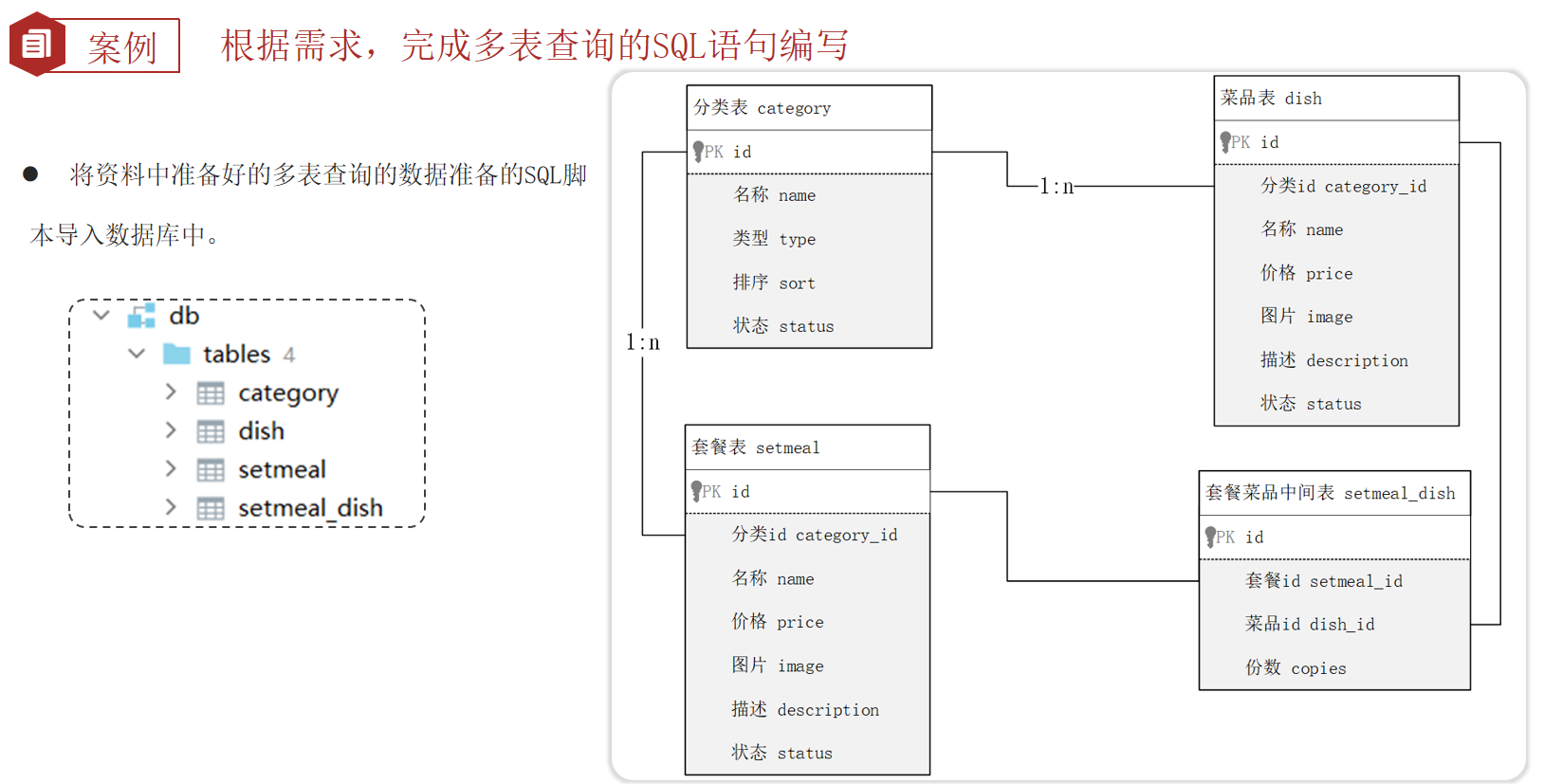
93
-- ================================================== 多表查询案例 =============================================
-- 数据准备 :
-- 分类表
create table category(
id int unsigned primary key auto_increment comment '主键ID',
name varchar(20) not null unique comment '分类名称',
type tinyint unsigned not null comment '类型 1 菜品分类 2 套餐分类',
sort tinyint unsigned not null comment '顺序',
status tinyint unsigned not null default 0 comment '状态 0 禁用,1 启用',
create_time datetime not null comment '创建时间',
update_time datetime not null comment '更新时间'
) comment '分类' ;

-- 菜品表
create table dish(
id int unsigned primary key auto_increment comment '主键ID',
name varchar(20) not null unique comment '菜品名称',
category_id int unsigned not null comment '菜品分类ID',
price decimal(8, 2) not null comment '菜品价格',
image varchar(300) not null comment '菜品图片',
description varchar(200) comment '描述信息',
status tinyint unsigned not null default 0 comment '状态, 0 停售 1 起售',
create_time datetime not null comment '创建时间',
update_time datetime not null comment '更新时间'
) comment '菜品';

-- 套餐表
create table setmeal(
id int unsigned primary key auto_increment comment '主键ID',
name varchar(20) not null unique comment '套餐名称',
category_id int unsigned not null comment '分类id',
price decimal(8, 2) not null comment '套餐价格',
image varchar(300) not null comment '图片',
description varchar(200) comment '描述信息',
status tinyint unsigned not null default 0 comment '状态 0:停用 1:启用',
create_time datetime not null comment '创建时间',
update_time datetime not null comment '更新时间'
)comment '套餐' ;

-- 套餐菜品关联表
create table setmeal_dish(
id int unsigned primary key auto_increment comment '主键ID',
setmeal_id int unsigned not null comment '套餐id ',
dish_id int unsigned not null comment '菜品id',
copies tinyint unsigned not null comment '份数'
)comment '套餐菜品中间表';

-- ================================== 导入测试数据 ====================================
-- category
insert into category (id, type, name, sort, status, create_time, update_time) values (1, 1, '酒水饮料', 10, 1, '2022-08-09 22:09:18', '2022-08-09 22:09:18');
insert into category (id, type, name, sort, status, create_time, update_time) values (2, 1, '传统主食', 9, 1, '2022-08-09 22:09:32', '2022-08-09 22:18:53');
insert into category (id, type, name, sort, status, create_time, update_time) values (3, 2, '人气套餐', 12, 1, '2022-08-09 22:11:38', '2022-08-10 11:04:40');
insert into category (id, type, name, sort, status, create_time, update_time) values (4, 2, '商务套餐', 13, 1, '2022-08-09 22:14:10', '2022-08-10 11:04:48');
insert into category (id, type, name, sort, status, create_time, update_time) values (5, 1, '经典川菜', 6, 1, '2022-08-09 22:17:42', '2022-08-09 22:17:42');
insert into category (id, type, name, sort, status, create_time, update_time) values (6, 1, '新鲜时蔬', 7, 1, '2022-08-09 22:18:12', '2022-08-09 22:18:28');
insert into category (id, type, name, sort, status, create_time, update_time) values (7, 1, '汤类', 11, 1, '2022-08-10 10:51:47', '2022-08-10 10:51:47');

-- dish
insert into dish (id, name, category_id, price, image, description, status, create_time, update_time) values (1,'王老吉', 1, 6.00, 'https://reggie-itcast.oss-cn-beijing.aliyuncs.com/41bfcacf-7ad4-4927-8b26-df366553a94c.png', '', 1, '2022-06-09 22:40:47', '2022-06-09 22:40:47');
insert into dish (id, name, category_id, price, image, description, status, create_time, update_time) values (2,'北冰洋', 1, 4.00, 'https://reggie-itcast.oss-cn-beijing.aliyuncs.com/4451d4be-89a2-4939-9c69-3a87151cb979.png', '还是小时候的味道', 1, '2022-06-10 09:18:49', '2022-06-10 09:18:49');
insert into dish (id, name, category_id, price, image, description, status, create_time, update_time) values (3,'雪花啤酒', 1, 4.00, 'https://reggie-itcast.oss-cn-beijing.aliyuncs.com/bf8cbfc1-04d2-40e8-9826-061ee41ab87c.png', '', 1, '2022-06-10 09:22:54', '2022-06-10 09:22:54');
insert into dish (id, name, category_id, price, image, description, status, create_time, update_time) values (4,'米饭', 2, 2.00, 'https://reggie-itcast.oss-cn-beijing.aliyuncs.com/76752350-2121-44d2-b477-10791c23a8ec.png', '精选五常大米', 1, '2022-06-10 09:30:17', '2022-06-10 09:30:17');
insert into dish (id, name, category_id, price, image, description, status, create_time, update_time) values (5,'馒头', 2, 1.00, 'https://reggie-itcast.oss-cn-beijing.aliyuncs.com/475cc599-8661-4899-8f9e-121dd8ef7d02.png', '优质面粉', 1, '2022-06-10 09:34:28', '2022-06-10 09:34:28');
insert into dish (id, name, category_id, price, image, description, status, create_time, update_time) values (6,'老坛酸菜鱼', 5, 56.00, 'https://reggie-itcast.oss-cn-beijing.aliyuncs.com/4a9cefba-6a74-467e-9fde-6e687ea725d7.png', '原料:汤,草鱼,酸菜', 1, '2022-06-10 09:40:51', '2022-06-10 09:40:51');
insert into dish (id, name, category_id, price, image, description, status, create_time, update_time) values (7,'经典酸菜鮰鱼', 5, 66.00, 'https://reggie-itcast.oss-cn-beijing.aliyuncs.com/5260ff39-986c-4a97-8850-2ec8c7583efc.png', '原料:酸菜,江团,鮰鱼', 1, '2022-06-10 09:46:02', '2022-06-10 09:46:02');
insert into dish (id, name, category_id, price, image, description, status, create_time, update_time) values (8,'蜀味水煮草鱼', 5, 38.00, 'https://reggie-itcast.oss-cn-beijing.aliyuncs.com/a6953d5a-4c18-4b30-9319-4926ee77261f.png', '原料:草鱼,汤', 1, '2022-06-10 09:48:37', '2022-06-10 09:48:37');
insert into dish (id, name, category_id, price, image, description, status, create_time, update_time) values (9,'清炒小油菜', 6, 18.00, 'https://reggie-itcast.oss-cn-beijing.aliyuncs.com/3613d38e-5614-41c2-90ed-ff175bf50716.png', '原料:小油菜', 1, '2022-06-10 09:51:46', '2022-06-10 09:51:46');
insert into dish (id, name, category_id, price, image, description, status, create_time, update_time) values (10,'蒜蓉娃娃菜', 6, 18.00, 'https://reggie-itcast.oss-cn-beijing.aliyuncs.com/4879ed66-3860-4b28-ba14-306ac025fdec.png', '原料:蒜,娃娃菜', 1, '2022-06-10 09:53:37', '2022-06-10 09:53:37');
insert into dish (id, name, category_id, price, image, description, status, create_time, update_time) values (11,'清炒西兰花', 6, 18.00, 'https://reggie-itcast.oss-cn-beijing.aliyuncs.com/e9ec4ba4-4b22-4fc8-9be0-4946e6aeb937.png', '原料:西兰花', 1, '2022-06-10 09:55:44', '2022-06-10 09:55:44');
insert into dish (id, name, category_id, price, image, description, status, create_time, update_time) values (12,'炝炒圆白菜', 6, 18.00, 'https://reggie-itcast.oss-cn-beijing.aliyuncs.com/22f59feb-0d44-430e-a6cd-6a49f27453ca.png', '原料:圆白菜', 1, '2022-06-10 09:58:35', '2022-06-10 09:58:35');
insert into dish (id, name, category_id, price, image, description, status, create_time, update_time) values (13,'清蒸鲈鱼', 5, 98.00, 'https://reggie-itcast.oss-cn-beijing.aliyuncs.com/c18b5c67-3b71-466c-a75a-e63c6449f21c.png', '原料:鲈鱼', 1, '2022-06-10 10:12:28', '2022-06-10 10:12:28');
insert into dish (id, name, category_id, price, image, description, status, create_time, update_time) values (14,'东坡肘子', 5, 138.00, 'https://reggie-itcast.oss-cn-beijing.aliyuncs.com/a80a4b8c-c93e-4f43-ac8a-856b0d5cc451.png', '原料:猪肘棒', 1, '2022-06-10 10:24:03', '2022-06-10 10:24:03');
insert into dish (id, name, category_id, price, image, description, status, create_time, update_time) values (15,'梅菜扣肉', 5, 58.00, 'https://reggie-itcast.oss-cn-beijing.aliyuncs.com/6080b118-e30a-4577-aab4-45042e3f88be.png', '原料:猪肉,梅菜', 1, '2022-06-10 10:26:03', '2022-06-10 10:26:03');
insert into dish (id, name, category_id, price, image, description, status, create_time, update_time) values (16,'剁椒鱼头', 5, 66.00, 'https://reggie-itcast.oss-cn-beijing.aliyuncs.com/13da832f-ef2c-484d-8370-5934a1045a06.png', '原料:鲢鱼,剁椒', 1, '2022-06-10 10:28:54', '2022-06-10 10:28:54');
insert into dish (id, name, category_id, price, image, description, status, create_time, update_time) values (17,'馋嘴牛蛙', 5, 98.00, 'https://reggie-itcast.oss-cn-beijing.aliyuncs.com/7a55b845-1f2b-41fa-9486-76d187ee9ee1.png', '配料:鲜活牛蛙,丝瓜,黄豆芽', 1, '2022-06-10 10:37:52', '2022-06-10 10:37:52');
insert into dish (id, name, category_id, price, image, description, status, create_time, update_time) values (18,'鸡蛋汤', 7, 4.00, 'https://reggie-itcast.oss-cn-beijing.aliyuncs.com/c09a0ee8-9d19-428d-81b9-746221824113.png', '配料:鸡蛋,紫菜', 1, '2022-06-10 10:54:25', '2022-06-10 10:54:25');
insert into dish (id, name, category_id, price, image, description, status, create_time, update_time) values (19,'平菇豆腐汤', 7, 6.00, 'https://reggie-itcast.oss-cn-beijing.aliyuncs.com/16d0a3d6-2253-4cfc-9b49-bf7bd9eb2ad2.png', '配料:豆腐,平菇', 1, '2022-06-10 10:55:02', '2022-06-10 10:55:02');

-- setmeal
insert into setmeal (id, category_id, name, price, status, description, image, create_time, update_time) values (1, 4, '商务套餐A', 20.00, 1, '', 'https://reggie-itcast.oss-cn-beijing.aliyuncs.com/21a5ed3a-97f6-447a-af9d-53deabfb5661.png', '2022-06-10 10:58:09', '2022-06-10 10:58:09');
insert into setmeal (id, category_id, name, price, status, description, image, create_time, update_time) values (2, 4, '商务套餐B', 22.00, 1, '', 'https://reggie-itcast.oss-cn-beijing.aliyuncs.com/8d0075f8-9008-4390-94ca-2ca631440304.png', '2022-06-10 11:00:13', '2022-06-10 11:11:37');
insert into setmeal (id, category_id, name, price, status, description, image, create_time, update_time) values (3, 3, '人气套餐A', 49.00, 1, '', 'https://reggie-itcast.oss-cn-beijing.aliyuncs.com/8979566b-0e17-462b-81d8-8dbace4138f4.png', '2022-06-10 11:11:23', '2022-06-10 11:11:23');

-- setmeal_dish
insert into setmeal_dish (id, setmeal_id, dish_id, copies) values (1, 1, 1, 1);
insert into setmeal_dish (id, setmeal_id, dish_id, copies) values (2, 1, 4, 1);
insert into setmeal_dish (id, setmeal_id, dish_id, copies) values (3, 1, 11, 1);
insert into setmeal_dish (id, setmeal_id, dish_id, copies) values (4, 2, 2, 1);
insert into setmeal_dish (id, setmeal_id, dish_id, copies) values (5, 2, 4, 1);
insert into setmeal_dish (id, setmeal_id, dish_id, copies) values (6, 2, 9, 1);
insert into setmeal_dish (id, setmeal_id, dish_id, copies) values (7, 3, 2, 1);
insert into setmeal_dish (id, setmeal_id, dish_id, copies) values (8, 3, 6, 1);
insert into setmeal_dish (id, setmeal_id, dish_id, copies) values (9, 3, 5, 1);

需求:

1
2
3
4
5
6
7
8
9
10
11
12
13
14
15
16
17
18
19
20
21
22
23
24
25
26
27
28
29
30
31
32
33
34
35
36
37
38
39
40
41
42
43
44
45
46
47
48
49
50
51
52
53
54
55
56
57
58
59
60
61
62
63
64
65
66
67
68
69
70
71
-- 需求:
-- 1. 查询价格低于 10元 的菜品的名称 、价格 及其 菜品的分类名称 .
-- 表: dish , category
-- SQL:
select dish.name, dish.price, category.name
from dish,
category
where dish.category_id = category.id
and dish.price < 10;


-- 2. 查询所有价格在 10元(含)到50元(含)之间 且 状态为'起售'的菜品, 展示出菜品的名称、价格 及其 菜品的分类名称 (即使菜品没有分类 , 也需要将菜品查询出来).
-- 表: dish , category
-- SQL:
# select dish.name, dish.price, category.name
# from dish
# left join category
# on dish.category_id = category.id and dish.price >= 10 and dish.price <= 50 and dish.status = 1;
# 这样写是错的 判断条件要从and改成where

select dish.name, dish.price, category.name
from dish
left join category
on dish.category_id = category.id
where dish.price between 10 and 50
and dish.status = 1;


-- 3. 查询每个分类下最贵的菜品, 展示出分类的名称、最贵的菜品的价格 .
-- 表: dish , category
-- SQL:
select category.name, max(dish.price)
from dish,
category
where dish.category_id = category.id
group by category.id;


-- 4. 查询各个分类下 菜品状态为 '起售' , 并且 该分类下菜品总数量大于等于3 的 分类名称 .
-- 表: dish , category
-- SQL:
select category.name, count(*)
from dish,
category
where dish.category_id = category.id
and dish.status = 1
group by category.id
having count(*) >= 3;

-- 5. 查询出 "商务套餐A" 中包含了哪些菜品 (展示出套餐名称、价格, 包含的菜品名称、价格、份数).
-- 表: setmeal , setmeal_dish , dish
-- SQL:
select setmeal.name, setmeal.price, dish.name, dish.price, setmeal_dish.copies
from setmeal,
setmeal_dish,
dish
where setmeal_dish.setmeal_id = setmeal.id
and setmeal_dish.dish_id = dish.id
and setmeal.name = '商务套餐A';


-- 6. 查询出低于菜品平均价格的菜品信息 (展示出菜品名称、菜品价格).
-- 表: dish
-- SQL:
-- a. 计算 菜品平均价格
select avg(price) from dish;

-- b. 查询出低于菜品平均价格的菜品信息
select name, price from dish where price < (select avg(price) from dish);
select * from dish where price < (select avg(price) from dish);

事务

事务是一组操作的集合,它是一个不可分割的工作单位。事务会把所有的操作作为一个整体一起向系统提交或撤销操作请求,即这些操作 要么同时成功,要么同时失败

注意:默认MySQL的事务是自动提交的,也就是说,当执行一条DML语句,MySQL会立即隐式的提交事务

事务的控制
  • 开启事务:start transaction;begin;
  • 提交事务:commit;
  • 回滚事务:rollback;
1
2
3
4
5
6
7
start transaction ; -- 开启事务

delete from tb_dept where id = 1;
delete from tb_emp where dept_id = 1;

commit ; -- 成功则提交
rollback ; -- 失败则回滚
事务的四大特性(ACID)
  1. 原子性(Atomicity):事务是不可分割的最小单元,要么全部成功,要么全部失败。
  2. 一致性(Consistency):事务完成时,必须使所有的数据都保持一致状态。
  3. 隔离性(Isolation):数据库系统提供的隔离机制,保证事务在不受外部并发操作影响的独立环境下运行。
  4. 持久性(Durability):事务一旦提交或回滚,它对数据库中的数据的改变就是永久的。

索引

索引(index)是帮助数据库高效获取数据的数据结构 。

优点:

  • 提高数据查询的效率,降低数据库的IO成本。
  • 通过索引列对数据进行排序,降低数据排序的成本,降低CPU消耗。

缺点:

  • 索引会占用存储空间。
  • 索引大大提高了查询效率,同时却也降低了insertupdatedelete的效率。
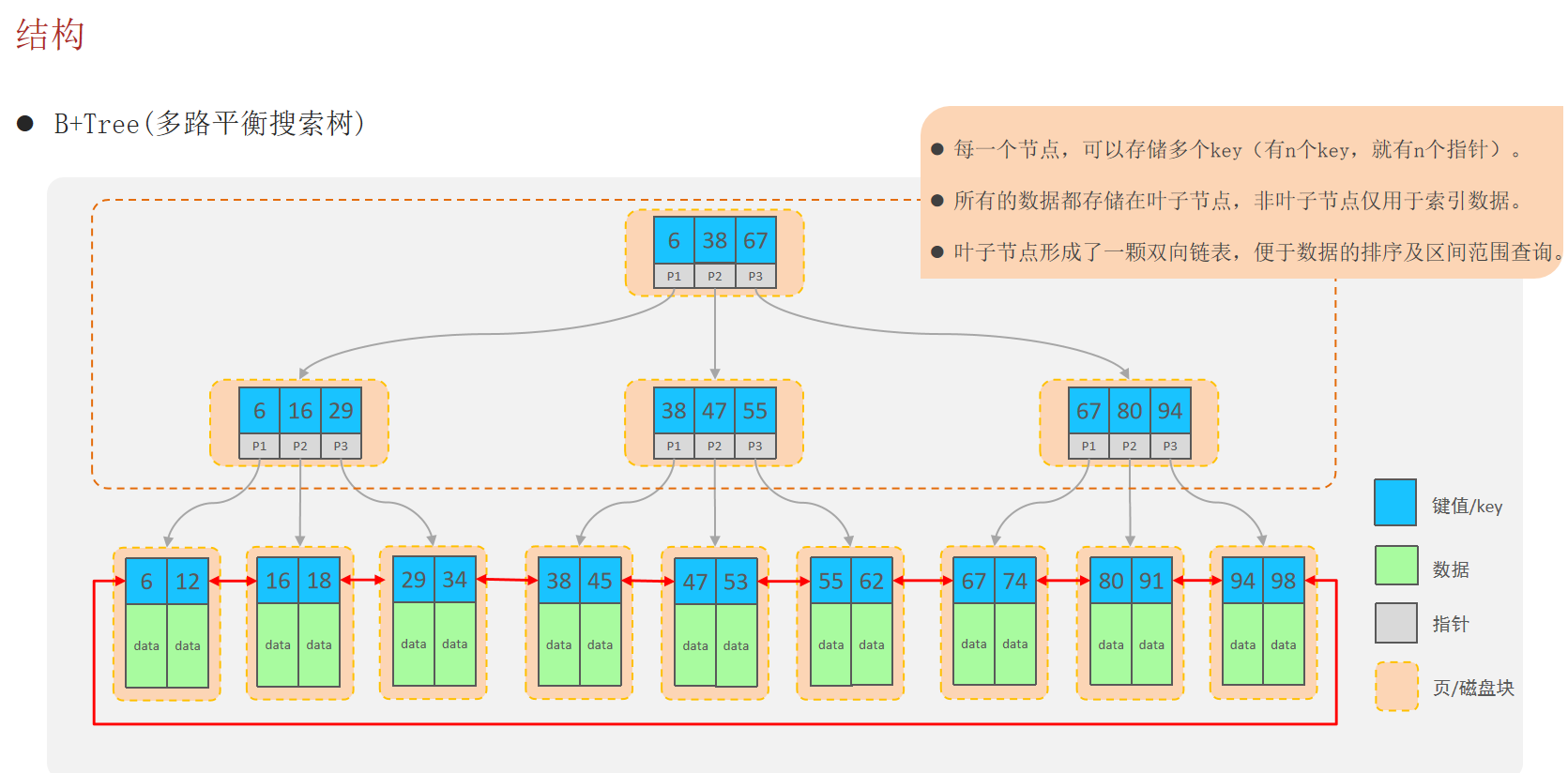
索引的结构

MySQL数据库支持的索引结构有很多,如:Hash索引、B+Tree索引、Full-Text索引等。我们平常所说的索引,如果没有特别指明,都是指默认的B+Tree结构组织的索引。
索引的语法
  • 创建索引:create [ unique ] index 索引名 on 表名 (字段名,... ) ;
  • 查看索引:show index from 表名;
  • 删除索引:drop index 索引名 on 表名;

注意:

  1. 主键字段,在建表时,会自动创建主键索引
  2. 添加唯一约束unique时,数据库实际上会添加唯一索引
1
2
3
4
5
6
7
8
9
-- 索引
-- 创建 : 为tb_emp表的name字段建立一个索引 .
create index idx_emp_name on tb_emp(name);

-- 查询 : 查询 tb_emp 表的索引信息 .
show index from tb_emp;

-- 删除: 删除 tb_emp 表中name字段的索引 .
drop index idx_emp_name on tb_emp;

Mybatis

MyBatis是一款优秀的持久层框架,用于简化JDBC的开发。

MyBatis本是Apache的一个开源项目iBatis,2010年这个项目由apache迁移到了google code,并且改名为MyBatis 。2013年11月迁移到Github

官网:https://mybatis.org/mybatis-3/zh/index.html(现在无法访问)

The MyBatis Blog(现在可以访问)

MyBatis中文网:MyBatis中文网

Mybatis入门

Mybatis快速入门程序

案例:使用Mybatis查询所有用户数据

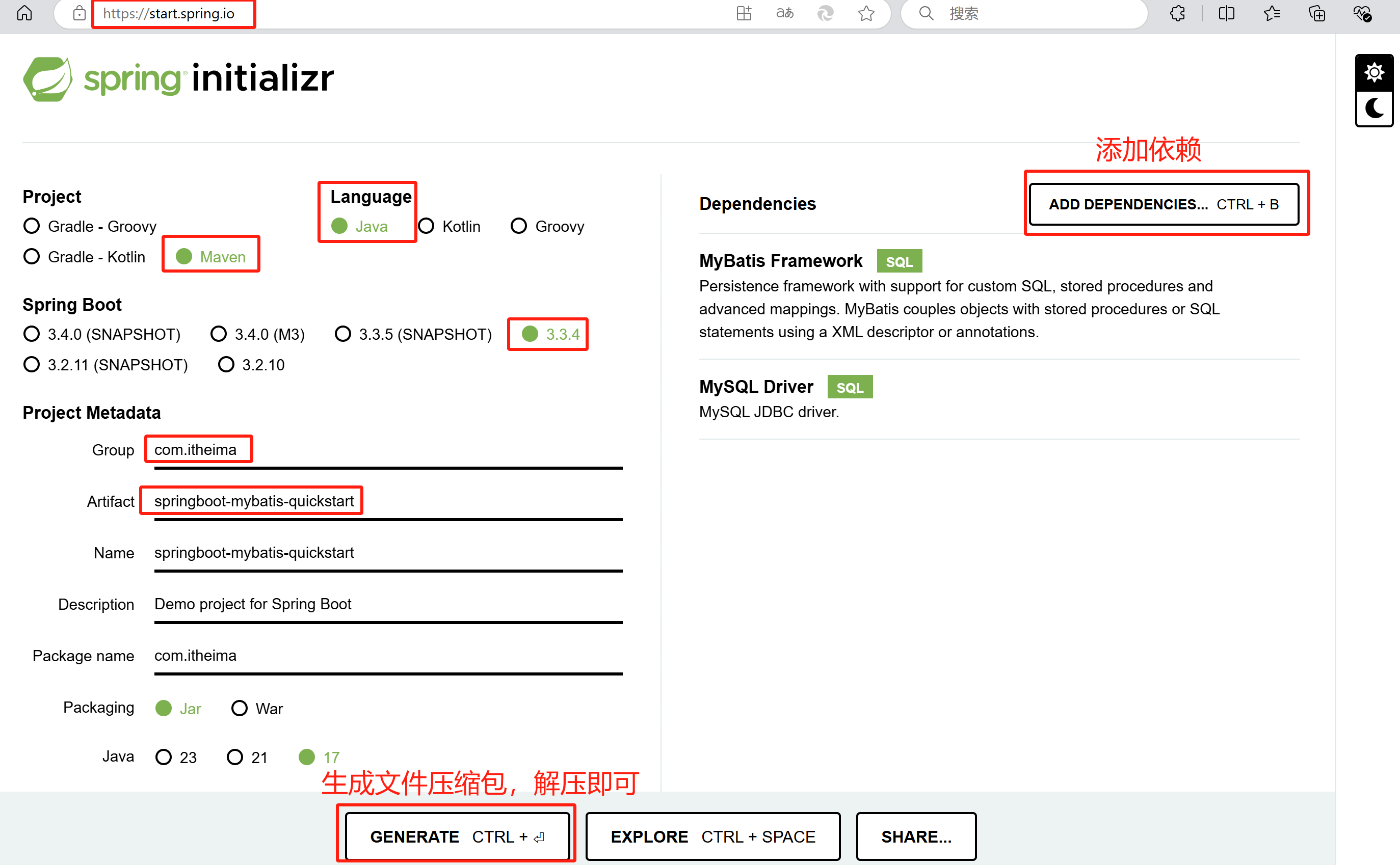
1.创建springboot工程,引入Mybatis的相关依赖:MyBatis FrameworkMySQL Driver

2.创建数据库mybatis,创建数据库表user

1
2
3
4
5
6
7
8
9
10
11
12
13
14
15
-- 创建数据库mybatis,在该数据库下创建表user
create table user(
id int unsigned primary key auto_increment comment 'ID',
name varchar(100) comment '姓名',
age tinyint unsigned comment '年龄',
gender tinyint unsigned comment '性别, 1:男, 2:女',
phone varchar(11) comment '手机号'
) comment '用户表';

insert into user(id, name, age, gender, phone) VALUES (null,'白眉鹰王',55,'1','18800000000');
insert into user(id, name, age, gender, phone) VALUES (null,'金毛狮王',45,'1','18800000001');
insert into user(id, name, age, gender, phone) VALUES (null,'青翼蝠王',38,'1','18800000002');
insert into user(id, name, age, gender, phone) VALUES (null,'紫衫龙王',42,'2','18800000003');
insert into user(id, name, age, gender, phone) VALUES (null,'光明左使',37,'1','18800000004');
insert into user(id, name, age, gender, phone) VALUES (null,'光明右使',48,'1','18800000005');

3.在com.itheima.pojo包下创建实体类User

1
2
3
4
5
6
7
8
9
10
11
12
13
14
15
16
17
18
19
20
21
22
23
24
25
26
27
28
29
30
31
32
33
34
35
36
37
38
39
40
41
42
43
44
45
46
47
48
49
50
51
52
53
54
55
56
57
58
59
60
61
62
63
64
65
66
67
68
69
70
71
package com.itheima.pojo;

public class User {
private Integer id;
private String name;
private Short age;
private Short gender;
private String phone;

public User() {
}

public User(Integer id, String name, Short age, Short gender, String phone) {
this.id = id;
this.name = name;
this.age = age;
this.gender = gender;
this.phone = phone;
}

public Integer getId() {
return id;
}

public void setId(Integer id) {
this.id = id;
}

public String getName() {
return name;
}

public void setName(String name) {
this.name = name;
}

public Short getAge() {
return age;
}

public void setAge(Short age) {
this.age = age;
}

public Short getGender() {
return gender;
}

public void setGender(Short gender) {
this.gender = gender;
}

public String getPhone() {
return phone;
}

public void setPhone(String phone) {
this.phone = phone;
}

@Override
public String toString() {
return "User{" +
"id=" + id +
", name='" + name + '\'' +
", age=" + age +
", gender=" + gender +
", phone='" + phone + '\'' +
'}';
}
}

4.配置Mybatis(数据库连接信息)

src->main->resources->application.properties文件中,配置数据库连接信息。

1
2
3
4
5
6
7
8
9
10
# 配置数据库的连接信息 - 四要素
# 驱动类名称
spring.datasource.driver-class-name=com.mysql.cj.jdbc.Driver
# 数据库连接的url(mybatis是数据库的名称)
spring.datasource.url=jdbc:mysql://localhost:3306/mybatis
# 连接数据库的用户名
spring.datasource.username=root
# 连接数据库的密码
spring.datasource.password=
# 注意:我的root用户密码为空,所有不用填写password,如果密码不为空需要在=号后面填写密码

设置Properties文件编码:Idea 设置编码UTF-8 Idea中 .properties 配置文件中文乱码-CSDN博客

5.编写SQL语句(注解XML

com.itheima.mapper包下创建接口UserMapper

1
2
3
4
5
6
7
8
package com.itheima.mapper;

@Mapper //在运行时,会自动生成该接口的实现类对象(代理对象),并且将该对象交给IOC容器管理
public interface UserMapper {
//查询全部用户信息
@Select("select * from user")
public List<User> list();
}

6.单元测试

src->test->java->com->itheima->SpringbootMybatisQuickstartApplicationTests.java文件下,进行测试。

1
2
3
4
5
6
7
8
9
10
11
12
13
14
15
package com.itheima;

@SpringBootTest //springboot整合单元测试的注解
class SpringbootMybatisQuickstartApplicationTests {
@Autowired
private UserMapper userMapper;

@Test
public void testListUser(){
List<User> userList = userMapper.list();
userList.stream().forEach(user -> {
System.out.println(user);
});
}
}
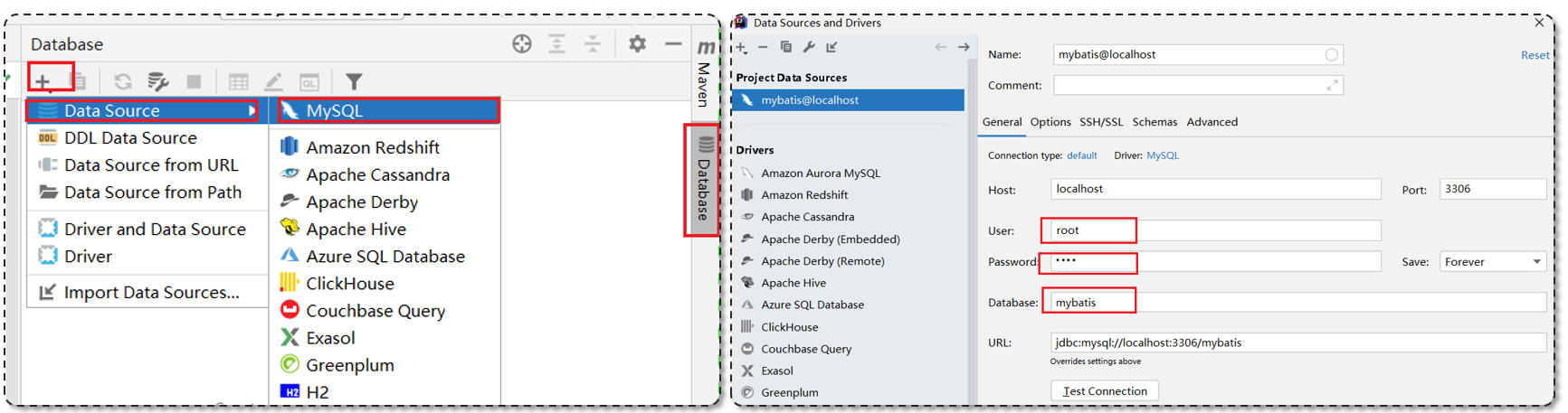
配置SQL提示

默认在Mybatis中编写SQL语句是不识别的。可以做如下配置:
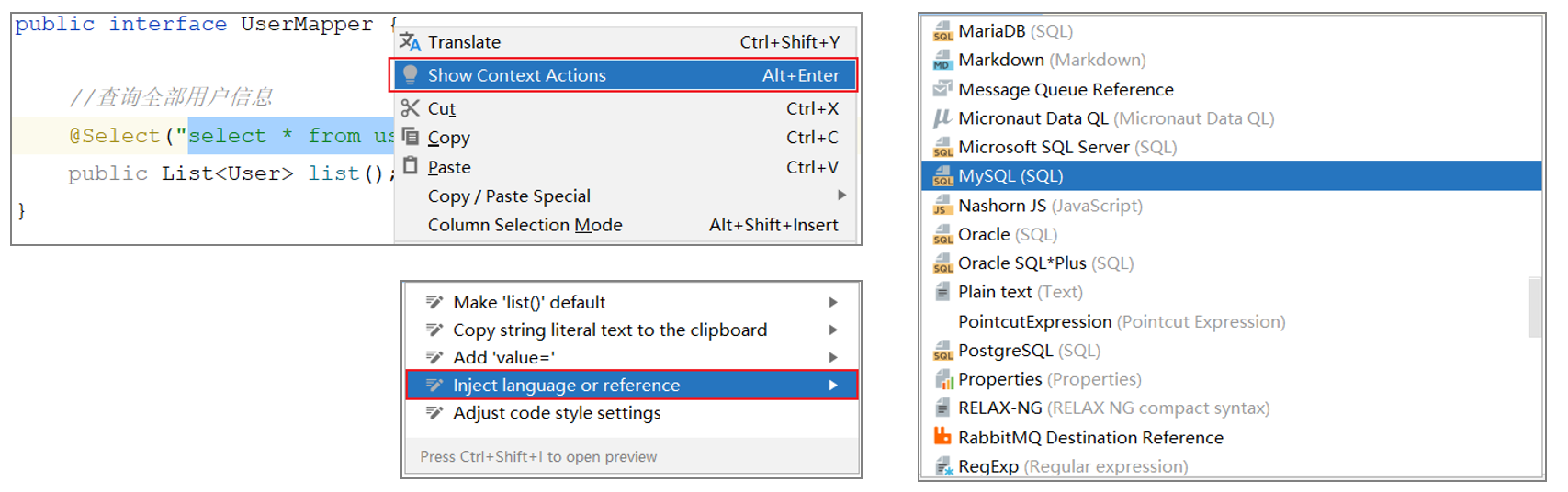
如果IDEA不提示表的信息, 是因为IDEA和数据库没有建立连接,不识别表信息。

解决方式:在IDEA中配置MySQL数据库连接。
JDBC

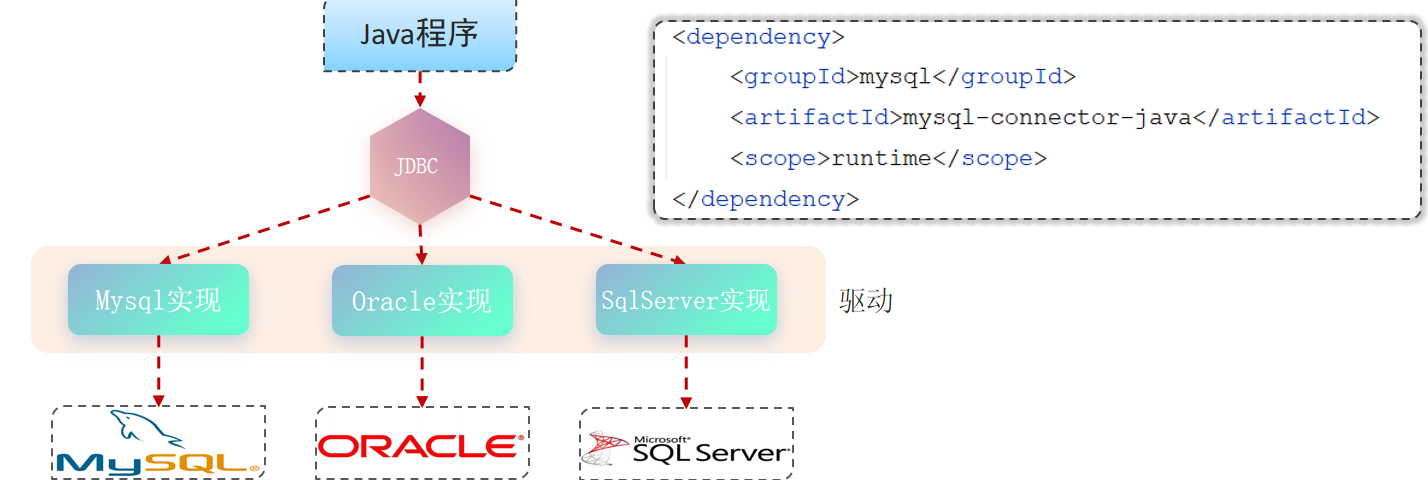
JDBC: ( Java DataBase Connectivity ),就是使用Java语言操作关系型数据库的一套API

  1. sun公司官方定义的一套操作所有关系型数据库的规范,即接口。
  2. 各个数据库厂商去实现这套接口,提供数据库驱动jar包。
  3. 程序员使用这套接口(JDBC)编程,真正执行的代码是驱动jar包中的实现类。
1
2
3
4
5
6
7
8
9
10
11
12
13
14
15
16
17
18
19
20
21
22
23
24
25
26
27
28
29
30
31
32
33
34
35
//原始JDBC程序
@Test
public void testJdbc() throws Exception {
//1. 注册驱动
Class.forName("com.mysql.cj.jdbc.Driver");

//2. 获取连接对象
String url = "jdbc:mysql://localhost:3306/mybatis";
String username = "root";
String password = "";
Connection connection = DriverManager.getConnection(url, username, password);

//3. 获取执行SQL的对象Statement,执行SQL,返回结果
String sql = "select * from user";
Statement statement = connection.createStatement();
ResultSet resultSet = statement.executeQuery(sql);

//4. 封装结果数据
List<User> userList = new ArrayList<>();
while (resultSet.next()){
int id = resultSet.getInt("id");
String name = resultSet.getString("name");
short age = resultSet.getShort("age");
short gender = resultSet.getShort("gender");
String phone = resultSet.getString("phone");

User user = new User(id,name,age,gender,phone);
userList.add(user);
System.out.println(user);
}

//5. 释放资源
statement.close();
connection.close();
}
数据库连接池
  1. 数据库连接池是个容器,负责分配、管理数据库连接(Connection)。
  2. 它允许应用程序重复使用一个现有的数据库连接,而不是再重新建立一个。
  3. 释放空闲时间超过最大空闲时间的连接,来避免因为没有释放连接而引起的数据库连接遗漏。

优势:资源重用,提升系统响应速度,避免数据库连接遗漏。

标准接口:DataSource

  • 官方(sun)提供的数据库连接池接口,由第三方组织实现此接口。

  • 功能:获取连接。Connection getConnection() throws SQLException;

  • 常见产品:C3P0DBCPDruidHikariSpringBoot默认)。

    Druid(德鲁伊)连接池是阿里巴巴开源的数据库连接池项目。

SpringBoot默认使用Hikari:(测试控制台显示)

1
2
2024-10-17T10:29:12.382+08:00  INFO 30856 --- [springboot-mybatis-quickstart] [ionShutdownHook] com.zaxxer.hikari.HikariDataSource       : HikariPool-1 - Shutdown initiated...
2024-10-17T10:29:12.386+08:00 INFO 30856 --- [springboot-mybatis-quickstart] [ionShutdownHook] com.zaxxer.hikari.HikariDataSource

切换Druid数据库连接池:

方法一:

pom.xml文件中添加依赖:

1
2
3
4
5
6
<!-- druid连接池 -->
<dependency>
<groupId>com.alibaba</groupId>
<artifactId>druid-spring-boot-starter</artifactId>
<version>1.2.8</version>
</dependency>

src->main->resources->application.properties文件中添加:

1
spring.datasource.type=com.alibaba.druid.pool.DruidDataSource

方法二:(我的使用这个会报错,暂时还没解决)

1
2
3
4
5
6
7
8
# 驱动类名称
spring.datasource.druid.driver-class-name=com.mysql.cj.jdbc.Driver
# 数据库连接的url
spring.datasource.druid.url=jdbc:mysql://localhost:3306/mybatis
# 连接数据库的用户名
spring.datasource.druid.username=root
# 连接数据库的密码
spring.datasource.druid.password=
Lombok

Lombok是一个实用的Java类库,能通过注解的形式自动生成构造器、getter/setterequalshashcodetoString等方法,并可以自动化生成日志变量。

使用Lombok时,还需要安装一个Lombok的插件(IDEA自带)。在pom.xml文件添加依赖:

1
2
3
4
<dependency>
<groupId>org.projectlombok</groupId>
<artifactId>lombok</artifactId>
</dependency>
注解 作用
@Getter/@Setter 为所有的属性提供get/set方法
@ToString 会给类自动生成易阅读的 toString 方法
@EqualsAndHashCode 根据类所拥有的非静态字段自动重写 equals 方法和 hashCode 方法
@Data 提供了更综合的生成代码功能(@Getter + @Setter + @ToString + @EqualsAndHashCode)
@NoArgsConstructor 为实体类生成无参的构造器方法
@AllArgsConstructor 为实体类生成除了static修饰的字段之外带有各参数的构造器方法。
1
2
3
4
5
6
7
8
9
10
11
12
package com.itheima.pojo;

@Data
@NoArgsConstructor
@AllArgsConstructor
public class User {
private Integer id;
private String name;
private Short age;
private Short gender;
private String phone;
}

Lombok会在编译时,自动生成对应的Java代码。在target->classes->com->itheima->pojo->User.class文件夹下,可以查看编译后的文件,Lombok已经自动生成相应的方法。

Mybatis基础操作

准备工作

1.准备数据库表emp

1
2
3
4
5
6
7
8
9
10
11
12
13
14
15
16
17
18
19
20
21
22
23
24
25
26
27
28
29
30
31
32
33
34
35
36
37
38
39
40
41
42
43
44
45
46
-- 部门管理
create table dept(
id int unsigned primary key auto_increment comment '主键ID',
name varchar(10) not null unique comment '部门名称',
create_time datetime not null comment '创建时间',
update_time datetime not null comment '修改时间'
) comment '部门表';

insert into dept (id, name, create_time, update_time) values(1,'学工部',now(),now()),(2,'教研部',now(),now()),(3,'咨询部',now(),now()), (4,'就业部',now(),now()),(5,'人事部',now(),now());


-- 员工管理
create table emp (
id int unsigned primary key auto_increment comment 'ID',
username varchar(20) not null unique comment '用户名',
password varchar(32) default '123456' comment '密码',
name varchar(10) not null comment '姓名',
gender tinyint unsigned not null comment '性别, 说明: 1 男, 2 女',
image varchar(300) comment '图像',
job tinyint unsigned comment '职位, 说明: 1 班主任,2 讲师, 3 学工主管, 4 教研主管, 5 咨询师',
entrydate date comment '入职时间',
dept_id int unsigned comment '部门ID',
create_time datetime not null comment '创建时间',
update_time datetime not null comment '修改时间'
) comment '员工表';

INSERT INTO emp
(id, username, password, name, gender, image, job, entrydate,dept_id, create_time, update_time) VALUES
(1,'jinyong','123456','金庸',1,'1.jpg',4,'2000-01-01',2,now(),now()),
(2,'zhangwuji','123456','张无忌',1,'2.jpg',2,'2015-01-01',2,now(),now()),
(3,'yangxiao','123456','杨逍',1,'3.jpg',2,'2008-05-01',2,now(),now()),
(4,'weiyixiao','123456','韦一笑',1,'4.jpg',2,'2007-01-01',2,now(),now()),
(5,'changyuchun','123456','常遇春',1,'5.jpg',2,'2012-12-05',2,now(),now()),
(6,'xiaozhao','123456','小昭',2,'6.jpg',3,'2013-09-05',1,now(),now()),
(7,'jixiaofu','123456','纪晓芙',2,'7.jpg',1,'2005-08-01',1,now(),now()),
(8,'zhouzhiruo','123456','周芷若',2,'8.jpg',1,'2014-11-09',1,now(),now()),
(9,'dingminjun','123456','丁敏君',2,'9.jpg',1,'2011-03-11',1,now(),now()),
(10,'zhaomin','123456','赵敏',2,'10.jpg',1,'2013-09-05',1,now(),now()),
(11,'luzhangke','123456','鹿杖客',1,'11.jpg',5,'2007-02-01',3,now(),now()),
(12,'hebiweng','123456','鹤笔翁',1,'12.jpg',5,'2008-08-18',3,now(),now()),
(13,'fangdongbai','123456','方东白',1,'13.jpg',5,'2012-11-01',3,now(),now()),
(14,'zhangsanfeng','123456','张三丰',1,'14.jpg',2,'2002-08-01',2,now(),now()),
(15,'yulianzhou','123456','俞莲舟',1,'15.jpg',2,'2011-05-01',2,now(),now()),
(16,'songyuanqiao','123456','宋远桥',1,'16.jpg',2,'2010-01-01',2,now(),now()),
(17,'chenyouliang','123456','陈友谅',1,'17.jpg',NULL,'2015-03-21',NULL,now(),now());

2.创建一个新的springboot工程,选择引入对应的起步依赖(mybatismysql驱动、lombok)。

3.application.properties中引入数据库连接信息。

1
2
3
4
5
6
7
8
# 驱动类名称
spring.datasource.driver-class-name=com.mysql.cj.jdbc.Driver
# 数据库连接的url
spring.datasource.url=jdbc:mysql://localhost:3306/mybatis
# 连接数据库的用户名
spring.datasource.username=root
# 连接数据库的密码
spring.datasource.password=

4.创建对应的实体类Emp(实体类属性采用驼峰命名)。

1
2
3
4
5
6
7
8
9
10
11
12
13
14
15
16
17
18
package com.itheima.pojo;

@Data
@NoArgsConstructor
@AllArgsConstructor
public class Emp {
private Integer id; //ID
private String username; //用户名
private String password; //密码
private String name; //姓名
private Short gender; //性别, 1 男, 2 女
private String image; //图像url
private Short job; //职位, 说明: 1 班主任,2 讲师, 3 学工主管, 4 教研主管, 5 咨询师'
private LocalDate entrydate; //入职日期
private Integer deptId; //部门ID
private LocalDateTime createTime; //创建时间
private LocalDateTime updateTime; //修改时间
}

5.准备Mapper接口EmpMapper

1
2
3
4
5
6
package com.itheima.mapper;

@Mapper
public interface EmpMapper {

}
删除
根据主键删除
1
2
3
4
5
6
@Mapper
public interface EmpMapper {
//根据ID删除数据
@Delete("delete from emp where id = #{id}")
public int delete(int id); //返回值可以设置为void或者int,int返回删除的记录数
}

注意:如果mapper接口方法形参只有一个普通类型的参数,#{…}里面的属性名可以随便写,如:#{id}#{value}

1
2
3
4
5
6
7
8
9
10
11
@SpringBootTest
class SpringbootMybatisTestApplicationTests {
@Autowired
private EmpMapper empMapper;

@Test
public void testDelete(){//测试
int delete = empMapper.delete(18);
System.out.println(delete);
}
}

输出日志:

1
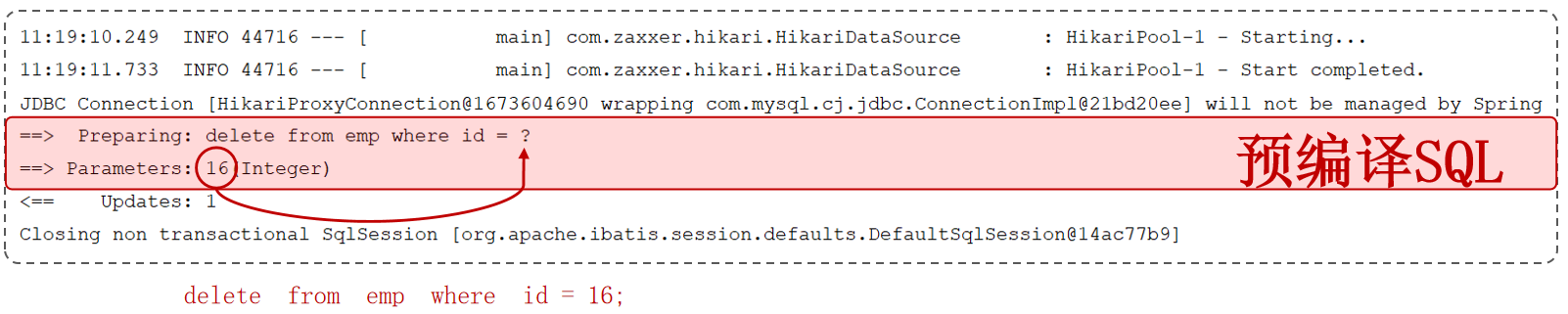
2
3
==>  Preparing: delete from emp where id = ?
==> Parameters: 18(Integer)
<== Updates: 1
参数占位符
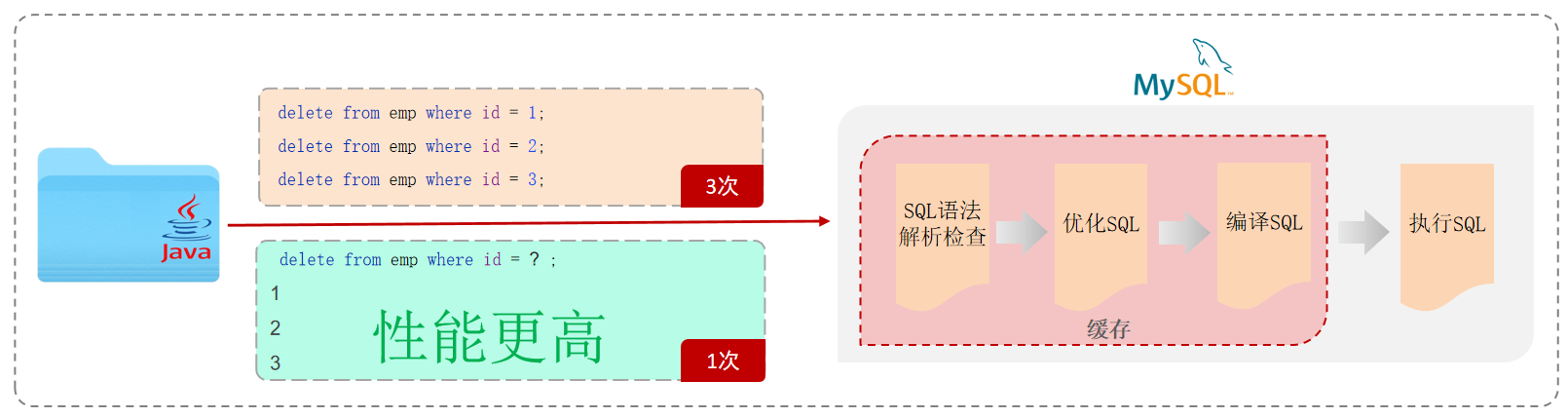
  • #{…}:执行SQL时,会将#{…}替换为? ,生成预编译SQL,会自动设置参数值。使用时机:参数传递,都使用#{…}
  • ${…}拼接SQL。直接将参数拼接在SQL语句中,存在SQL注入问题。使用时机:对表名、列表进行动态设置时使用。
日志输出

application.properties中,打开mybatis的日志,并指定输出到控制台。

1
2
#指定mybatis输出日志的位置,输出控制台
mybatis.configuration.log-impl=org.apache.ibatis.logging.stdout.StdOutImpl
SQL注入

SQL注入是通过操作输入的数据来修改事先定义好的SQL语句,以达到执行代码对服务器进行攻击的方法。

1
2
3
4
5
select count(*) from emp where username = 'zhangwuji' and password = '111';
-- 当用户输入正确的用户名zhangwuji和对应正确的密码111才能登录成功。

select count(*) from emp where username = 'wuieuwiueiwuiew' and password = '' or '1' = '1';
-- 用户随意输入一个用户名,在密码中输入' or '1' = '1时,就会变成如上MySQL语句,也能执行成功,这就是SQL注入。能够SQL注入成功,是因为直接将参数直接拼接在SQL语句的方法。
预编译SQL

预编译SQL性能更高,更安全(防止SQL注入)。

增加
1
2
3
4
//新增
@Insert("insert into emp(username, name, gender, image, job, entrydate, dept_id, create_time, update_time)" +
"values (#{username}, #{name}, #{gender},#{image}, #{job}, #{entrydate}, #{deptId}, #{createTime}, #{updateTime})")
public void insert(Emp emp);
1
2
3
4
5
6
7
8
9
10
11
12
13
14
15
16
17
18
@Test
public void testInsert(){
//构造员工对象
Emp emp = new Emp();
emp.setUsername("srr");
emp.setName("rourou");
emp.setGender((short) 2);
emp.setImage("1.jpg");
emp.setJob((short) 1);
emp.setEntrydate(LocalDate.of(2023, 9, 1));
emp.setDeptId(1);
emp.setCreateTime(LocalDateTime.now());
emp.setUpdateTime(LocalDateTime.now());

//执行新增员工操作
empMapper.insert(emp);
System.out.println(emp.getId());//null 执行基础的插入操作不会返回主键值
}

输出日志:

1
2
3
4
5
==>  Preparing: insert into emp(username, name, gender, image, job, entrydate, dept_id, create_time, update_time)values (?, ?, ?,?, ?, ?, ?, ?, ?)
==> Parameters: srr(String), rourou(String), 2(Short), 1.jpg(String), 1(Short), 2023-09-01(LocalDate), 1(Integer), 2024-10-20T14:35:03.993125900(LocalDateTime), 2024-10-20T14:35:03.993125900(LocalDateTime)
<== Updates: 1
Closing non transactional SqlSession [org.apache.ibatis.session.defaults.DefaultSqlSession@781aff8b]
null
增加(主键返回)

在数据添加成功后,需要获取插入数据库数据的主键

1
2
3
4
5
6
//新增
@Options(useGeneratedKeys = true, keyProperty = "id") //会自动将生成的主键值,赋值给emp对象的id属性
//useGeneratedKeys为true,获取返回的主键值,keyProperty指定返回的主键封装到的属性值
@Insert("insert into emp(username, name, gender, image, job, entrydate, dept_id, create_time, update_time)" +
"values (#{username}, #{name}, #{gender},#{image}, #{job}, #{entrydate}, #{deptId}, #{createTime}, #{updateTime})")
public void insert(Emp emp);
1
2
3
4
5
6
7
8
9
10
11
12
13
14
15
16
17
18
@Test
public void testInsert(){
//构造员工对象
Emp emp = new Emp();
emp.setUsername("srr2");
emp.setName("rourou");
emp.setGender((short) 2);
emp.setImage("1.jpg");
emp.setJob((short) 1);
emp.setEntrydate(LocalDate.of(2023, 9, 1));
emp.setDeptId(1);
emp.setCreateTime(LocalDateTime.now());
emp.setUpdateTime(LocalDateTime.now());

//执行新增员工操作
empMapper.insert(emp);
System.out.println(emp.getId());//返回主键值
}

输出日志:

1
2
3
4
5
==>  Preparing: insert into emp(username, name, gender, image, job, entrydate, dept_id, create_time, update_time)values (?, ?, ?,?, ?, ?, ?, ?, ?)
==> Parameters: srr2(String), rourou(String), 2(Short), 1.jpg(String), 1(Short), 2023-09-01(LocalDate), 1(Integer), 2024-10-20T14:44:35.690441100(LocalDateTime), 2024-10-20T14:44:35.690441100(LocalDateTime)
<== Updates: 1
Closing non transactional SqlSession [org.apache.ibatis.session.defaults.DefaultSqlSession@632b305d]
22
更新
1
2
3
4
//更新
@Update("update emp set username = #{username}, name = #{name}, gender = #{gender}, image = #{image}, " +
"job = #{job}, entrydate = #{entrydate}, dept_id = #{deptId}, update_time = #{updateTime} where id = #{id}")
public void update(Emp emp);
1
2
3
4
5
6
7
8
9
10
11
12
13
14
15
16
17
@Test
public void testUpdate(){
//构造员工对象
Emp emp = new Emp();
emp.setId(21);
emp.setUsername("srr8");
emp.setName("rourou8");
emp.setImage("1.png");
emp.setGender((short) 2);
emp.setJob((short) 1);
emp.setEntrydate(LocalDate.of(2023, 9, 8));
emp.setUpdateTime(LocalDateTime.now());
emp.setDeptId(2);

//执行更新员工操作
empMapper.update(emp);
}

输出日志:

1
2
3
==>  Preparing: update emp set username = ?, name = ?, gender = ?, image = ?, job = ?, entrydate = ?, dept_id = ?, update_time = ? where id = ?
==> Parameters: srr8(String), rourou8(String), 2(Short), 1.png(String), 1(Short), 2023-09-08(LocalDate), 2(Integer), 2024-10-20T14:56:57.003958300(LocalDateTime), 21(Integer)
<== Updates: 1
查询
1
2
3
//根据ID查询
@Select("select * from emp where id = #{id}")
public Emp getById(Integer id);
1
2
3
4
5
@Test
public void testGetById(){
Emp emp = empMapper.getById(21);
System.out.println(emp);
}

输出日志:

1
2
3
4
5
6
7
==>  Preparing: select * from emp where id = ?
==> Parameters: 21(Integer)
<== Columns: id, username, password, name, gender, image, job, entrydate, dept_id, create_time, update_time
<== Row: 21, srr8, 123456, rourou8, 2, 1.png, 1, 2023-09-08, 2, 2024-10-20 14:35:04, 2024-10-20 14:56:57
<== Total: 1
Closing non transactional SqlSession [org.apache.ibatis.session.defaults.DefaultSqlSession@7fe8c7db]
Emp(id=21, username=srr8, password=123456, name=rourou8, gender=2, image=1.png, job=1, entrydate=2023-09-08, deptId=null, createTime=null, updateTime=null)

注意:deptId=null, createTime=null, updateTime=null,这三个字段的值没有封装进Emp对象中。

数据封装

实体类属性名和数据库表查询返回的字段名一致,Mybatis会自动封装。

实体类属性名和数据库表查询返回的字段名不一致,不能自动封装。
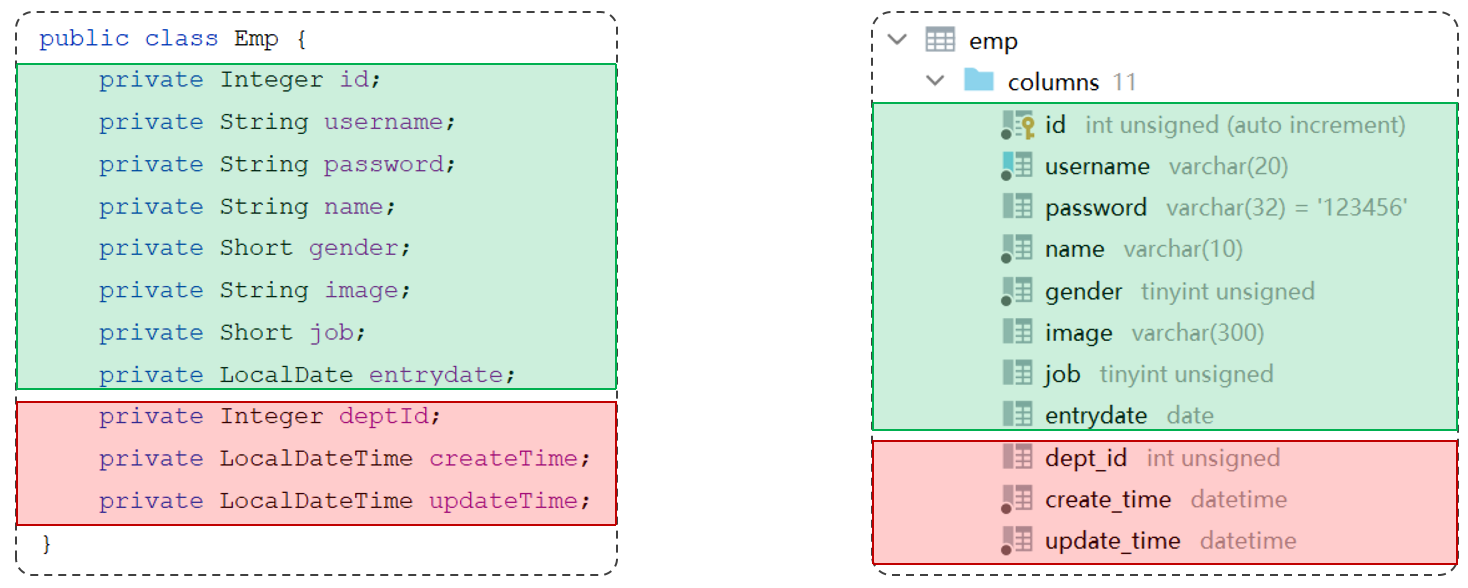
解决方法:

1.起别名:在SQL语句中,对不一样的列名起别名,别名和实体类属性名一样。

1
2
3
4
//方案一: 给字段起别名, 让别名与实体类属性一致
@Select("select id, username, password, name, gender, image, job, entrydate, " +
"dept_id deptId, create_time createTime, update_time updateTime from emp where id = #{id}")
public Emp getById(Integer id);

2.手动结果映射:通过@Results@Result进行手动结果映射。

1
2
3
4
5
6
7
8
//方案二: 通过@Results, @Result注解手动映射封装
@Results({
@Result(column = "dept_id", property = "deptId"),
@Result(column = "create_time", property = "createTime"),
@Result(column = "update_time", property = "updateTime")
})
@Select("select * from emp where id = #{id}")
public Emp getById(Integer id);

3.开启驼峰命名:如果字段名与属性名符合驼峰命名规则,Mybatis会自动通过驼峰命名规则映射

1
2
3
#开启驼峰命名自动映射,即从数据库字段名 a_column 映射到Java属性名 aColumn。
#开启mybatis的驼峰命名自动映射开关 a_column ------> aCloumn
mybatis.configuration.map-underscore-to-camel-case=true

输出日志:

1
2
3
4
5
6
7
==>  Preparing: select id, username, password, name, gender, image, job, entrydate, dept_id deptId, create_time createTime, update_time updateTime from emp where id = ?
==> Parameters: 21(Integer)
<== Columns: id, username, password, name, gender, image, job, entrydate, deptId, createTime, updateTime
<== Row: 21, srr8, 123456, rourou8, 2, 1.png, 1, 2023-09-08, 2, 2024-10-20 14:35:04, 2024-10-20 14:56:57
<== Total: 1
Closing non transactional SqlSession [org.apache.ibatis.session.defaults.DefaultSqlSession@66d25ba9]
Emp(id=21, username=srr8, password=123456, name=rourou8, gender=2, image=1.png, job=1, entrydate=2023-09-08, deptId=2, createTime=2024-10-20T14:35:04, updateTime=2024-10-20T14:56:57)
条件查询

#{…}无法出现在引号之内,因为#{…}要被?所替代,所以'%#{name}%'编译后会变成'%?%'

解决方法:

1.将'%#{name}%'修改成'%${name}%'。但是使用${}存在性能低、不安全、SQL注入问题。

1
2
3
4
//方式一
@Select("select * from emp where name like '%${name}%' and gender = #{gender} and " +
"entrydate between #{begin} and #{end} order by update_time desc ")
public List<Emp> list(String name, Short gender, LocalDate begin , LocalDate end);
1
2
3
4
5
@Test
public void testList(){
List<Emp> empList = empMapper.list("张", (short) 1, LocalDate.of(2010, 1, 1), LocalDate.of(2020, 1, 1));
System.out.println(empList);
}

输出日志:

1
2
3
4
5
6
7
==>  Preparing: select * from emp where name like '%张%' and gender = ? and entrydate between ? and ? order by update_time desc
==> Parameters: 1(Short), 2010-01-01(LocalDate), 2020-01-01(LocalDate)
<== Columns: id, username, password, name, gender, image, job, entrydate, dept_id, create_time, update_time
<== Row: 2, zhangwuji, 123456, 张无忌, 1, 2.jpg, 2, 2015-01-01, 2, 2024-10-17 13:40:58, 2024-10-17 13:40:58
<== Total: 1
Closing non transactional SqlSession [org.apache.ibatis.session.defaults.DefaultSqlSession@34c53688]
[Emp(id=2, username=zhangwuji, password=123456, name=张无忌, gender=1, image=2.jpg, job=2, entrydate=2015-01-01, deptId=2, createTime=2024-10-17T13:40:58, updateTime=2024-10-17T13:40:58)]

2.使用concat字符串拼接函数concat

1
2
3
4
//方式二
@Select("select * from emp where name like concat('%',#{name},'%') and gender = #{gender} and " +
"entrydate between #{begin} and #{end} order by update_time desc ")
public List<Emp> list(String name, Short gender, LocalDate begin , LocalDate end);

输出日志:

1
2
3
4
5
6
7
==>  Preparing: select * from emp where name like concat('%',?,'%') and gender = ? and entrydate between ? and ? order by update_time desc
==> Parameters: 张(String), 1(Short), 2010-01-01(LocalDate), 2020-01-01(LocalDate)
<== Columns: id, username, password, name, gender, image, job, entrydate, dept_id, create_time, update_time
<== Row: 2, zhangwuji, 123456, 张无忌, 1, 2.jpg, 2, 2015-01-01, 2, 2024-10-17 13:40:58, 2024-10-17 13:40:58
<== Total: 1
Closing non transactional SqlSession [org.apache.ibatis.session.defaults.DefaultSqlSession@72557746]
[Emp(id=2, username=zhangwuji, password=123456, name=张无忌, gender=1, image=2.jpg, job=2, entrydate=2015-01-01, deptId=2, createTime=2024-10-17T13:40:58, updateTime=2024-10-17T13:40:58)]
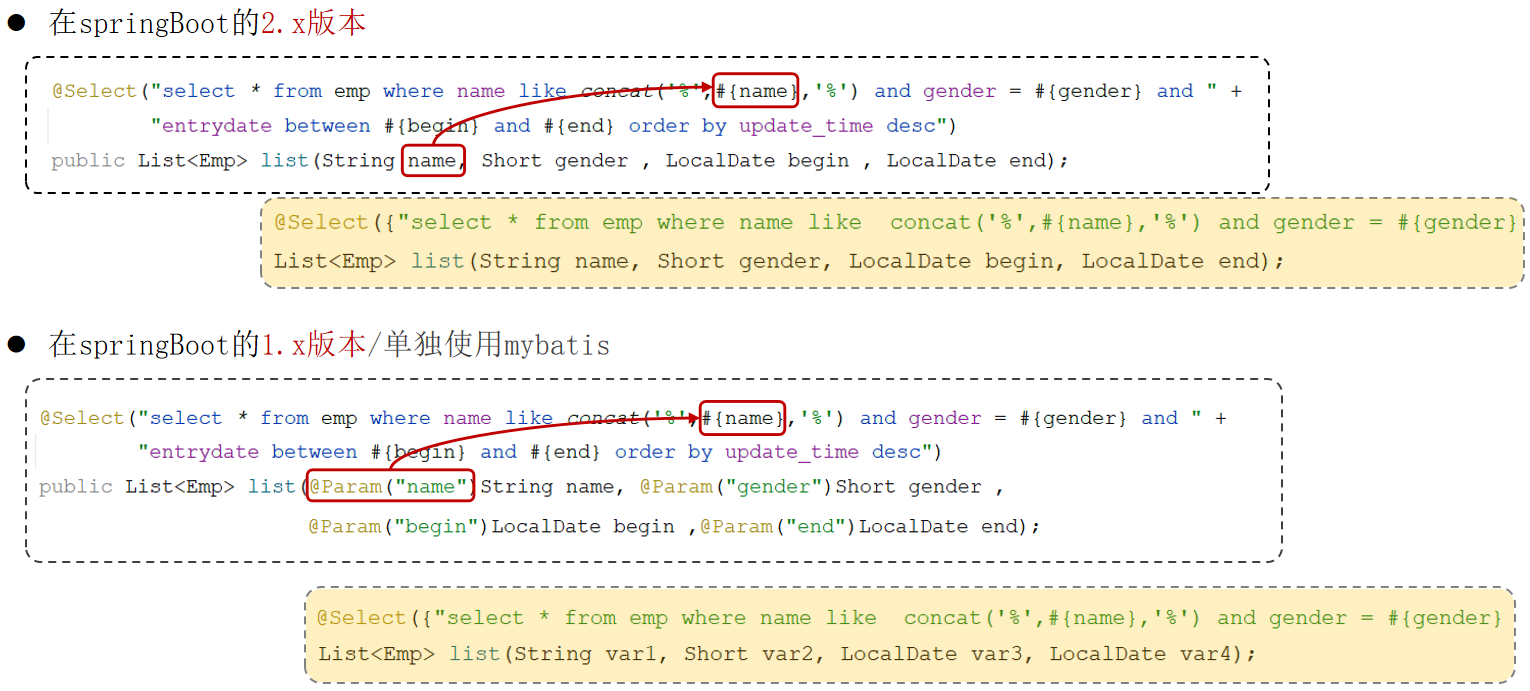
参数名说明

XML映射文件

规范
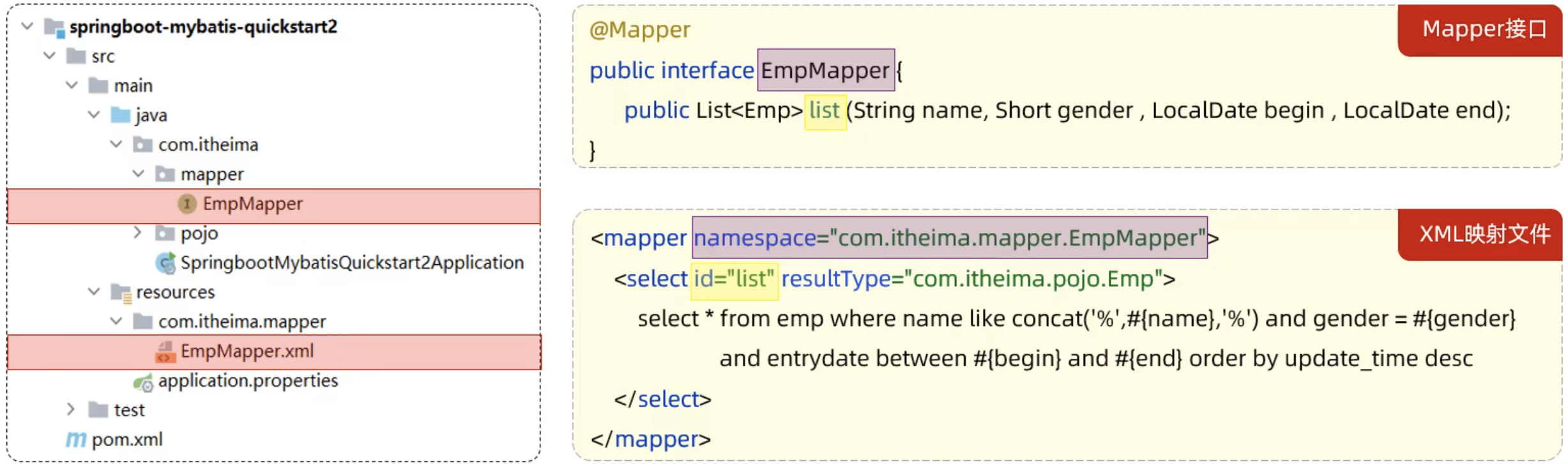
  1. XML映射文件的名称与Mapper接口名称一致,并且将XML映射文件和Mapper接口放置在相同包下(同包同名)。
  2. XML映射文件的namespace属性为Mapper接口全限定名一致。
  3. XML映射文件中SQL语句的idMapper接口中的方法名一致,并保持返回类型一致。

1.在下resources文件夹下新建一样的包com/itheima/mapper,在该包下新建同名的XML文件EmpMapper.xml

1
2
3
4
5
6
7
8
9
10
11
<?xml version="1.0" encoding="UTF-8" ?>
<!DOCTYPE mapper
PUBLIC "-//mybatis.org//DTD Mapper 3.0//EN"
"http://mybatis.org/dtd/mybatis-3-mapper.dtd">
<mapper namespace="com.itheima.mapper.EmpMapper">
<!--resultType: 单条记录封装的类型-->
<select id="list" resultType="com.itheima.pojo.Emp">
select * from emp where name like concat('%',#{name},'%') and gender = #{gender}
and entrydate between #{begin} and #{end} order by update_time desc
</select>
</mapper>

2.在java文件夹下的包com/itheima/mappe中的EmpMapper.java文件编写查询方法。

1
public List<Emp> list(String name, Short gender, LocalDate begin , LocalDate end);

3.测试方法不变。

1
2
3
4
5
@Test
public void testList(){
List<Emp> empList = empMapper.list("张", (short) 1, LocalDate.of(2010, 1, 1), LocalDate.of(2020, 1, 1));
System.out.println(empList);
}

注意:使用XML映射文件本质是通过相同的包,接口名和方法名,在XML文件中找到对应的SQL语句去执行该操作。

MybatisX

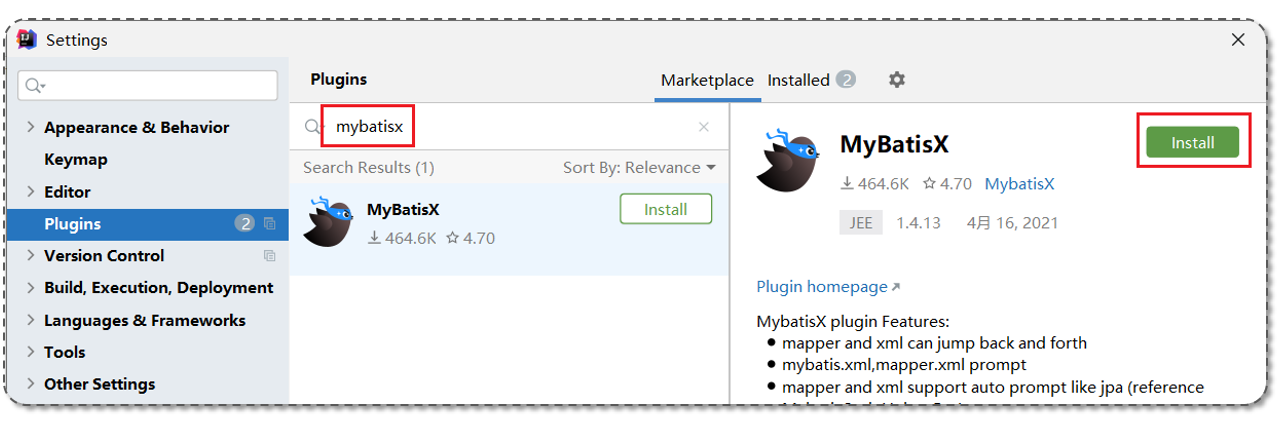
MybatisX是一款基于IDEA的快速开发Mybatis的插件,为效率而生。

安装:
使用Mybatis的注解,主要是来完成一些简单的增删改查功能。如果需要实现复杂的SQL功能,建议使用XML来配置映射语句。

官方说明:https://mybatis.net.cn/getting-started.html

Mybatis动态SQL

动态SQL

随着用户的输入或外部条件的变化而变化的SQL语句,称为动态SQL

<if>

<if>:用于判断条件是否成立。使用test属性进行条件判断,如果条件为true,则拼接SQL

<where>where元素只会在子元素有内容的情况下才插入where子句。而且会自动去除子句的开头的ANDOR

1
2
3
4
5
6
7
8
9
10
11
12
13
14
15
<select id="list" resultType="com.itheima.pojo.Emp">
select * from emp
<where>
<if test="name != null">
name like concat('%', #{name}, '%')
</if>
<if test="gender != null">
and gender = #{gender}
</if>
<if test="begin != null and end != null">
and entrydate between #{begin} and #{end}
</if>
</where>
order by update_time desc
</select>
1
2
//动态条件查询
public List<Emp> list(String name, Short gender, LocalDate begin , LocalDate end);
1
2
3
4
5
6
7
8
9
10
//根据条件查询员工
@Test
public void testList(){
List<Emp> empList = empMapper.list("张", (short) 1, LocalDate.of(2010, 1, 1), LocalDate.of(2020, 1, 1));
//List<Emp> empList = empMapper.list("张", null, null, null);
//List<Emp> empList = empMapper.list("张", (short)1, null, null);
//List<Emp> empList = empMapper.list(null, (short)1, null, null);
//List<Emp> empList = empMapper.list(null, null, null, null);
System.out.println(empList);
}
案例

案例说明:动态更新员工信息,如果更新时传递有值,则更新;如果更新时没有传递值,则不更新。

<set>:动态地在行首插入SET关键字,并会删掉额外的逗号。(用在update语句中)

1
2
3
4
5
6
7
8
9
10
11
12
13
14
15
<!-- 动态更新员工-->
<update id="update2">
update emp
<set>
<if test="username != null">username = #{username},</if>
<if test="name != null">name = #{name},</if>
<if test="gender != null">gender = #{gender},</if>
<if test="image != null">image = #{image},</if>
<if test="job != null">job = #{job},</if>
<if test="entrydate != null">entrydate = #{entrydate},</if>
<if test="deptId != null">dept_id = #{deptId},</if>
<if test="updateTime != null">update_time = #{updateTime}</if>
</set>
where id = #{id}
</update>
1
2
//动态更新员工
public void update2(Emp emp);
1
2
3
4
5
6
7
8
9
10
11
12
13
14
//动态更新员工
@Test
public void testUpdate2(){
//构造员工对象
Emp emp = new Emp();
emp.setId(22);
emp.setUsername("Tom222333");
emp.setName("汤姆222");
emp.setGender((short)1);
emp.setUpdateTime(LocalDateTime.now());

//执行更新员工操作
empMapper.update2(emp);
}
<foreach>

属性:

  • collection:集合名称。
  • item:集合遍历出来的元素/项。
  • separator:每一次遍历使用的分隔符。
  • open:遍历开始前拼接的片段。
  • close:遍历结束后拼接的片段。
1
2
3
4
5
6
7
8
9
10
11
12
13
14
<!--批量删除员工 (18,19,20)-->
<!--
collection: 遍历的集合,和参数名保持一致
item: 遍历出来的元素,一个变量名(随意取值)
separator: 分隔符
open: 遍历开始前拼接的SQL片段
close: 遍历结束后拼接的SQL片段
-->
<delete id="deleteByIds">
delete from emp where id in
<foreach collection="ids" item="id" separator="," open="(" close=")">
#{id}
</foreach>
</delete>
1
2
//批量删除员工
public void deleteByIds(List<Integer> ids);
1
2
3
4
5
6
//批量删除员工 - 13,14,15
@Test
public void testDeleteByIds(){
List<Integer> ids = Arrays.asList(13, 14, 15);
empMapper.deleteByIds(ids);
}
<sql><include>

<sql>:定义可重用的SQL片段。id指定唯一标识。

<include>:通过属性refid,指定包含的SQL片段。
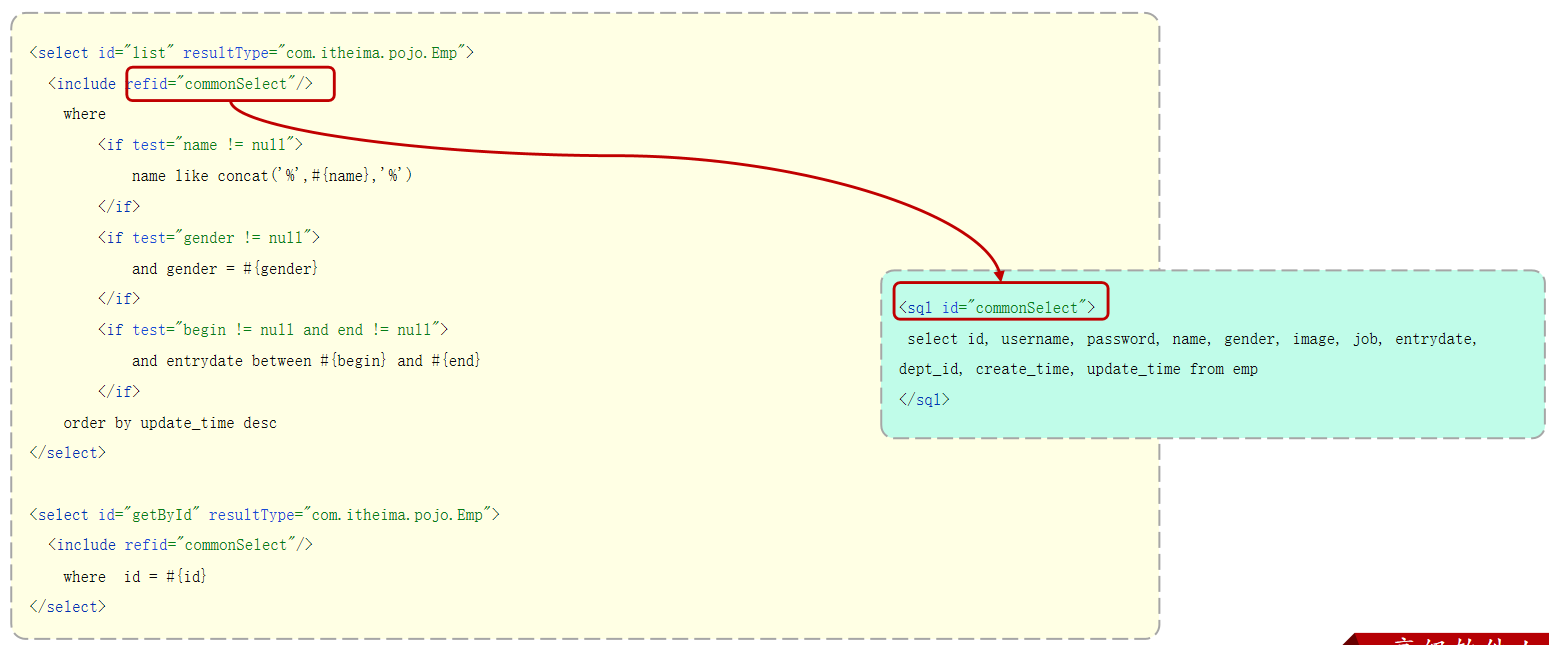
1
2
3
4
5
6
7
8
9
10
11
12
13
14
15
16
17
18
19
20
<sql id="commonSelect">
select id, username, password, name, gender, image, job, entrydate, dept_id, create_time, update_time
from emp
</sql>

<select id="list" resultType="com.itheima.pojo.Emp">
<include refid="commonSelect"/>
<where>
<if test="name != null">
name like concat('%', #{name}, '%')
</if>
<if test="gender != null">
and gender = #{gender}
</if>
<if test="begin != null and end != null">
and entrydate between #{begin} and #{end}
</if>
</where>
order by update_time desc
</select>

JavaWeb后端开发:MySQL和MyBatis
http://surourou8.github.io/2024/10/20/JavaWeb后端开发:MySQL和MyBatis/
作者
Su Rourou
发布于
2024年10月20日
许可协议